
1. Introduction
Thank you for choosing the MACAP MI40 Luxe On-Demand Espresso Grinder. This manual provides essential information for the safe and efficient operation, maintenance, and troubleshooting of your grinder. Please read it thoroughly before initial use and retain it for future reference.
The MI40 Luxe is designed for precision espresso grinding, featuring 65 mm flat burrs, a high-torque motor, and a responsive touchscreen for programmable dosing. Its low-retention design ensures minimal waste and consistent flavor.
2. Safety Instructions
- Always disconnect the grinder from the power supply before cleaning or performing any maintenance.
- Do not immerse the grinder in water or any other liquid.
- Keep hands and foreign objects away from the burrs and grinding chamber during operation.
- Use only whole roasted coffee beans in the hopper. Do not grind other substances.
- Ensure the hopper is securely in place before operating the grinder.
- This appliance is not intended for use by persons with reduced physical, sensory, or mental capabilities, or lack of experience and knowledge, unless they have been given supervision or instruction concerning use of the appliance by a person responsible for their safety.
3. Setup
- Unpacking: Carefully remove the grinder and all components from the packaging. Inspect for any damage.
- Hopper Installation: Place the 2.6lb compact hopper onto the grinder body, ensuring it is seated correctly and securely. The hopper includes a safety mechanism that prevents the grinder from operating if it is not properly installed.
- Power Connection: Connect the power cord to a grounded electrical outlet. Ensure the voltage matches the specifications of the grinder.
- Initial Grind Adjustment: Before adding coffee beans, turn the grind adjustment collar to a coarse setting. This prevents burr damage if the burrs are too close together.

Figure 3.1: MACAP MI40 Luxe Espresso Grinder (Chrome) with hopper.
4. Operating Instructions
4.1 Grind Adjustment
The MI40 Luxe features a Nice Grind Control Dial for ultra-fine, stepless adjustment. To adjust the grind size:
- Ensure the grinder is off or the hopper is empty to avoid grinding beans during adjustment.
- Rotate the grind adjustment collar (located below the hopper) to achieve the desired fineness. Turning clockwise results in a finer grind, counter-clockwise for a coarser grind.
- Make small adjustments and test the grind with a small amount of coffee until the desired consistency is achieved.

Figure 4.1: Close-up of the Nice Grind Control Dial for stepless adjustment.
4.2 Touchscreen Dosing
The responsive touchscreen allows for programmable dosing, enhancing workflow efficiency.
- Power On: Flip the main power switch located on the side of the grinder. The touchscreen will illuminate.
- Select Dose: The touchscreen typically displays options for single, double, or continuous grinding. Tap the desired dose icon.
- Adjust Dose Time: For programmable doses, press and hold the dose icon to enter programming mode. Use the on-screen controls to adjust the grinding time, which corresponds to the dose weight.
- Grinding: Place your portafilter under the dosing chute. The grinder will automatically start and stop based on the selected or programmed dose. For continuous grinding, tap the continuous grind icon.

Figure 4.2: Front view displaying the touchscreen and dosing area.
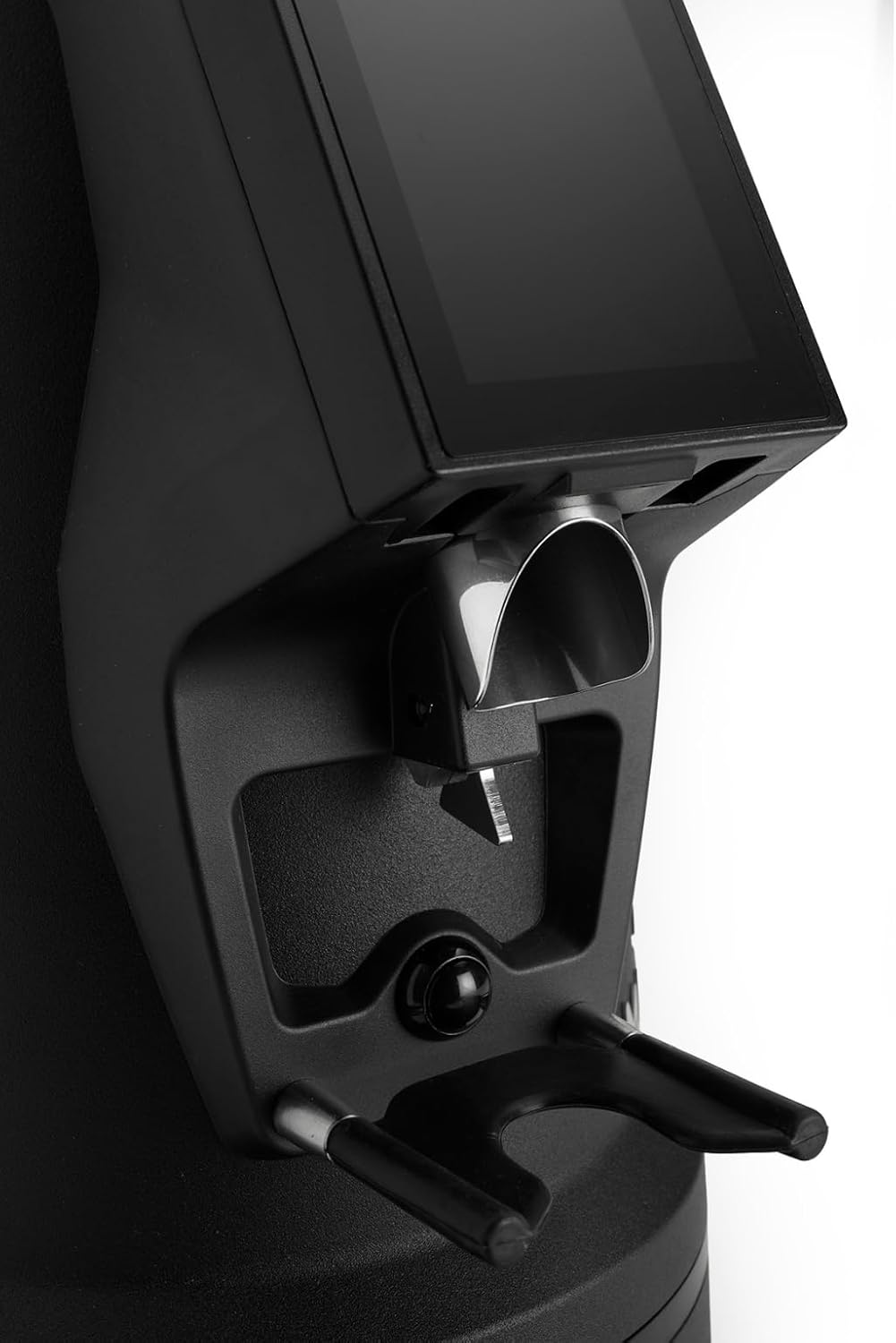
Figure 4.3: Detailed view of the dosing chute and portafilter holder.
5. Maintenance
Regular cleaning and maintenance ensure optimal performance and longevity of your grinder.
5.1 Daily Cleaning
- Exterior: Wipe the exterior of the grinder with a soft, damp cloth. Do not use abrasive cleaners or solvents.
- Dosing Chute: Use a brush or vacuum cleaner to remove any residual coffee grounds from the dosing chute.
5.2 Weekly / Bi-Weekly Cleaning (Burrs and Grinding Chamber)
- Disconnect Power: Always unplug the grinder before disassembling for cleaning.
- Remove Hopper: Empty any remaining coffee beans and remove the hopper.
- Access Burrs: Carefully unscrew or unlock the upper burr carrier according to the grinder's design. Refer to the manufacturer's specific instructions for burr removal.
- Clean Burrs: Use a stiff brush or a vacuum cleaner to remove all coffee grounds from both the upper and lower burrs. Avoid using water.
- Clean Grinding Chamber: Brush or vacuum out the grinding chamber thoroughly.
- Reassemble: Carefully reassemble the burr carrier and hopper, ensuring all components are securely in place.
6. Troubleshooting
This section addresses common issues you might encounter with your MI40 Luxe grinder.
| Problem | Possible Cause | Solution |
|---|---|---|
| Grinder does not turn on | No power supply; Hopper not correctly installed; Main switch off | Check power cord connection; Ensure hopper is fully seated; Turn on main power switch. |
| Inconsistent grind size | Burrs are dirty or worn; Grind setting too coarse/fine | Clean burrs thoroughly; Adjust grind setting incrementally; Consider burr replacement if worn. |
| Grinder motor runs but no coffee dispenses | Grinding chamber or chute is clogged; Hopper is empty | Clean the grinding chamber and dosing chute; Refill hopper with coffee beans. |
| Touchscreen unresponsive | Temporary software glitch; Power issue | Turn off the grinder, unplug it for 30 seconds, then plug back in and restart. If issue persists, contact support. |
7. Specifications
| Feature | Detail |
|---|---|
| Model | MI40 Luxe |
| Burr Type | 65 mm Flat Burrs |
| Grind Adjustment | Stepless (Nice Grind Control Dial) |
| Dosing | On-Demand, Touchscreen Programmable |
| Hopper Capacity | 2.6 lbs (approx. 1.2 kg) |
| Material | Stainless Steel |
| Color | Chrome |
| Item Weight | 19.6 Pounds (approx. 8.9 kg) |
| Dimensions (L x W x H) | 12" x 7.6" x 22" (approx. 30.5cm x 19.3cm x 55.9cm) |
8. Warranty and Support
For specific warranty information regarding your MACAP MI40 Luxe grinder, please refer to the documentation provided at the time of purchase or visit the official Macap website. Warranty terms and conditions may vary by region and retailer.
If you require technical assistance, spare parts, or have questions not covered in this manual, please contact your authorized Macap dealer or the manufacturer's customer support directly. Contact details can typically be found on the official Macap website or your purchase invoice.