
1. Introduction
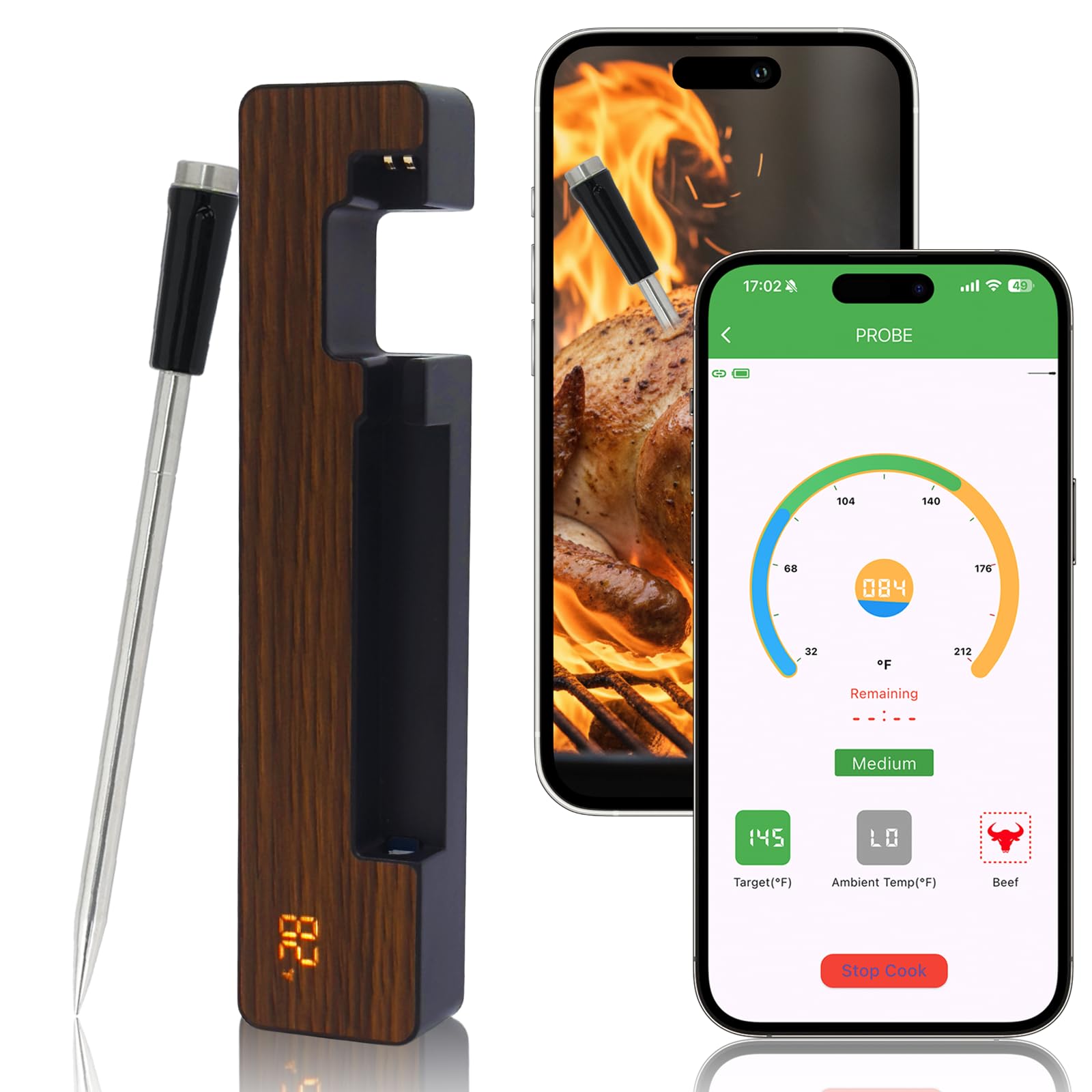
The AIBBQLIFE Wireless Meat Thermometer A5S is designed to provide precise temperature monitoring for various cooking methods, ensuring perfectly cooked meals every time. With advanced Bluetooth 5.3 technology and smart app control, you can monitor your food from a distance with ease.
Key Features:
- Real-Time Monitoring & Long Range: Get precise temperature readings directly on your smartphone or base. Built-in Bluetooth 5.3 offers a 600ft range, allowing you to monitor cooking from anywhere in your home. The app is compatible with both iOS & Android devices.
- High Accuracy & Timely Alerts: Experience precise temperature control with a deviation of only ±1.8°F (±1.0°C). The built-in timer and alarm notify you when your food reaches the target temperature. Celsius and Fahrenheit display can be set via the app.
- Waterproof & Durable Design: The stainless steel probe and durable base are designed for tough conditions. The probe handle is heat-resistant up to 932°F. With an IP68 waterproof rating, the probe can be used in ovens, BBQs, smokers, rotisseries, grilling, smoking, or air fryers.
- Fast Connection & Preset Cooking Menus: Offers a faster, more stable connection. Device connection takes just a second. Preloaded with different food menus and taste presets, suitable for both beginners and seasoned chefs.
- Fast Charging & Long Battery Life: Equipped with a Type-C charging port. The base charges in 2 hours for 24 hours of continuous use. The probe charges in 16 minutes for up to 24 hours of use.
2. Setup Guide
2.1 Unboxing and Initial Charge
Upon receiving your AIBBQLIFE Wireless Meat Thermometer A5S, carefully unbox the device. The package includes the thermometer probe, the charging base, and a Type-C charging cable. It is recommended to fully charge both the probe and the base before first use to ensure optimal performance.
2.2 App Installation
- Locate the QR code in the user manual or search for 'AIBBQLIFE' in your device's app store (compatible with iOS and Android).
- Download and install the 'AIBBQLIFE' application.
2.3 Device Pairing
- Ensure Bluetooth is enabled on your smartphone.
- Open the 'AIBBQLIFE' app.
- Remove the probe from its charging base. The base will display the current temperature.
- Within the app, select the option to 'Add Device'. The app should quickly detect and connect to your A5S thermometer.
3. Operating Instructions
3.1 Inserting the Probe
Carefully insert the stainless steel probe into the thickest part of the meat, avoiding bones. Ensure the probe is inserted beyond the safety notch on the shaft to guarantee accurate internal temperature readings and prevent probe damage. The ceramic handle is designed to withstand high temperatures, allowing the probe to remain in the food during cooking.

3.2 Monitoring Temperature
Once the probe is inserted, the current temperature will be displayed on the charging base and within the AIBBQLIFE app on your smartphone. The app provides a real-time graph of the temperature progression.

3.3 Setting Target Temperature and Alerts
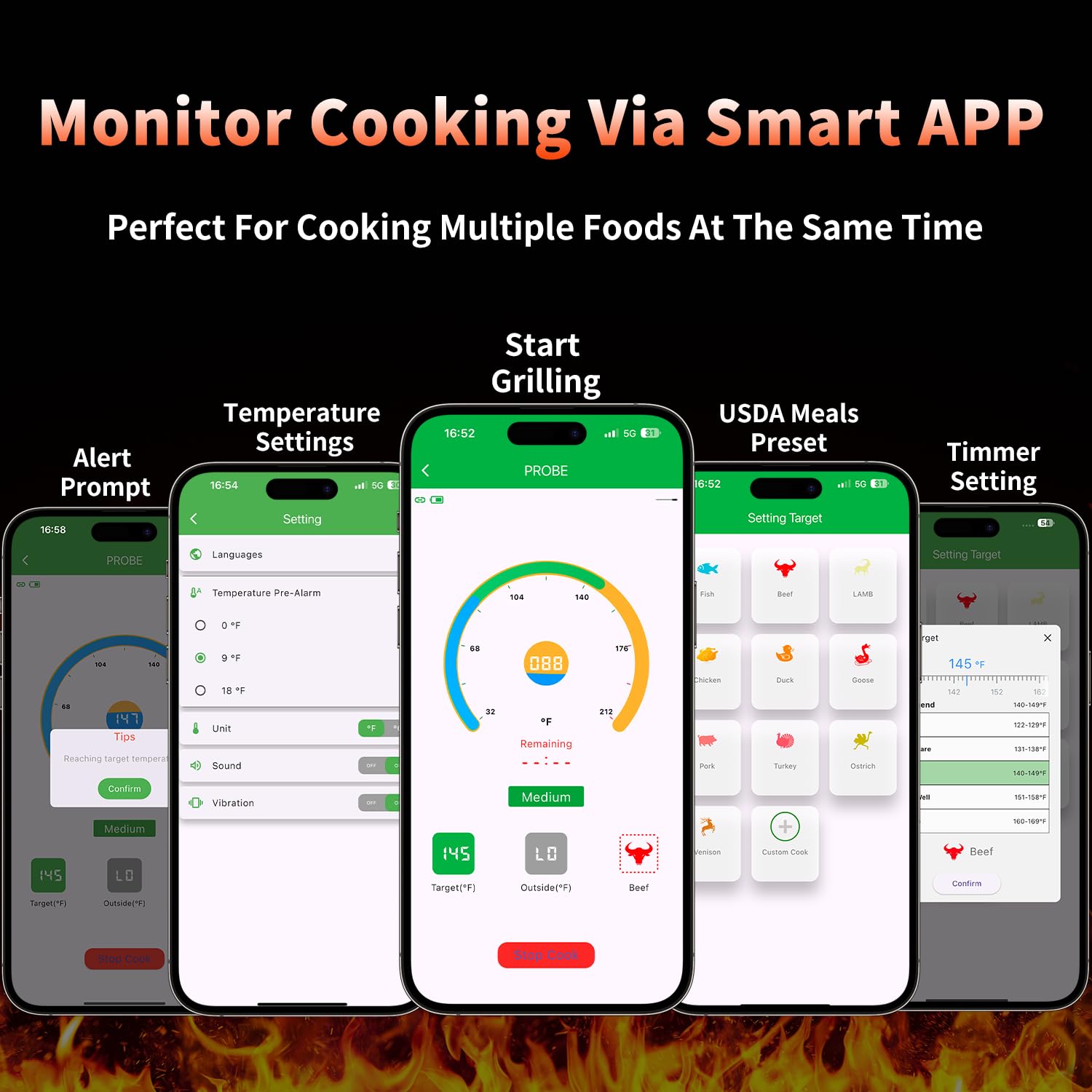
The AIBBQLIFE app allows you to set a target temperature for your food. You can choose from preloaded food menus and taste presets (e.g., rare, medium, well-done for beef) or set a custom temperature. The app will provide timely alerts and notifications when your food reaches the desired temperature.
3.4 Applicable Scenarios
The AIBBQLIFE Wireless Meat Thermometer A5S is versatile and can be used in various cooking environments:
- Outdoor: BBQ, Smoker, Grill.
- Indoor: Oven, Air Fryer, Rotisserie, Pan.

4. Maintenance
4.1 Cleaning the Probe
The stainless steel probe has an IP68 waterproof rating, making it easy to clean. After each use, wash the probe with soap and water. It can also be placed in a dishwasher. Ensure the probe is completely dry before returning it to the charging base.

4.2 Charging
The charging base features a Type-C port. Connect the provided Type-C cable to the base and a suitable power source. The base charges in approximately 2 hours and provides up to 24 hours of continuous use. The probe itself charges rapidly in 16 minutes for up to 24 hours of use. Always ensure the device is fully charged before long cooking sessions.

4.3 Storage
The charging base has a magnetic design, allowing it to be conveniently attached to metal surfaces like a refrigerator or oven. This keeps the thermometer accessible and securely stored.

5. Troubleshooting
| Problem | Possible Cause | Solution |
|---|---|---|
| No temperature reading on base/app | Probe not properly inserted; Low battery; Connection issue. | Ensure probe is fully inserted past the safety notch. Charge the probe and base. Re-pair the device with the app. |
| Inaccurate temperature readings | Probe not inserted deep enough; Probe tip touching bone/gristle; Probe damaged. | Re-insert the probe into the thickest part of the meat, avoiding bones. If damage is suspected, contact support. |
| App not connecting to thermometer | Bluetooth off; Device out of range; App issue. | Ensure Bluetooth is on. Move closer to the base/probe. Restart the app or your phone. |
| Short battery life | Incomplete charging; Old battery. | Ensure full charge cycles. If issues persist, contact support. |
6. Specifications
- Brand: AIBBQLIFE
- Model Name: A5S Wireless Meat Thermometer
- Connectivity Technology: Bluetooth 5.3
- Range: Up to 600 ft (Bluetooth)
- Temperature Accuracy: ±1.8°F (±1.0°C)
- Probe Material: Stainless Steel with Ceramic Handle
- Probe Handle Heat Resistance: Up to 932°F (500°C)
- Internal Probe Temperature Range: 32°F to 212°F (0°C to 100°C)
- Waterproof Rating: IP68 (Probe)
- Display Type: Digital (on base)
- Charging Port: Type-C
- Base Charging Time: 2 hours for 24 hours use
- Probe Charging Time: 16 minutes for up to 24 hours use
- Included Components: Meat Thermometer with Charging Cable
- Item Weight: 4.6 ounces
7. Warranty & Support
For warranty information and customer support, please refer to the documentation included in your product packaging or visit the official AIBBQLIFE website. If you encounter any issues not covered in this manual, please contact our customer service team for assistance.
