
1. Introduction
This manual provides essential instructions for the safe and effective use of your INTERGREAT 20 Gun Safe, Model B0G39CXFVR. Please read this manual thoroughly before installation and operation to ensure proper functionality and security. Keep this manual for future reference.
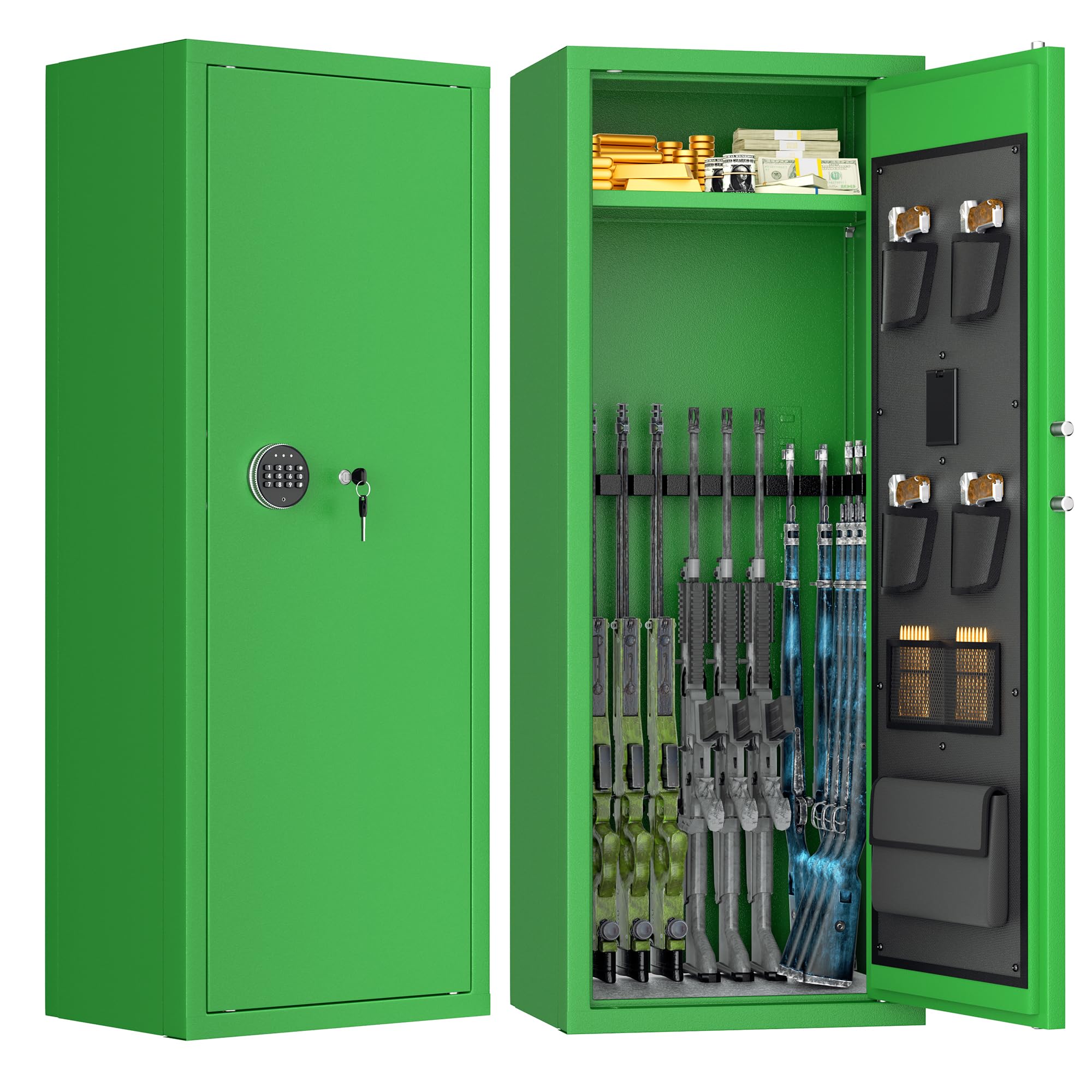
Figure 1: The INTERGREAT 20 Gun Safe, featuring a digital keypad and key access, designed for secure firearm storage.
2. Safety Information
WARNING: Failure to follow these safety instructions may result in serious injury or property damage.
- Always install the cabinet on a stable, level surface.
- Keep the cabinet away from children and pets to prevent unauthorized access.
- Do not install the cabinet on a wall or other location where it could tip over and cause injury. Securely anchor the safe as instructed.
- Never store the emergency keys or external power box inside the safe. Keep them in a secure location separate from the safe.
- Ensure the safe is closed and locked at all times when not in use.
3. Product Overview
The INTERGREAT 20 Gun Safe is constructed from high-density cold-rolled steel plate, providing robust protection for your firearms. It features an anti-theft and anti-pry system with a thick alloy steel door, solid locking bolts, and hidden hinges.
3.1 Key Features
- Durable Construction: Made from high-density cold-rolled steel with excellent temperature and corrosion resistance.
- Anti-Theft Design: 30-inch thick alloy anti-pry steel door, 4 x 20mm solid locking bolts, and hidden hinges.
- Large Capacity: Accommodates up to 10 rifles with 3 removable gun racks.
- Organized Storage: Adjustable shelf (120 lbs capacity) and six door pockets for handguns and ammunition.
- Digital Security: Digital password lock with physical key override.
- Alarm System: Vibration alarm and incorrect entry alarm buzzer.
- Anti-Tip Design: Pre-drilled holes for secure floor or wall mounting.
3.2 Components and Dimensions

Figure 2: Overview of the INTERGREAT Gun Safe, showing its dimensions and included accessories.
The safe measures 15.2"D x 21"W x 55.2"H. Included accessories are 4 mounting bolts, 2 emergency keys, 1 power supply, and this instruction manual.

Figure 3: Detailed view of the safe's interior, highlighting the adjustable shelf, robust lock bolt, four pistol pockets, an internal LED light, and a bullet bag for organized storage.
4. Setup Instructions
4.1 Unpacking
- Carefully remove the safe from its packaging.
- Inspect the safe for any signs of damage. If damaged, contact customer support immediately.
- Locate all included accessories: 4 expansion bolts, 2 emergency keys, 1 external power supply, 1 handgun bag, 2 bullet bags, and 4 pistol pockets.
4.2 Mounting the Safe
It is highly recommended to secure the safe using the provided expansion bolts to prevent tipping and unauthorized removal. The safe has pre-drilled holes at the bottom and back for this purpose.

Figure 4: Guide for securing the safe using the provided expansion bolts.
- Measure Location: Identify and mark the location of the pre-set drill holes on the wall or floor where you intend to mount the safe.
- Insert Anchors: Drill holes at the marked locations. Carefully press the expansion anchors into these holes.
- Position Safe: Align the safe's pre-drilled holes with the installed anchors.
- Secure Safe: Mount the safe by running screws through the safe's holes and into the anchors, tightening them securely.
4.3 Interior Configuration
- Install the 3 removable gun racks as desired for rifle storage.
- Position the adjustable shelf at your preferred height.
- Utilize the 4 pistol pockets and handgun bag for organized storage of smaller firearms and accessories.
5. Operating Instructions
5.1 Accessing the Safe
Your INTERGREAT gun safe offers three methods of access:

Figure 5: Illustration of the three access methods for the safe.
- Digital Password + Knob: Enter your personalized digital password on the keypad, then turn the knob to open the door.
- Override Key + Knob: In case of forgotten password or battery failure, insert the emergency override key into the keyhole, turn it, and then turn the knob to open the door.
- External Power Box: If the internal batteries are depleted and you do not have the emergency key readily available, connect the external power box to the designated port on the keypad. This will temporarily power the keypad, allowing you to enter your digital password and open the safe.
IMPORTANT: Never store the emergency keys or the external power box inside the safe.
5.2 Setting/Changing Digital Password
Refer to the specific instructions provided with your safe's digital lock mechanism for detailed steps on setting or changing your personalized password. Typically, this involves pressing a reset button inside the safe (with the door open) and then entering your new code.
5.3 Alarm System
The safe is equipped with an alarm system to deter unauthorized access.

Figure 6: Explanation of the safe's alarm features.
- Vibration Alarm: Press the "#" key on the keypad to activate the vibration alarm. The system will enter an alert state and sound an alarm if the safe detects significant vibration or movement.
- Alarm Buzzer: If an incorrect digital password is entered three consecutive times, the alarm buzzer will activate for one minute. To silence the alarm, enter the correct code.
6. Maintenance
6.1 Cleaning
- Wipe the exterior of the safe with a soft, damp cloth. Avoid abrasive cleaners or solvents that could damage the finish.
- Keep the keypad clean and free of dust or debris.
6.2 Battery Replacement
The digital keypad is powered by batteries (typically AA or AAA, check your specific model's battery compartment). Replace batteries annually or when the low battery indicator appears. Use high-quality alkaline batteries for optimal performance.
6.3 Regular Checks
- Periodically check the mounting bolts to ensure they remain tight and secure.
- Test the digital lock and emergency key access periodically to ensure they are functioning correctly.
7. Troubleshooting
7.1 Keypad Not Responding
- Check the batteries. Replace them if they are low or depleted.
- Ensure the external power box is correctly connected if using it.
- If the keypad remains unresponsive, use the emergency override key.
7.2 Alarm Sounds Unexpectedly
- If the alarm sounds after incorrect code entries, enter the correct code to silence it.
- If the vibration alarm is active and sounds without cause, ensure the safe is on a stable surface and not subject to external vibrations. Deactivate the vibration alarm if not needed.
7.3 Door Will Not Open/Close
- Ensure no obstructions are preventing the door from closing or the bolts from engaging.
- If using the digital lock, ensure the correct code is entered and the knob is turned fully.
- If using the emergency key, ensure it is fully inserted and turned before operating the knob.
8. Specifications
| Feature | Detail |
|---|---|
| Brand | INTERGREAT |
| Model Number | B0G39CXFVR |
| Color | Green |
| Material | Alloy Steel |
| Product Dimensions (D x W x H) | 15.2" x 21" x 55.2" |
| Rifle Capacity | Up to 10-12 rifles |
| Number of Shelves | 2 (adjustable) |
| Weight Capacity (Shelf) | 120 Pounds |
| Lock Type | Keypad (Digital) with Emergency Key |
| Mounting Type | Floor Mount, Wall Mount |
| Included Components | 1 Handgun Bag, 2 Bullet Bag, 4 Expansion Bolts, 4 Pistol Pockets, Emergency Power Supply |
9. Warranty and Support
INTERGREAT is committed to providing high-quality products and professional after-sales service. If you encounter any assembly or product-related issues, our professional after-sales team is available 24 hours a day to provide satisfactory solutions.
For support, please refer to the contact information provided at the point of purchase or visit the official INTERGREAT website.