
1. Important Safety Instructions
Please read all instructions carefully before using this appliance and retain them for future reference. Failure to follow these instructions may result in electric shock, fire, or serious injury.
- Always use a power outlet with the correct voltage and grounding.
- Do not operate the unit with a damaged power cord or plug.
- Keep the unit away from water and other liquids. Do not immerse the unit in water.
- Do not block the air inlet or outlet. Ensure proper ventilation around the unit.
- Do not insert objects into the air vents.
- Unplug the unit before cleaning or performing any maintenance.
- This appliance is not intended for use by persons (including children) with reduced physical, sensory, or mental capabilities, or lack of experience and knowledge, unless they have been given supervision or instruction concerning use of the appliance by a person responsible for their safety.
- Children should be supervised to ensure that they do not play with the appliance.
- If the supply cord is damaged, it must be replaced by the manufacturer, its service agent, or similarly qualified persons to avoid a hazard.
2. Product Overview
The HAUSHOF 2.6kW Portable Spot Cooler is a versatile appliance designed to provide cooling, dehumidification, and fan functions for your personal space. It features a compact design with casters for easy mobility and includes a window panel kit for efficient exhaust.
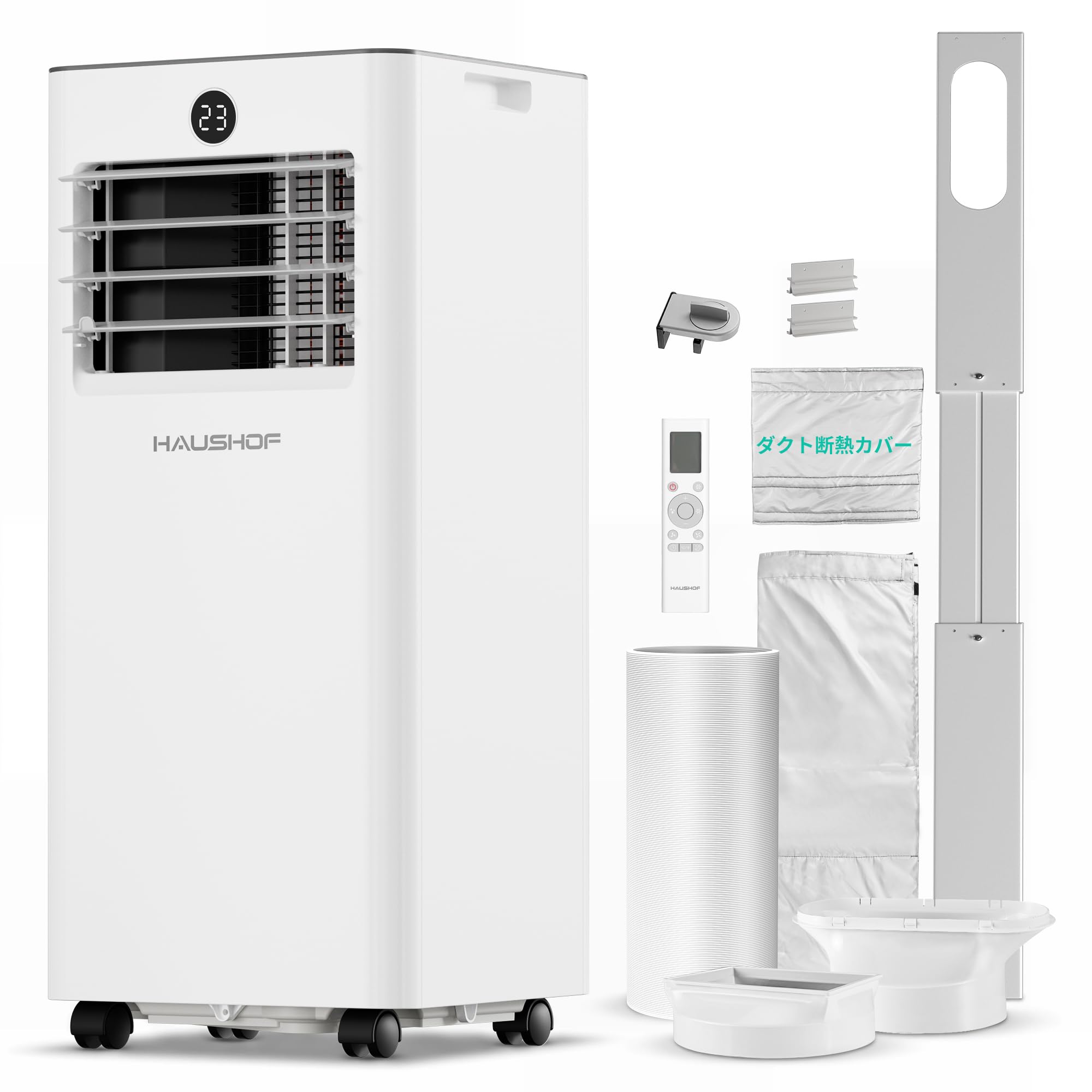
Figure 2.1: HAUSHOF 2.6kW Portable Spot Cooler main unit.
This image shows the complete HAUSHOF 2.6kW Portable Spot Cooler, a white, rectangular unit with a control panel on top and air vents on the front. It is designed for easy portability with integrated casters.
Key Features:
- 3-in-1 Functionality: Cooling, Fan, and Dehumidification modes.
- High Cooling Capacity: 2.6kW (60Hz) for effective spot cooling.
- Efficient Dehumidification: Up to 24L/day, ideal for damp conditions and clothes drying.
- Self-Evaporative System: Reduces the need for manual drainage in cooling mode under normal conditions.
- Adjustable Airflow: 2-stage fan speed and adjustable louvers for up/down/left/right airflow direction.
- Sleep Mode: Gradually adjusts temperature for comfortable overnight use.
- Digital Display: Clear temperature display on the front panel for easy monitoring.
- Window Panel Kit: Includes 3 window panels for heights up to 185cm, with security hardware.
- Exhaust Hose Insulation Cover: Improves cooling efficiency by reducing heat radiation from the exhaust hose.
- Remote Control: For convenient operation from a distance.
- Portable Design: Equipped with casters for easy movement between rooms.
3. Setup
3.1 Unpacking
- Carefully remove the unit and all accessories from the packaging.
- Check that all components are present: Spot Cooler unit, Exhaust Duct, Duct Connector A, Duct Connector B, Remote Control, Drain Hose, Window Stopper, Adjusters (x2), Sponge Seals (x4), Window Panels (x3), Fixing Screw Set (x6), Exhaust Hose Insulation Cover.
- Keep the packaging for future storage or transportation.
3.2 Window Panel and Exhaust Hose Installation
Proper installation of the window panel and exhaust hose is crucial for efficient operation.

Figure 3.1: Step-by-step guide for window panel and exhaust hose installation.
This image illustrates the nine steps required to set up the HAUSHOF Spot Cooler, including connecting the exhaust duct, assembling the window panels, and securing the unit to a window.
- Connect Exhaust Duct: Extend the exhaust duct and securely attach Duct Connector A to one end.
- Attach to Unit: Insert Duct Connector A into the exhaust duct cover on the back of the portable cooler unit. Extend the exhaust duct to the required length.
- Connect Duct Connector B: Attach Duct Connector B to the other end of the exhaust duct.
- Assemble Window Panels: Depending on your window height, assemble the window panels using the provided adjusters and screws. The panels can accommodate heights from 65cm to 185cm.
- Install Adjusters: Attach the adjusters to your window rail.
- Secure Window: Use the window stopper to prevent the window from opening, enhancing security.
- Connect to Window Panel: Connect Duct Connector B to the opening in the assembled window panel.
- Position Unit: Place the portable cooler unit near the window. Ensure the distance between the unit and the window is at least 70cm, and the top of the exhaust hose is at least 90cm from the floor.
- Apply Insulation Cover: For improved cooling efficiency, wrap the exhaust hose with the provided insulation cover.
3.3 Drainage Setup
The HAUSHOF Spot Cooler features a self-evaporative system in cooling mode, which typically eliminates the need for manual drainage under normal temperature and humidity conditions. However, in high humidity environments or when using the dehumidification mode, water will accumulate and needs to be drained.
- Continuous Drainage (Dehumidification Mode): Attach the drain hose to the drainage port at the back of the unit and direct it to a suitable container or floor drain. Ensure the hose is sloped downwards for continuous flow.
- Manual Drainage (Full Tank): When the internal water tank is full, the unit will stop operating, and a full tank indicator will light up. Turn off the unit, remove the rubber plug from the drainage port, and drain the water into a bucket or tray. Replace the plug securely after draining.
4. Operating Instructions
4.1 Control Panel Overview
The unit can be operated via the touch control panel on top of the unit or the included remote control.

Figure 4.1: Control panel layout and manual louvre adjustment.
This image displays the intuitive touch control panel with clearly labeled buttons for various functions, along with illustrations of how to manually adjust the horizontal and vertical louvers for desired airflow direction.
- Power Button (1): Turns the unit ON or OFF.
- Mode Button (2): Cycles through Cooling, Fan, and Dehumidification modes.
- Fan Speed Button (3): Adjusts fan speed (Low/High).
- Temperature Down Button (4): Decreases the set temperature.
- Temperature Up Button (5): Increases the set temperature.
- Timer Button (6): Sets the auto-on or auto-off timer (1-24 hours).
- Sleep Mode Button (7): Activates Sleep Mode.
- Lock Button (8): Locks the control panel to prevent accidental changes.
- Digital Display: Shows the set temperature or timer settings.
4.2 Operating Modes
- Cooling Mode: Press the Mode button until the snowflake icon appears. Use the Up/Down buttons to set your desired temperature (16°C - 32°C).
- Fan Mode: Press the Mode button until the fan icon appears. The unit will circulate air without cooling. Use the Fan Speed button to adjust airflow.
- Dehumidification Mode: Press the Mode button until the water drop icon appears. The unit will remove moisture from the air. In this mode, continuous drainage is recommended.
4.3 Airflow Adjustment
Manually adjust the horizontal and vertical louvers on the front of the unit to direct the airflow up, down, left, or right as desired.
4.4 Sleep Mode
Activate Sleep Mode for quieter operation and gradual temperature adjustments during the night. In cooling mode, the set temperature will increase by 1°C after the first hour and another 1°C after the second hour, then maintain that temperature.
4.5 Remote Control Usage
The remote control duplicates all functions available on the control panel. Point the remote control directly at the unit's receiver when operating.
5. Maintenance
Regular maintenance ensures optimal performance and extends the lifespan of your spot cooler.
5.1 Filter Cleaning
The air filter should be cleaned every two weeks or more frequently depending on usage and air quality.

Figure 5.1: Illustration of the easy-to-clean air filter.
This image highlights the removable and washable air filter of the HAUSHOF Spot Cooler, demonstrating how easily it can be detached for cleaning with a vacuum cleaner or water.
- Turn off the unit and unplug it from the power outlet.
- Locate the air filter panel (usually on the side or back of the unit).
- Gently pull out the filter.
- Clean the filter with a vacuum cleaner to remove dust. For more thorough cleaning, wash it with lukewarm water and a mild detergent.
- Rinse the filter thoroughly and allow it to air dry completely before reinserting it into the unit.
5.2 Storage
If the unit will not be used for an extended period:
- Drain all water from the unit.
- Clean the air filter.
- Run the unit in fan mode for a few hours to dry the internal components.
- Unplug the unit and coil the power cord.
- Store the unit in a cool, dry place, preferably in its original packaging.
6. Troubleshooting
Before contacting customer support, please refer to the following troubleshooting guide for common issues.
| Problem | Possible Cause | Solution |
|---|---|---|
| Unit does not turn on | No power supply; Power cord not plugged in; Full water tank | Check power outlet; Plug in power cord securely; Drain water tank |
| Unit not cooling effectively | Air filter dirty; Air inlet/outlet blocked; Room too large; Window kit not properly sealed; Exhaust hose not installed or insulated | Clean air filter; Clear obstructions; Use in recommended room size; Ensure window kit is sealed; Install/insulate exhaust hose |
| Water leakage | Drain plug loose; Drain hose not properly connected or blocked | Secure drain plug; Check drain hose connection and clear any blockages |
| Unit is noisy | Unit not on a flat surface; Air filter dirty | Place unit on a flat, stable surface; Clean air filter |
| Full tank indicator on | Water tank is full | Drain the water tank |
7. Specifications
| Feature | Specification |
|---|---|
| Brand | HAUSHOF |
| Model | HH25079 |
| Cooling Capacity | 2.6 kW (60Hz) |
| Power Consumption | 860W (60Hz) |
| Dehumidification Capacity | 24 L/day |
| Temperature Setting Range | 16°C - 32°C |
| Dimensions (D x W x H) | 28.9 cm x 30.3 cm x 69.3 cm |
| UPC | 820909629054 |
| ASIN | B0G397ZC84 |
| Window Panel Compatibility | Up to 185 cm height |
8. Warranty and Support
HAUSHOF products are manufactured under strict quality control. This product comes with a 2-year warranty from the date of purchase.
Figure 8.1: HAUSHOF 2-year warranty details.
This image displays the HAUSHOF warranty certificate, indicating a 2-year warranty period and commitment to quality and customer service.
If you encounter any initial defects, malfunctions, or have any questions regarding your product, please do not hesitate to contact our customer service team. We are committed to providing prompt and effective support.
For customer support, please refer to the contact information provided on your purchase receipt or visit the official HAUSHOF website.