
Introduction
The ORDRO AC5 Plus is a versatile 4K video camera camcorder designed for capturing high-quality video and photos. It features 12X optical zoom, 120X digital zoom, a rotatable touch screen, anti-shake technology, autofocus, and time-lapse capabilities. This manual provides essential information for setting up, operating, and maintaining your camcorder.

Image: The ORDRO AC5 Plus camcorder highlighting 4K video quality, 12X optical zoom, and 24MP photo resolution.
What's in the Box
Verify that all items listed below are included in your package:
- 1x ORDRO AC5 Plus 4K Camcorder
- 1x Lens Cap
- 1x 64GB SD Card
- 1x LED RGB Light
- 2x Rechargeable Lithium-Ion Batteries
- 1x External Microphone
- 1x Macro Lens
- 1x Wide-Angle Lens
- 1x Lens Hood
- 1x Camera Bracket
- 1x HDMI Cable
- 1x 1-to-2 Adapter
- 1x Remote Control
- 1x USB Cable
- 1x User Manual
- 1x Camcorder Bag
- 1x Carry Bag

Image: Visual representation of all components included in the ORDRO AC5 Plus package.
Unboxing Video
Video: An unboxing video demonstrating the contents of the ORDRO AC5 Plus 4K video camera package.
Setup
1. Battery and SD Card Installation
- Insert the rechargeable lithium-ion battery into the battery compartment. Ensure it is correctly oriented.
- Insert a high-speed U3 Class 10 SD card (up to 512GB) into the SD card slot until it clicks into place.
2. Attaching Accessories
- External Microphone: Attach the external microphone to the camcorder's hot shoe mount. Connect the microphone cable to the appropriate audio input port. Adjust the microphone gain switch (+0dB for normal, +10dB for long distance).
- LED RGB Light: Mount the LED RGB light onto the camcorder's hot shoe or an external bracket. Connect it via USB-C for power. Adjust color temperature and brightness as needed.
- Wide-Angle/Macro Lens: Screw the wide-angle lens onto the front of the camcorder's main lens. For macro shots, detach the wide-angle component to use the macro lens.
- Handheld Holder/Bracket: Secure the camcorder to the handheld holder or bracket for improved stability and ergonomic grip, especially for low-angle shots.

Image: The ORDRO AC5 Plus camcorder fully assembled with its external microphone, LED light, and handheld holder.
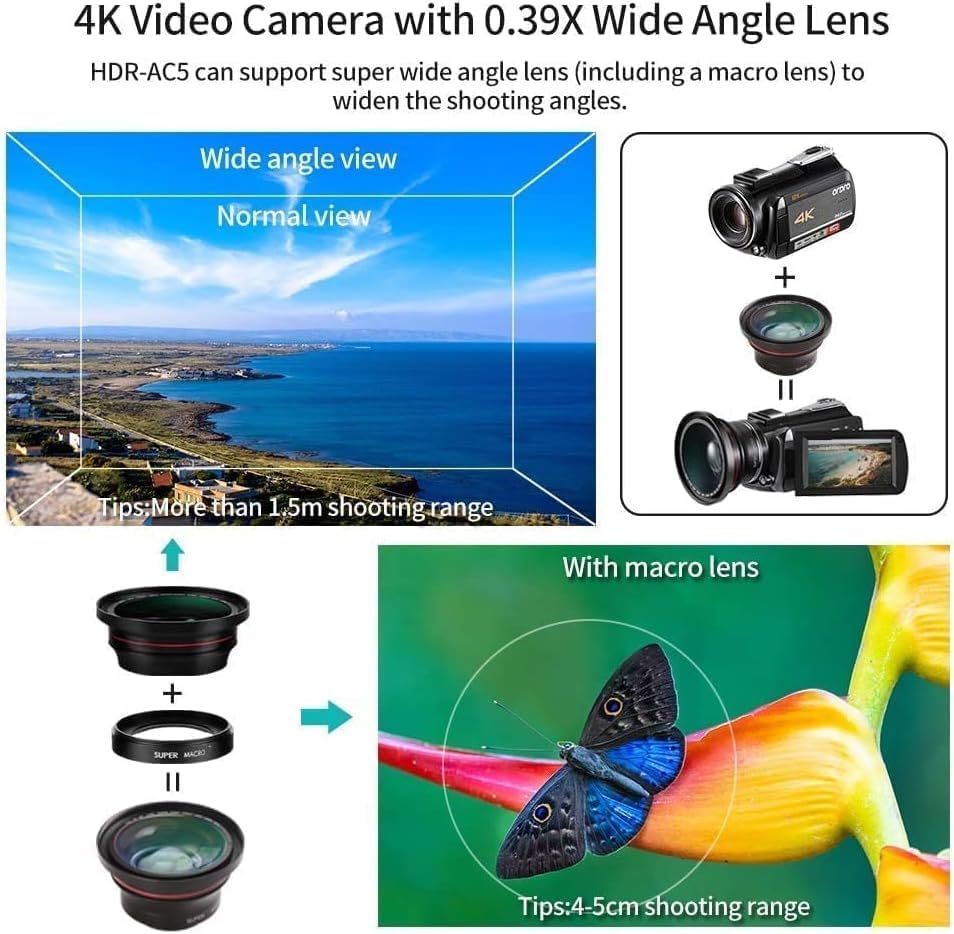
Image: Illustration of the wide-angle and macro lens attachment process, showing the expanded field of view and close-up macro capability.
Operating Instructions
1. Power On/Off
- To power on, open the LCD screen or press the power button.
- To power off, close the LCD screen or press and hold the power button.
2. Recording Video and Photos
- Video Recording: Press the RECORD button to start recording 4K video. Press again to stop.
- Photo Capture: Press the PHOTO button to take 24MP still images.
- Pause Function: During video recording, press the PHOTO button to pause, and press again to resume recording.

Image: Visual guide for using the pause and restart functions during video recording.
3. Zoom Functions
- Use the zoom lever to control the 12X optical zoom for clear magnification without pixelation.
- The camcorder also supports 120X digital zoom for further magnification.
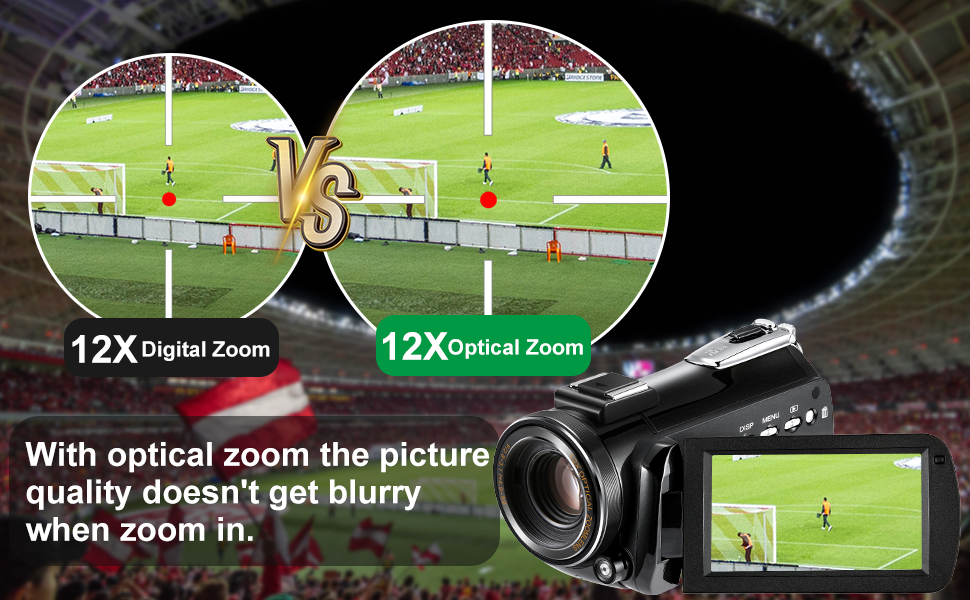
Image: A visual comparison demonstrating the clarity of 12X optical zoom versus digital zoom.
4. Touch Screen Operation
- The 3.1-inch IPS rotatable touch screen allows for intuitive navigation of menus and settings.
- Tap on the screen to adjust focus, change settings, or review footage.

Image: The 3.1-inch IPS touch screen in use, demonstrating its rotatable feature.
5. Live Streaming and Webcam Functionality
- Connect the camcorder to your computer via the USB cable.
- On the camcorder screen, select "PC Camera" mode.
- The camcorder will now function as a full HD webcam for platforms like Zoom, Twitch, or YouTube.

Image: The camcorder connected to a computer and TV, illustrating its use as a webcam for live streaming and video calls.

Image: A user demonstrating the camcorder's webcam functionality with a laptop.
6. Wi-Fi and Smartphone App
- Download the companion app (available for Android and iOS).
- Connect your smartphone to the camcorder's Wi-Fi network.
- Use the app to control settings, start/stop recording, and transfer photos/videos for sharing on social media.
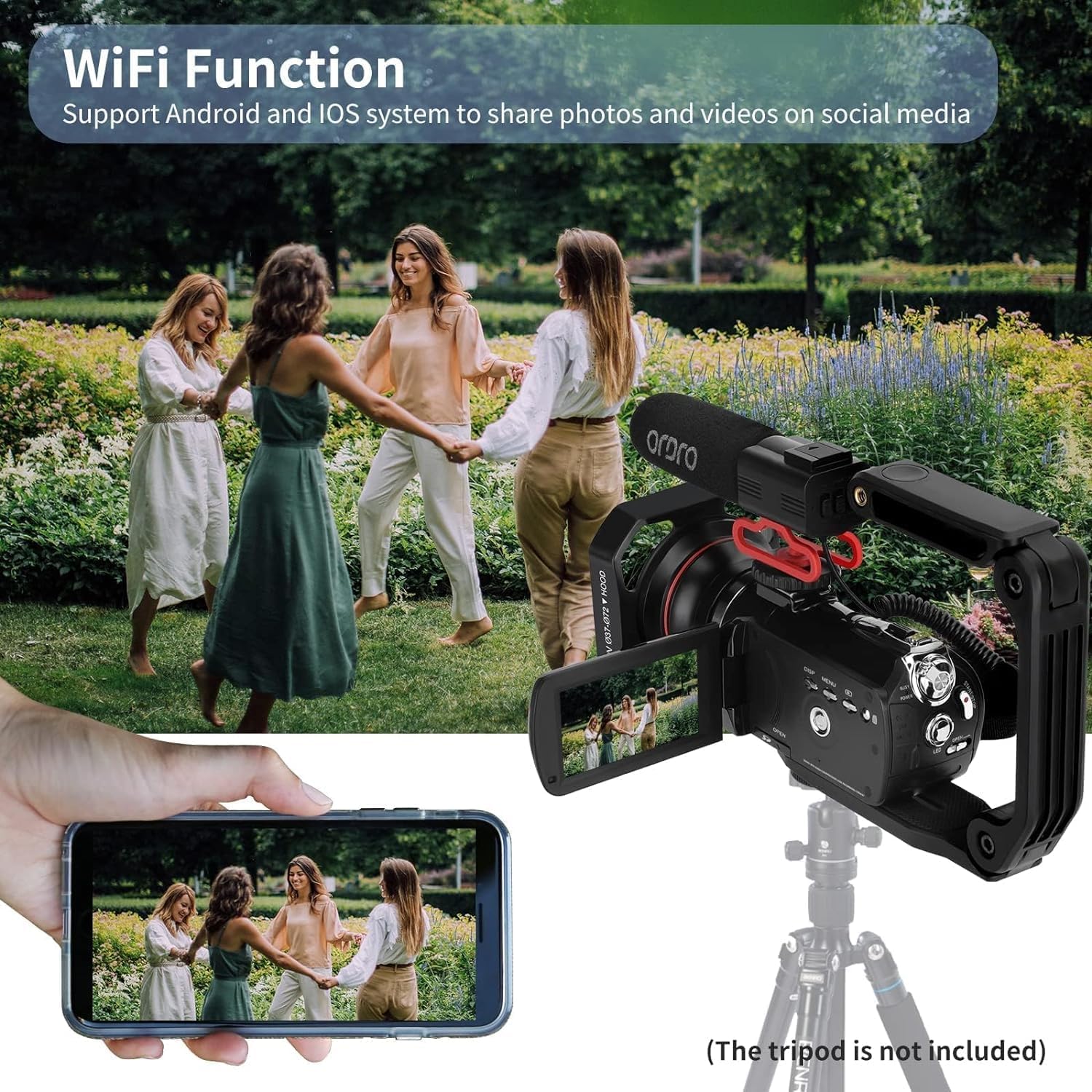
Image: The camcorder's Wi-Fi function in action, showing a smartphone mirroring the camera's display for remote control and sharing.
7. Autofocus and Smart Focus-Following
- The camcorder features automatic focus adjustment.
- Activate the focus-locking mode for one-key focus-locking and instant focusing.
- Smart focus-following helps keep subjects in focus, especially useful for vlogging.
8. Time-Lapse Function
- Access the menu to select the time-lapse recording mode.
- Set your desired interval and duration for capturing time-lapse videos.
9. Remote Control
- Use the included 7-meter IR remote control to operate the camcorder wirelessly.
- Functions include start/stop recording, zoom, and menu navigation.
10. Recording While Charging
- The camcorder supports recording while connected to an external power source via USB, ensuring uninterrupted shooting.
11. Connecting to TV or Computer
- Use the HDMI cable to connect the camcorder to a TV for viewing playback.
- Connect via USB to a computer for file transfer or webcam mode.

Image: Instructions for connecting the camcorder to a TV using an HDMI cable and to a computer using a USB cable for data transfer or webcam use.
Live Streaming Features Overview
Video: A video showcasing the ORDRO AC5 Plus camcorder's features for live streaming, including setup, focus-following, remote control, and power options.
Maintenance
- Cleaning: Use a soft, dry cloth to clean the camcorder body. For the lens, use a specialized lens cleaning cloth and solution. Avoid abrasive materials.
- Storage: Store the camcorder in a cool, dry place away from direct sunlight and extreme temperatures. Remove batteries if storing for extended periods.
- Battery Care: Fully charge batteries before use. Avoid overcharging or completely draining them to prolong their lifespan.
- Firmware Updates: Check the manufacturer's website periodically for any available firmware updates to ensure optimal performance.
Troubleshooting
- Camcorder does not power on: Ensure the battery is fully charged and correctly inserted. Try connecting to external power via USB.
- Cannot record: Check if an SD card is inserted and has sufficient free space. Ensure the card is not locked.
- Poor image/video quality: Clean the lens. Check lighting conditions. Ensure focus is properly set.
- Wi-Fi connection issues: Ensure the camcorder's Wi-Fi is enabled and your smartphone is within range. Restart both devices.
- Remote control not working: Check the remote control battery. Ensure there are no obstructions between the remote and the camcorder's IR receiver.
Specifications
| Feature | Specification |
|---|---|
| Brand | ORDRO |
| Model Name | AC5 PLUS |
| Camcorder Type | Video Camera |
| Video Capture Resolution | 3880p (4K) |
| Effective Still Resolution | 24 MP |
| Optical Zoom | 12x |
| Digital Zoom | 120x |
| Screen Size | 3.5 Inches (3.1-inch IPS rotatable touch screen mentioned in features) |
| Photo Sensor Technology | CMOS |
| Flash Memory Type | Micro SDXC (up to 512GB) |
| Connectivity Technology | USB, Wi-Fi |
| Focus Type | Auto Focus |
| Image Stabilization | Digital |
| Features | 4K Video Recording, Optical Lens, Built-In Light, Face Detection, Time Lapse |
| Power | 1 9V batteries required (included) |
| Color | Black |
Warranty and Support
ORDRO stands behind its products with a 1-year support and free replacement plan to ensure your complete satisfaction. For technical assistance, warranty claims, or product inquiries, please refer to the contact information provided in the included user manual or visit the official ORDRO website.
Manufacturer: Shiliyunsheng


