
1. Introduction
The GEOID CC700 Pro is an advanced GPS bike computer designed to enhance your cycling experience with smart navigation, comprehensive data tracking, and robust connectivity. Featuring a 2.8-inch color touchscreen, it provides clear visuals and intuitive control for all your rides.
2. What's in the Box
- Bike Computer
- Type-C Cable
- Tempered Glass Screen Protector
- Bike Computer Stem Mount
- Replacement Stem Mount for Bike Computer

Image: A visual representation of all items included in the GEOID CC700 Pro package, neatly arranged on a blue background. This includes the bike computer, various mounts, cables, and screen protector.
3. Setup & Installation
3.1. Mounting the Bike Computer
The GEOID CC700 Pro comes with both a standard bike computer stem mount and a replacement stem mount for flexible installation on your bicycle handlebars.

Image: A close-up of the GEOID bike computer mount, showing its design and the included hex wrenches for installation.
3.2. Initial Device Configuration & App Pairing
To begin using your CC700 Pro, you need to pair it with the designated mobile application. This process involves installing the app, logging in, and scanning a QR code displayed on the bike computer.
Video: This video demonstrates the initial setup process, including downloading the OneLapFit app, logging in, and pairing the GEOID CC700 Pro bike computer by scanning a QR code.
3.3. Language Settings
The CC700 Pro supports 11 languages. You can change the device language through the settings menu on the bike computer.
- Supported Languages: English, Italian, Japanese, Spanish, Korean, Portuguese, German, French, Polish, Traditional Chinese, and Russian.
4. Operating the Device
4.1. Basic Operation
The device features a touchscreen and 3 physical buttons for quick and safe operation during your ride. You can start, pause, and end rides, as well as navigate through data pages.
Video: This video provides a detailed guide on the basic operation of the GEOID CC700 Pro, including starting and stopping rides, navigating menus, and adjusting settings.
4.2. Display & Customization
The 2.8-inch color touchscreen offers clear navigation and data display. You can customize data screens to show metrics important to you.

Image: The GEOID CC700 Pro displaying a vibrant color screen with various cycling data, highlighting its 2.8-inch size and touchscreen capabilities.
4.3. Navigation Features
The CC700 Pro supports global offline map downloads with 8GB storage. It features color-coded maps, turn prompts, street names, map zoom, and dual-perspective views (North-Up and Head-Up).
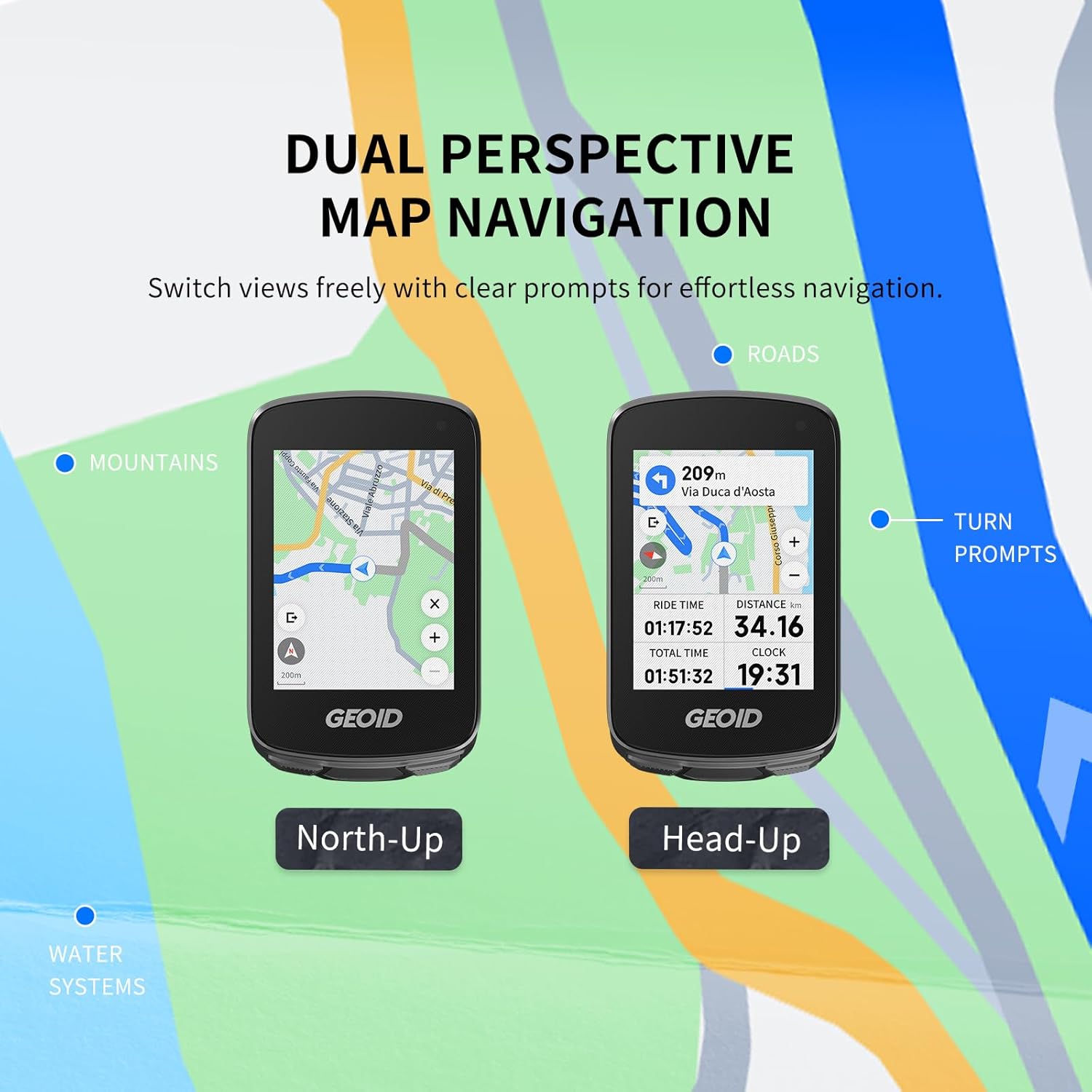
Image: Two views of the GEOID CC700 Pro screen showing dual perspective map navigation (North-Up and Head-Up) with turn prompts and road details.
Re-Route Planning: If you go off-route, the device instantly recalculates your path to guide you back. This feature requires the bike computer to be connected to the designated app.

Image: The GEOID CC700 Pro screen displaying a re-routing message and updated map, indicating its ability to recalculate routes when a rider deviates from the planned path.
4.4. GPS & Positioning
The device supports 5 satellite systems (GPS, BEIDOU, GLONASS, QZSS, and GALILEO) and AGNSS for rapid 5-second location acquisition. AGNSS data is valid for 14 days and should be synced via WiFi in an open area.

Image: A cyclist on a road with the GEOID CC700 Pro screen showing satellite and AGNSS connectivity for fast positioning.
4.5. Connectivity
The CC700 Pro features both WiFi and Bluetooth for seamless data transmission. WiFi enables automatic AGNSS and riding record synchronization, as well as direct firmware updates on the device.
- Sensor Connection: Supports ANT+ and Bluetooth standard protocols for connecting various sensors like speed, cadence, heart rate, power meters, smart trainers, radar tail lights, and electronic shifting.

Image: A cyclist with the GEOID CC700 Pro, illustrating its universal compatibility with various ANT+ and Bluetooth sensors for speed, cadence, heart rate, power, smart trainers, electronic shifting, radar, bike lights, and cameras.
4.6. Indoor Training
The CC700 Pro supports indoor training with smart trainers, allowing you to customize power targets, resistance levels, and gradients. This helps in focusing on performance improvement without external factors.
4.7. Message Notifications
Receive detailed mobile phone message notifications directly on your bike computer, keeping you informed without needing to check your phone. This feature can be enabled or disabled.

Image: The GEOID CC700 Pro screen displaying an incoming call notification, demonstrating its message notification feature while cycling.
4.8. DJI Action Camera Integration
When connected to a DJI action camera (compatible with DJI Action 4 and Action 5 Pro), the cycling page automatically adds a control dial UI. This allows you to switch modes and start/stop recording directly from the bike computer.
5. Data Management
Easily export and share FIT files via the specified app. The CC700 Pro is compatible with STRAVA and TrainingPeaks for auto-sync of cycling data after account binding.

Image: The GEOID CC700 Pro displaying data analysis on a smartphone app, with logos for Strava and TrainingPeaks, indicating compatibility for data sharing.
The device has 8GB of storage capacity, holding plenty of country maps and cycling data. Once the memory is full, new ride data will overwrite the oldest records. Always upload your data to the OneLapFit app after each ride to avoid loss.
6. Specifications
| Feature | Detail |
|---|---|
| Item Weight | 7.7 ounces |
| Product Dimensions | 2.24"L x 0.76"W x 3.78"H |
| Display Size | 2.8 Inches |
| Waterproof Rating | IPX7 |
| Connectivity Technology | ANT+, Bluetooth, Wi-Fi |
| Map Type | Worldwide |
| Batteries | 1 Lithium Ion battery (included) |
| Mounting Type | Handlebar Mount |
7. Troubleshooting
- Device not powering on: Ensure the battery is charged. Connect to the Type-C cable and a power source.
- GPS signal acquisition slow: Ensure you are in an open outdoor area away from tall buildings or dense tree cover. Sync AGNSS data via WiFi regularly.
- Sensors not connecting: Check if sensors are powered on and within range. Ensure the correct protocol (ANT+ or Bluetooth) is selected in the device settings.
- App pairing issues: Verify Bluetooth is enabled on your phone and the bike computer. Ensure the OneLapFit app is updated to the latest version.
- Data sync failure: Check your WiFi connection. Ensure your OneLapFit app is open and connected to the device.
8. Maintenance
- Cleaning: Wipe the device with a soft, damp cloth. Avoid harsh chemicals or abrasive materials.
- Storage: Store the device in a cool, dry place when not in use. Avoid extreme temperatures.
- Battery Care: Charge the battery regularly, even if the device is not used frequently, to maintain battery health.
9. Warranty & Support
The GEOID CC700 Pro comes with a 1-Year Warranty. For any product inquiries, technical support, or warranty claims, please contact Geoid Fitness customer service.
Customer Service: Refer to the contact information provided in your product packaging or visit the official GEOID website for support.


