
Hasuit NKJG80
Hasuit NKJG80 Lighted Medicine Cabinet User Manual
Model: NKJG80 | Size: 31.5'' x 23.6''
1. Introduction
Thank you for choosing the Hasuit NKJG80 Lighted Medicine Cabinet. This manual provides essential information for the safe installation, operation, and maintenance of your new bathroom cabinet. Please read these instructions thoroughly before assembly and use, and retain them for future reference.
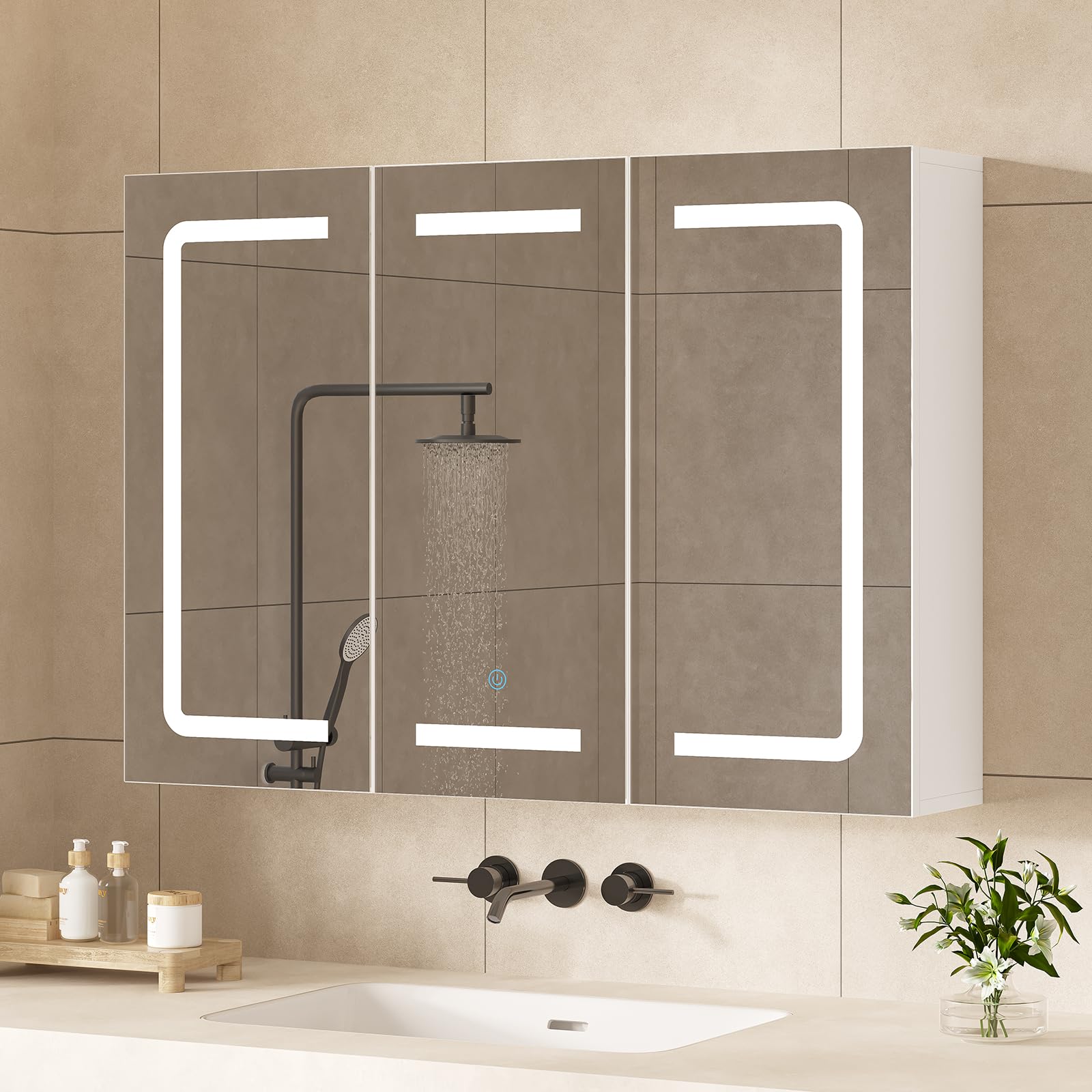
Image 1.1: Hasuit NKJG80 Lighted Medicine Cabinet, front view.
2. Important Safety Information
To ensure safe operation and prevent injury or damage, please adhere to the following safety guidelines:
- Electrical Safety: Always unplug the cabinet from the power source before cleaning, performing maintenance, or making any adjustments.
- Water Exposure: Do not install the cabinet in locations where it may come into direct contact with water or other liquids, beyond typical bathroom humidity. Ensure proper ventilation.
- Assembly: Use only the provided assembly tools and follow the installation instructions carefully. Improper assembly can lead to instability and potential injury.
- Heat Sources: Keep the cabinet away from direct heat sources, such as radiators or heating vents, to prevent material damage.
- Weight Capacity: Do not place excessively heavy objects on the cabinet or shelves that could cause it to tip over or collapse. Distribute weight evenly.
- Children and Pets: Keep children and pets away from the cabinet during assembly. Small parts can be a choking hazard.
3. Package Contents
Verify that all components are present and undamaged before beginning assembly. If any parts are missing or damaged, please contact customer support.
- Hasuit Lighted Medicine Cabinet (Main Unit)
- Adjustable Shelves (3 included)
- Installation Kit (Hardware, mounting brackets)
- User Manual (This document)
4. Product Specifications
| Feature | Specification |
|---|---|
| Model Number | NKJG80 |
| Dimensions (W x H x D) | 31.5" x 23.6" x 6.3" |
| Material | Engineered Wood |
| Color | White |
| Number of Doors | 3 |
| Mirror Type | 3-Way Mirror Doors |
| Lighting | LED Lights (3 Color & Brightness Adjustable) |
| Charging Station | 2 AC Outlets (120V/16A), 2 USB Ports (5V/2.1A) |
| Shelves | 3 Adjustable Shelves |
| Installation Type | Wall-Mounted |
| Weight | Approximately 106 lbs |

Image 4.1: Detailed product dimensions (Width: 31.5", Height: 23.6", Depth: 6.3").
5. Setup and Installation
Professional installation is recommended for optimal safety and performance. Ensure you have appropriate tools and understand local building codes before proceeding.
5.1 Pre-Installation Checklist
- Confirm all parts are present and undamaged.
- Identify a suitable wall location with access to a power outlet.
- Ensure the wall can support the cabinet's weight (approximately 106 lbs).
- Gather necessary tools (e.g., drill, level, measuring tape, screwdriver).
5.2 Mounting the Cabinet
- Mark the desired mounting height and width on the wall using a level and measuring tape.
- Drill pilot holes for the mounting brackets according to the provided template in the installation kit.
- Securely attach the mounting brackets to the wall using appropriate fasteners for your wall type (e.g., wall anchors for drywall, screws for studs).
- Carefully lift the medicine cabinet and hook it onto the installed mounting brackets. Ensure it is securely seated and level.
- Connect the power cord to a suitable electrical outlet.
5.3 Installing Adjustable Shelves
The cabinet includes three adjustable shelves. You can customize their height to suit your storage needs.
- Locate the pre-drilled holes inside the cabinet.
- Insert the shelf pins into the desired holes at equal heights for each shelf.
- Place the shelves onto the pins, ensuring they are stable.

Image 5.1: Interior storage with adjustable shelves.
6. Operating Instructions
6.1 LED Lighting Control
The cabinet features an integrated LED lighting system with adjustable color temperature and brightness.
- Power On/Off: Touch the circular sensor on the mirror surface to turn the lights on (blue indicator) or off (white indicator).
- Change Color Temperature: With the lights on, single-click the touch button to cycle through 3 color modes: 6400K Cold Light, 4500K Natural Light, and 3000K Warm Light. The cabinet has a memory function that retains your last setting.
- Adjust Brightness: Long-press the touch button to adjust the brightness level from 0% to 100%. Release the button when the desired brightness is reached.
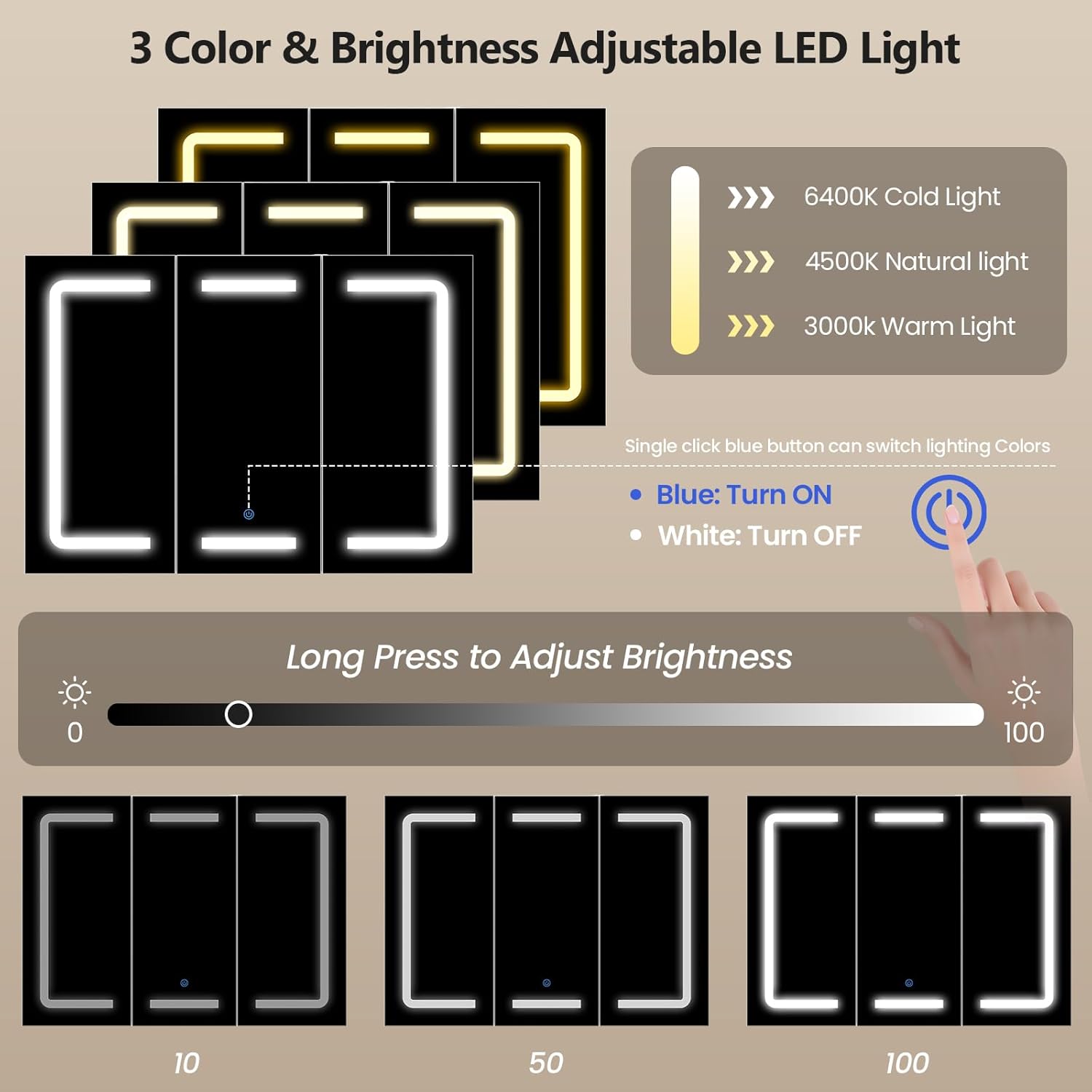
Image 6.1: LED light color and brightness controls.

Image 6.2: Key features of the Hasuit Lighted Medicine Cabinet.
6.2 Using the 3-Way Mirror
The innovative design allows the side mirror doors to rotate, providing a 270-360 degree panoramic view for various grooming tasks.
- Gently open the side mirror doors to your desired angle.
- Adjust the doors to achieve the best visibility for tasks such as hair styling, shaving, or makeup application.

Image 6.3: The 3-way mirror provides versatile viewing angles.
6.3 Built-in Charging Station
The cabinet includes a built-in charging station with AC outlets and USB ports for convenient power access.
- Locate the charging station inside the cabinet.
- Plug in your electric razor, electric toothbrush, hair dryer, or other compatible devices into the 2 AC outlets or 2 USB ports.
- Ensure the cabinet is properly connected to a power source for the charging station to function.

Image 6.4: Built-in power strip for charging devices.
6.4 Official Product Video
Video 6.1: An official product video from Hasuit Direct demonstrating the features and functionality of the lighted medicine cabinet, including the 3-way mirror, LED lights, and storage.
7. Maintenance and Care
Regular cleaning and proper care will extend the life and appearance of your medicine cabinet.
- Cleaning the Mirror: Use a soft, lint-free cloth and a non-abrasive glass cleaner. Spray the cleaner onto the cloth, not directly onto the mirror, to avoid liquid seeping into the edges.
- Cleaning the Cabinet Surface: Wipe surfaces with a soft, damp cloth. For stubborn marks, use a mild, non-abrasive cleaner. Dry immediately with a clean cloth.
- Avoid Harsh Chemicals: Do not use abrasive cleaners, ammonia-based products, or solvents, as these can damage the finish and mirror coating.
- Hinge Adjustment: The stainless steel hinges are adjustable. If the mirror doors do not align perfectly, you can fine-tune the fit by adjusting the screws on the door hinges.

Image 7.1: High-quality construction details, including stainless steel hinges and waterproof surfaces.
8. Troubleshooting
If you encounter any issues with your medicine cabinet, refer to the following common problems and solutions:
| Problem | Possible Cause | Solution |
|---|---|---|
| LED lights do not turn on. | No power connection; faulty touch sensor. | Ensure the cabinet is plugged into a working outlet. Check the power switch. If the issue persists, contact customer support. |
| Charging station not working. | No power connection; device incompatibility. | Verify the cabinet is powered. Test with a different device. Ensure devices are within specified voltage/amperage limits. |
| Mirror doors are misaligned. | Hinges require adjustment. | Adjust the screws on the stainless steel hinges to realign the doors. |
| Cabinet feels unstable after installation. | Improper mounting; insufficient wall support. | Re-check mounting brackets and fasteners. Ensure they are securely attached to wall studs or appropriate anchors. Consult a professional if unsure. |
9. Warranty and Support
Hasuit is committed to providing high-quality products. If your medicine cabinet arrives damaged, scratched, or with missing parts, please contact us immediately for assistance.
For warranty claims, technical support, or any questions regarding your product, please contact Hasuit customer service through the retailer where you purchased the item or visit the official Hasuit website.
Note: This product may be eligible for extended protection plans offered by third-party providers. Please refer to your purchase details for more information on available protection plans.
Ask a question about this manual
Ask about setup, troubleshooting, compatibility, parts, safety, or missing instructions. Manuals+ will review the question and use this page’s manual context to help answer it.