
1. Introduction

Image: The Yaheetech Gaming Chair Model 615816 positioned in a modern gaming environment, showcasing its design and presence.
Thank you for choosing the Yaheetech Gaming Chair Model 615816. This manual provides essential information for the safe and efficient use of your new gaming chair. Please read these instructions carefully before assembly and use, and retain them for future reference.
Safety Warnings
- Do not exceed the maximum load capacity of 136 kg (300 lbs).
- To prevent tipping, avoid leaning heavily or suddenly on the chair's backrest, especially when fully reclined.
- Ensure all screws and bolts are securely tightened before use. Periodically check and re-tighten as necessary.
- Keep children and pets away during assembly. Small parts may pose a choking hazard.
- Use the chair only on a flat, stable surface.
- Do not stand on the chair.
- Avoid exposing the chair to direct sunlight or extreme temperatures to prevent material degradation.
2. Product Overview
The Yaheetech Gaming Chair Model 615816 is designed for comfort and support during extended periods of sitting, whether for gaming, work, or study. It features an ergonomic design with multiple adjustable components.
Key Features
- Ergonomic Design: High backrest with neck, shoulder, lumbar, arm, and leg support.
- Adjustable Reclining Angle: Reclines between 90 and 135 degrees.
- Massage Lumbar Cushion: USB-powered for enhanced comfort.
- Extendable Footrest: Provides leg support for relaxation.
- Adjustable Seat Height: Gas lift mechanism for smooth height adjustment.
- Pocket Spring Cushion: Adapts to body posture for pressure absorption.
- Premium Faux Leather: Breathable, easy to clean, and durable.
- 360° Swivel: Smooth rotation for mobility.
- Wide Metal Star Base: Ensures stability and durability.
- Convenient Back Pocket: For storing small items like power banks or controllers.

Image: Overview of the Yaheetech Gaming Chair highlighting its ergonomic design, high-density foam seat, pocket spring cushion, breathable perforated faux leather, convenient back pocket, massage lumbar pillow with switch, and wide metal star base.

Image: Detailed view of the internal pocket spring cushion, illustrating its construction for enhanced comfort and pressure absorption.
3. Setup and Assembly
The Yaheetech Gaming Chair requires assembly. Please refer to the separate Assembly Manual included in your package for detailed, step-by-step instructions. Ensure all components are present before beginning assembly.
Package Contents:
- Gaming Chair Components (Backrest, Seat, Armrests, Base, Wheels, Gas Lift, etc.)
- Assembly Manual
- Accessory Kit (Screws, Allen Wrench, etc.)
- Lumbar Cushion with USB Cable
- Headrest Cushion
Note: Some components may be pre-assembled. Follow the instructions in the dedicated assembly manual carefully to ensure correct and safe setup.
4. Operating Instructions
4.1. Adjusting Seat Height
To adjust the seat height, locate the lever on the right side beneath the seat.
- To raise the seat: Lift the lever while taking your weight off the seat. The seat will rise automatically. Release the lever at the desired height.
- To lower the seat: Lift the lever while remaining seated. The seat will lower. Release the lever at the desired height.
4.2. Reclining the Backrest
The backrest can be reclined between 90 and 135 degrees.
- To recline: Pull the recline lever (usually on the left side) upwards and lean back. Release the lever to lock the backrest in position.
- To return to upright position: Pull the recline lever upwards and lean forward slightly. The backrest will return to its original position. Release the lever to lock.
4.3. Using the Footrest
The chair features an extendable footrest for added comfort.
- To extend: Pull the footrest out from under the seat.
- To retract: Push the footrest back under the seat until it is fully stored.
4.4. Activating the Massage Lumbar Cushion
The lumbar cushion provides a massage function.
- Connect the USB cable from the lumbar cushion to a compatible USB power source (e.g., computer USB port, USB wall adapter 5V-1A, power bank).
- Press the ON/OFF button on the USB cable to activate or deactivate the massage function.
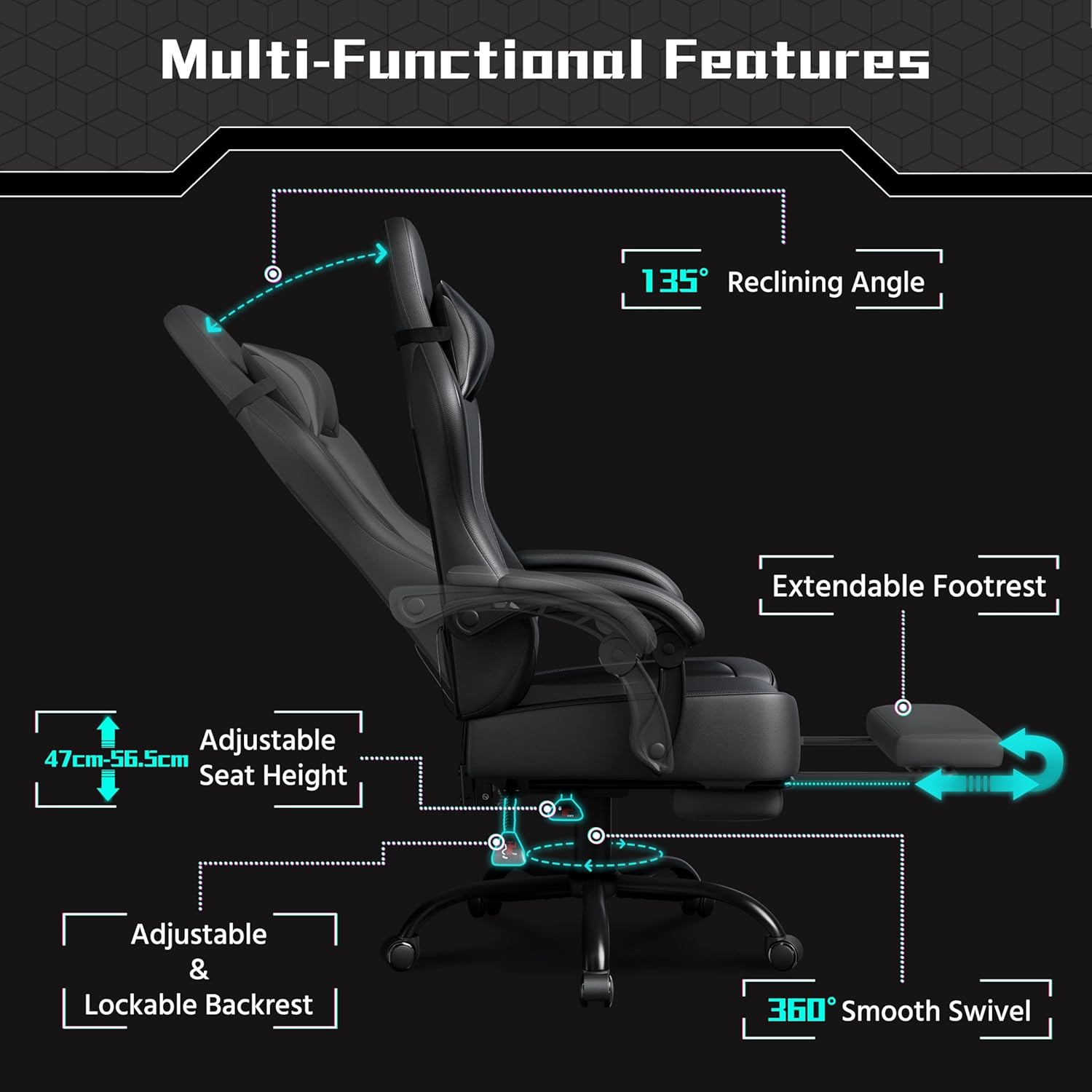
Image: Diagram illustrating the multi-functional features of the Yaheetech Gaming Chair, including the 135° reclining angle, extendable footrest, adjustable seat height (47cm-56.5cm), adjustable and lockable backrest, and 360° smooth swivel.

Image: Illustration of the Yaheetech Gaming Chair's 90-135° reclining capability and how its ergonomic design provides support for the neck, shoulders, lumbar region, arms, and legs.
5. Maintenance
Proper maintenance ensures the longevity and optimal performance of your gaming chair.
- Cleaning: The faux leather upholstery can be cleaned with a simple damp cloth. Do not use detergents or chemical cleaning agents, as these may damage the material.
- Inspection: Periodically check all screws, bolts, and moving parts (wheels, gas lift, recline mechanism) for tightness and proper function. Re-tighten any loose fasteners.
- Lubrication: If any moving parts become stiff or noisy, a small amount of silicone-based lubricant can be applied.
- Avoid Overloading: Always adhere to the maximum weight capacity of 136 kg.
- Storage: If storing the chair for an extended period, keep it in a cool, dry place away from direct sunlight.

Image: Close-up view of the premium faux leather material used on the Yaheetech Gaming Chair, highlighting its breathable, easy-to-clean, and durable properties.
6. Troubleshooting
This section addresses common issues you might encounter with your gaming chair.
| Problem | Possible Cause | Solution |
|---|---|---|
| Chair wobbles or feels unstable. | Loose fasteners; uneven floor. | Check and tighten all screws and bolts. Ensure the chair is on a flat surface. |
| Seat height adjustment not working. | Gas lift malfunction; lever mechanism stuck. | Ensure the lever is fully engaged. If the gas lift is faulty, contact customer support. |
| Backrest does not recline or lock. | Recline mechanism stuck; lever not fully engaged. | Check the recline lever for obstructions. Ensure it is pulled fully to recline and released to lock. |
| Massage function not working. | USB cable not connected; power source issue; ON/OFF button not pressed. | Ensure the USB cable is securely connected to a working power source. Press the ON/OFF button on the cable. Try a different USB port or power adapter. |
| Squeaking noises. | Loose connections; friction between parts. | Tighten all fasteners. Apply a small amount of silicone lubricant to moving joints if necessary. |
If you encounter an issue not listed here or if the suggested solutions do not resolve the problem, please contact Yaheetech customer support.
7. Specifications
| Model Number | 615816 |
| Brand | Yaheetech |
| Color | Black |
| Materials | Polyurethane, PVC, Foam, Metal, Laminate, Polyester, Plastic |
| Assembled Dimensions (W x D x H) | 72 x 72 x 124.5-134 cm (28.3 x 28.3 x 49-52.8 inches) |
| Seat Area (W x D) | 52.5 x 50 cm (20.7 x 19.7 inches) |
| Adjustable Seat Height | 47-56.5 cm (18.5-22.2 inches) |
| Maximum Load Capacity | 136 kg (300 lbs) |
| Product Weight | 19.4 kg (42.8 lbs) |
| Reclining Angle | 90-135 degrees |
| Assembly Required | Yes |
| Recommended Use | Computer, Gaming, Video Games |
| Room Type | Office, Bedroom, Game and Recreation Room |

Image: Detailed diagram showing the dimensions of the Yaheetech Gaming Chair, including width, depth, height, seat dimensions, and footrest extension.
8. Warranty and Support
For warranty information, please refer to the documentation provided with your purchase or visit the official Yaheetech website. If you require assistance with assembly, parts, or troubleshooting that is not covered in this manual, please contact Yaheetech customer support.
Contact Information: Please visit www.yaheetech.com for support options, including FAQs, contact forms, and customer service details.

