
1. Introduction
This manual provides detailed instructions for the installation, operation, and maintenance of your HUIYEETEX Zigbee Roller Blinds Motor. Please read this manual thoroughly before installation and use to ensure proper function and safety. This motor is designed for 1-1/2 inch (38mm) diameter tubes and features a built-in rechargeable battery.
The motor supports various control methods, including a basic RF remote control. For App and Voice control functionalities (e.g., via Tuya APP, Alexa, Google Home, Siri), a compatible Tuya Zigbee hub is required and sold separately.

Figure 1: Applicable Curtain Types. The motor is compatible with standard roller shades, blackout blinds, and DIY window treatments.
2. Package Contents
Verify that all components listed below are included in your package:
- 1x HUIYEETEX Zigbee Roller Blinds Motor
- 1x USB Charging Cable
- 1x Handheld RF Remote Control
- Mounting Brackets and Accessories

Figure 2: What's in the Kit. This image displays the rechargeable blind motor, rubber drive fittings, remote, Type-C charging cable, and mounting adapter.
3. Specifications
| Feature | Detail |
|---|---|
| Model Number | GM25LEU-1.1/28-TYZ |
| Tube Compatibility | 1-1/2 inch (38mm) diameter tubes |
| Power Source | 5V Rechargeable Battery (1 A battery included) |
| Charging | USB port (charging cable included), compatible with power bank or solar panel (sold separately) |
| Control Methods | RF Remote Control (included), App Control (Tuya APP), Voice Control (Alexa, Google Home, Siri) - App/Voice control requires a Tuya Zigbee hub (sold separately) |
| Torque | 1.1 Nm |
| Rated Power | 8.4W |
| Motor Diameter | 25mm |
| Charge Voltage | DC 8.4V |
| Current | 1A |
| Frequency | 433.32 MHz (for RF remote) |
| Rated RPM | 28r/min |
| Item Weight | 1.41 pounds |
| Package Dimensions | 17.8 x 3.5 x 2.52 inches |
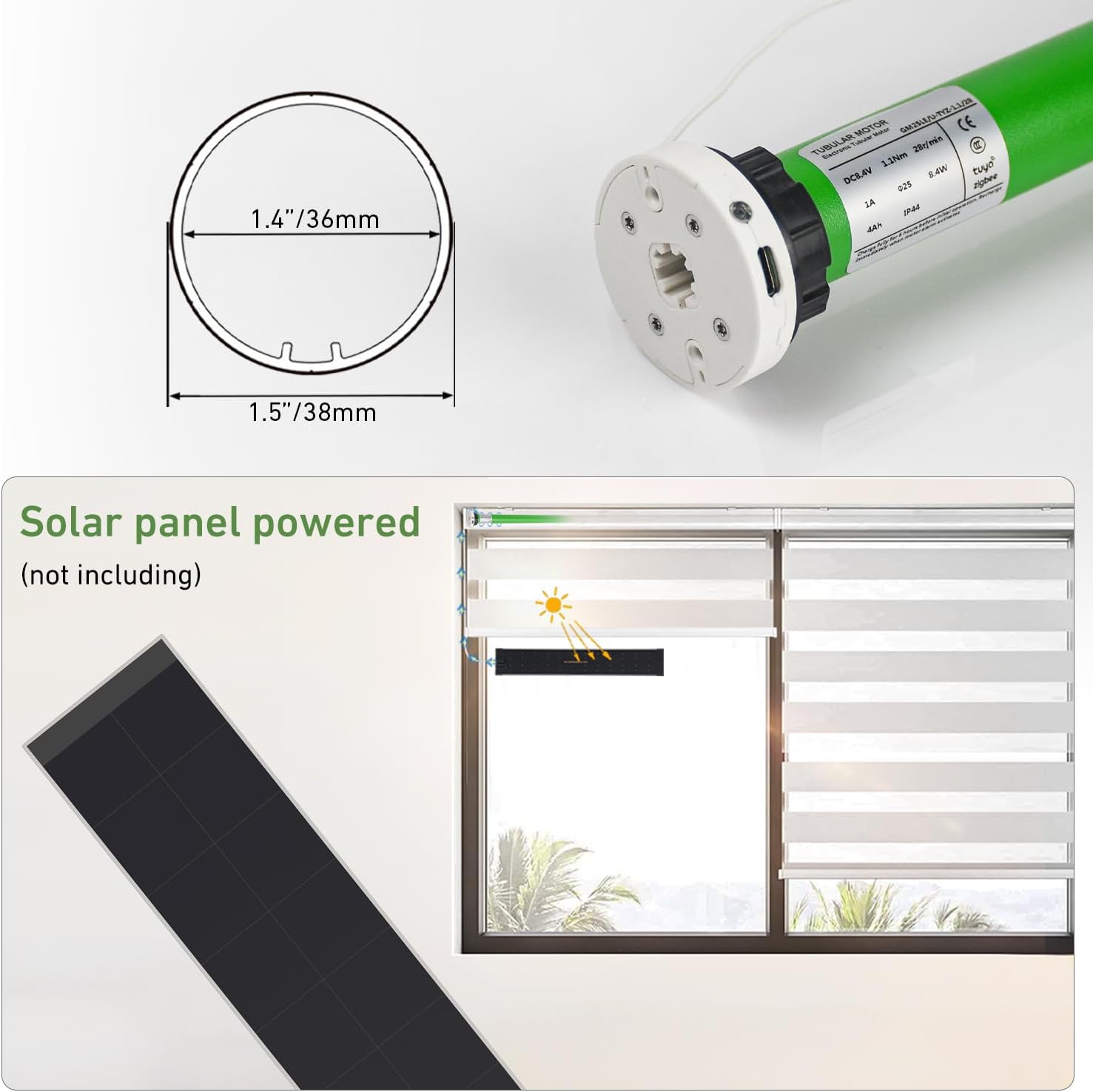
Figure 3: Motor Specifications and Dimensions. This image provides technical details and measurements of the motor.
4. Setup and Installation
Follow these steps to install your HUIYEETEX Zigbee Roller Blinds Motor:
- Prepare the Blind: Carefully remove your existing roller blind from its mounting brackets. If it has a chain drive, remove the chain mechanism.
- Measure Tube Dimensions: Measure the inner and outer diameters of your blind's tube. This motor is designed for tubes with an inner diameter of approximately 36mm (1.4 inches) and an outer diameter of 38mm (1.5 inches). Ensure your tube matches these specifications for proper fit.
- Insert the Motor: Insert the HUIYEETEX motor into the roller blind tube. Ensure it fits snugly and the drive fittings are correctly engaged with the tube.
- Mount the Blind: Re-mount the roller blind with the motor installed into your window frame using the provided mounting brackets. Ensure the motor's charging port and LED indicator are accessible.
- Set Up Controls: Proceed to the 'Operating Instructions' section to pair your remote control and, if applicable, connect to a Zigbee hub for smart control.

Figure 4: Motor with Mounting Hardware. This image demonstrates the motor's compatibility with 38mm tubes and its mounting components.
5. Operating Instructions
5.1. Charging the Motor
The motor has a built-in rechargeable battery. Connect the provided USB charging cable to the motor's charging port and a 5V USB power adapter (not included), power bank, or a compatible solar panel (sold separately). The LED indicator will show charging status. A full charge typically takes several hours.

Figure 5: Solar Panel Charging Option. The motor can be charged via USB or an optional solar panel.
5.2. RF Remote Control Operation
Your motor comes with a basic RF remote control for direct operation. Refer to the remote control's specific instructions for pairing and setting upper/lower limits. Typically, buttons include UP, DOWN, and STOP/PAUSE.
- UP Button: Raises the blind.
- DOWN Button: Lowers the blind.
- STOP/PAUSE Button: Stops the blind at its current position.
5.3. Smart Control (Requires Tuya Zigbee Hub)
For App and Voice control, a Tuya Zigbee hub (sold separately) is required. Once the hub is set up and connected to your home network, you can integrate the HUIYEETEX motor with the Tuya Smart App or Smart Life App.
- Connect Zigbee Hub: Follow the instructions provided with your Tuya Zigbee hub to set it up and connect it to your home Wi-Fi network.
- Pair Motor with Hub: Open the Tuya Smart App or Smart Life App. Follow the in-app instructions to add a new device and pair your Zigbee roller blinds motor with the hub. This usually involves putting the motor into pairing mode (refer to motor's specific pairing sequence, often a button press on the motor itself).
- App Control: Once paired, you can control the blinds directly from the Tuya Smart App or Smart Life App on your smartphone or tablet. This includes opening, closing, stopping, and setting schedules.
- Voice Control: Integrate the Tuya Smart App with voice assistants like Amazon Alexa, Google Home, or Apple Siri. Once integrated, you can use voice commands such as "Alexa, turn up the shades" or "Hey Google, close the blinds."
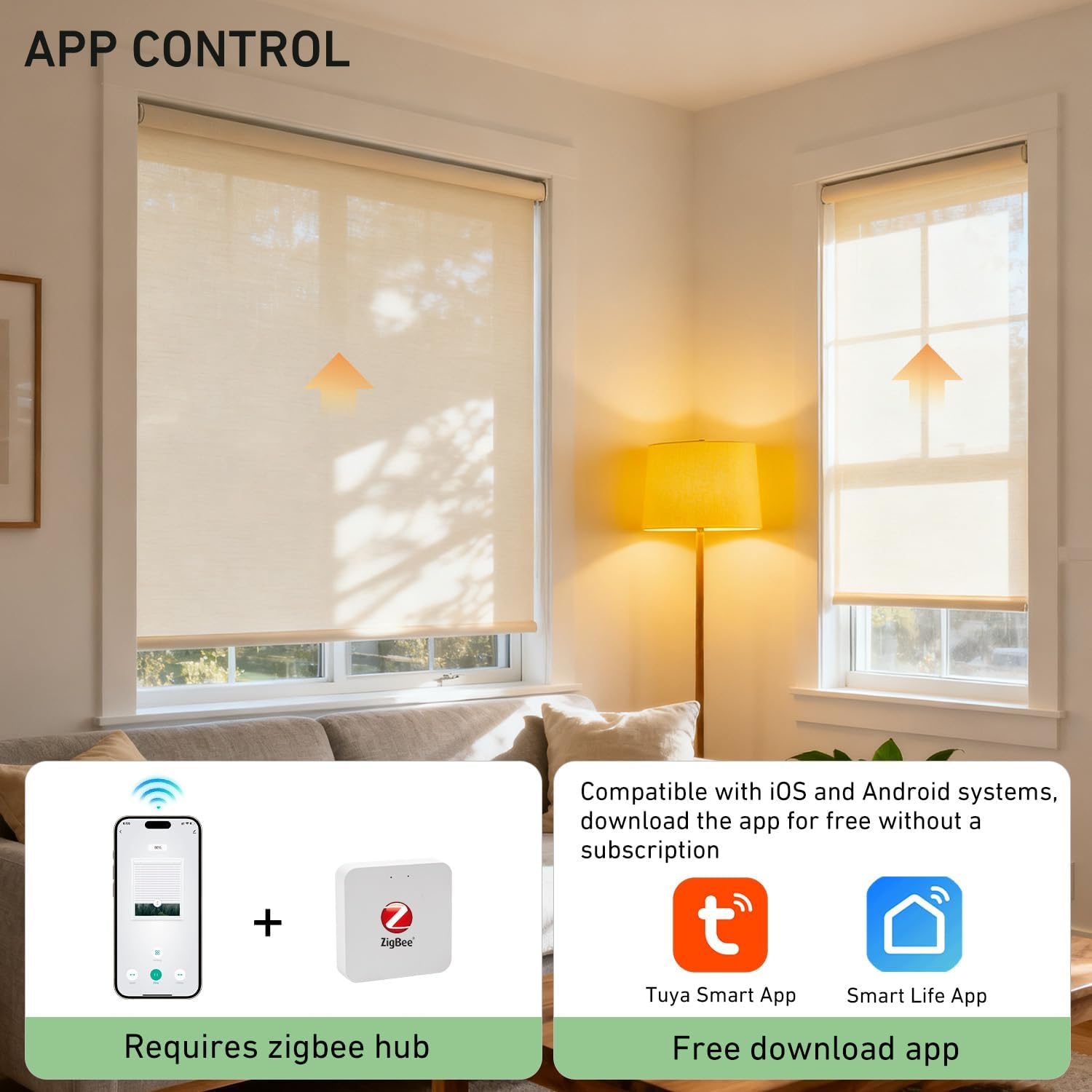
Figure 6: App Control Setup. A Zigbee hub is required for app and voice control.

Figure 7: 3-Way Control Options. The motor supports App, Voice, and RF Remote control.
6. Maintenance
To ensure the longevity and optimal performance of your HUIYEETEX Zigbee Roller Blinds Motor, follow these maintenance guidelines:
- Regular Charging: Charge the motor regularly to maintain battery health. The frequency depends on usage. If using a solar panel, ensure it receives adequate sunlight.
- Cleaning: Keep the motor and surrounding area free from dust and debris. Use a soft, dry cloth for cleaning. Do not use harsh chemicals or abrasive materials.
- Avoid Obstructions: Ensure the blinds operate freely without any obstructions in their path. Obstructions can strain the motor and reduce its lifespan.
- Environmental Conditions: Operate the motor within recommended temperature and humidity ranges. Avoid exposing it to extreme conditions.
7. Troubleshooting
If you encounter issues with your HUIYEETEX Zigbee Roller Blinds Motor, refer to the following common problems and solutions:
- Motor Not Responding to Remote:
- Check if the motor battery is charged.
- Ensure the remote control battery is functional.
- Re-pair the remote control with the motor according to the remote's instructions.
- Motor Not Responding to App/Voice Control:
- Verify that a Tuya Zigbee hub is properly installed and connected to your home network.
- Ensure the motor is successfully paired with the Zigbee hub in the Tuya Smart App or Smart Life App.
- Check your internet connection and the status of your Zigbee hub.
- Confirm that your voice assistant (Alexa, Google Home) is correctly linked to the Tuya Smart App.
- Blind Stops Mid-Way or Does Not Reach Limits:
- The battery might be low; charge the motor.
- Re-calibrate the upper and lower limits using your remote control or app.
- Check for any physical obstructions preventing the blind from moving freely.
- Motor Makes Unusual Noise:
- Ensure the motor is correctly seated within the blind tube and that the mounting brackets are secure.
- Check for any foreign objects inside the blind tube or near the motor.
8. Safety Information
Please observe the following safety precautions:
- Keep the motor and remote control out of reach of children and pets.
- Do not attempt to disassemble or repair the motor yourself. Contact qualified personnel for service.
- Ensure the charging cable is not damaged before use.
- Avoid exposing the motor to water or excessive moisture.
- The tubular motor design eliminates hanging cords, enhancing safety for children and pets by preventing entanglement hazards.

Figure 8: Kids and Pets Safe. Motorized blinds remove entanglement dangers associated with traditional corded blinds.
9. Warranty and Support
Information regarding product warranty and customer support was not provided in the available product details. Please refer to the product packaging or the seller's website for specific warranty terms and contact information for technical support.


