
1. Introduction
This manual provides essential information for the safe and effective operation of your Bonvoisin 2.2kW VFD Frequency Inverter, Model BVS-2KW. This device is designed to control the speed of three-phase AC motors by varying the frequency and voltage of the power supply. Please read this manual thoroughly before installation, operation, or maintenance to ensure proper use and to prevent damage or injury.

Image: Bonvoisin VFD Frequency Inverter with key specifications, highlighting its role as a 2.2kW (3HP) 3-phase to 3-phase converter for 380V systems.
2. Safety Information
Always prioritize safety when working with electrical equipment. Improper installation or operation can lead to serious injury or equipment damage. Only qualified personnel should install, operate, and maintain this device.
General Safety Precautions:
- Ensure the power supply is disconnected before any wiring or maintenance.
- Properly ground the inverter and the motor.
- Do not touch electrical components while the inverter is powered.
- Install the inverter in a well-ventilated area, away from flammable materials.
- Verify all wiring connections are secure and correct before applying power.
Integrated Protection Features:
The Bonvoisin VFD includes comprehensive protection functions to safeguard the device and connected motor:
- Overcurrent Protection
- Overload Protection
- Overvoltage Protection
- Undervoltage Protection
- Overheating Protection
- Short-circuit Protection
- Earth Fault Protection
- Load Drop Protection

Image: Visual representation of the Bonvoisin VFD's integrated safety features, including various protection mechanisms.
3. Product Features
- Power Selection Guide: The inverter's rated power must be equal to or greater than the motor's power. For high torque applications (e.g., car lifts or compressors), select an inverter with 2 to 3 times the motor power for reliable operation. This 2.2 kW inverter is suitable for motors up to 2.2 kW.
- High-Quality AC Power Supply: Designed for 380V three-phase motors, providing a clean three-phase input and output signal. Offers high starting torque at frequencies as low as 0.5 Hz for precise, broadband, and smooth speed control.
- Intelligent Control & Display: Features a user-friendly keypad and a high-resolution digital display for intuitive parameter setting. The removable control panel supports remote installation and control, ideal for complex setups.
- Excellent Heat Dissipation & Robust Construction: Equipped with an efficient dual-fan cooling system and an independent heat dissipation channel with a thickened heat sink. This ensures stable performance during prolonged high-load operation. The industrial-grade, flame-retardant ABS housing provides impact resistance, heat resistance, and enhanced safety.
- Comprehensive Protection: Includes overcurrent, overload, over/undervoltage, overheating, and short-circuit protection to extend motor system lifespan.
- Wide Compatibility & Convenience: Suitable for various three-phase motor applications such as fans, water pumps, compressors, CNC machines, and conveyor belts. Comes with a 1-meter control panel connection cable for convenient operation.

Image: An overview of the Bonvoisin VFD's design details, including the 1-meter extension cable, heat dissipation, robust housing, and low noise operation.
4. Package Contents
Upon unpacking, please verify that all items listed below are included and in good condition:
- Bonvoisin VFD Frequency Inverter (Model BVS-2KW)
- 1-meter Control Panel Connection Cable
- Instruction Manual (this document)
- Reminder Card
5. Product Overview and Dimensions
The Bonvoisin VFD is designed for industrial environments, featuring a robust ABS housing and efficient cooling. Understanding its physical layout and dimensions is crucial for proper installation.
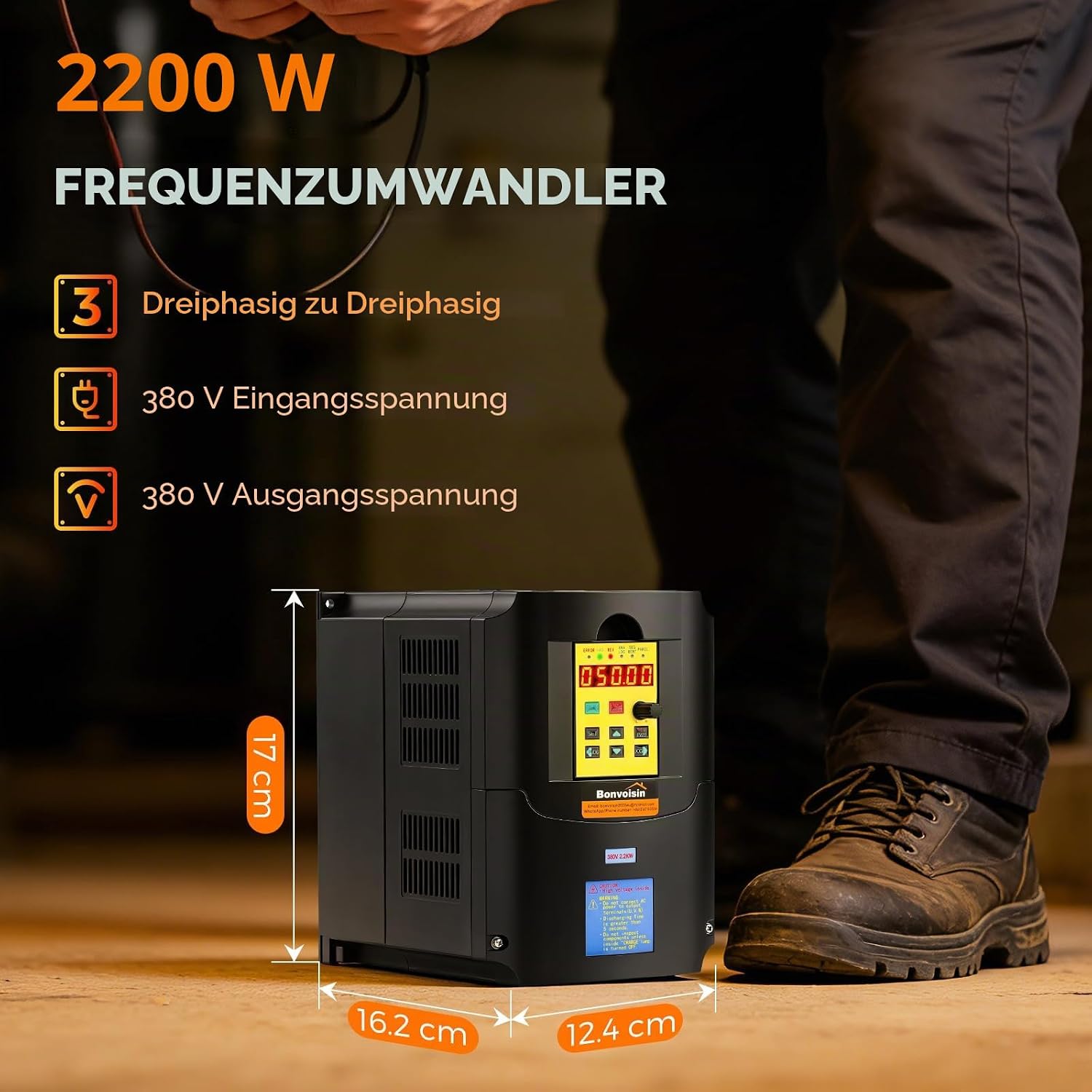
Image: The Bonvoisin VFD Frequency Inverter shown with its physical dimensions (17 cm height, 16.2 cm width, 12.4 cm depth) and key electrical specifications.

Image: An illustration of the Bonvoisin VFD highlighting its efficient dual-fan cooling system and independent heat dissipation channels.
6. Installation and Wiring
Correct installation and wiring are critical for the safe and reliable operation of the VFD. Ensure all local electrical codes and safety standards are followed.
Mounting:
- Mount the VFD vertically on a flat, non-flammable surface.
- Allow sufficient clearance around the unit for proper ventilation and heat dissipation.
- Ensure the ambient temperature and humidity are within the specified operating ranges.
Wiring Instructions (380V Input):
Follow the diagram below for connecting the 380V three-phase power supply, earth conductor, and three-phase motor to the VFD. Use appropriate wire gauges and circuit breakers for protection.

Image: A wiring diagram illustrating the connection of the Bonvoisin VFD to a 380V three-phase power supply, an earth conductor, and a three-phase motor, including circuit breakers for protection.

Image: A technical diagram showing the internal wiring and control signal connections for the Bonvoisin VFD, including inputs for RUN, REV, RESET, digital frequency inputs, external potentiometer connections, and relay outputs.
7. Control Panel Guide
The VFD features a user-friendly control panel for setting parameters and operating the device. The panel is also removable and can be connected remotely using the provided 1-meter extension cable.

Image: A detailed diagram of the Bonvoisin VFD control panel, labeling the digital tube, error indicator, FWD/REV indicators, RUN key, SET key, STOP/RESET key, speed knob, REV/FWD key, and arrow keys for menu navigation and parameter modification.

Image: A detailed view of the Bonvoisin VFD's removable control panel, highlighting its digital display and various control buttons with their functions.
Control Panel Elements:
- Digital Tube (1): Displays the inverter's runtime frequency or parameter values.
- ERROR Indicator: Illuminates to indicate a fault condition.
- FWD Indicator: Illuminates when the motor is rotating clockwise.
- REV Indicator: Illuminates when the motor is rotating counter-clockwise.
- RUN Key (2): Press once to start the motor.
- SET Key (3): Enters the menu mode for parameter settings.
- STOP/RESET Key (4): Stops the motor or resets fault conditions. Returns to the parent menu in parameter setting mode.
- Speed Knob (5): Adjusts the output frequency/motor speed.
- REV/FWD Key (6): Changes the direction of the converter (motor rotation).
- Arrow Keys (7, 8): Used to navigate menu items, modify parameters, or move the cursor in the display.
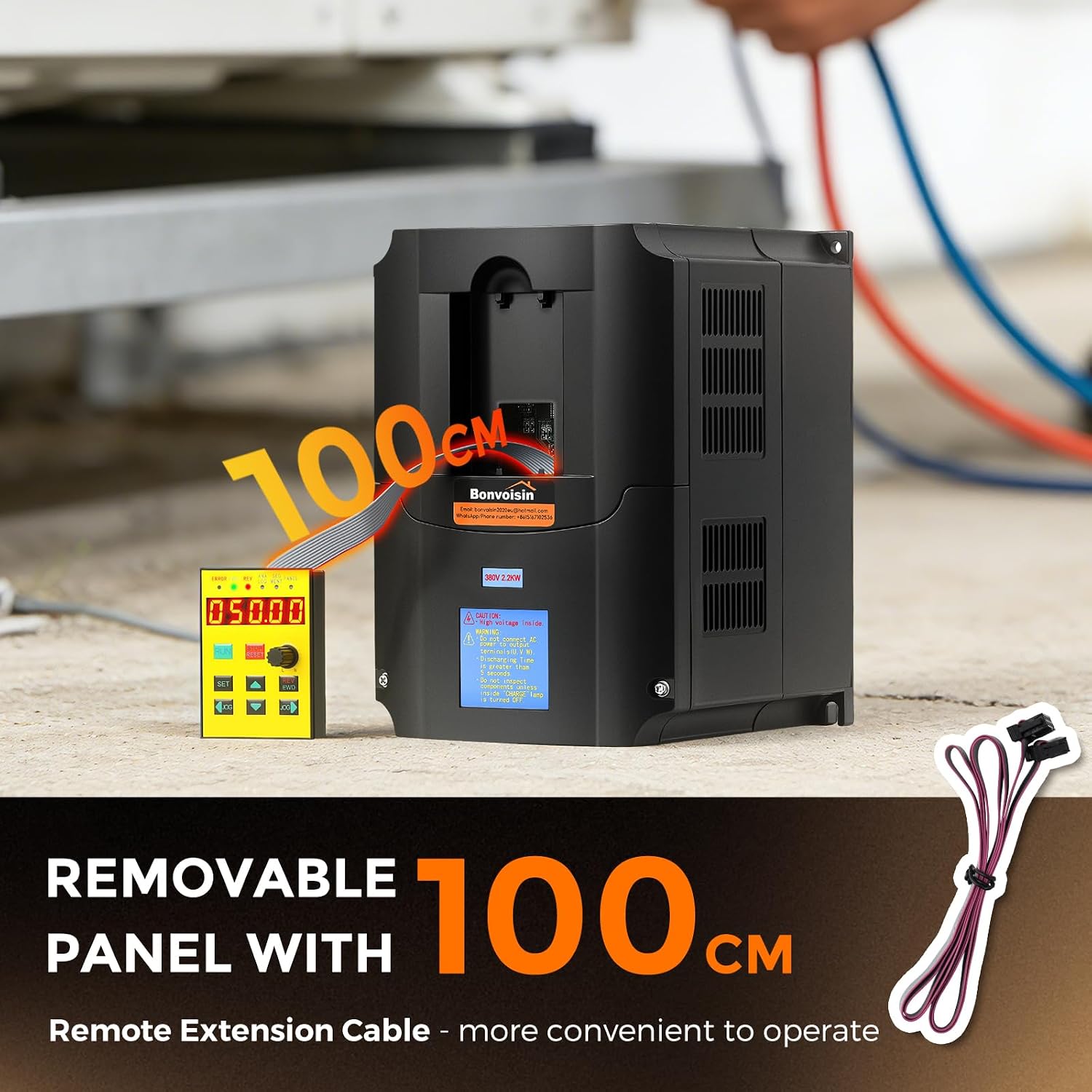
Image: The Bonvoisin VFD with its removable control panel detached and connected via a 100 cm (1 meter) extension cable, demonstrating its flexibility for remote operation.
8. Operating Instructions
Basic Operation:
- Power On: After ensuring all wiring is correct and secure, connect the VFD to the 380V three-phase power supply. The digital display will illuminate.
- Start Motor: Press the RUN key. The motor will start and accelerate to the set frequency.
- Adjust Speed: Rotate the Speed Knob to increase or decrease the output frequency, thereby adjusting the motor speed.
- Change Direction: Press the REV/FWD key to switch the motor's rotation direction (clockwise/counter-clockwise).
- Stop Motor: Press the STOP/RESET key. The motor will decelerate and stop.
Parameter Setting:
The VFD allows for detailed configuration of various operating parameters. Refer to the full parameter list in the comprehensive manual for specific codes and settings.
- Enter Menu: Press the SET key to enter the parameter setting menu.
- Navigate: Use the Arrow Keys to scroll through parameter groups and individual parameters.
- Select/Edit: Press SET again to select a parameter for editing. Use the Arrow Keys or Speed Knob to change the value.
- Save: Press SET to confirm and save the new value.
- Exit Menu: Repeatedly press the STOP/RESET key to exit the menu and return to the main operating display.
9. Maintenance
Regular maintenance ensures the longevity and optimal performance of your VFD.
Routine Checks:
- Daily: Check for unusual noises, vibrations, or odors. Monitor the display for any error codes.
- Weekly/Monthly: Inspect the cooling fans for dust accumulation and ensure they are operating freely. Clean the exterior of the VFD with a soft, dry cloth.
- Quarterly/Annually: With power disconnected, inspect all wiring connections for tightness and signs of corrosion. Check for any physical damage to the housing or components.
Environmental Considerations:
- Keep the VFD in a clean, dry environment.
- Avoid exposure to direct sunlight, excessive dust, corrosive gases, or liquids.
- Ensure adequate airflow for cooling.
10. Troubleshooting
This section provides solutions for common issues. For complex problems, contact technical support.
Common Issues and Solutions:
- VFD does not power on:
Possible Cause: No input power or incorrect wiring.
Solution: Check power supply connections, circuit breakers, and ensure input voltage matches specifications. - Motor does not run:
Possible Cause: Incorrect wiring, motor parameters not set, or fault condition.
Solution: Verify motor wiring (U, V, W terminals), check motor parameters in the VFD settings, and clear any active fault codes using the STOP/RESET key. - Motor speed is unstable:
Possible Cause: Incorrect acceleration/deceleration times, or load fluctuations.
Solution: Adjust acceleration/deceleration parameters. Ensure the VFD is appropriately sized for the motor and load. - Overcurrent/Overload Fault:
Possible Cause: Motor overload, short circuit in motor wiring, or rapid acceleration.
Solution: Reduce motor load, check motor wiring for shorts, increase acceleration time parameter. - Overvoltage/Undervoltage Fault:
Possible Cause: Unstable input power, regenerative braking, or incorrect voltage settings.
Solution: Check input power stability. If using with high inertia loads, consider adding a braking resistor (if supported by model). Verify voltage parameters.
11. Specifications
Technical specifications for the Bonvoisin VFD Frequency Inverter, Model BVS-2KW.
| Parameter | Value |
|---|---|
| Brand | Bonvoisin |
| Model Name | BVS-2KW |
| Wattage / Electrical Power | 2.2 KW (2200 Watt) |
| Input Voltage | 380 Volt (AC), 3-Phase |
| Output Voltage | 380 Volt (AC), 3-Phase |
| Peak Power | 3000 Watt |
| Electrical Output Waveform | Pure Sine Wave |
| Display Type | LED |
| Power Source | Mains operation |
| Recommended Applications | Industrial Motor Control (e.g., fans, pumps, compressors, CNC machines, conveyors) |
| Certifications | CE |
| Color | Black |

Image: A collage of images showing various industrial applications for the Bonvoisin VFD, including fans, conveyors, concrete mixers, and pump systems.

Image: An illustration depicting the diverse application areas of the Bonvoisin VFD, including motors, water pumps, ventilators, mixers, air compressors, and conveyor belts, with a note on power oversizing for high-load applications.
12. Warranty and Support
Warranty Information:
The Bonvoisin VFD Frequency Inverter (Model BVS-2KW) comes with a 1-year warranty from the date of purchase. This warranty covers defects in materials and workmanship under normal use. It does not cover damage caused by improper installation, misuse, accidents, unauthorized modifications, or natural disasters.
Technical Support:
For technical assistance, troubleshooting beyond this manual, or warranty claims, please contact Bonvoisin customer support. Have your product model number (BVS-2KW) and purchase information ready when contacting support.