
Product Overview
The AquaMiracle SV500 Fish Tank Filter is designed for 10-30 gallon aquariums, providing efficient water filtration, aeration, and green water control. It features a 6W UV bulb with a programmable timer and flexible operation modes to maintain a healthy aquatic environment.
- Efficient Performance: 6W power, 130 GPH flow rate, suitable for 10-30 gallon tanks.
- Flexible Operation Modes: Choose between Aeration Mode for oxygen enrichment or Rainfall Mode for even water distribution.
- Advanced Filtration Sponge: Captures suspended particles, fish waste, and organic debris.
- Programmable UV Bulb: Integrated 6W UV light with 4/8/12/24 hour timer settings for green water control.
- Visual Status Monitoring: Transparent viewing portal to confirm UV lamp operation.
Setup and Installation
Proper installation ensures optimal performance of your AquaMiracle SV500 filter. Follow these steps carefully.
Assembly
The filter comes with various components for different configurations. Ensure all parts are securely connected before placing the unit in the aquarium.
Video: How to Install the Aquarium Filter. This video demonstrates the step-by-step assembly and installation process of the AquaMiracle aquarium filter, including connecting the various components and placing it in the tank.
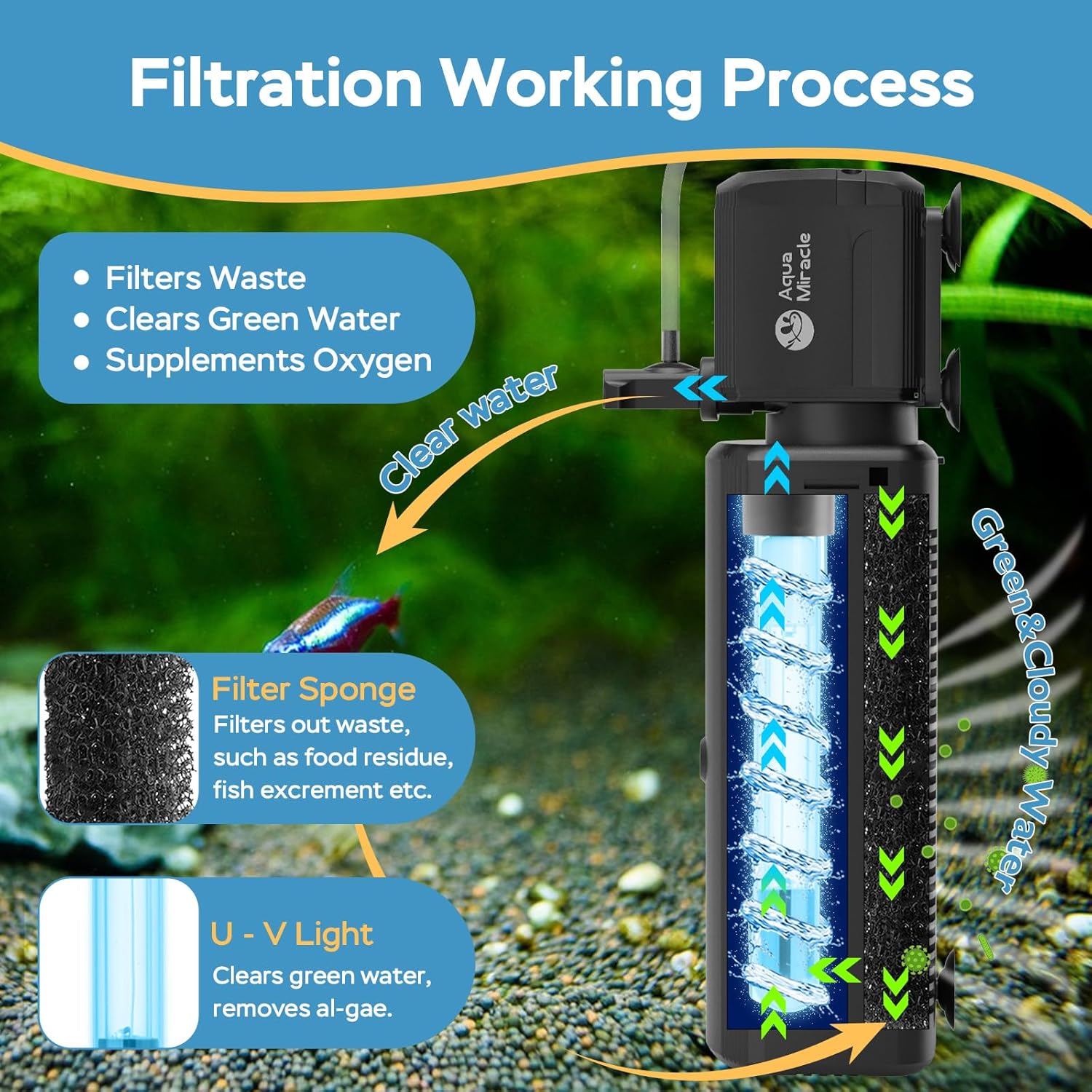
Image: Filtration Working Process. This diagram illustrates how water flows through the filter, showing the mechanical filtration by the sponge and the purification by the UV light to remove green and cloudy water.
Positioning
The filter should always be fully submerged in water. It can be positioned vertically or horizontally using the suction cups provided, making it suitable for various tank types, including fish tanks and turtle tanks.

Image: Correct Positioning. This image displays different ways to correctly position the filter within an aquarium, including vertical and horizontal orientations for both fish and turtle tanks, emphasizing full submersion.
Operating Modes
The AquaMiracle SV500 offers two primary operation modes to cater to your aquarium's specific needs.
Video: The Operation Modes of the Aquarium Filter. This video illustrates the two functional configurations of the filter: Aeration Mode and Rainfall Mode, showing how to switch between them and their effects on water circulation.
Aeration Mode
This mode enhances oxygen saturation in the water through venturi technology. An adjustable air intake allows you to control the amount of bubbles for optimal oxygen distribution.

Image: Aeration Mode. This image shows the filter operating in aeration mode, producing a stream of bubbles to increase oxygen levels in the aquarium water.
Rainfall Mode
The rainfall mode uses a spray bar attachment to distribute purified water evenly across the surface, promoting gentle water movement and gas exchange.

Image: Rainfall Mode. This image depicts the filter in rainfall mode, with water gently cascading from the spray bar into the aquarium, providing surface agitation.
UV Timer Settings
The integrated UV light helps control green water and cloudiness. Use the timer to set the UV illumination period to 4, 8, 12, or 24 hours. Note that the timer only controls the UV light, not the pump.

Image: Timer for the Lamp. This image shows the external timer control unit for the UV lamp, with options for 4, 8, 12, or 24 hours of operation, and a light indicator.
Maintenance
Regular maintenance is crucial for the longevity and efficiency of your AquaMiracle filter. This includes cleaning the filter sponge and checking the UV bulb.
Video: How to Disassemble and Clean the Aquarium Filter. This video provides a visual guide on how to safely disassemble the filter unit, remove the filter sponge and UV bulb, and clean them for optimal performance.
Cleaning the Filter Sponge
- Unplug the filter from the power source.
- Carefully remove the filter unit from the aquarium.
- Twist and separate the pump head from the filter body.
- Slide out the filter sponge from the filter body.
- Rinse the filter sponge thoroughly under running water (preferably old aquarium water to preserve beneficial bacteria) until clean.
- Reinsert the clean filter sponge into the filter body.
UV Bulb Maintenance
- After removing the filter sponge, carefully slide out the UV bulb assembly.
- Clean the quartz sleeve of the UV bulb with a soft cloth to remove any residue that might hinder UV light penetration.
- Inspect the UV bulb for any signs of damage or wear. Replace if necessary.
- Reassemble the UV bulb and filter sponge into the filter body, ensuring all connections are secure.
Troubleshooting
If you encounter any issues with your AquaMiracle SV500 filter, refer to the following common troubleshooting tips:
| Problem | Possible Cause | Solution |
|---|---|---|
| Filter not running / No water flow | Not plugged in; Impeller jammed; Air in pump; Low water level. | Check power connection; Clean impeller; Prime pump by submerging fully; Ensure water level is above filter intake. |
| Reduced water flow | Clogged filter sponge; Debris in pump intake. | Clean or replace filter sponge; Remove debris from pump intake. |
| Green or cloudy water persists | UV lamp not working; Incorrect UV timer setting; Excessive algae growth. | Check UV lamp indicator; Adjust UV timer to 24H if needed; Clean UV quartz sleeve; Perform partial water changes. |
| Excessive noise | Impeller obstruction; Air trapped in pump. | Clean impeller; Ensure filter is fully submerged and free of air. |
Specifications
| Feature | Detail |
|---|---|
| Model Name | SV500 |
| Power Source | Corded Electric |
| Power Consumption | 6W |
| Maximum Flow Rate | 130 GPH (Gallons Per Hour) |
| Recommended Tank Size | 10-30 Gallons |
| Product Dimensions (LxWxH) | 2.4" x 2.1" x 9.25" |
| Item Weight | 1.14 pounds (0.52 Kilograms) |
| Material | ABS, Copper, Rubber |
| Special Feature | Portable, UV Light with Timer |
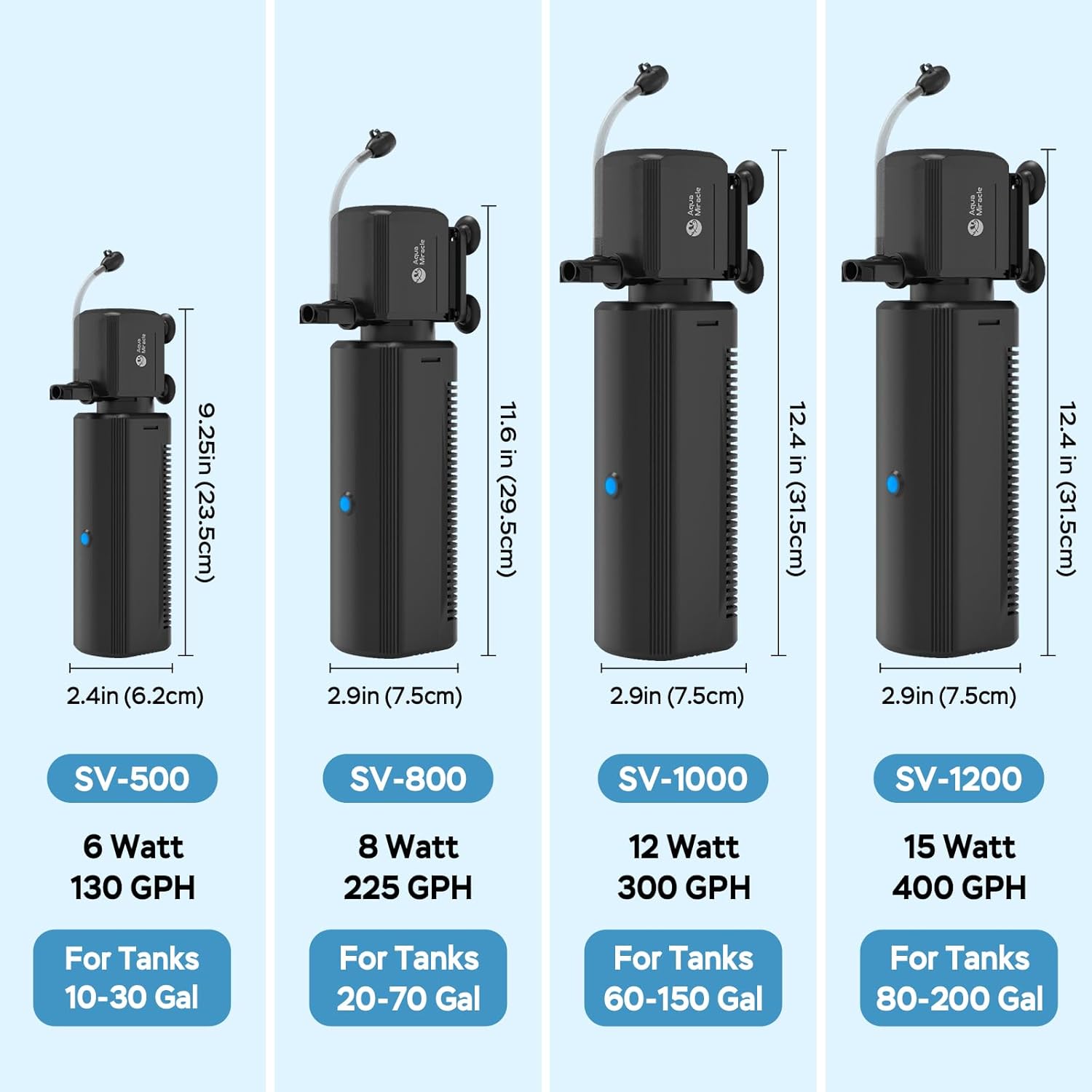
Image: Model Specifications. This image provides a visual comparison of different AquaMiracle filter models (SV500, SV800, SV1000, SV1200), detailing their wattage, GPH, dimensions, and recommended tank sizes.
Warranty and Support
The AquaMiracle SV500 Fish Tank Filter comes with a 1 Year Warranty from the manufacturer, Tenyon. For any product inquiries, technical support, or warranty claims, please contact AquaMiracle customer service through their official channels or the retailer where the product was purchased.
Always refer to the official AquaMiracle website or your purchase documentation for the most up-to-date support information.