
Introduction
This manual provides comprehensive instructions for the installation, operation, and maintenance of the Fdit Global 4G/GSM Gate Controller. This device is designed for access control systems, parking systems, and other remote control applications, utilizing GSM 4G communication for reliable operation. It supports remote control via SMS or calling, with feedback provided to the user.
Please read this manual thoroughly before installation and operation to ensure correct usage and to prevent damage to the device or connected systems.
Product Overview
The Fdit Global 4G/GSM Gate Controller offers advanced features for secure and convenient access management.
Key Features:
- GSM 4G Communication: Operates on GSM 4G frequency bands, supporting global connectivity.
- User Management: Supports up to 1001 authorized users for access control.
- Remote Control: Devices can be controlled via SMS or calling, with SMS feedback.
- Wide Application: Suitable for access control systems, garage doors, swing doors, folding doors, and parking systems.
- Callny Control App: Compatible with the Callny Control phone application for enhanced management.
- Remote Software Updates: Supports remote software updates.
- Wide Voltage Input: AC/DC 9-36V input for versatile power options.
Package Contents:
- 1x Fdit 4G/GSM Gate Controller (G203 model specified in package list, but applies to the series)
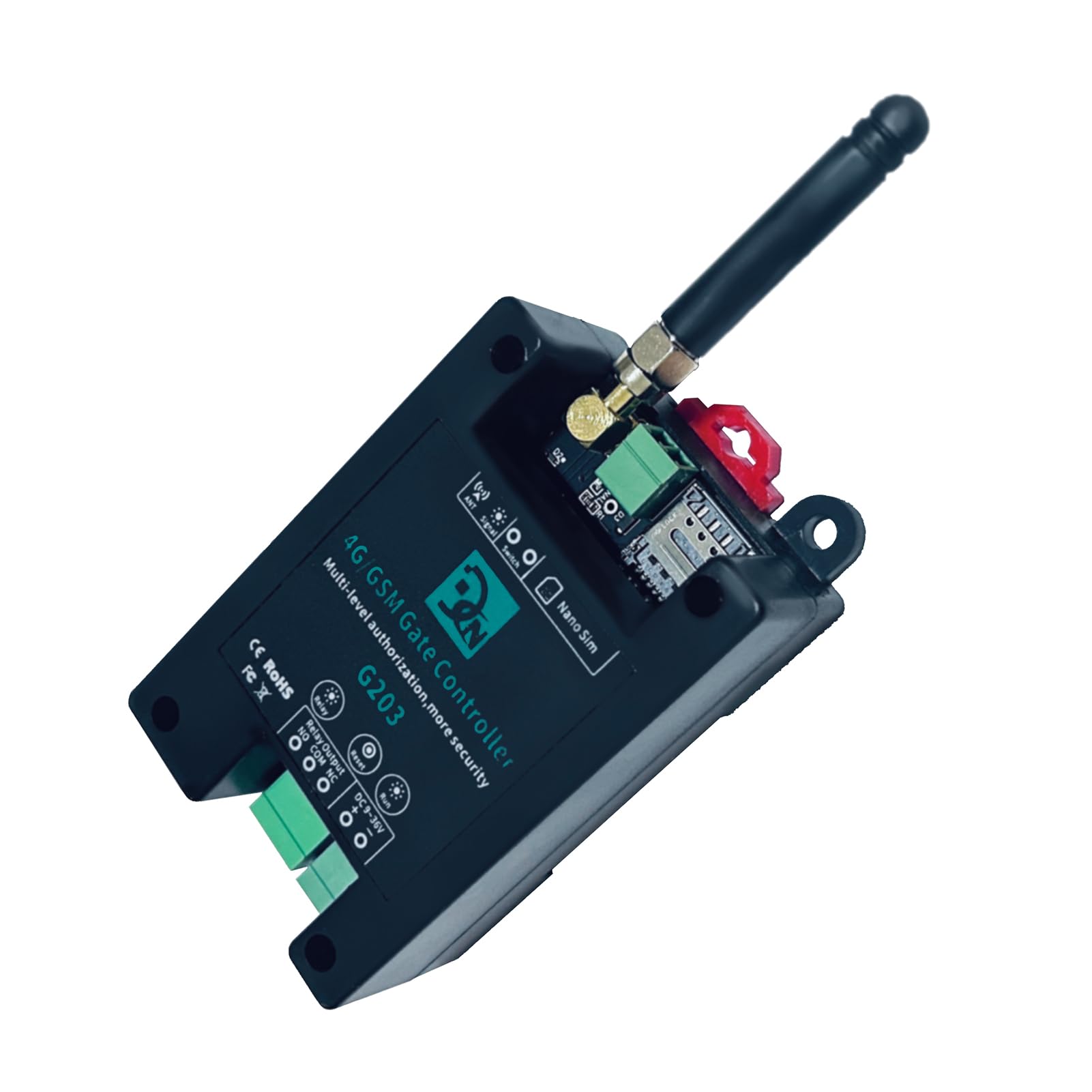
Figure 1: Fdit 4G/GSM Gate Controller G203. This image shows the top-down view of the controller with its antenna, SIM card slot, and various connection terminals.
Specifications
| Feature | Specification |
|---|---|
| Model | G202PLUS, G203, CN302, CN303, CN305 |
| Material | ABS |
| Rated Voltage | DC 9V~36V/1A |
| Working Temperature | -10℃~+60℃ |
| Storage Temperature | -20℃~+60℃ |
| Relative Humidity | 10-90%, No condensation |
| SIM Card Type | Nano SIM, 3V |
| Antenna | 50 Ω SMA |
| Relay Output Capacity | 5A/250VAC, 7A/125VAC, 20A/14VDC |
| Supported 4G Bands (FDD) | B1/B2/B3/B4/B5/B7/B8/B12, B13/B17/B18/B19/B20/B25/B26/B28/B66 |
| Supported 4G Bands (TDD) | B38/B40/B41 |
| Dimensions (L*W*H) | 9.7 x 5 x 3.2 cm (Product), 13 x 8 x 6 cm (Package) |
| Weight | 122g (Package) |
Setup
1. SIM Card Installation:
- Ensure the device is powered off.
- Locate the Nano SIM card slot on the controller.
- Insert a valid 3V Nano SIM card into the slot. Ensure it is correctly oriented.
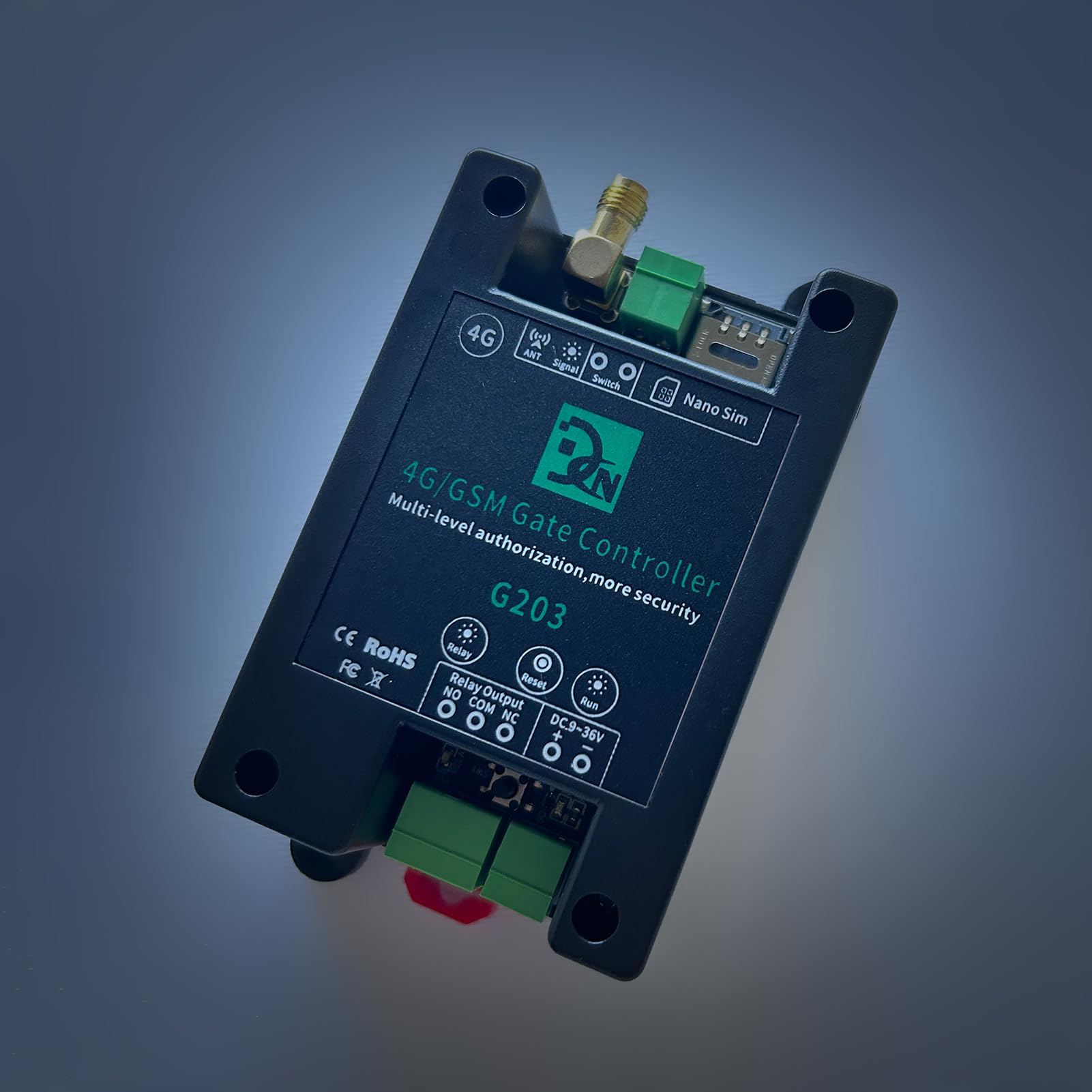
Figure 2: Top view of the Fdit Gate Controller showing the Nano SIM card slot and antenna connection.
2. Antenna Connection:
- Connect the provided 50 Ω SMA antenna to the "ANT" port on the controller.
- Ensure the antenna is securely tightened for optimal signal reception.
3. Power Supply Connection:
- Connect a DC 9V-36V/1A power supply to the "DC 9-36V" terminals. Observe polarity: "+" to positive, "-" to negative.
4. Relay Output Wiring:
The controller features a relay output with Normally Open (NO), Common (COM), and Normally Closed (NC) terminals. Wire the relay according to your application's requirements.

Figure 3: Wiring diagram for connecting an AC load (e.g., a light) to the relay output. The AC power supply connects to the relay's COM and NO terminals, and the load is connected in series.

Figure 4: Wiring diagram for connecting a DC load (e.g., a keypad or other access device) to the relay output. The DC power supply and the load are connected to the relay's COM and NO terminals.
Note: Ensure all wiring is performed by a qualified professional and adheres to local electrical codes.
Operating Instructions
1. Initial Power-Up:
- After connecting the SIM card, antenna, and power supply, the device will power on.
- Observe the "Signal" and "Run" indicator lights for status. A stable signal light indicates network connectivity.
2. Callny Control App:
The Callny Control app provides a user-friendly interface for managing the gate controller.
- Download the App: Scan the QR code provided with the product or search for "Callny Control" in your device's app store.

Figure 5: Image showing the Fdit Gate Controller alongside a smartphone displaying a QR code for downloading the Callny Control App.
- Device Pairing: Follow the in-app instructions to pair your gate controller with the Callny Control app.
- User Authorization: Use the app to add, modify, or delete authorized users. The controller supports up to 1001 users.
- Remote Control: The app allows for remote activation/deactivation of the relay, checking signal status, and other functions.

Figure 6: Screenshot of the Callny Control app interface, showing various control options such as Free Calling, ON/OFF, Relay Status, Check Signal, Authorize Users, and more.
3. SMS and Call Control:
Authorized users can control the gate controller by sending specific SMS commands or by making a call to the SIM card number installed in the device.
- SMS Commands: Refer to the Callny Control app or supplementary documentation for a list of valid SMS commands for relay activation, user management, and status checks.
- Call Control: When an authorized user calls the device's number, the controller will activate the relay (e.g., open a gate) and then terminate the call. No call charges are incurred for this operation.
- Feedback: The device will send an SMS confirmation for successful operations or error messages.
Maintenance
- Regular Cleaning: Keep the device clean and free from dust and debris. Use a soft, dry cloth for cleaning. Do not use liquid cleaners.
- Antenna Check: Periodically check the antenna connection to ensure it is secure and undamaged for optimal signal strength.
- Software Updates: The device supports remote software updates. Ensure your device's software is up-to-date for optimal performance and security. Updates can typically be initiated via the Callny Control app or by contacting support.
- SIM Card Validity: Ensure the installed SIM card remains active and has sufficient credit (if prepaid) for SMS and call functions.
Troubleshooting
| Problem | Possible Cause | Solution |
|---|---|---|
| Device not responding to calls/SMS |
|
|
| Relay not activating |
|
|
| Callny Control App not connecting |
|
|
Warranty and Support
Warranty Information:
Specific warranty details are typically provided with your purchase documentation or can be obtained from your retailer. Please retain your proof of purchase for warranty claims.
Technical Support:
For technical assistance, troubleshooting beyond this manual, or inquiries regarding software updates, please contact Fdit customer support or your authorized dealer. Contact information can usually be found on the product packaging or the official Fdit website.
When contacting support, please be prepared to provide your product model number (G202PLUS, G203, CN302, CN303, CN305) and a detailed description of the issue.