
1. Introduction
This manual provides instructions for the Redragon K733 PRO Wireless Gasket RGB Number Pad. This device features 22 mechanical keys, PC and calculator modes, a 10-digit display, knob control, 5-layer noise dampening, and creamy custom linear switches. It supports USB-C wired, Bluetooth, and 2.4Ghz wireless connectivity.

Figure 1: Redragon K733 PRO Number Pad Overview
2. Setup
2.1 Package Contents
- Redragon K733 PRO Number Pad
- USB-C to USB-A Cable
- User Manual
- Keycap Puller (for hot-swappable switches)
- Switch Puller (for hot-swappable switches)
2.2 Connectivity Options
The K733 PRO supports three connection modes: USB-C wired, Bluetooth (BT 3.0/5.0), and 2.4Ghz wireless.
2.2.1 USB-C Wired Connection
- Connect the provided USB-C cable to the port on the number pad.
- Connect the USB-A end of the cable to an available USB port on your computer.
- The number pad will be automatically recognized and ready for use.
2.2.2 2.4Ghz Wireless Connection
- Locate the 2.4Ghz USB dongle (usually stored in a compartment on the number pad).
- Plug the USB dongle into an available USB port on your computer.
- Ensure the number pad's mode switch (if present, usually on the side or bottom) is set to 2.4G.
- The number pad should connect automatically.
2.2.3 Bluetooth Connection
- Ensure the number pad's mode switch is set to BT.
- On your computer or device, open Bluetooth settings.
- Initiate pairing mode on the number pad (refer to specific key combination in the manual, typically Fn + a number key for Bluetooth channels).
- Select "Redragon K733 PRO" from the list of available Bluetooth devices and complete the pairing process.
3. Operation
3.1 PC Mode and Calculator Mode
The K733 PRO features two primary operating modes: PC Mode and Calculator Mode. Switch between these modes using the PC/CAL button located above the number keys.

Figure 2: PC and Calculator Modes
- PC Mode: The number pad functions as a standard numeric keypad for your computer. Input numbers and operations directly into applications.
- Calculator Mode: The number pad operates as a standalone 10-digit calculator. Calculations are displayed on the integrated screen. Use the SEND button to transmit the calculated result to your computer. The AC button clears the calculator display.
3.2 Knob Control
The multi-function knob provides quick access to RGB lighting and volume controls.

Figure 3: All-in-ONE Control Knob
- Switching Modes: Press and hold the knob for 3 seconds to toggle between RGB lighting control and volume control.
- RGB Lighting Control: When in RGB mode, rotate the knob to adjust brightness (4 steps, including OFF). Press the knob to cycle through various RGB lighting effects.
- Volume Control: When in volume mode, rotate the knob to increase or decrease system volume. Press the knob to mute/unmute audio.
3.3 RGB Lighting Effects
The K733 PRO features dynamic RGB backlighting. Use the knob control to cycle through different lighting modes and adjust brightness. There are various color cycle modes and keypress-reactive modes available.
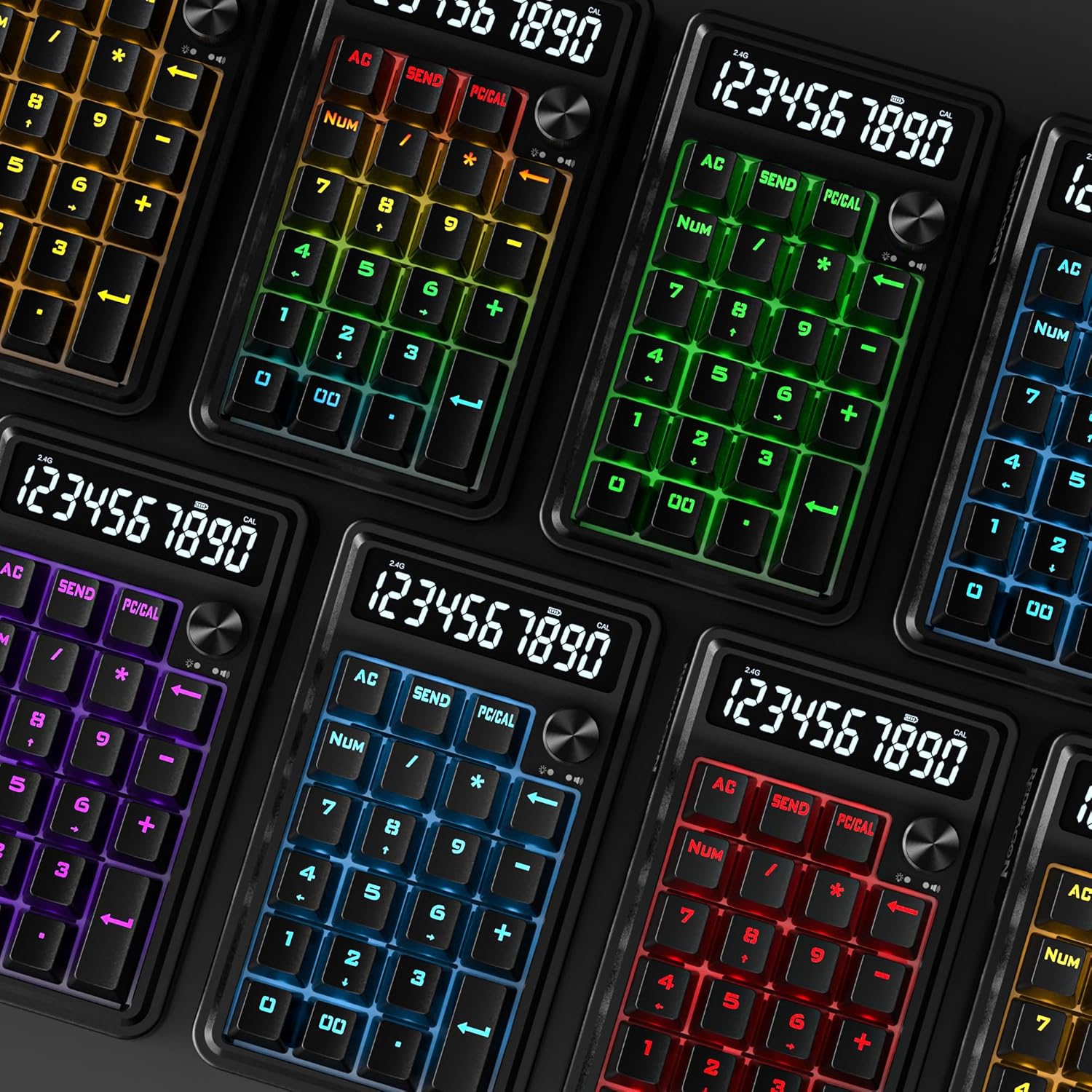
Figure 4: RGB Lighting Variations
3.4 Gasket Design and Noise Dampening
The number pad incorporates a gasket-mounted design and 5-layer noise dampening for an enhanced typing experience. This includes 3.5mm PO foam, IXPE switch foam, PET sound pad, bottom socket foam, and a silicone bottom pad, all contributing to reduced noise and a softer keystroke feel.

Figure 5: Gasket Design for Melodic Keystrokes
4. Maintenance
4.1 Cleaning
- Disconnect the number pad from your computer before cleaning.
- Use a soft, dry cloth to wipe the surface of the number pad.
- For stubborn dirt, slightly dampen the cloth with water or a mild cleaning solution. Avoid excessive moisture.
- Use compressed air to remove dust and debris from between the keys.
4.2 Hot-Swappable Switches
The K733 PRO features hot-swappable switches, allowing for easy replacement without soldering. This enables customization of typing feel or replacement of faulty switches.

Figure 6: Hot-Swappable Custom Linear Switch
- Using the provided keycap puller, carefully remove the desired keycap.
- Using the provided switch puller, gently grip the switch and pull it straight up to remove it from the socket.
- Align the pins of the new switch with the holes in the PCB socket.
- Press the new switch firmly into place until it clicks. Ensure it is seated correctly and not bent.
- Replace the keycap.
5. Troubleshooting
5.1 Number Pad Not Responding
- Wired Connection: Ensure the USB-C cable is securely connected to both the number pad and the computer. Try a different USB port or cable.
- 2.4Ghz Wireless: Ensure the USB dongle is plugged in and the number pad's mode switch is set to 2.4G. Check battery level.
- Bluetooth Wireless: Ensure the number pad is in Bluetooth mode and successfully paired with your device. Check battery level.
- Battery: If using wireless modes, ensure the battery is charged. Connect via USB-C to charge.
5.2 RGB Lighting Not Working or Incorrect
- Ensure the number pad is powered on.
- Use the knob control to cycle through lighting modes and adjust brightness. Ensure brightness is not set to OFF.
- If the issue persists, try resetting the number pad (refer to the manufacturer's website for specific reset procedures if not detailed here).
5.3 Calculator Mode Issues
- Ensure the number pad is in Calculator Mode (display should show numbers). Press the PC/CAL button to switch modes.
- If calculations are incorrect, ensure correct input and operations.
- If the SEND function is not working, ensure the number pad is properly connected to the computer in PC mode after calculation.
6. Specifications
| Feature | Detail |
|---|---|
| Model | K733 PRO |
| Keys | 22 Mechanical Keys |
| Connectivity | USB-C Wired, Bluetooth (BT 3.0/5.0), 2.4Ghz Wireless |
| Switch Type | Custom Linear (Hot-swappable) |
| Actuation Travel | 2.0 ± 0.5 mm |
| Actuation Force | 40 ± 10 gf |
| Total Travel | 3.60 mm |
| Display | 10 Digits (for Calculator Mode) |
| Backlighting | RGB |
| Noise Dampening | 5-Layer (PO foam, IXPE switch foam, PET sound pad, bottom socket foam, silicone bottom pad) |
| Dimensions | Approximately 6.3 x 3.7 inches (16 x 9.4 cm) |
| Weight | 13 ounces (approx. 368 grams) |
| Compatible Devices | PC, Laptop, Tablet |
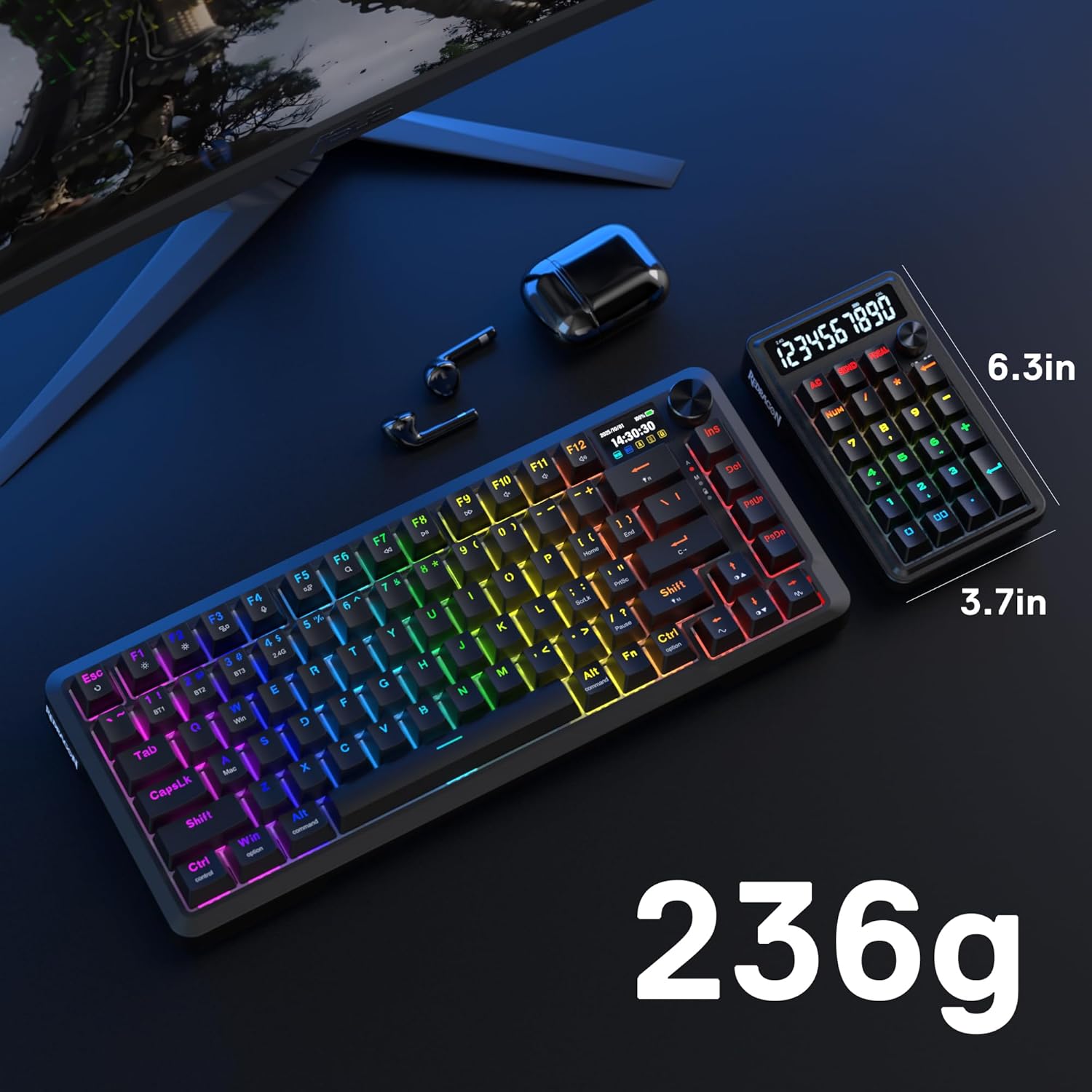
Figure 7: Approximate Dimensions
7. Warranty and Support
For warranty information and technical support, please refer to the official Redragon website or contact their customer service. Keep your purchase receipt for warranty claims.
Official Redragon Website: www.redragonusa.com
