
1. Introduction
The SONRU Bluetooth 6.0 Audio Receiver (Model LE523) is designed to upgrade your wired audio systems to wireless capabilities. It allows you to stream high-fidelity audio from your Bluetooth-enabled devices, such as smartphones, tablets, and laptops, to traditional speakers, home stereo systems, or car audio via AUX 3.5mm or RCA connections. Featuring Bluetooth 6.0 technology, this receiver offers low latency and stable connections for an enhanced listening experience.
2. Package Contents
Please check the package for the following items:
- SONRU Bluetooth Audio Receiver (Model LE523)
- Instruction Manual
- Type-C Charging Cable
- 3.5mm AUX Audio Cable
- RCA Audio Cable
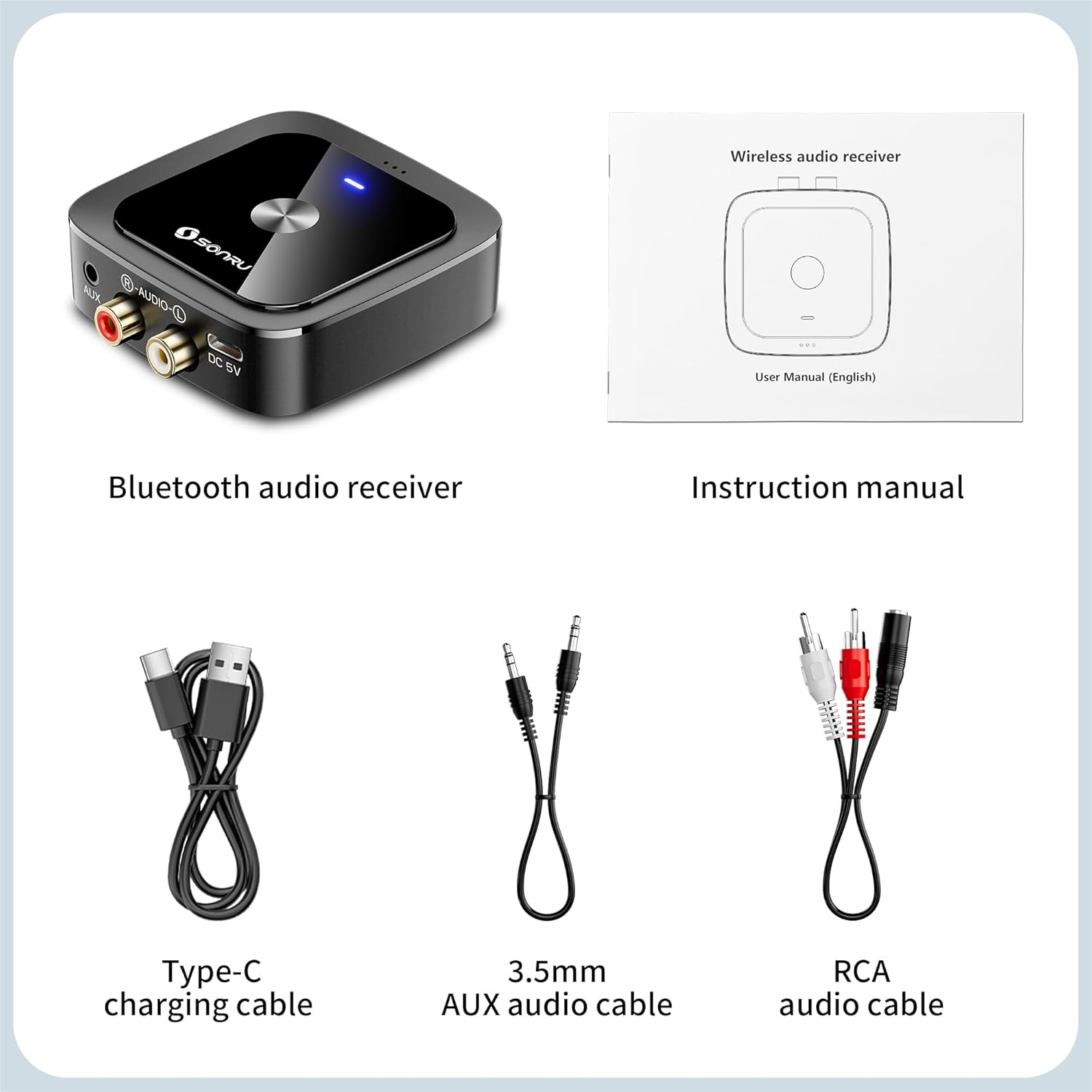
Image: SONRU Bluetooth Audio Receiver and its accessories.
3. Product Features
- Advanced Bluetooth 6.0 Technology: Equipped with the latest Bluetooth 6.0 for stable, lower latency, and reduced signal interruption, supporting multiple HD audio codecs.
- Extended Battery Life: A built-in high-capacity rechargeable battery provides up to 24 hours of continuous playback on a single 2-hour charge.
- Dual Device Connectivity: Connects to two Bluetooth devices simultaneously. Music playback automatically pauses for incoming calls and resumes after the call ends without re-pairing.
- Universal Compatibility: Easily connects to home stereo systems, car audio, wired headphones, and amplifiers via 3.5mm audio cable or RCA audio cable.
- Compact and Portable Design: Lightweight and small, making it suitable for various environments including home, office, travel, and commuting.

Image: Internal view of the Bluetooth 6.0 chip.
4. Setup Instructions
Follow these steps to set up your SONRU Bluetooth 6.0 Audio Receiver:
- Charge the Device: Connect the provided Type-C charging cable to the receiver and a USB power source. A full charge takes approximately 2 hours. The indicator light will change to show charging status.
- Connect to Audio System:
- For devices with a 3.5mm AUX input, use the 3.5mm audio cable to connect the receiver's AUX port to your audio system's AUX input.
- For devices with RCA inputs, use the RCA audio cable to connect the receiver's R-AUDIO-L ports to your audio system's corresponding RCA inputs.

Image: Connection diagram for the Bluetooth receiver.
- Power On and Pair:
- Step 1: Turn on the SONRU Bluetooth receiver by pressing and holding the multi-function button until the indicator light flashes.
- Step 2: On your Bluetooth-enabled device (e.g., smartphone), go to Bluetooth settings and search for available devices. Select "LE523" from the list to pair.
- Step 3: Once paired, the indicator light on the receiver will remain solid blue. Ensure your audio system is set to the correct input (AUX or RCA) to receive audio.

Image: Step-by-step connection guide.
Setup Demonstration Video
Video: This video demonstrates the setup and basic functionality of the SONRU Bluetooth Adapter, including pairing with a device and connecting to an audio system. It highlights the ease of use and the product's features.
5. Operating Instructions
- Power On/Off: Press and hold the multi-function button for approximately 3 seconds to power on or power off the device.
- Music Playback: Once successfully paired, play music from your Bluetooth-enabled device. The audio will stream wirelessly to your connected audio system.
- Volume Control: Use the volume buttons on the side of the receiver to adjust the output volume. You can also control volume from your connected Bluetooth device.
- Dual Device Connection: If two devices are connected, the receiver will prioritize the device currently playing audio. When an incoming call is received on one device, music from the other device will automatically pause. Press the multi-function button to answer the call.
- Answering/Ending Calls: When a call comes in, press the multi-function button once to answer. Press it again to end the call.
- Rejecting Calls: Press and hold the multi-function button for approximately 2 seconds to reject an incoming call.

Image: Dual device connection in a car, showing call handling.

Image: Battery life and charging information.
6. Maintenance
- Keep the device dry. Avoid exposure to moisture or liquids.
- Do not attempt to disassemble or modify the device. This may void the warranty and cause damage.
- Clean the device with a soft, dry cloth. Do not use harsh chemicals or abrasive cleaners.
- Store the device in a cool, dry place when not in use for extended periods.
7. Troubleshooting
If you encounter issues with your SONRU Bluetooth receiver, refer to the following common problems and solutions:
- No Sound:
- Ensure the receiver is powered on and successfully paired with your device.
- Check that the audio cables (AUX or RCA) are securely connected to both the receiver and your audio system.
- Verify that your audio system is set to the correct input source (e.g., AUX, Line In).
- Adjust the volume on both your Bluetooth device and the connected audio system.
- Cannot Pair with Device:
- Make sure the receiver is in pairing mode (indicator light flashing).
- Ensure Bluetooth is enabled on your source device and it is within range (typically up to 10 meters/33 feet).
- Try turning off and on both the receiver and your source device, then attempt pairing again.
- Clear previous Bluetooth connections on your source device if you have too many saved devices.
- Intermittent Connection or Short Range:
- Reduce the distance between the receiver and your Bluetooth source device.
- Remove any obstacles (walls, large metal objects) that may interfere with the Bluetooth signal.
- Avoid placing the receiver near other wireless devices that may cause interference (e.g., Wi-Fi routers, microwaves).
8. Specifications
| Model Number | LE523 |
| Bluetooth Version | 6.0 |
| Connectivity Technology | 3.5 mm, RCA |
| Audio Output Mode | Stereo |
| Audio Output Type | Bluetooth |
| Special Feature | Automatic On/Off |
| Compatible Devices | Desktop, Smartphones, Tablets, TVs, Laptops, Car Stereo, Home Music Player, Wired Headphones |
| Item Weight | 5.3 ounces |
| Batteries | 1 9V battery required (included) |
| Color | Black |
9. Warranty and Support
SONRU products are designed and manufactured to the highest quality standards. For warranty information, technical support, or customer service inquiries, please refer to the contact details provided on the product packaging or visit the official SONRU website. Please retain your proof of purchase for warranty claims.

