
1. Introduction
The Kohree 12V DC 7.0 GPM Smart RV Water Pump is designed to provide a consistent and efficient water supply for recreational vehicles (RVs), marine vessels, and other off-grid applications. This manual provides essential information for the safe installation, operation, and maintenance of your smart water pump. Please read this manual thoroughly before installation and operation.
2. Safety Information
Observe the following safety precautions to prevent injury and damage to the pump or property:
- Always disconnect power to the pump before performing any installation, maintenance, or troubleshooting.
- Ensure the pump is installed in a dry, well-ventilated area, protected from direct sunlight and extreme temperatures.
- Do not pump flammable liquids, gasoline, or other hazardous materials. This pump is designed for water only.
- Protect the pump and plumbing system from freezing temperatures to prevent damage.
- Ensure all electrical connections are secure and properly insulated to prevent short circuits.
- Use appropriate fuse protection for the 12V DC power supply.
3. Product Features
- Smart Variable Speed Constant Pressure: Maintains stable system pressure by adjusting motor speed based on water demand, eliminating traditional pump cycling.
- Bluetooth App Control: Adjust 3 constant pressure levels (1, 2, 3) and monitor pump status directly from your iOS or Android smartphone.
- Real-time Monitoring & Fault Alerts: Continuously monitors water pressure and temperature. Detects pipeline leaks, pressure sensor failures, low water temperature, and dry running conditions. Provides instant alerts to your phone.
- Comprehensive Protection: Features built-in protection against dry running, thermal overload, overcurrent, high/low temperature, and high altitude operation.
- Quiet Operation: Operates below 45 dB, enhanced by anti-vibration rubber feet and a shockproof iron plate. No accumulator tank is required due to the variable speed motor.
- Extended Pump Lifespan: Reduced pump cycling minimizes wear and tear on internal components, leading to longer service life.
- Wide Applications: Suitable for various uses including RVs, boats, showering, dishwashing, car washing, and gardening.

Image: The Kohree Smart RV Water Pump featuring its intelligent control core for advanced performance.
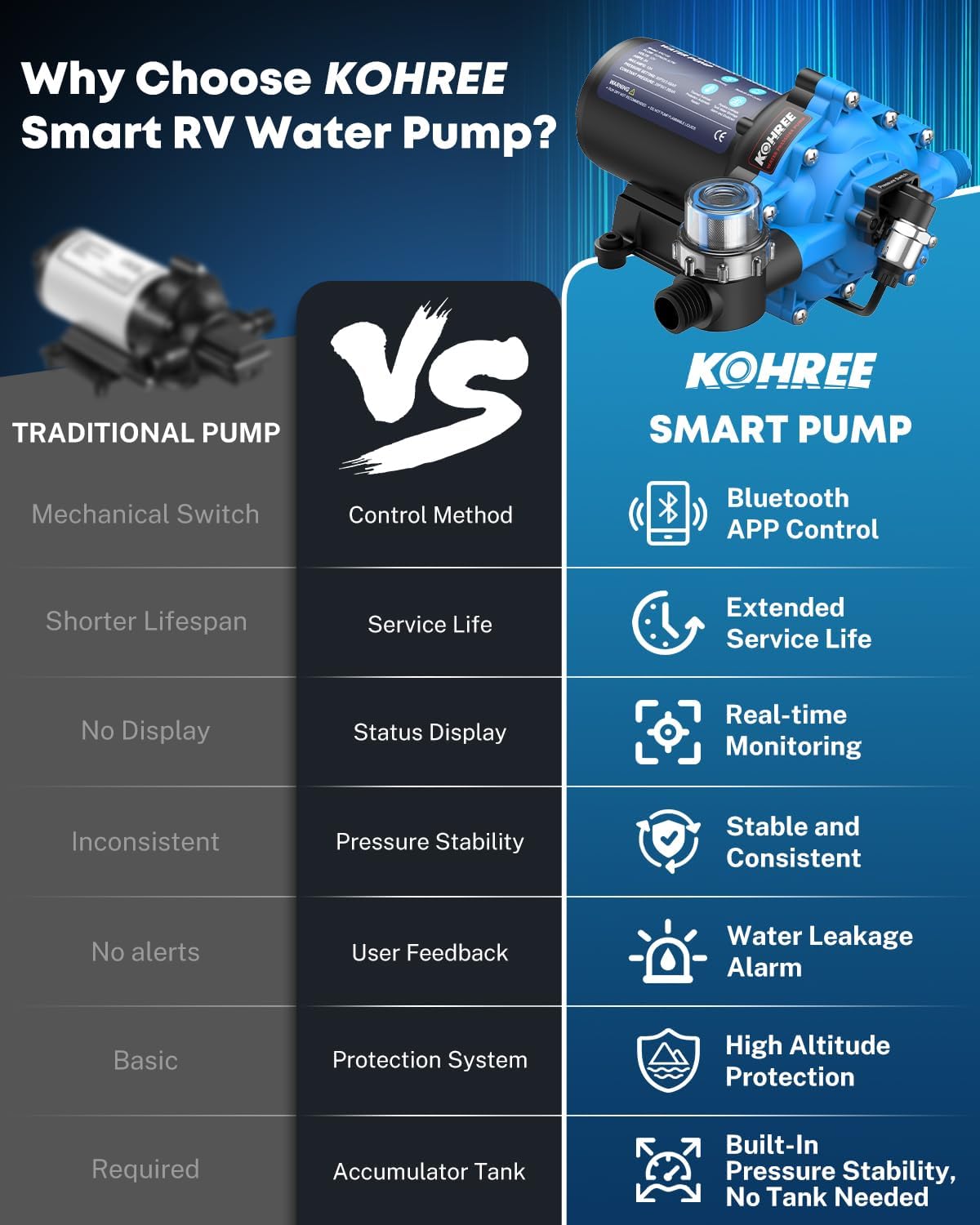
Image: A comparison highlighting the advantages of the Kohree Smart Pump over traditional RV water pumps, including Bluetooth app control, extended service life, real-time monitoring, water leakage alarm, high altitude protection, and built-in pressure stability without an accumulator tank.
4. Package Contents
Verify that all items are present in the package:
- 1 x Kohree 12V DC Smart RV Water Pump
- 1 x 1/2 inch NPT Straight Hose Barb Adapter
- 1 x 1/2 inch NPT 90-degree Elbow Hose Barb Adapter
- 1 x 50 Mesh Inlet Strainer
- 1 x Roll of Teflon Tape
- Stainless Steel Clamps
- User Manual
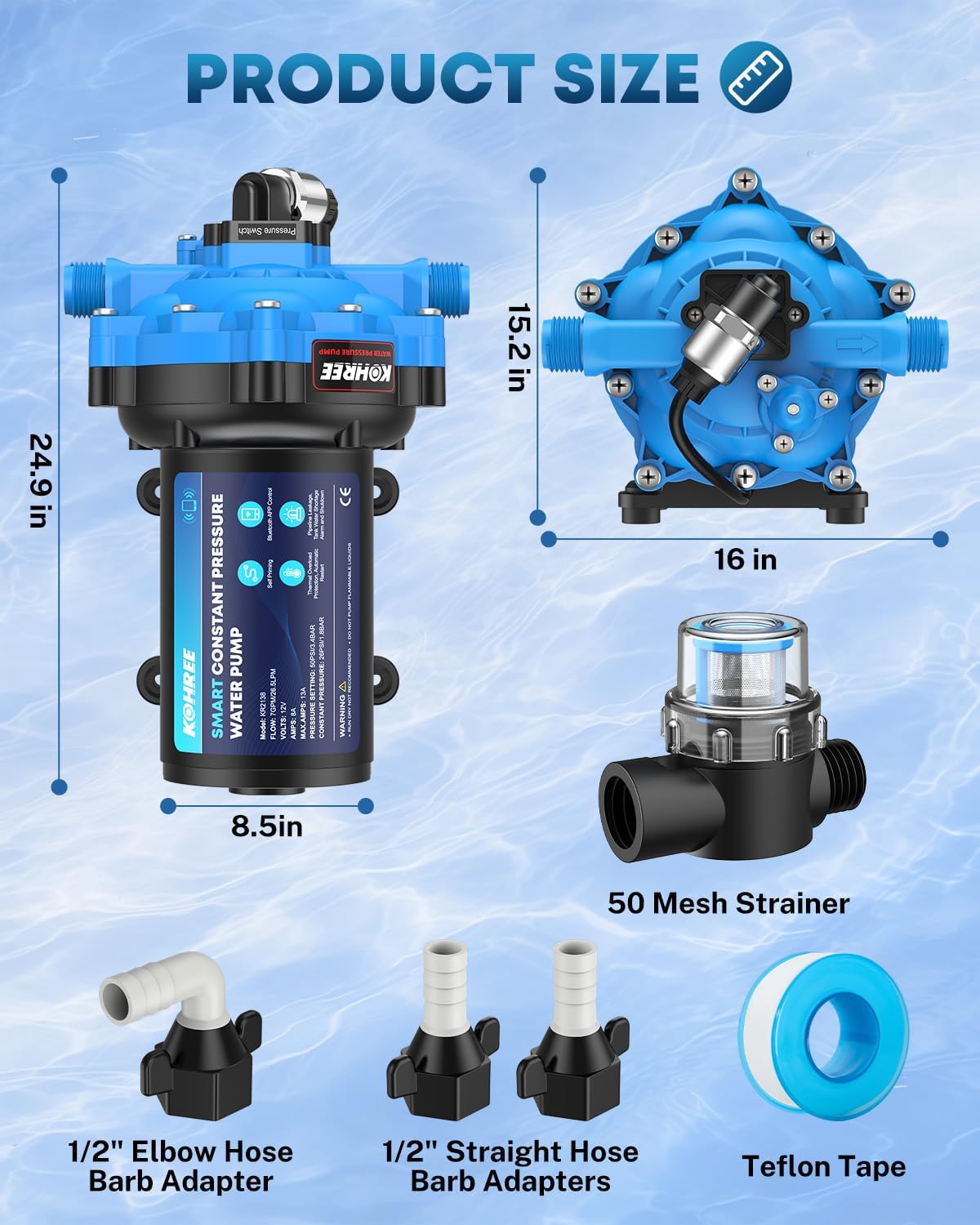
Image: The Kohree Smart RV Water Pump with its dimensions and included accessories: 50 mesh strainer, 1/2 inch elbow hose barb adapter, 1/2 inch straight hose barb adapters, and Teflon tape.
5. Setup and Installation
Follow these steps for proper installation:
- Mounting: Select a dry, well-ventilated location for the pump. Securely mount the pump using its anti-vibration rubber feet to minimize noise and vibration. Ensure there is adequate space for plumbing connections and future maintenance.
- Plumbing Connections:
- Identify the inlet and outlet ports on the pump. The inlet is typically marked with an arrow indicating flow direction towards the pump.
- Install the provided 50 mesh inlet strainer on the suction (inlet) side of the pump to prevent debris from entering.
- Apply Teflon tape to the threads of the 1/2 inch NPT barbed fittings before connecting them to the pump ports.
- Connect your water supply lines to the barbed fittings using the stainless steel clamps to ensure a watertight seal.
- Ensure all plumbing connections are tight but do not overtighten.
- Electrical Connection:
- Connect the pump to a 12V DC power source. The red wire is positive (+), and the black wire is negative (-).
- Ensure correct polarity to prevent damage to the pump.
- Install an appropriate fuse (not included, refer to pump specifications for recommended amperage) in the positive power line close to the power source.
- Secure all electrical connections and protect them from moisture.
- Priming the Pump:
- Ensure the water supply tank has water.
- Open a faucet in your system (e.g., kitchen sink) to allow air to escape.
- Turn on the pump. The pump will begin to draw water and expel air.
- Once a steady stream of water flows from the faucet, close the faucet. The pump should then build pressure and stop running.

Image: A schematic diagram illustrating the installation of the Kohree Smart RV Water Pump within a typical RV plumbing system, highlighting connections to the water tank, water heater, and various fixtures.
6. Operating Instructions
The Kohree Smart RV Water Pump offers intelligent, variable-speed operation.
- Power On/Off: Use the main power switch for your water system or the ON/OFF function within the Bluetooth app to control the pump.
- Automatic Operation: Once powered on and primed, the pump will automatically start when a faucet is opened and stop when all faucets are closed and system pressure is reached. Its variable speed technology ensures a consistent flow without rapid cycling.
- Pressure Adjustment (via App): Use the Bluetooth app to select one of the three constant pressure modes (1, 2, or 3) to optimize water flow and pressure according to your preference and system requirements.

Image: A visual representation of the three constant pressure modes (0.15mpa/21.75 PSI, 0.18mpa/26.1 PSI, 0.21mpa/30.45 PSI) and a graph demonstrating the superior pressure stability of the Kohree Smart Water Pump compared to a traditional RV water pump under varying water demand.
7. Bluetooth App Control
The Kohree Smart RV Water Pump can be controlled and monitored via a dedicated smartphone application.
- App Download: Refer to the specific instructions in the printed user manual for QR codes or links to download the official Kohree app for iOS and Android devices.
- Pairing: Once the app is installed, ensure your pump is powered on and Bluetooth is enabled on your smartphone. Follow the in-app instructions to search for and pair with your Kohree Smart Water Pump.
- Monitoring: The app provides real-time data display, including:
- Voltage
- Amp Draw
- Water Temperature
- Water Pressure
- Current Constant Pressure Mode
- Settings: Adjust the constant pressure mode (1, 2, or 3) to suit your needs directly from the app interface.
- Fault Alerts: The app will display instant notifications for detected faults such as pipeline leakage, pressure sensor failure, low water temperature, or dry running, allowing for prompt action.

Image: A smartphone screen showing the Kohree Bluetooth app interface, displaying real-time data like voltage, amp draw, water temperature, and water pressure, along with constant pressure mode selection and fault prompts.

Image: Visual representation of the smart self-diagnosis and protection system, including high altitude protection, thermal protection, over-current protection, and app alerts for pipeline leakage, pressure sensor failure, low water temperature, and dry running.
8. Maintenance
Regular maintenance ensures optimal performance and extends the lifespan of your pump.
- Inspect Connections: Periodically check all plumbing and electrical connections for leaks, corrosion, or loose fittings. Tighten as necessary.
- Clean Inlet Strainer: The 50 mesh inlet strainer should be inspected and cleaned regularly to prevent blockages from debris, which can reduce flow and pressure.
- Winterization: If the pump will be exposed to freezing temperatures, it is crucial to drain the pump and the entire plumbing system completely. Running RV antifreeze through the system is also recommended.
- General Cleaning: Keep the exterior of the pump clean and free from dirt or dust. Do not use harsh chemicals for cleaning.
9. Troubleshooting
If you encounter issues with your pump, refer to the following troubleshooting guide. For persistent problems, contact customer support.
| Problem | Possible Cause | Solution |
|---|---|---|
| Pump does not run | No power; Blown fuse; Loose wiring; Motor fault | Check power supply; Replace fuse; Secure wiring; Contact support if motor fault. |
| No water flow | No water in tank; Clogged inlet strainer; Air in system (not primed); Kinked hose | Refill water tank; Clean strainer; Prime the pump; Straighten hose. |
| Low pressure/Low flow | Clogged strainer; Leaks in plumbing; Incorrect pressure setting; Partially closed valve | Clean strainer; Check for and fix leaks; Adjust pressure via app; Ensure valves are fully open. |
| Pump cycles frequently | Small leak in system; Faucet dripping; Incorrect pressure setting | Check for and fix small leaks; Ensure all faucets are fully closed; Adjust pressure via app. |
| Pump runs continuously | Significant leak; Open faucet; Pressure sensor failure | Locate and fix major leaks; Close all faucets; Contact support if sensor failure is suspected. |
| Fault Alert on App | Pipeline leakage; Pressure sensor failure; Low water temperature; Dry running | Address the specific issue indicated by the alert (e.g., check for leaks, ensure water supply, protect from cold). |
10. Specifications
| Specification | Detail |
|---|---|
| Brand | Kohree |
| Model Number | KR2138 |
| Power Source | Corded Electric (12V DC) |
| Voltage | 12 Volts (DC) |
| Maximum Flow Rate | 7.0 Gallons Per Minute (GPM) |
| Operating Noise Level | Below 45 dB |
| Inlet/Outlet Ports | 1/2 inch NPT |
| Protection Features | Thermal Overload, Dry Run, Overcurrent, High/Low Temperature, High Altitude |
11. Warranty and Support
For warranty information, technical assistance, or to purchase replacement parts, please contact Kohree customer service. Refer to the product packaging or the official Kohree website for the most current contact details.