
1. Introduction
Thank you for choosing the Temprium 8000 BTU Portable Air Conditioner. This unit is designed to provide efficient cooling, dehumidification, and fan functions for indoor spaces. Please read this manual thoroughly before installation and operation to ensure proper use and maintenance.
This portable air conditioner is suitable for rooms up to 350 sq. ft. It features smart control options via the Temprium App, voice commands with Alexa and Google Assistant, and a remote control. The unit operates quietly, making it ideal for various indoor environments.
2. Important Safety Information
Always follow basic safety precautions when using electrical appliances to reduce the risk of fire, electric shock, or injury.
- Read all instructions before using the appliance.
- Ensure the power supply matches the voltage specified on the unit's rating label.
- Do not operate the unit with a damaged cord or plug.
- Do not block air outlets or inlets. Maintain at least 20 inches of clearance around the unit.
- Do not insert objects into the air vents.
- Always unplug the unit before cleaning or servicing.
- Keep the unit upright during transport and operation. If tilted, allow it to stand upright for at least 24 hours before use.
- This appliance is not intended for use by persons (including children) with reduced physical, sensory or mental capabilities, or lack of experience and knowledge, unless they have been given supervision or instruction concerning use of the appliance by a person responsible for their safety.
- Children should be supervised to ensure that they do not play with the appliance.
3. What's in the Box
Carefully unpack your portable air conditioner and check that all items are present:
- 1 Portable AC Unit
- 1 Exhaust Hose
- 1 Window Panel Adaptor
- 1 Unit Adaptor
- 1 Window Panel
- 3 Window Extension Panels
- 1 Foam Seal
- 1 Remote Control
- 2 AAA Batteries
- 1 Drain Hose

Image: Illustration of the portable AC unit and its included accessories.
Video: Unboxing and identifying the components included with the Temprium Portable AC unit.
4. Setup and Installation
The Temprium portable air conditioner is designed for easy installation in most sliding windows. Follow these steps for proper setup:
4.1 Exhaust Hose Assembly
- Connect the exhaust hose to the unit adaptor.
- Connect the other end of the exhaust hose to the window panel adaptor.
Video: Detailed instructions for installing the window kit components.
4.2 Window Kit Installation
The adjustable window kit fits window openings from 20 to 49.02 inches. Use the main window panel and extension panels as needed to fit your window type (horizontal or vertical sliding).
- Open the window and place the main window panel into the opening.
- Adjust the length using the extension panels to securely fit the window opening. Use the foam seal to ensure a tight fit and prevent air leakage.
- Close the window against the panel to hold it in place.
- Attach the assembled exhaust hose (with window panel adaptor) to the opening in the window panel.
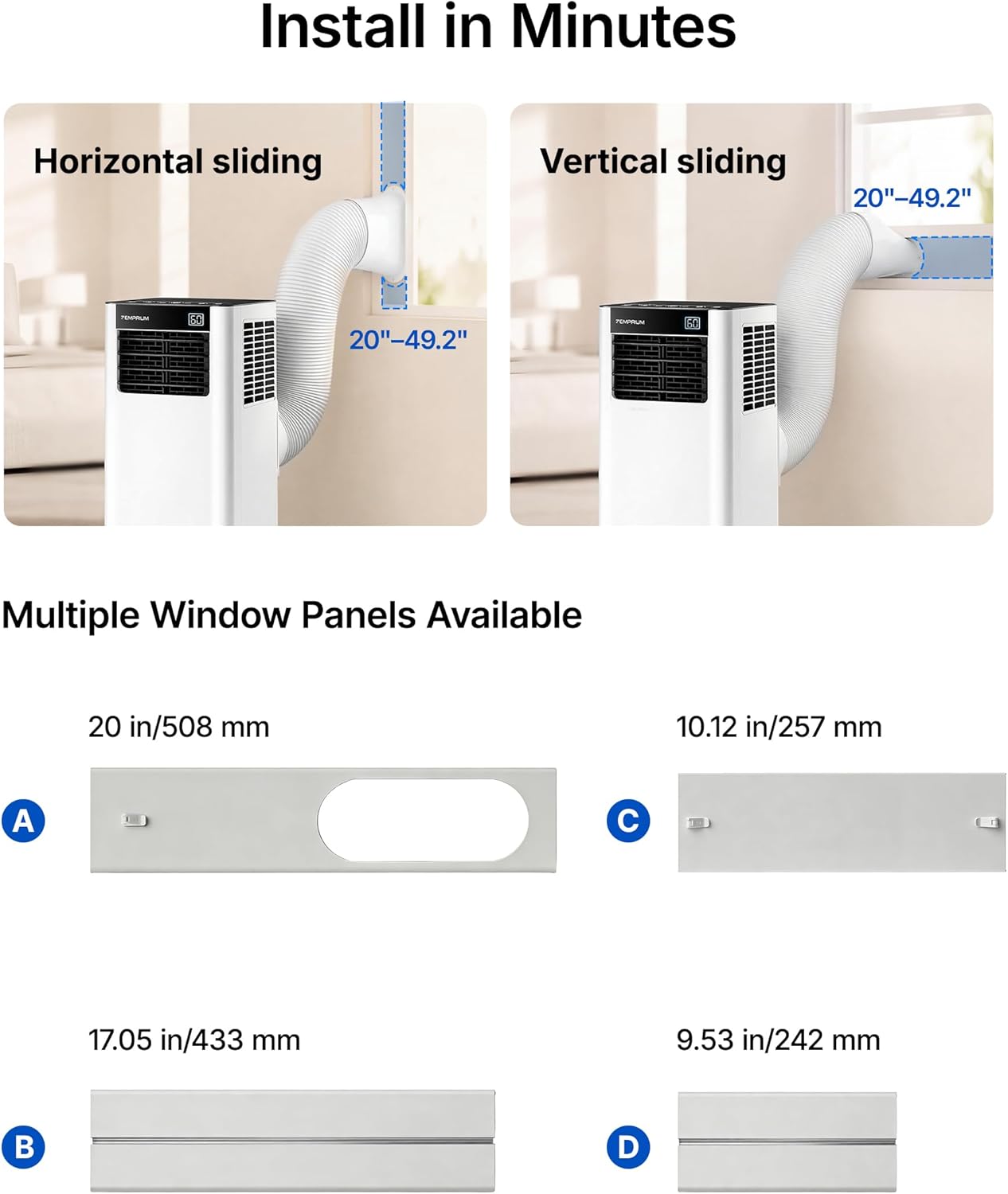
Image: Diagrams showing how to install the window kit for both horizontal and vertical sliding windows, with dimensions.

Image: Visual guide for connecting the ventilation duct and installing window panels.
4.3 Positioning the Unit
Place the portable AC unit on a flat, stable surface near the window. Ensure the exhaust hose is not kinked or bent, allowing for proper airflow. The unit has smooth-rolling casters and integrated handles for easy movement between rooms.
5. Operating Modes
Your Temprium portable AC offers four operating modes: Cool, Dry, Fan, and Sleep.

Image: Visual representation of the four operating modes and their key features.
5.1 Cool Mode
This mode provides powerful cooling for rooms up to 350 sq. ft. The temperature can be adjusted between 60℉ and 86℉ (16℃ and 30℃). Select High or Low fan speeds to customize comfort.
5.2 Dry Mode (Dehumidifier)
In Dry mode, the unit removes excess moisture from the air, up to 41 pints per day. This is useful in humid conditions or damp areas. A drain hose is required for continuous drainage in this mode.
5.3 Fan Mode
Fan mode circulates air without cooling or dehumidifying. Choose between High and Low fan speeds for gentle airflow and improved air circulation.
5.4 Sleep Mode
Sleep mode operates the unit at a low noise level (as low as 50 dB) for undisturbed rest. The 24-hour timer and optional soft atmosphere light can be customized for your sleeping environment.

Image: The portable AC unit operating quietly in a bedroom, illustrating its suitability for sleep.
6. Control Options
The Temprium portable AC offers multiple ways to control its functions:
6.1 Control Panel
The responsive touch panel on top of the unit allows direct control of all settings.
6.2 Remote Control
Use the included remote control to adjust settings from up to 23 feet away. Insert the two AAA batteries into the remote before use.
6.3 Temprium App Control
Download the Temprium App to control the unit remotely from your smartphone. This allows you to pre-cool your room or adjust settings from anywhere.
Video: Guide on connecting the Temprium App to your portable AC unit.
6.4 Voice Control (Alexa & Google Assistant)
The unit is compatible with Alexa and Google Assistant. Link your Temprium account to your smart home assistant for hands-free control using simple voice commands.

Image: Demonstrates smart control options including the control panel, Temprium App, Google Assistant, Alexa, and remote control.
Video: Instructions for setting up Alexa or Google Assistant with the portable AC.
7. Maintenance
Regular maintenance ensures optimal performance and longevity of your air conditioner.
7.1 Filter Cleaning
The unit features a removable, washable mesh filter. Clean the filter regularly (every two weeks or more often depending on use) to maintain efficient airflow and cooling performance. Refer to the full user guide for detailed cleaning instructions.
7.2 Drainage
The built-in self-evaporation system minimizes daily drainage in cooling mode. However, in high humidity conditions or when using Dry mode, manual drainage or continuous drainage via the included drain hose may be required. Monitor the water level indicator and drain as necessary.

Image: Explains the internal auto-evaporation system that reduces the need for frequent manual drainage.
8. Troubleshooting
If you encounter issues with your Temprium portable air conditioner, refer to the dedicated Troubleshooting Guide (PDF) available for download. Common issues and their solutions are typically covered in that document.
For immediate assistance, ensure the unit is properly plugged in, the air filter is clean, and the exhaust hose is correctly installed and not obstructed.
Link to Troubleshooting Guide: Troubleshooting Guide (PDF)
9. Specifications
| Feature | Specification |
|---|---|
| Brand | Temprium |
| Model Name | PAC009-8K |
| Cooling Power | 8000 British Thermal Units (ASHRAE) |
| Coverage Area | Up to 350 sq. ft. |
| Product Dimensions (D x W x H) | 11.4"D x 12"W x 26.7"H |
| Item Weight | 40.8 Pounds |
| Voltage | 115 Volts |
| Wattage | 780 watts |
| Noise Level | 50 Decibels (in Sleep Mode) |
| Temperature Range | 60℉ – 86℉ |
| Dehumidification Capacity | Up to 41 pints/day |
| Control Method | App, Remote, Touch, Voice (Alexa & Google Assistant) |
| Filter Type | Mesh Filter (Washable) |
| Refrigerant | R-32 |
| Window Opening Minimum Width | 20 Inches |
| Window Opening Maximum Width | 49.02 Inches |
| Energy Efficiency (CEER) | 6.1 |

Image: Product details table outlining BTU ratings, maximum area, and optimum usable area for various models.
10. Warranty and Support
This Temprium portable air conditioner comes with a one-year manufacturer's warranty. For warranty claims or technical support, please contact Temprium customer service.
For additional resources, you may refer to the User Guide (PDF) and Installation Manual (PDF).


