
Introduction
This manual provides detailed instructions for the installation, operation, and maintenance of your BUXFMHT Fingerprint Door Lock Model A1. Please read this manual thoroughly before installation and use to ensure proper function and security. Keep this manual for future reference.
Product Features
- Multiple Unlock Methods: Supports fingerprint, password, mobile application (APP), IC card, and mechanical key for versatile access.
- Remote Access & Monitoring: Remote unlock functionality via Tuya APP and access to unlock records.
- Advanced Fingerprint Recognition: High-sensitivity semiconductor sensor for fast and accurate fingerprint identification, designed to prevent identical fingerprint fraud.
- Enhanced Security: Anti-peep password function (random numbers before/after actual code) and alarm for 5 incorrect password attempts or forced entry.
- Temporary Access: Option for temporary passwords or normally open mode for guest access.
- Low Battery Alert: Notifies users when batteries are low, with emergency power options via mechanical key or USB port.
- Easy Installation: Designed for straightforward installation on most standard doors (30-50mm thickness) without requiring drilling.
Package Contents
Upon opening the package, please verify that all components are present and undamaged:
- BUXFMHT Fingerprint Door Lock A1 (Front and Rear Panels)
- Latch Bolt
- Strike Plate
- Mounting Screws and Hardware
- Mechanical Keys (2)
- IC Cards (2)
- Installation Template
- User Manual (This document)
Specifications
| Brand | BUXFMHT |
| Model Name | Door Lock A1 |
| Special Features | Auto-Lock, Fingerprint, Passcode Unlock, Weather Resistant |
| Dimensions (L x W x H) | 16.8 x 8.9 x 21.8 cm |
| Recommended Uses | Front Door, Home, Office, Apartment, Hotel |
| Color | Fingerprint Lock A1 (Black) |
| Power Source | 4 x AAA Batteries (not included) |
| Battery Life | Approx. 6-9 months |
| Door Thickness Compatibility | 30-50 mm |
| UPC | 727370820655 |
Setup and Installation
Before beginning installation, ensure your door meets the compatibility requirements (30-50mm thickness). No drilling is typically required for standard installations, as the lock is designed to replace existing spherical locks.
1. Check Door Dimensions
Verify your door's dimensions against the provided diagram to ensure proper fit. Pay attention to the backset (60mm or 70mm), bore hole diameter (54mm), and latch hole dimensions (24mm x 12mm).

2. Install Latch Bolt
Insert the latch bolt into the door edge. Ensure the bevel of the latch faces the door frame. Secure with screws.
3. Install Exterior Assembly
Feed the cable through the door hole and align the exterior assembly with the latch bolt. Ensure the spindle is correctly oriented.
4. Install Interior Mounting Plate
Attach the interior mounting plate to the door, securing it with screws to the exterior assembly. Connect the cable from the exterior assembly to the interior assembly.
5. Install Interior Assembly and Batteries
Attach the interior assembly to the mounting plate. Insert 4 AAA batteries (not included) into the battery compartment. Ensure correct polarity. Close the battery cover.
6. Adjust Door Handle Direction (if necessary)
The lock's handle direction can be adjusted to suit left-hand or right-hand opening doors. Refer to the specific instructions in the included physical manual for detailed steps on adjusting the handle.
7. Initial Setup and Calibration
After installation, follow the instructions in the physical manual to calibrate the lock and set up the initial administrator password and fingerprint.
Operating Instructions
Your BUXFMHT Fingerprint Door Lock A1 offers multiple ways to unlock your door.
1. Unlocking Methods Overview
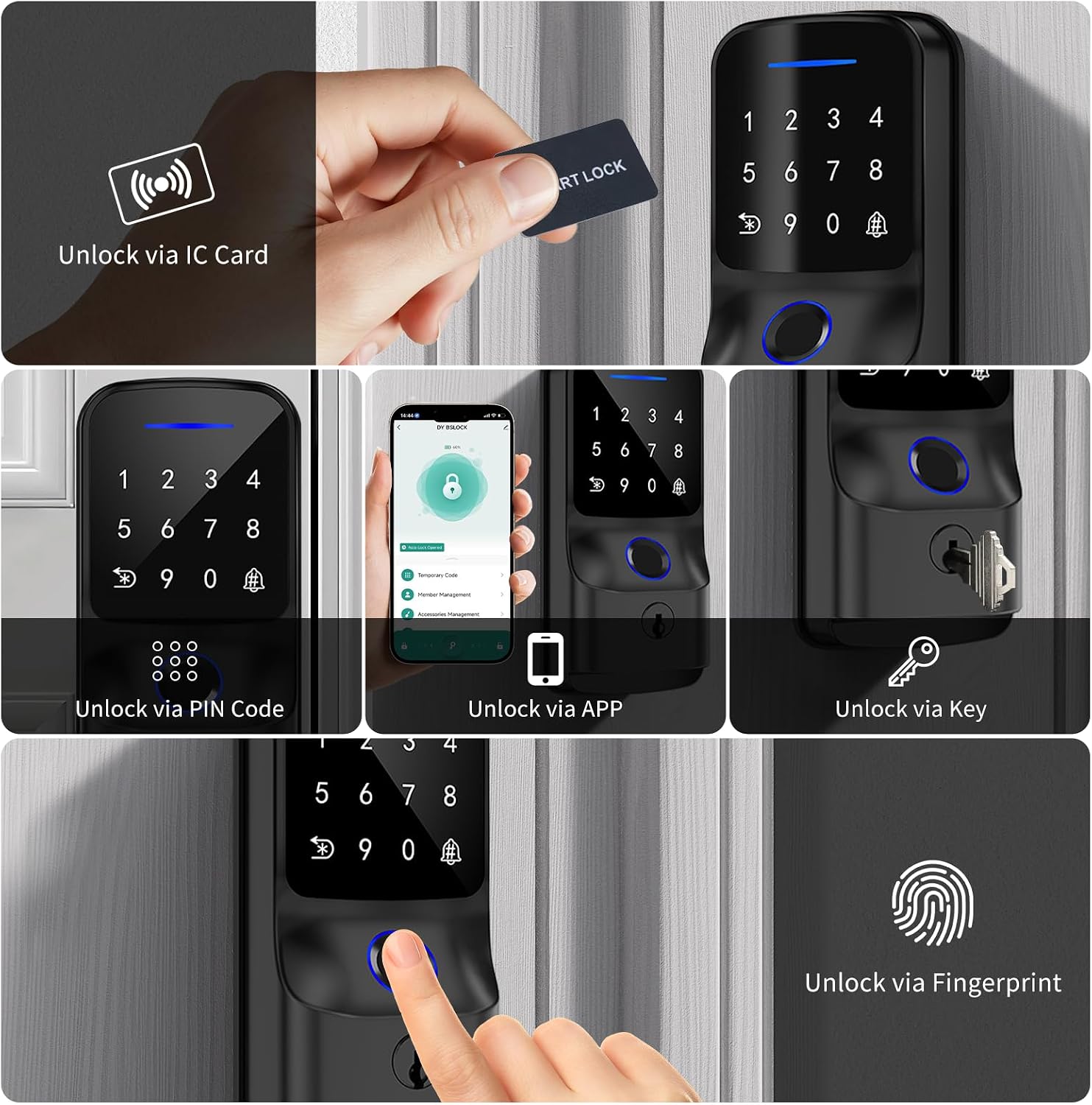
2. Fingerprint Unlock
Place your registered finger on the fingerprint sensor. The lock will unlock if the fingerprint is recognized. Ensure your finger is clean and dry for optimal recognition.

3. Passcode Unlock (Keypad)
Enter your registered passcode on the touchscreen keypad. The lock will unlock upon correct entry.
Anti-Peep Password: To prevent others from observing your code, you can enter random digits before or after your actual passcode. For example, if your code is 123456, you can enter 987123456321. The lock will still recognize the correct sequence within the longer entry.

4. APP Control (Tuya)
Download and install the Tuya Smart application on your smartphone. Pair your lock with the app following the in-app instructions. Through the app, you can:
- Remotely unlock the door.
- View unlock records and activity logs.
- Generate one-time or temporary passcodes for guests.
- Manage user fingerprints and IC cards.
- Adjust lock settings, including auto-lock duration.

5. IC Card Unlock
Present a registered IC card to the designated sensor area on the lock. The lock will unlock upon successful recognition.
6. Mechanical Key Unlock
In case of battery depletion or electronic malfunction, use the provided mechanical key to manually unlock the door. Insert the key into the keyhole and turn to unlock.
7. Auto-Lock Function
The lock is equipped with an auto-lock feature that automatically secures the door after a set period. This duration can typically be configured via the mobile application.
Maintenance
Battery Replacement and Emergency Power
The lock requires 4 AAA batteries. When the battery level is low, the lock will provide a warning. Replace batteries promptly to avoid interruption of service. If the batteries completely deplete, you can use the mechanical key for emergency access or connect a mobile power bank via the USB port on the lock for temporary power to unlock.
Cleaning
Clean the lock's exterior with a soft, dry cloth. Avoid using abrasive cleaners, solvents, or harsh chemicals, as these can damage the finish and electronic components. Keep the fingerprint sensor and keypad clean for optimal performance.
Troubleshooting
- Lock not responding: Check battery levels. If low, replace batteries or use emergency USB power.
- Fingerprint reader not working: Ensure your finger is clean and dry. Try re-registering your fingerprint if the issue persists. Ensure the sensor itself is clean.
- Keypad not responding: Ensure the keypad is clean. If the lock is completely unresponsive, check batteries.
- Alarm sounds after multiple incorrect entries: This is a security feature. Wait for the alarm to clear before attempting to unlock again.
- Door not locking/unlocking smoothly: Check for any obstructions in the door frame or latch bolt. Ensure the lock is installed correctly and aligned.
- App connectivity issues: Ensure your phone's Bluetooth is enabled and the lock is within range. Restart the app or re-pair the lock if necessary.
Warranty Information
This BUXFMHT Fingerprint Door Lock A1 comes with a 12-month quality guarantee from the date of purchase. This warranty covers manufacturing defects and malfunctions under normal use. It does not cover damage caused by misuse, unauthorized modification, accident, or improper installation.
Please retain your proof of purchase for warranty claims.
Customer Support
If you encounter any issues or have questions regarding your BUXFMHT Fingerprint Door Lock A1, please do not hesitate to contact our customer support team. We aim to resolve all inquiries within 24 hours.
Please refer to the product packaging or the seller's contact information for the most up-to-date support channels.