
1. Safety Information
Always read and understand all safety warnings and instructions before operating this product. Failure to follow the warnings and instructions may result in electric shock, fire, and/or serious injury.
- Wear eye protection and gloves during operation.
- Be aware of flying debris.
- Keep children and pets away from the operating area.
- Ensure the battery is fully charged before use.
- Do not operate in wet conditions.
2. Product Overview
The MZK 20V 12-inch Cordless String Trimmer and Edger is designed for efficient lawn and garden maintenance. It features a powerful motor, lightweight design, and versatile functionality.

Figure 2.1: MZK 20V 2-in-1 Cordless 12-inch String Trimmer.
Key Features:
- Upgraded Motor: Features a brand-new upgraded motor with a high speed of 8000 RPM for efficient cutting and trimming.
- Lightweight Design: Weighs only 6.3 lbs with an ergonomic adjustable handle for effortless operation and reduced user fatigue.
- 12-inch Cutting Diameter: Provides larger coverage and includes an automatic line feed system, eliminating manual adjustments.
- Extended Usability: Includes one built-in spool and four additional replacement spools.
- 2-in-1 Design: Easily converts between string trimmer and edger functions.
3. Package Contents
Verify that all items are present upon unpacking:
- MZK 20V 12-inch Cordless String Trimmer/Edger Unit
- 2 x 4AH 20V Lithium-Ion Batteries
- Battery Charger
- 8 x Replacement Spools (1 pre-installed, 7 additional)
- User Manual
4. Assembly
The trimmer requires minimal assembly. Follow these steps to prepare your tool for use:
- Attach the auxiliary handle to the main shaft. Ensure it is securely fastened at a comfortable position.
- Slide the protective guard onto the trimmer head and secure it with the provided fasteners.
- Insert a fully charged 20V battery into the battery slot until it clicks into place.

Figure 4.1: Assembled trimmer with battery.
5. Charging the Battery
The MZK string trimmer comes with two 20V 4AH batteries and a compact charger. To charge the battery:
- Remove the battery from the trimmer by pressing the release button and sliding it out.
- Connect the charger to a standard electrical outlet.
- Insert the battery into the charger. The indicator light on the charger will show the charging status.
- Once fully charged, remove the battery from the charger. Charging time is approximately 2 hours from empty to full.
6. Operation
This tool functions as both a string trimmer and an edger. Always ensure the area is clear of obstacles and wear appropriate safety gear.
6.1 Starting and Stopping
- To start: Press the safety switch (usually a button) and then squeeze the ON/OFF trigger simultaneously.
- To stop: Release the ON/OFF trigger.

Figure 6.1: Dual safety switch for safe operation.
6.2 Trimming Function
Hold the trimmer with both hands, keeping the cutting head parallel to the ground. Move the trimmer in a sweeping motion to cut grass and weeds. The automatic line feed system will release more line as needed.
6.3 Edging Function
To convert to edger mode, adjust the trimmer head angle by pressing the red button near the head and rotating it 90 degrees. Use the integrated wheel to guide the trimmer along edges for a clean finish.

Figure 6.2: Trimmer in edging and trimming configurations.
7. Adjustments
7.1 Handle Adjustment
The ergonomic auxiliary handle can be adjusted to various angles for user comfort. Loosen the red knob, adjust the handle to your desired position, and tighten the knob securely.

Figure 7.1: Adjustable comfort grip for personalized use.
7.2 Trimmer Head Angle Adjustment
The trimmer head can be rotated 180 degrees and adjusted to 4 different angles (0° to 60°) to adapt to various terrains and tasks. Press the red button near the trimmer head and rotate it to the desired angle until it locks into place.

Figure 7.2: Trimmer head with 180° rotation for versatile use.
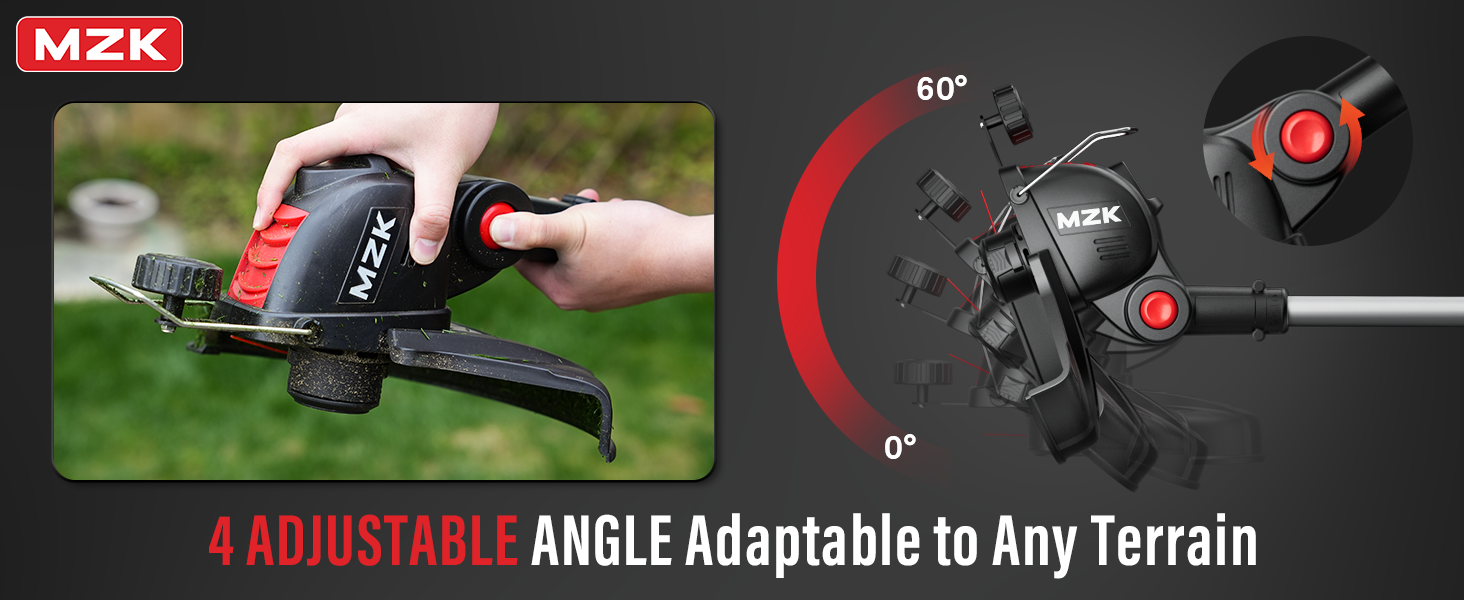
Figure 7.3: Trimmer head with 4 adjustable angles for different terrains.
8. Maintenance
8.1 Spool Replacement
To replace the line spool:
- Ensure the trimmer is off and the battery is removed.
- Press the tabs on the spool cover and remove it.
- Remove the empty spool.
- Insert a new replacement spool, ensuring the line is threaded through the eyelet.
- Replace the spool cover, ensuring it clicks into place.

Figure 8.1: Quick spool replacement for continuous operation.
8.2 Cleaning and Storage
- After each use, clean the trimmer head and guard of any grass clippings or debris.
- Store the trimmer in a dry, secure location out of reach of children.
- Remove the battery before storing for extended periods.
9. Troubleshooting
If you encounter issues with your MZK String Trimmer, refer to the following common problems and solutions:
| Problem | Possible Cause | Solution |
|---|---|---|
| Trimmer does not start | Battery not inserted correctly or discharged; Safety switch not engaged. | Ensure battery is fully charged and properly inserted. Press safety switch before squeezing trigger. |
| Line does not advance automatically | Spool is empty or jammed; Line is tangled. | Replace spool or untangle line. Ensure correct line type is used. |
| Reduced cutting performance | Dull or short line; Motor overloaded. | Advance or replace line. Avoid cutting excessively thick or wet vegetation. |
10. Specifications
- Brand: MZK
- Model Number: G-DC2505-2 (ST12D07)
- Power Source: Battery Powered (20V Lithium-Ion)
- Cutting Width: 12 inches
- Motor Speed: Up to 8000 RPM
- Product Dimensions: 17.32"L x 6.69"W
- Item Weight: 6.3 lbs
- Battery Average Life: Approximately 30 minutes per battery (depending on usage)
- Required Assembly: Yes
11. Official Product Video
Watch the official MZK introduction video for the string trimmer/edger to see its features and operation in action.
Video 11.1: MZK all-new String Trimmer/Edger Intro. This video provides a brief overview of the product's features and how it operates.
12. Warranty and Support
MZK is committed to providing the best shopping experience. If you have any questions or problems with your MZK tool, please contact customer service. We are always here to help you solve any problems you may encounter.
For support, please refer to the contact information provided in your product packaging or visit the official MZK website.