
1. Introduction
The Cleer ARC 4 Plus Open Ear Earbuds offer a unique listening experience designed for comfort and situational awareness. Featuring Dolby Atmos with head tracking, these true wireless Bluetooth earphones provide immersive spatial audio without blocking ambient sounds. With up to 34 hours of playtime, IPX7 waterproofing, and seamless multi-device connectivity, they are suitable for various activities including workouts and daily use. The Cleer+ App allows for personalized audio control and customization.
2. What's in the Box
Ensure all items are present in your Cleer ARC 4 Plus package:
- Cleer ARC 4 Plus Open Ear Headphones
- Charging Case
- USB-C Charging Cable
- User Manual
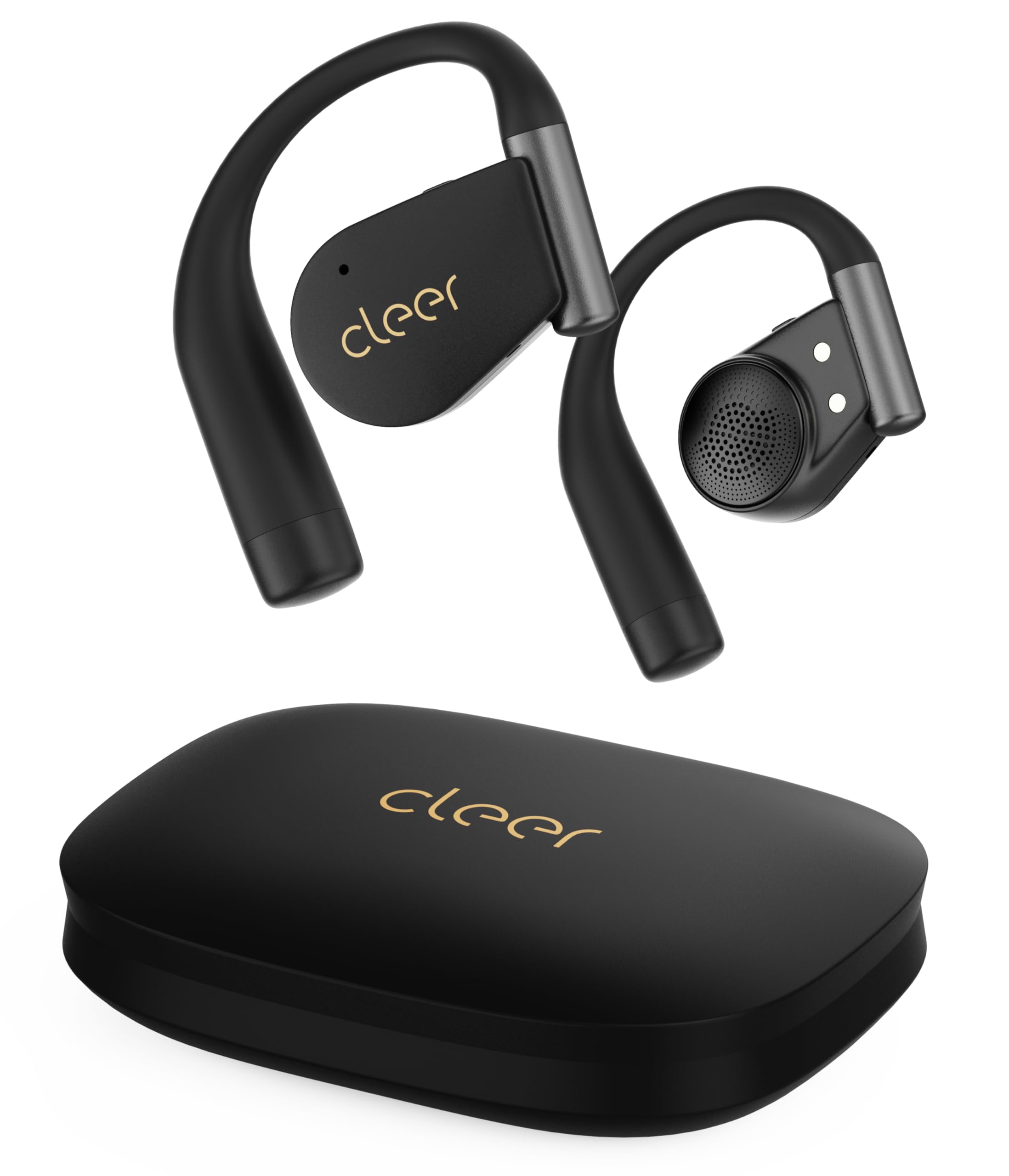
Image: Cleer ARC 4 Plus Open Ear Earbuds and their charging case.
3. Product Overview
3.1 Immersive Spatial Audio Experience
Experience 3D surround sound with Dolby Atmos and precise head tracking. This technology recreates concert-hall acoustics, enhancing movies, games, and music for a theater-like immersion.

Image: A man wearing Cleer ARC 4 Plus earbuds, illustrating the immersive spatial audio experience with Dolby Atmos and THX certification.
Video: An overview of the ARC 4 Plus Open Ear Headphones, highlighting their design and key features.
3.2 Open-Ear Comfort & Safety
The open-ear design allows you to enjoy audio while remaining aware of your surroundings, making them ideal for outdoor activities or commuting. The ultra-lightweight 10.8g design with flexible, silicone-wrapped earhooks ensures all-day comfort without ear fatigue.

Image: A man wearing Cleer ARC 4 Plus earbuds, showcasing the open-ear design for comfort and situational awareness.

Image: A woman running outdoors with Cleer ARC 4 Plus earbuds, demonstrating the secure fit during activity.
3.3 Extended Battery Life & Fast Charging
Enjoy up to 9 hours of playback on a single charge, with an additional 25 hours provided by the charging case, totaling 34 hours. A quick 10-minute charge provides 3 hours of playtime.

Image: Cleer ARC 4 Plus earbuds in their charging case, illustrating the 34-hour total playback time and quick charge feature.
3.4 IPX7 Waterproof & Durable Build
The IPX7 rating ensures the earbuds are sweatproof and rainproof, making them suitable for intense workouts and outdoor activities. They are constructed with premium materials for long-lasting performance.

Image: A woman working out with Cleer ARC 4 Plus earbuds, demonstrating their IPX7 water resistance against sweat and rain.
3.5 Seamless Multi-Device Connectivity
With Bluetooth 5.4, the ARC 4 Plus can connect to two devices simultaneously, allowing for instant switching between calls, meetings, and music without interruption.

Image: A man using Cleer ARC 4 Plus earbuds, illustrating seamless multipoint connectivity between a computer and a smartphone.
3.6 Cleer+ App Smart Control
Customize EQ settings, update firmware, and program touch controls for a personalized audio experience via the Cleer+ app.

Image: A smartphone screen showing the Cleer+ App interface with various settings for the ARC 4 Plus earbuds.
4. Setup
4.1 Initial Pairing
- Ensure your earbuds are charged.
- Open the charging case. The earbuds will automatically enter pairing mode.
- On your device (smartphone, tablet, etc.), enable Bluetooth.
- Search for "Cleer ARC 4 Plus" in the list of available Bluetooth devices and select it to pair.
4.2 Cleer+ App Installation
For full customization and advanced features, download the Cleer+ App from your device's app store (iOS App Store or Google Play Store).
- Search for "Cleer+" in your app store.
- Download and install the app.
- Open the Cleer+ App and follow the on-screen instructions to connect your ARC 4 Plus earbuds.
Video: A guide on how to use the Cleer+ App with your earbuds for personalized settings.
5. Operating
5.1 Touch Controls
The earbuds feature intuitive touch controls for managing playback, calls, and other functions. These can be customized via the Cleer+ App.
- Single Tap: Play/Pause music, Answer/End call.
- Double Tap: Next track (Right earbud), Previous track (Left earbud).
- Triple Tap: Voice Assistant.
- Long Press: Volume Up (Right earbud), Volume Down (Left earbud).
5.2 Spatial Audio & Head Tracking
Activate or deactivate Spatial Audio and Head Tracking features through the Cleer+ App for an enhanced listening experience. You can select optimized modes for music or movies.
5.3 Crystal Clear Calls
The earbuds are equipped with 4-mic Qualcomm cVc technology and wind noise reduction for clear voice capture, ensuring high-quality calls even in noisy environments.
6. Maintenance
6.1 Cleaning
Gently wipe the earbuds and charging case with a soft, dry cloth. Avoid using harsh chemicals or abrasive materials.
6.2 Charging
Place the earbuds into the charging case. Connect the USB-C cable to the charging case and a power source. The LED indicators on the case will show the charging status.
6.3 Water Resistance
The IPX7 rating means the earbuds are protected against temporary immersion in water (up to 1 meter for 30 minutes). Ensure the earbuds are completely dry before placing them back in the charging case to prevent damage.
7. Troubleshooting
- Earbuds not pairing: Ensure Bluetooth is enabled on your device and the earbuds are in pairing mode. Try restarting both the earbuds and your device.
- No sound: Check volume levels on both your device and the earbuds. Ensure they are properly connected.
- Charging issues: Verify the charging cable and power source are working. Ensure the earbuds are correctly seated in the charging case.
- Factory Reset: If issues persist, perform a factory reset via the Cleer+ App or by following instructions in the full user manual.
8. Specifications
| Feature | Specification |
|---|---|
| Model Name | ARC 4 Plus |
| Connectivity Technology | Bluetooth 5.4, Wireless |
| Audio Driver Type | Dynamic Driver |
| Battery Life (Total) | 34 Hours (9 hours per charge + 25H via charging case) |
| Charging Time | 2 Hours |
| Water Resistance Level | IPX7 (Water Resistant) |
| Control Type | Touch Control, Volume Control, APP Control, Voice Control |
| Special Features | Dolby Atmos with Head Tracking, Snapdragon Sound, Open-Ear Design |
| Item Weight (Earbuds) | 10.8g (each) |
| Item Weight (Case) | 97 Grams |
9. Warranty and Support
The Cleer ARC 4 Plus Open Ear Earbuds come with a 1-Year Warranty. For friendly customer support or any inquiries, please visit the official Cleer store on Amazon or contact Cleer directly.
Official Cleer Store: Visit Cleer Store


