
1. Introduction
This manual provides instructions for the setup, operation, and maintenance of your new PERFASCIN BN59-01480L Replacement Voice Remote Control. This remote is designed to be compatible with various Samsung QLED, LED, and HDR 4K Smart TV models, offering a seamless replacement for your original remote.
The remote features voice control capabilities, enhancing your interaction with your television. Please read this manual thoroughly to ensure proper use and to maximize your viewing experience.
2. Setup
2.1 Battery Installation
- Locate the battery compartment on the back of the remote control.
- Slide the battery cover downwards to open it.
- Insert two AAA batteries (not included), ensuring the correct polarity (+ and -) as indicated inside the compartment.
- Slide the battery cover back into place until it clicks securely.

Figure 1: Back view of the remote control, illustrating the battery compartment and pairing button.
2.2 Pairing the Remote with Your TV
This voice remote requires pairing with your Samsung Smart TV before use to enable full functionality, including voice commands.
- Ensure your TV is powered on.
- Point the remote control towards your TV.
- Press and hold the Return button (
 ) and the Play/Pause button () simultaneously for approximately 3 seconds. The pairing indicator on the remote (usually a small LED) may flash.
 - A message will appear on your TV screen indicating that the remote is pairing or has successfully paired.
- Once paired, you can begin using all remote functions, including voice control.
3. Operating the Remote
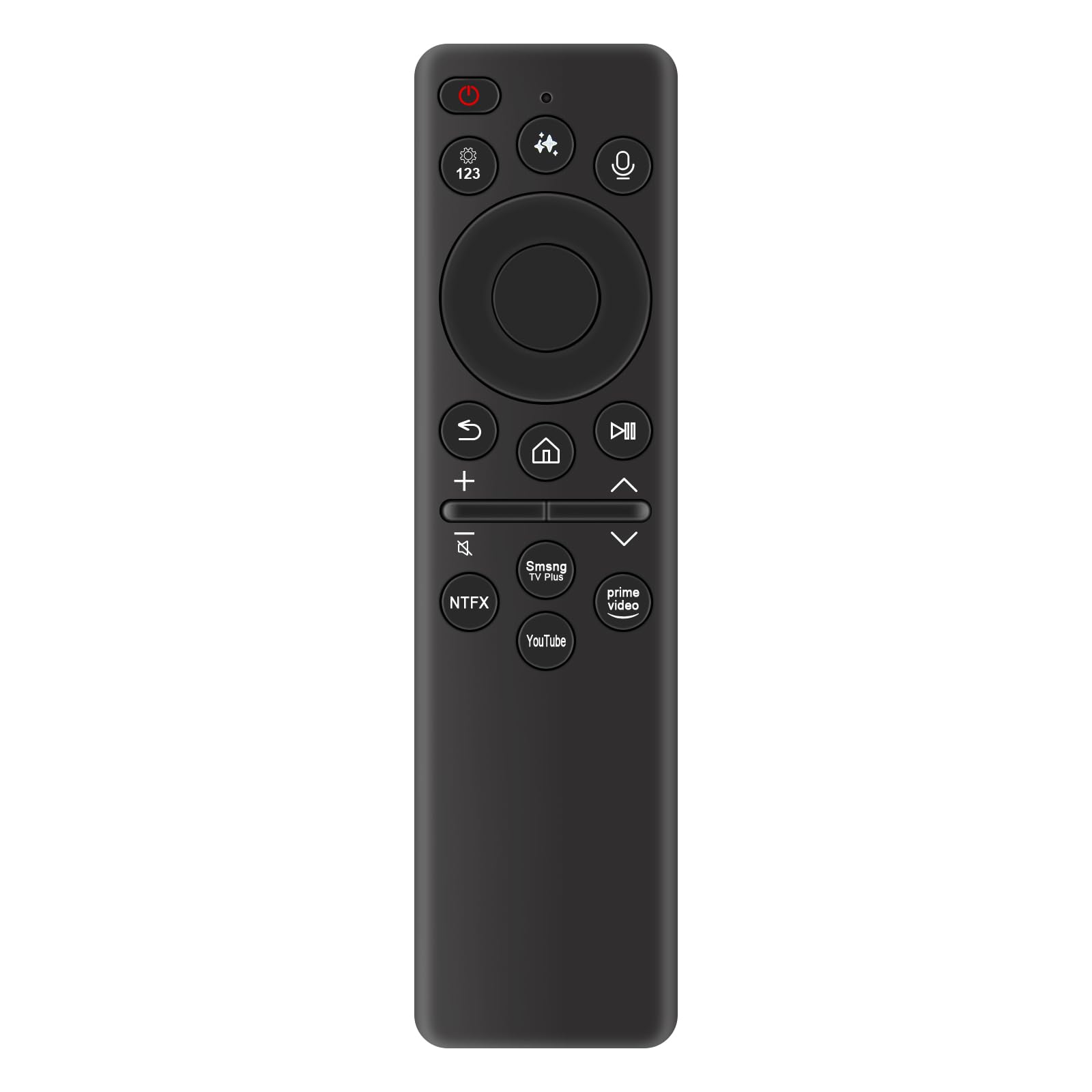
The PERFASCIN BN59-01480L remote control provides intuitive access to your TV's features. Below is an overview of key buttons and their functions.
Figure 2: Front view of the remote control with the Voice Control button highlighted.
3.1 Button Functions
- Power Button (): Turns the TV on or off.
- Voice Control Button (): Activates the voice assistant for commands.
- Settings/123 Button (): Accesses TV settings or numeric keypad.
- Directional Pad (Up, Down, Left, Right, Enter): Navigates menus and selects items.
- Return Button (): Returns to the previous screen or menu.
- Home Button (): Accesses the Smart Hub or home screen.
- Play/Pause Button (): Controls media playback.
- Volume Up/Down (): Adjusts the TV volume.
- Channel Up/Down (): Changes TV channels.
- Mute Button (): Mutes or unmutes the TV sound.
- App Shortcut Buttons (e.g., Netflix, Prime Video, YouTube, Samsung TV Plus): Direct access to popular streaming applications.
3.2 Using Voice Control
After successful pairing, you can use the voice control feature:
- Press and hold the Voice Control Button ().
- Speak your command clearly into the microphone located on the remote.
- Release the button when you are finished speaking.
Examples of commands: "Open Netflix," "Change to Channel 5," "Search for action movies," "Volume up."
4. Maintenance
4.1 Cleaning
To clean your remote control, gently wipe it with a soft, dry cloth. For stubborn dirt, slightly dampen the cloth with water. Avoid using harsh chemicals, abrasive cleaners, or excessive moisture, as these can damage the remote's surface or internal components.
4.2 Battery Replacement
Replace batteries when the remote's performance degrades or if it becomes unresponsive. Always replace both batteries at the same time with new AAA batteries. Do not mix old and new batteries, or different types of batteries.
4.3 Storage
Store the remote in a cool, dry place away from direct sunlight and extreme temperatures. If the remote will not be used for an extended period, it is advisable to remove the batteries to prevent leakage.
5. Troubleshooting
5.1 Remote Not Responding
- Check Batteries: Ensure batteries are inserted correctly with the correct polarity and are not depleted. Replace if necessary.
- Line of Sight: Ensure there are no obstructions between the remote and the TV's infrared receiver.
- Distance: Make sure you are within the effective operating range of the remote.
5.2 Pairing Issues
- Re-attempt Pairing: Follow the pairing instructions in Section 2.2 carefully.
- TV Interference: Ensure no other devices are interfering with the TV's Bluetooth signal.
- TV Compatibility: Verify that your TV model is listed as compatible.
5.3 Voice Control Not Working
- Ensure Pairing: Voice control requires the remote to be successfully paired with the TV.
- Microphone Obstruction: Ensure the microphone on the remote is not covered.
- Speak Clearly: Speak directly into the microphone in a clear voice.
- TV Settings: Check your TV's sound and voice recognition settings.
6. Specifications
| Feature | Detail |
|---|---|
| Model Number | BN59-01480L (sub BN59-01480A) |
| Brand | PERFASCIN |
| Special Feature | Voice Search |
| Color | Black |
| Material | ABS |
| Power Source | 2 x AAA Batteries (not included) |
| Dimensions (L x W x H) | 14.5 cm x 3.8 cm x 1.27 cm (5.71 in x 1.5 in x 0.5 in) |
| Item Weight | 1 ounce (approximately 28 grams) |
| Compatible Devices | Samsung QLED, LED, HDR 4K Smart TVs (e.g., GQ43Q7FAAUXZG, QE43QN90F, QE50Q7FAA, TQ43Q7FAAUXXC, etc.) |

Figure 3: Remote control dimensions.
7. Support Information
If you encounter any issues not covered in this manual or require further assistance, please contact our customer support. We are committed to providing professional suggestions and support within 24 hours.
For specific inquiries regarding compatibility or troubleshooting, please provide your TV model number when contacting support.