
1. Important Safety Information
Please read all instructions carefully before assembly and use. Retain this manual for future reference.
- Always unplug the vanity before assembly or disassembly.
- Be cautious of sharp edges and pinch points during assembly.
- Do not overload the vanity with heavy items.
- Keep electrical components dry and away from heat sources.
- Always follow the manufacturer's instructions for safe use and maintenance.
- Ensure all connections are secure before use.
- This product is intended for indoor use only.
2. Package Contents
Verify that all components are present before beginning assembly. Refer to the included parts list in your packaging for detailed identification.

Image: Overview of vanity components and dimensions. The product ships in two separate boxes.
- Vanity Tabletop with Mirror Assembly
- Dresser Cabinet (6-drawer)
- Leg Storage Unit
- Assembly Hardware (screws, dowels, drawer slides, etc.)
- Power Adapter for LED Mirror
- Instruction Manual (this document)
3. Setup and Assembly
Assembly of the ELYKEN Makeup Vanity requires self-assembly. It is recommended to have two people for certain steps. Please follow the detailed step-by-step instructions provided in the separate assembly guide included in your package.
3.1 Key Assembly Considerations
- Drawer Slides: Ensure drawer slides are installed correctly for smooth operation.
- Leg Storage Unit: The leg storage unit can be oriented inward or outward to suit your preference and space.
- Anti-Tip Kit: Secure the vanity to the wall using the provided anti-tip kit to prevent accidental tipping, especially if children are present.

Image: Proper installation of drawer slides for smooth functionality.

Image: The leg storage unit can be installed with shelves facing inward or outward.

Image: Installation of the anti-tip kit for enhanced stability and safety.
4. Operating Instructions
4.1 LED Lighted Mirror
The vanity features an LED dimmable lighted mirror with three distinct light colors to suit various lighting needs.

Image: The LED mirror offers three color temperatures: Warm white (3000K), Neutral white (4500K), and Cool White (6000K).
- Changing Light Color: Tap the touch sensor on the mirror to cycle through Warm White (3000K), Neutral White (4500K), and Cool White (6000K).
- Adjusting Brightness: Press and hold the touch sensor to adjust the brightness level for the selected light color.
4.2 Built-in Power Outlets
The vanity table includes a built-in charging station for convenience.
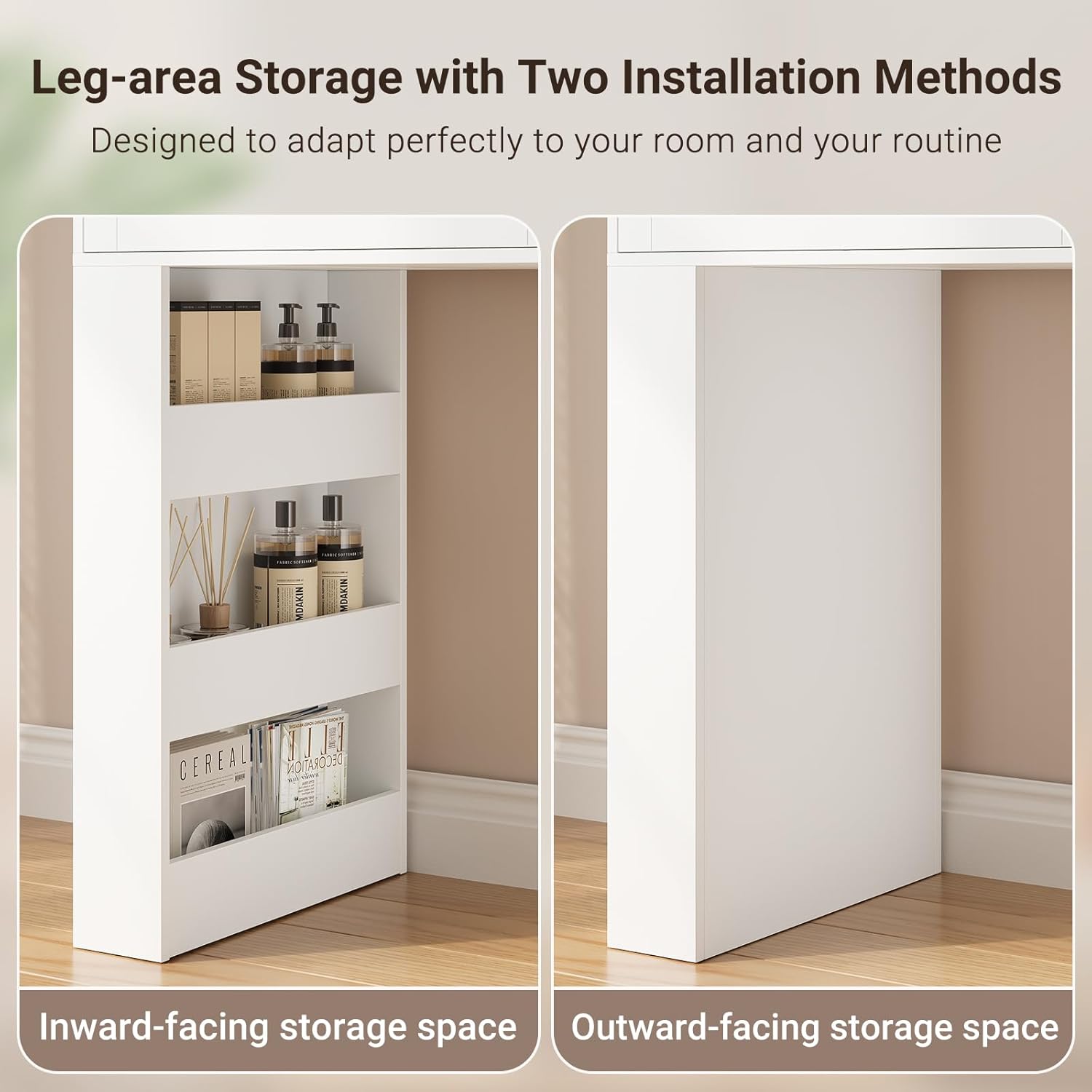
Image: The integrated charging station features two 125V/12A AC outlets and two 5V/2A USB ports.
- AC Outlets: Two standard three-prong 125V/12A AC outlets are provided for powering appliances such as hair dryers or curling irons.
- USB Ports: Two 5V/2A USB ports are available for charging electronic devices like phones or tablets.
- Ensure the vanity is properly plugged into a wall outlet for the power outlets to function.
4.3 Multi-Functional Configuration
The vanity is designed for flexible placement and can be configured in two main modes.

Image: The vanity can be arranged in an L-shaped or straight-line configuration to adapt to different room layouts.
- L-shaped Mode: The dresser cabinet can be positioned at an angle to the main vanity desk, creating an L-shaped setup.
- Straight-line Mode: The dresser cabinet can be aligned directly with the main vanity desk for a linear arrangement.
- The position of the dresser cabinet is adjustable to suit your space and needs.
4.4 Storage Features
The vanity offers extensive storage options to keep your items organized.
- Drawers: The vanity includes multiple drawers for cosmetics, accessories, and other personal items.
- Open Shelves: Integrated open shelves provide easy access storage for frequently used products.
- Jewelry Hooks: Metal hooks are provided for organizing necklaces, bracelets, and other jewelry.

Image: Metal hooks for organizing jewelry within the vanity's storage area.
5. Maintenance
Regular maintenance will help prolong the life and appearance of your vanity.
- Cleaning Surfaces: Wipe surfaces with a soft, damp cloth. Avoid abrasive cleaners or harsh chemicals that may damage the finish.
- Mirror Cleaning: Use a glass cleaner specifically designed for mirrors and a lint-free cloth. Do not spray cleaner directly onto the mirror; apply it to the cloth first.
- Electrical Components: Ensure all electrical components (mirror, outlets) remain dry. If any liquid spills, unplug immediately and allow to dry completely before re-use.
- Hardware: Periodically check all screws and fasteners to ensure they are tight. Retighten as necessary.
- Avoid Overloading: Do not place excessively heavy items on the vanity or in drawers to prevent structural damage.
6. Troubleshooting
If you encounter issues with your ELYKEN Makeup Vanity, refer to the following common problems and solutions.
| Problem | Possible Cause | Solution |
|---|---|---|
| LED Mirror does not light up. |
|
|
| Power Outlets (AC/USB) are not working. |
|
|
| Drawers are stiff or do not slide smoothly. |
|
|
| Vanity feels unstable or wobbly. |
|
|
7. Specifications
| Model Number | B0G2M4H541 |
| Brand | ELYKEN |
| Color | White |
| Material | Engineered Wood |
| Overall Dimensions (With Desk) | 81" (L) x 15.75" (D) x 56.3" (H) |
| Item Depth | 15.7 inches |
| Number of Drawers | 6 |
| LED Light Colors | Warm White (3000K), Neutral White (4500K), Cool White (6000K) |
| Power Outlets | 2 x 125V/12A AC Outlets |
| USB Ports | 2 x 5V/2A USB Ports |
| Assembly Required | Yes |
8. Warranty and Support
For warranty information or technical support, please refer to the contact details provided in your product packaging or reach out to the seller directly through the platform where the purchase was made.
When contacting support, please have your model number (B0G2M4H541) and purchase date available.