
Introduction
Thank you for choosing the FLEXISPOT 600lbs Big and Tall Office Chair. This manual provides detailed instructions for assembly, operation, maintenance, and troubleshooting to ensure optimal performance and longevity of your chair. Please read this manual thoroughly before use and retain it for future reference.
Important Safety Information
Prolonged sitting may cause low back discomfort. Do not exceed the maximum weight recommendation of 600 pounds. Choose color and style variations carefully to ensure safety. Always use adjustable features properly to avoid injury.
Product Overview
The FLEXISPOT Big and Tall Office Chair is engineered for comfort and durability, supporting users up to 600 lbs. It features a 3D layered cushion design for comprehensive body support, dynamic adjustable features for personalized comfort, and silent blade wheels for smooth movement across various floor types.

Image: Front view of the FLEXISPOT Big and Tall Office Chair, showcasing its robust design and plush cushioning.
Assembly Instructions
While some components may arrive pre-assembled, final assembly is required. It is recommended to have a second person assist with certain steps.
Unpacking
- Carefully open the packaging and remove all components.
- Place all parts on a clean, flat, and soft surface to prevent scratches.
- Verify that all components listed in the parts list are present.
Assembly Steps
- Attach the Wheels to the Base: Insert the blade wheels into the holes at the end of each leg of the chair base until they click securely into place.
- Install the Gas Lift: Place the gas lift cylinder into the center hole of the chair base.
- Attach the Mechanism to the Seat: Align the chair mechanism with the screw holes under the seat cushion. Secure it with the provided screws. Ensure the front of the mechanism faces the front of the seat.
- Connect Lumbar Adjustment (Important): Before attaching the backrest to the seat, ensure the lumbar adjustment mechanism is properly connected. Failure to do so may require disassembling the seat and backrest later.
- Attach the Backrest to the Seat: Align the backrest with the seat and secure it using the designated screws.
- Attach the Armrests: Secure the armrests to both the seat and backrest using the provided hardware.
- Connect Seat to Gas Lift: Carefully place the assembled seat and backrest onto the gas lift cylinder, ensuring it is centered and stable.
- Final Checks: Ensure all screws are tightened to approximately 80% to avoid stripping, as recommended, and that the chair is stable before use.

Image: An illustrative diagram detailing the main components and their connection points during assembly.
Operating Instructions
Height Adjustment
To adjust the chair's height, locate the lever on the right side beneath the seat. While seated, pull the lever up to lower the chair. To raise the chair, stand up slightly and pull the lever up. Release the lever at your desired height.
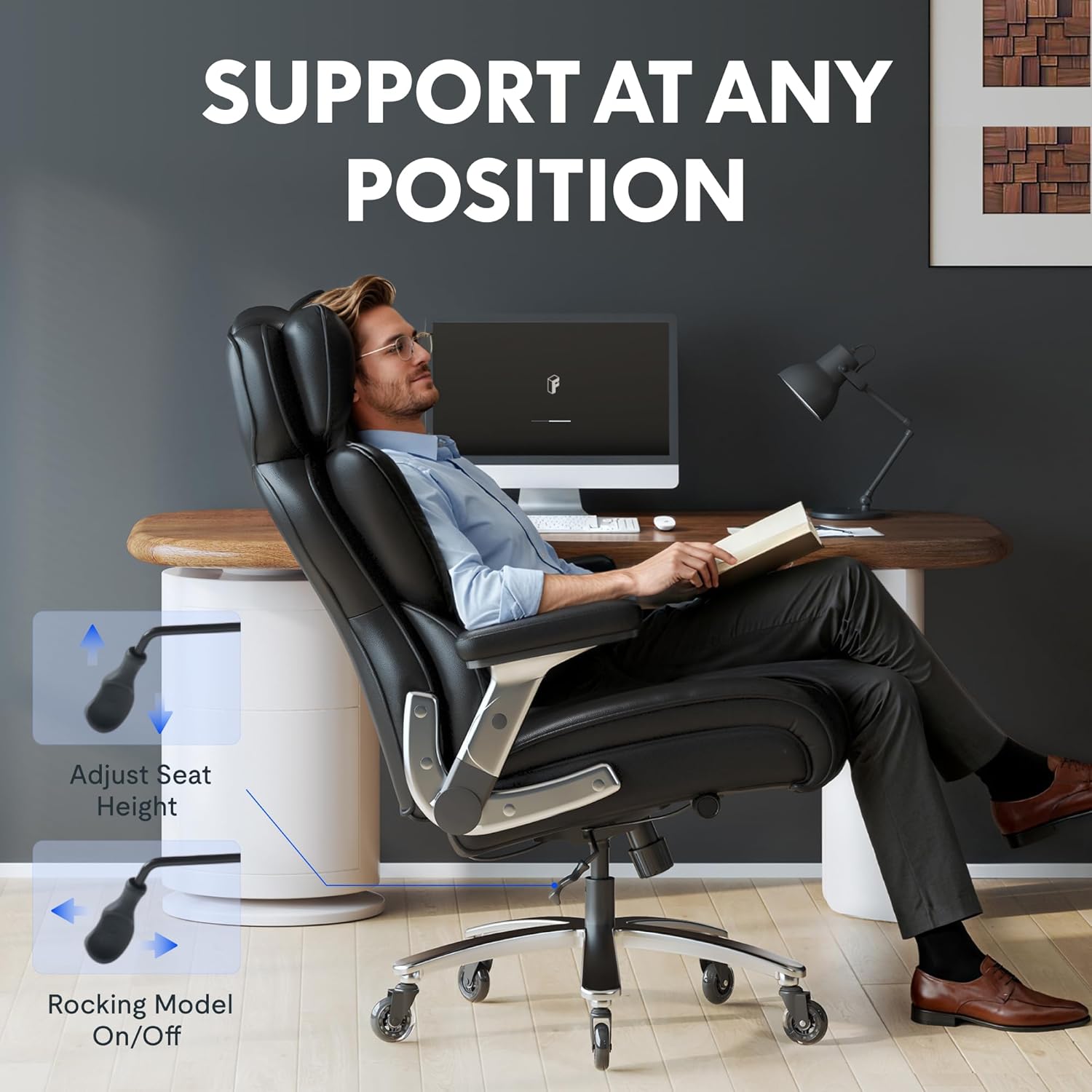
Image: A visual guide demonstrating the lever used for adjusting the seat height.
Recline Function
The chair features a rocking mechanism. To enable rocking, pull the lever on the left side of the chair outwards. To lock the chair in an upright position, push the lever inwards. The tension of the recline can be adjusted by turning the round knob located at the front underside of the seat. Turn clockwise to increase tension, counter-clockwise to decrease tension.

Image: Illustration of the chair's recline and rocking function, highlighting the control lever.
Lumbar Support Adjustment
The dynamic lumbar support can be adjusted to fit the natural curve of your spine. Locate the adjustment knob on the side of the chair, near the lumbar area. Rotate the knob to increase or decrease the lumbar support pressure to your preference.

Image: A visual representation of the adjustable lumbar support feature.
Armrest Adjustment
The 2D armrests can be adjusted for height and pivot. To adjust the height, press the button on the side of the armrest and move it up or down. Release the button to lock it in place. To pivot the armrest, simply rotate the top pad to your desired angle.

Image: Depiction of the 2D adjustable armrests, illustrating their height and pivot capabilities.
Product Videos
Video: Demonstrates the strength and comfort features of the chair for larger individuals.
Video: Highlights the chair's versatility for both work and relaxation.
Video: Showcases the oversized comfort design specifically for big and tall users.
Maintenance
Cleaning
- Leather Surfaces: Wipe with a soft, damp cloth. For stubborn stains, use a mild leather cleaner, testing on an inconspicuous area first. Avoid harsh chemicals or abrasive cleaners.
- Metal Parts: Clean with a soft, dry cloth.
General Care
- Regularly check all screws and bolts to ensure they are tight. Retighten if necessary, but do not overtighten.
- Keep the blade wheels clean from debris to ensure smooth movement.
- Avoid exposing the chair to direct sunlight or extreme temperatures to prevent material degradation.

Image: A detailed view of the chair's silent blade wheels, designed for smooth movement on carpet, wooden floors, and tile.
Troubleshooting
| Problem | Possible Cause | Solution |
|---|---|---|
| Chair does not recline or recoils too quickly. | Recline tension knob incorrectly adjusted. | Turn the tension knob (located under the seat, front) counter-clockwise to decrease tension for easier recline, or clockwise to increase tension. |
| Chair height adjustment is not working. | Gas lift lever not engaged or gas lift malfunction. | Ensure the height adjustment lever is fully pulled up. If the issue persists, contact customer support. |
| Chair is unstable or wobbly. | Loose screws or uneven assembly. | Check all assembly screws and tighten them securely. Ensure the chair is on a flat surface. |
| Wheels are not rolling smoothly. | Debris caught in wheels or damaged wheels. | Clean any hair or debris from the wheel casters. If wheels are damaged, consider replacement. |
Product Specifications
| Feature | Detail |
|---|---|
| Brand | FLEXISPOT |
| Model Number | B0G2LVKP9J |
| Color | Black-leather |
| Material | Metal, Leather, Foam |
| Product Dimensions (D x W x H) | 28"D x 31.4"W x 49.6"H |
| Seat Depth | 20.8 inches |
| Maximum Weight Recommendation | 600 Pounds |
| Arm Style | Rounded, 2D Adjustable |
| Leg Style | Wheels (Silent Blade Casters) |
| Back Style | Comfortable Back with Dynamic Lumbar Support |
| Certifications | SGS Class-4 lift, BIFMA certified |

Image: A comprehensive diagram illustrating the dimensions of the FLEXISPOT Big and Tall Office Chair.
Warranty and Support
FLEXISPOT products are designed for quality and durability. For specific warranty details regarding your FLEXISPOT 600lbs Big and Tall Office Chair, please refer to the warranty card included with your purchase or visit the official FLEXISPOT website.
If you encounter any issues or require assistance, please contact FLEXISPOT customer support. Have your model number (B0G2LVKP9J) and purchase date ready when contacting support.
Online Support: Visit the official FLEXISPOT website for FAQs, troubleshooting guides, and contact information.