
Introduction
Thank you for choosing the Jocoevol Corner Kitchen Pantry Storage Cabinet. This manual provides essential information for the safe assembly, proper operation, and effective maintenance of your new furniture. Please read these instructions carefully before beginning assembly and retain them for future reference.
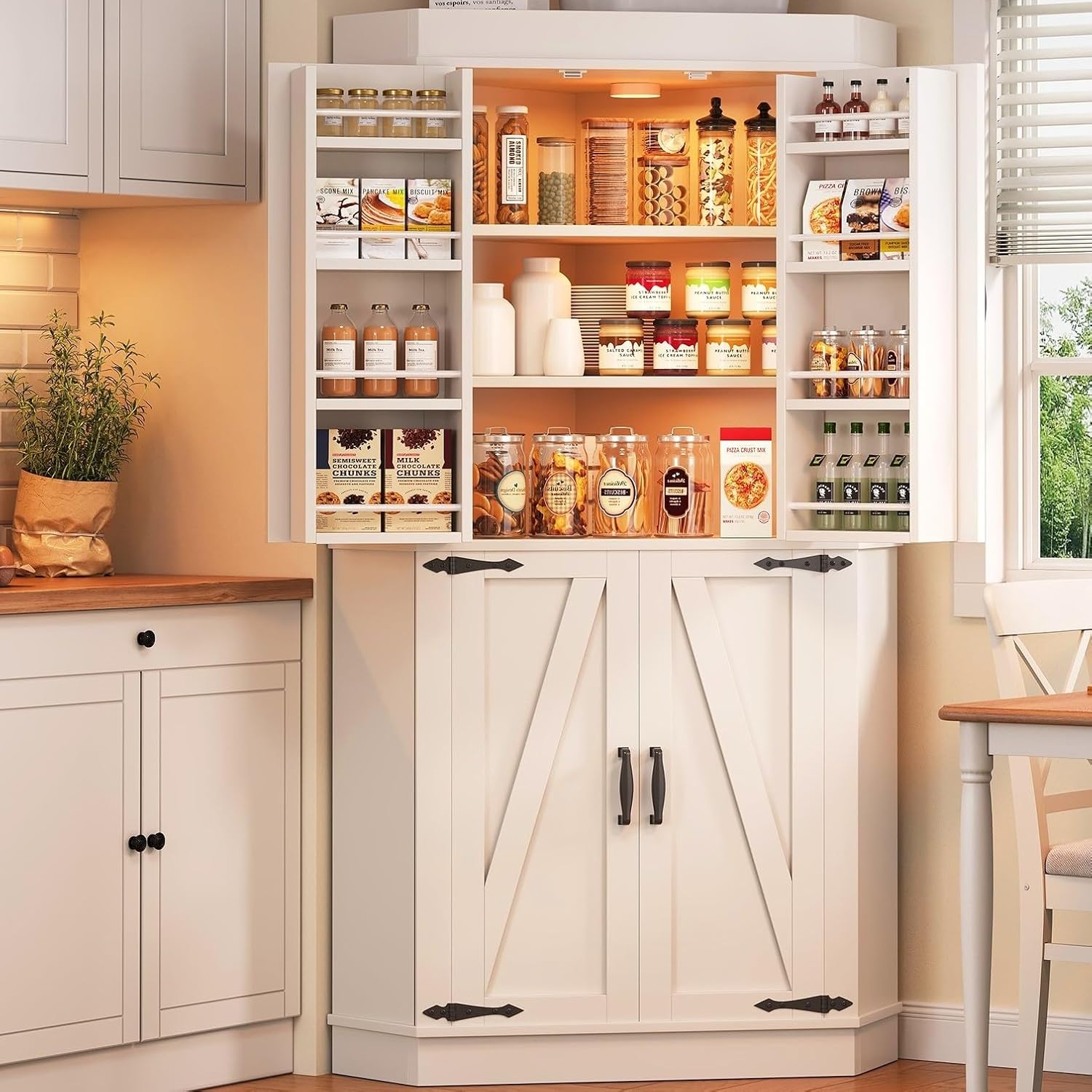
Image: The Jocoevol Corner Kitchen Pantry Storage Cabinet, showcasing its open upper section filled with pantry items and a closed lower section with barn-style doors, situated in a kitchen corner.
Safety Information
- Read All Instructions: Ensure you understand all assembly steps and safety warnings before proceeding.
- Two-Person Assembly: Assembly is recommended with two adults to prevent injury and ensure proper handling of components.
- Secure to Wall: Always install the provided anti-tip hardware to secure the cabinet to a wall. This prevents accidental tipping and potential injury, especially in households with children or pets.
- Weight Limits: Do not overload shelves. Distribute weight evenly. Refer to specifications for individual shelf weight capacities.
- Proper Tools: Use only the recommended tools for assembly.
- Keep Small Parts Away: During assembly, keep all small parts and hardware out of reach of children.
Package Contents
Before beginning assembly, verify that all components and hardware are present and undamaged. If any parts are missing or damaged, please contact customer support.
- Cabinet Panels (various sizes for top, bottom, sides, shelves, doors)
- Hardware Pack (screws, dowels, hinges, handles, anti-tip kit)
- Assembly Instructions Manual
Assembly Instructions
Prepare a clean, flat, and spacious area for assembly. It is recommended to have a second person assist with the assembly process.
Step 1: Identify Components and Dimensions
Unpack all parts and lay them out. Refer to the diagram below to identify each panel and understand the overall dimensions of the cabinet.

Image: A detailed diagram illustrating the various dimensions of the cabinet, including the overall height (70.5 inches), width (33.3 inches), and depth (23.6 inches) for both the upper and lower sections.
Step 2: Assemble the Base and Lower Cabinet Frame
Begin by connecting the base panels. Then, attach the side panels and the back panel to form the lower cabinet structure. Ensure all connections are secure.

Image: A close-up view of the top section of the cabinet, demonstrating its unique 90-degree corner design for space-saving placement.
Step 3: Install Lower Cabinet Shelves
Insert the fixed shelves into the designated slots. For adjustable shelves, use the provided shelf pins to set them at your desired height within the lower cabinet section.

Image: The interior of the lower cabinet section, featuring two wide shelves suitable for storing larger items.
Step 4: Assemble the Upper Cabinet Frame and Shelves
Repeat the framing process for the upper cabinet, attaching side and back panels. Install the fixed and adjustable shelves in the upper section, similar to the lower cabinet.

Image: The interior of the upper cabinet section, displaying several shelves and additional storage racks integrated into the doors, designed for smaller items.
Step 5: Attach Doors and Handles
Secure the hinges to the cabinet doors, then attach the doors to the cabinet frame. Ensure the doors align properly and open/close smoothly. Finally, install the decorative handles on all doors.

Image: A detailed view of the door shelves, demonstrating their capacity to hold various small items like spices or condiments, optimizing storage space.
Step 6: Install Anti-Tip Hardware
Position the cabinet in its desired corner. Using the provided anti-tip kit, secure the cabinet to the wall according to the instructions included with the hardware. This step is crucial for stability and safety.

Image: The fully assembled Jocoevol Corner Kitchen Pantry Storage Cabinet, with its barn-style doors closed, seamlessly integrated into a kitchen setting.
Operation
Adjusting Shelves
The cabinet features adjustable shelves in both upper and lower sections. To adjust a shelf, remove all items from it, lift the shelf, remove the shelf pins, reposition the pins to the desired height, and then place the shelf back onto the pins. Ensure all four pins are securely in place before reloading the shelf.
Door Usage
The cabinet doors open outwards. The upper doors feature integrated shelves for additional storage. Handle the doors gently to ensure longevity of the hinges and proper alignment.
Adjustable Lighting Modes (If Equipped)
Some models may include internal lighting with adjustable modes, often featuring a motion sensor. To activate or change modes, refer to the specific instructions provided with the lighting unit. This feature helps in easily locating items within the cabinet.

Image: The cabinet with its upper doors open, showcasing the interior shelves and the integrated lighting system, which can feature adjustable modes and motion sensing.
Maintenance
- Cleaning: Wipe surfaces with a soft, damp cloth. Avoid harsh chemicals or abrasive cleaners, which can damage the finish.
- Spills: Clean up spills immediately to prevent staining or damage to the engineered wood.
- Hardware Check: Periodically check all screws and connections to ensure they remain tight. Retighten if necessary.
- Stability: Regularly verify that the cabinet remains securely anchored to the wall with the anti-tip hardware.
Troubleshooting
- Cabinet is Wobbly:
• Ensure all screws are tightened.• Verify the cabinet is on a level surface.• Confirm the anti-tip hardware is properly installed and secured to the wall. - Doors Do Not Align:
• Adjust the hinges. Most hinges allow for minor adjustments to align doors horizontally, vertically, and in depth. Refer to hinge manufacturer instructions if specific adjustments are needed. - Missing or Damaged Parts:
• Do not attempt to force assembly with incorrect or damaged parts. Contact Jocoevol customer support for replacements.
Specifications
| Feature | Detail |
|---|---|
| Brand | Jocoevol |
| Model Name | pantry cabinet |
| Color | White |
| Product Dimensions | 23.6"D x 23.6"W x 70"H |
| Material | Engineered Wood |
| Mounting Type | Floor Mount |
| Installation Type | Freestanding |
| Number of Shelves | 12 (including door shelves) |
| Special Feature | Adjustable Shelf |
| Assembly Required | Yes |
| Item Weight | 60 pounds |
Warranty and Support
Jocoevol stands behind the quality of its products. For specific warranty details, please refer to the documentation included with your purchase or visit the official Jocoevol website. If you encounter any issues, require replacement parts, or have questions regarding assembly or use, please contact Jocoevol customer support. Contact information can typically be found on the product packaging or the brand's official website.