
1. Introduction
Thank you for choosing the VACTechPro F02 Lite Cordless Stick Vacuum Cleaner. This manual provides essential information for the safe and efficient use, maintenance, and troubleshooting of your new appliance. Please read it thoroughly before first use and keep it for future reference.

Image: The VACTechPro F02 Lite Cordless Stick Vacuum Cleaner in its full assembly, showcasing its sleek design.
2. Safety Instructions
To reduce the risk of fire, electric shock, or injury, always follow basic safety precautions when using an electrical appliance.
- Read all instructions before using the appliance.
- Do not use outdoors or on wet surfaces.
- Do not allow to be used as a toy. Close attention is necessary when used by or near children.
- Use only as described in this manual. Use only manufacturer's recommended attachments.
- Do not use with a damaged cord or plug. If appliance is not working as it should, has been dropped, damaged, left outdoors, or dropped into water, return it to a service center.
- Do not pull or carry by cord, use cord as a handle, close a door on cord, or pull cord around sharp edges or corners. Do not run appliance over cord. Keep cord away from heated surfaces.
- Do not unplug by pulling on cord. To unplug, grasp the plug, not the cord.
- Do not handle plug or appliance with wet hands.
- Do not put any object into openings. Do not use with any opening blocked; keep free of dust, lint, hair, and anything that may reduce airflow.
- Keep hair, loose clothing, fingers, and all parts of body away from openings and moving parts.
- Do not pick up anything that is burning or smoking, such as cigarettes, matches, or hot ashes.
- Do not use to pick up flammable or combustible liquids, such as gasoline, or use in areas where they may be present.
- Do not pick up toxic material, such as chlorine bleach, ammonia, or drain cleaner.
- Do not use without dust cup and/or filters in place.
- Turn off all controls before unplugging.
- Use extra care when cleaning on stairs.
- Do not charge the unit outdoors.
- Only use the charger supplied by the manufacturer.
3. Package Contents & Product Overview
Carefully unpack all components and check against the list below. Ensure all parts are present and undamaged.

Image: Diagram showing all included components: Motor (with dustbin and battery), Electric Floor Brush, Telescopic Metal Tube, Crevice Tool, 2-in-1 Brush, Cleaning Brush, High-Efficiency Filters (x2), Wall Mount for Charging Station, Adapter, and User Manual.
Components List:
- Main Motor Unit (with integrated dustbin and battery)
- Electric Floor Brush
- Telescopic Metal Tube
- Crevice Tool
- 2-in-1 Brush
- Cleaning Brush
- High-Efficiency Filters (x2)
- Wall Mount for Charging Station
- Power Adapter
- User Manual
4. Setup
4.1 Assembly
- Attach the Telescopic Tube: Insert the telescopic metal tube into the main motor unit until it clicks securely into place.
- Attach the Floor Brush: Connect the electric floor brush to the other end of the telescopic tube, ensuring it locks firmly.
- Install Wall Mount (Optional): Choose a suitable location for the wall mount. Secure it to the wall using the provided screws and anchors. This allows for convenient storage and charging.
4.2 Charging the Battery
Before first use, fully charge the vacuum cleaner. The VACTechPro F02 Lite features a DualCore Battery Management System for efficient charging.
- Connect the power adapter to the charging port on the main motor unit.
- Plug the adapter into a wall outlet.
- The charging indicator light will illuminate. Allow approximately 4-5 hours for a full charge.
- Once fully charged, the indicator light may change or turn off, depending on the model. Unplug the adapter.

Image: Illustration of flexible charging and storage options, showing the vacuum mounted on a wall charger and also charging directly via a power adapter.
5. Operating Instructions
5.1 Power On/Off and Suction Modes
- Power On: Press the power button on the main unit to start the vacuum cleaner. It will typically start in Eco mode.
- Change Suction Mode: Press the mode button to switch between the two available power levels:
- Eco Mode: Provides approximately 50 minutes of runtime, ideal for daily cleaning of hard floors and tiles.
- Max Mode: Provides approximately 20 minutes of runtime, suitable for stubborn dirt on carpets and in corners, offering 50 kPa suction power from its 550W motor.
- Power Off: Press the power button again to turn off the vacuum cleaner.

Image: The vacuum cleaner head demonstrating powerful suction on both hard floor and carpet, highlighting its 50kPa suction capability.
5.2 Using Attachments
The VACTechPro F02 Lite comes with various attachments for versatile cleaning:
- Electric Floor Brush: Best for general floor cleaning, including carpets and hard floors. Features an intelligent corner lamp (green LED) to illuminate dust in dark areas.
- Crevice Tool: Ideal for narrow gaps, corners, and hard-to-reach areas like window sills, sofa crevices, and car interiors.
- 2-in-1 Brush: Use the brush mode for delicate surfaces like keyboards or upholstery, and the nozzle mode for wider suction on furniture.

Image: The vacuum cleaner head with its green LED light illuminating dust under furniture, demonstrating the intelligent corner lamp design.

Image: The vacuum cleaner in action, illustrating its deep cleaning capabilities on various surfaces.
5.3 Self-Standing Design
The VACTechPro F02 Lite features a self-standing design, allowing you to conveniently pause cleaning and store the vacuum upright without needing to lean it against a wall or bend down.

Image: The VACTechPro F02 Lite standing upright independently in a living room setting, demonstrating its self-standing feature.
6. Maintenance
Regular maintenance ensures optimal performance and extends the lifespan of your vacuum cleaner.
6.1 Emptying the Dustbin
- Ensure the vacuum is turned off.
- Press the dustbin release button to detach the dustbin from the main unit.
- Hold the dustbin over a trash can and press the bottom release latch to open the dustbin and empty its contents.
- Close the dustbin lid and reattach the dustbin to the main unit until it clicks.

Image: Two panels showing the process of emptying the dustbin into a trash can and washing the filter under running water, illustrating simple and practical maintenance.
6.2 Cleaning the Filters
The F02 Lite features an 8-stage cyclonic dust separation system and a fully sealed construction with 99.99% filtration efficiency. Regular cleaning of the filters is crucial.
- Remove the dustbin as described above.
- Twist and pull out the filter assembly from the dustbin.
- Separate the individual filter components (HEPA filter, mesh filter).
- Rinse all washable filter components under cold running water until the water runs clear. Do not use detergents.
- Allow all filter parts to air dry completely for at least 24 hours before reassembling and placing them back into the vacuum cleaner. Using damp filters can damage the motor.
- The vacuum includes two sets of high-efficiency filters, allowing for rotation during drying.

Image: An exploded view of the vacuum cleaner's filtration system, highlighting the 8-stage cyclonic separation and conical filter for 99.99% filtration efficiency.
6.3 Cleaning the Brush Roll
The optimized anti-tangle system with V-shaped comb teeth helps prevent hair from wrapping around the brush roll. However, occasional cleaning may still be necessary.
- Ensure the vacuum is off and disconnected from power.
- Release the brush roll cover on the electric floor brush.
- Remove the brush roll.
- Use the provided cleaning brush or scissors to cut and remove any tangled hair or debris from the brush roll.
- Reinsert the brush roll and secure the cover.
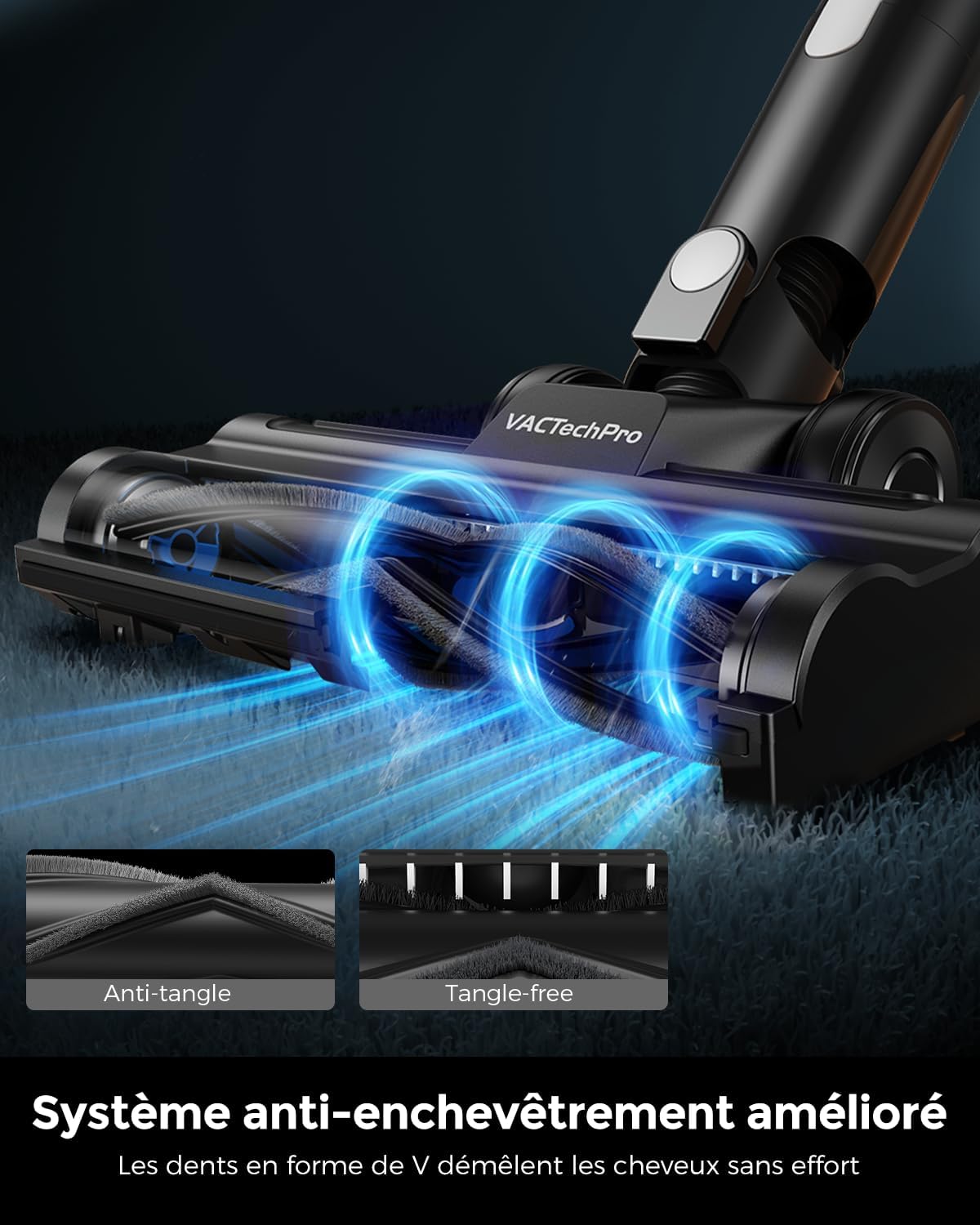
Image: A close-up of the electric floor brush, illustrating the V-shaped anti-tangle comb design that prevents hair from wrapping around the brush roll.
7. Troubleshooting
If you encounter any issues with your VACTechPro F02 Lite, please refer to the following table for common problems and solutions.
| Problem | Possible Cause | Solution |
|---|---|---|
| Vacuum does not turn on. | Battery is depleted. Battery not properly installed. |
Charge the battery fully. Ensure the battery is securely clicked into place. |
| Low suction power. | Dustbin is full. Filters are clogged. Brush roll is tangled. Nozzle/tube is blocked. |
Empty the dustbin. Clean and dry the filters. Clean the brush roll. Check and clear any blockages in the tube or attachments. |
| Brush roll not spinning. | Brush roll is tangled with hair/debris. Brush roll is not properly installed. |
Clean the brush roll. Reinstall the brush roll correctly. |
| Short runtime. | Battery not fully charged. Using Max mode continuously. Battery degradation. |
Ensure battery is fully charged. Use Eco mode for longer cleaning sessions. Contact customer support if battery life significantly decreases over time. |
If the problem persists after trying these solutions, please contact VACTechPro customer support.
8. Specifications
| Feature | Detail |
|---|---|
| Brand | VACTechPro |
| Model Name | F02 Lite |
| Wattage | 550 Watts |
| Suction Power | Up to 50 kPa |
| Run Time | Up to 50 minutes (Eco Mode), Up to 20 minutes (Max Mode) |
| Battery Type | Lithium-ion |
| Number of Power Levels | 2 |
| Filtration System | 8-stage Cyclonic Dust Separation, 99.99% Filtration Efficiency |
| Special Features | DualCore Battery Management System, Fully Sealed Construction, Smart Corner Lamp Design, Optimized Anti-tangle System |
| Recommended Uses | Carpeted floors, hard floors, upholstery, stairs, pet hair removal |
| Dimensions (L x W x H) | 35L x 15W x 22H centimeters |
| Color | Black and White |
9. Warranty and Support
VACTechPro products are manufactured to high-quality standards. For information regarding warranty coverage, please refer to the warranty card included in your package or visit the official VACTechPro website.
For technical support, replacement parts, or any other inquiries, please contact VACTechPro customer service through the contact information provided on the official website or your purchase platform.
Note: No official product videos with creator_type: "Seller" were found in the provided data to embed in this manual.