
1. Introduction
Welcome to the BYSAUD Full Size Loft Bed with Desk, LED Lights & Charging Station. This manual provides essential information for the safe assembly, operation, and maintenance of your new loft bed. Please read all instructions carefully before beginning assembly and retain this manual for future reference.
2. Safety Information
Your safety is paramount. Adhere to the following guidelines:
- Weight Limit: The maximum weight capacity for the loft bed is 400 pounds. Do not exceed this limit.
- Guardrails: Ensure all guardrails are properly installed and secured before use. The top bunk is not suitable for children under 6 years of age.
- Ladder Safety: Always use the provided ladder for access to the top bunk. Ensure the ladder is stable before climbing.
- Assembly: Assemble the bed on a soft, clean surface to prevent damage. Two or more adults are recommended for assembly.
- Regular Checks: Periodically check all bolts and connections to ensure they remain tight.
- Mattress Requirements: Use a mattress that is appropriate for the bed's dimensions and does not exceed the maximum recommended thickness to maintain guardrail effectiveness.
- Anti-Tipping Device: Utilize the anti-tipping device to secure the bed to the wall, preventing accidental tipping.
This image illustrates the robust guardrails, the anti-tipping device for wall attachment, and the padded headboard designed for user protection and comfort on the loft bed.
3. Package Contents
Verify that all components are present before beginning assembly. If any parts are missing or damaged, please contact customer support.

This image displays an exploded view of all individual components, including metal frames, wooden panels, drawers, and hardware, ensuring all parts are accounted for prior to assembly.
The package includes:
- Metal Frame Components
- Wooden Panels for Desk and Shelves
- 5 Fabric Drawers
- L-Shaped Desk
- 2 Storage Shelves
- Power Outlets (Charging Station)
- RGB LED Light Strips
- Movable Ladder
- Guardrails
- Assembly Hardware (screws, bolts, Allen wrench)
- Installation Manual
4. Setup and Assembly
Follow these steps for proper assembly. It is recommended to have at least two people for this process.
- Preparation: Clear a spacious area for assembly. Lay out all parts and hardware, matching them against the package contents list.
- Frame Assembly: Begin by assembling the main metal frame components as shown in the diagram. Secure all connections with the provided bolts and Allen wrench.
- Desk and Shelf Installation: Attach the L-shaped desk and storage shelves to the frame. Ensure they are level and securely fastened.
- Ladder and Guardrails: Install the movable ladder and all guardrails. Confirm that the guardrails are firmly attached to prevent movement.
- Drawer Assembly: Assemble the fabric drawers and place them in their designated storage areas under the desk.
- LED Lights and Charging Station: Install the RGB LED light strips according to the separate instructions provided with the lights. Mount the charging station onto the desk.
- Final Checks: Double-check all connections for tightness. Ensure the bed is stable and does not wobble.
This video provides a visual step-by-step guide for assembling the BYSAUD Full Size Loft Bed, demonstrating the correct placement and fastening of each component.

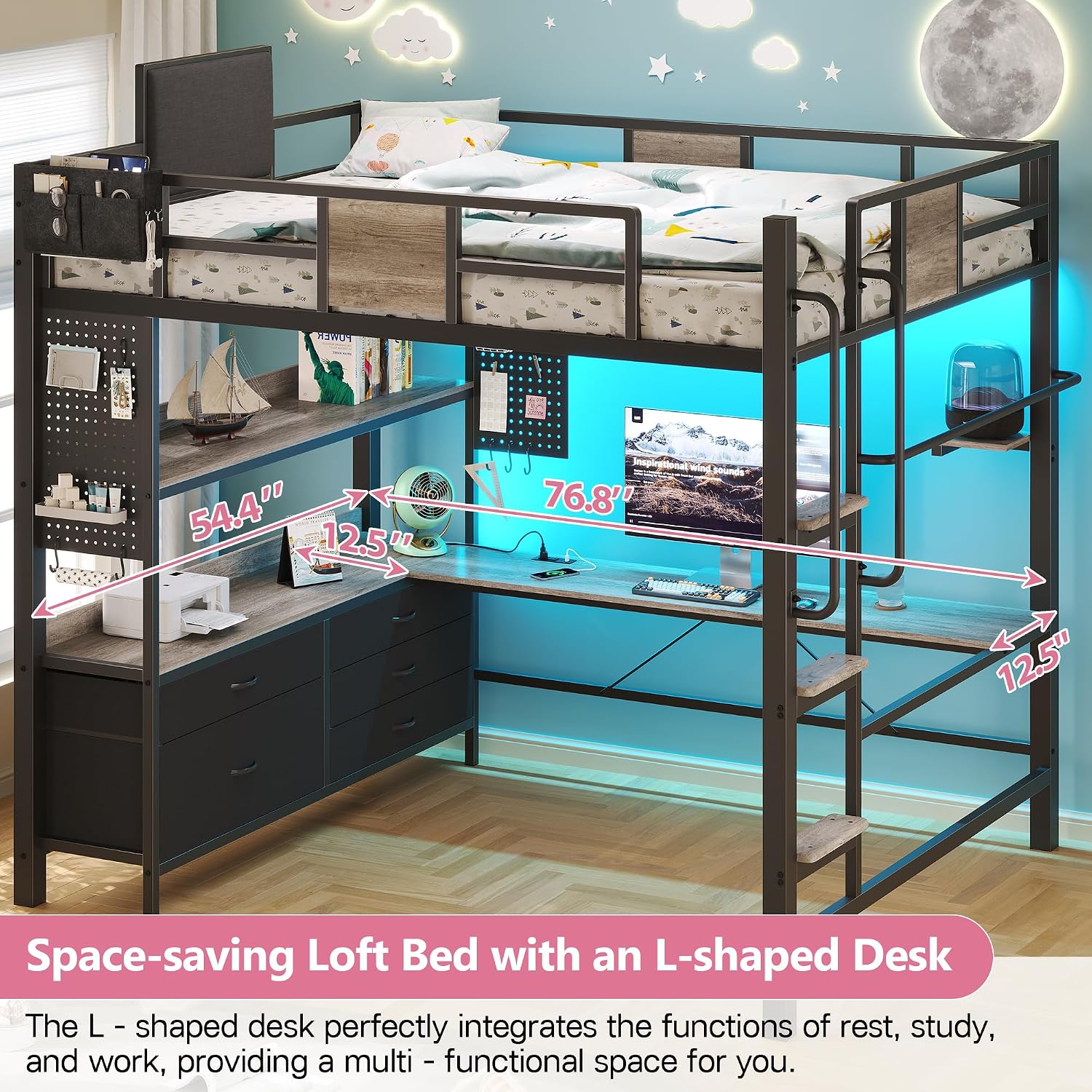
This image shows the complete BYSAUD Full Size Loft Bed after assembly, featuring the integrated L-shaped desk, storage shelves, and the LED lighting system.
5. Operating Instructions
5.1. LED Lights
The RGB LED lights can be controlled via a remote control or a dedicated smartphone application. Refer to the separate LED light instruction manual for detailed pairing and operation instructions.
- Power On/Off: Use the power button on the remote or app.
- Color Selection: Choose from over 60,000 colors.
- Mode Selection: Select from 29 flashing modes.
- Brightness Adjustment: Adjust light intensity as desired.

This image displays the RGB LED lights integrated into the loft bed, along with the remote control and smartphone app interface for managing colors, modes, and brightness.
5.2. Charging Station
The integrated charging station provides convenient power access for your electronic devices.
- AC Outlets: 2 x 125V/12A AC outlets.
- USB Ports: 1 x 5V/2.1A USB-A port and 1 x 5V/2.1A USB-C port.
- Usage: Plug in devices directly. Ensure total power draw does not exceed the station's capacity.

This image shows a close-up of the L-shaped desk, highlighting the integrated charging station with two AC outlets, one USB-A port, and one USB-C port, suitable for various electronic devices.
5.3. Storage Drawers
The five fabric drawers are flexible and can be relocated to different positions under the desk or shelves to suit your storage needs.

This image illustrates the five fabric storage drawers, demonstrating how they can be flexibly arranged and repositioned within the loft bed's under-desk area to optimize storage.
6. Maintenance
- Cleaning: Wipe the metal frame and wooden surfaces with a dry cloth. Avoid abrasive cleaners or harsh chemicals.
- Fabric Drawers: Spot clean fabric drawers with a mild detergent and damp cloth if necessary. Allow to air dry completely.
- Hardware: Periodically inspect all bolts, screws, and connections. Tighten any loose hardware to ensure the bed's stability and safety.
- LED Lights: Ensure the LED strips are free from dust and debris. Do not attempt to repair damaged LED strips; contact customer support for replacement.
7. Troubleshooting
| Problem | Possible Cause | Solution |
|---|---|---|
| Bed is wobbly or unstable. | Loose hardware connections. | Check and tighten all bolts and screws. Ensure the anti-tipping device is properly installed. |
| LED lights not working. | Power connection issue, remote battery dead, or light strip damage. | Verify power connection. Replace remote battery. If still not working, contact customer support. |
| Charging station not providing power. | Not plugged into a wall outlet, circuit breaker tripped, or device compatibility issue. | Ensure the charging station is plugged into a live wall outlet. Check your home's circuit breaker. Test with a different device. |
| Ladder feels insecure. | Ladder not properly hooked or secured to the bed frame. | Re-attach the ladder, ensuring it is firmly seated in its designated hooks or attachment points. |
8. Specifications
- Model: Loft Bed
- Brand: BYSAUD
- Size: Full Size
- Color: Oak Gray
- Product Dimensions: 76.8"L x 57.5"W x 71.3"H
- Weight Limit: 400 Pounds
- Item Weight: 131 Pounds
- Material: Metal (Frame), Wood (Panels), Microfiber (Headboard)
- Special Features: RGB LED Lights, Charging Station (2 AC, 1 USB-A, 1 USB-C), 5 Storage Drawers, L-Shaped Desk, Movable Ladder, Guardrails, Anti-Tipping Device.
- Assembly Required: Yes

This image provides a detailed diagram of the BYSAUD Full Size Loft Bed with all key dimensions labeled, including length, width, height, and specific measurements for the desk and bed frame.
9. Warranty and Support
Specific warranty details are not provided in the product information. For any questions, missing parts, or support needs, please contact BYSAUD customer service through the retailer where the product was purchased. Please have your purchase receipt and model number ready.