
1. Important Safety Instructions
Please read all instructions carefully before using this appliance. Retain this manual for future reference.
- Do not use outdoors or on wet surfaces.
- Do not allow to be used as a toy. Close attention is necessary when used by or near children.
- Use only as described in this manual. Use only manufacturer's recommended attachments.
- Do not use with damaged cord or plug. If appliance is not working as it should, has been dropped, damaged, left outdoors, or dropped into water, return it to a service center.
- Do not pull or carry by cord, use cord as a handle, close a door on cord, or pull cord around sharp edges or corners. Do not run appliance over cord. Keep cord away from heated surfaces.
- Do not unplug by pulling on cord. To unplug, grasp the plug, not the cord.
- Do not handle plug or appliance with wet hands.
- Do not put any object into openings. Do not use with any opening blocked; keep free of dust, lint, hair, and anything that may reduce airflow.
- Keep hair, loose clothing, fingers, and all parts of body away from openings and moving parts.
- Do not pick up anything that is burning or smoking, such as cigarettes, matches, or hot ashes.
- Do not pick up flammable or combustible liquids, such as gasoline, or use in areas where they may be present.
- Do not pick up toxic material (e.g., chlorine bleach, ammonia, drain cleaner).
- Do not use without dust cup and/or filters in place.
- Turn off all controls before unplugging.
- Use extra care when cleaning on stairs.
- Do not use to pick up large debris or sharp objects as this may damage the vacuum.
2. Product Overview
The Tikom V750 is a versatile cordless stick vacuum cleaner designed for efficient cleaning of various surfaces. It features a powerful motor, multiple suction modes, and a comprehensive filtration system.
Included Components
The package includes the following items:
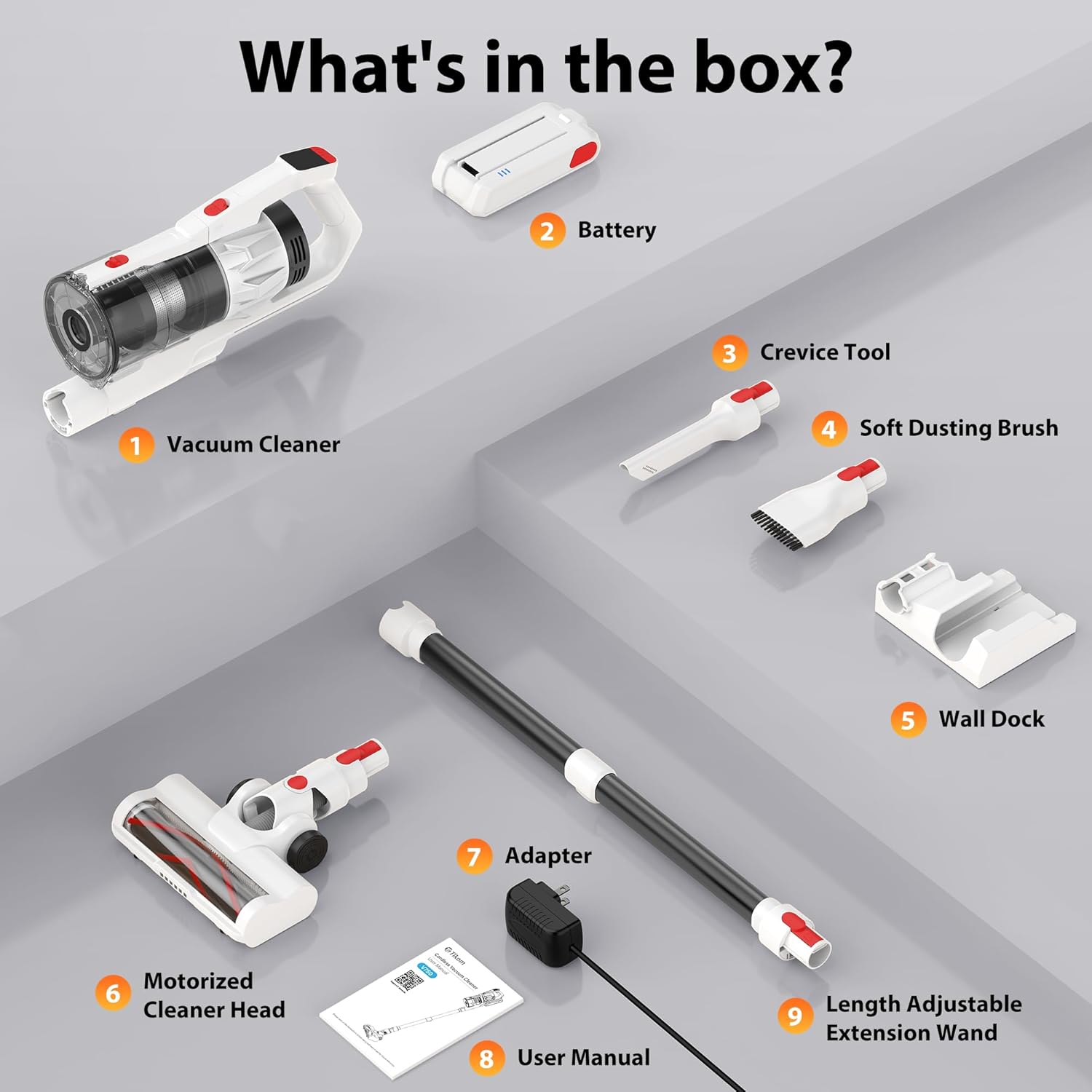
- Vacuum Cleaner Main Body
- Rechargeable Battery
- Crevice Tool
- Soft Dusting Brush
- Wall Dock (with 4 screws and plastic expansion anchors)
- Motorized Cleaner Head
- Power Adapter/Charger
- User Manual
- Length Adjustable Extension Wand
- HEPA Filter (pre-installed)
3. Setup and Assembly
Initial Charging
Before first use, fully charge the battery. The detachable 7*2600 mAh battery can be charged in two ways:
- Directly on the vacuum: Connect the power adapter to the charging port on the vacuum cleaner.
- Independently: Remove the battery from the vacuum and connect the power adapter directly to the battery.
A full charge typically takes 4-5 hours. The LED display will indicate charging status.

The battery provides approximately 50 minutes of runtime on low suction and 25 minutes on high suction.
Assembling the Vacuum
- Insert the extension wand into the main vacuum body until it clicks securely.
- Attach the motorized cleaner head to the other end of the extension wand until it clicks.
- For handheld use, attach desired accessories (crevice tool or soft dusting brush) directly to the main vacuum body.
Wall-Mount Installation
The included wall dock provides convenient storage and charging. Choose a suitable location near a power outlet. Use the provided screws and plastic expansion anchors to securely mount the dock to the wall. Ensure the vacuum cleaner cannot be started while the battery is charging on the wall mount for safety.

4. Operating Instructions
Powering On/Off and Suction Modes
Press the power button to turn the vacuum cleaner on or off. The Tikom V750 offers two suction levels:
- Low Suction: Suitable for light cleaning and extending battery life.
- High Suction: Provides maximum power for stubborn dirt and debris.
Toggle between suction modes using the dedicated button on the handle.

LED Smart Display
The intuitive color LED display provides real-time information:
- Battery Level Icon: Shows remaining battery charge.
- Suction Level Indicator: Displays current suction mode (Low/High).
- Malfunction Warnings: Alerts you to potential issues, such as a brush roll error.

Using Attachments and Features
The V750 comes with various attachments for versatile cleaning:

- Motorized Cleaner Head: Ideal for floors and carpets. Features a 180° rotatable design and 6 LED lights for cleaning dark areas. The V-shaped roller brush is designed to prevent hair tangling.
- Soft Dusting Brush: Use for delicate surfaces, furniture, and keyboards.
- Crevice Tool: Perfect for narrow gaps, corners, and hard-to-reach areas.
- Extension Wand: Connects the main body to the cleaner head or other tools for extended reach, allowing cleaning of high areas like ceilings or curtains.

The vacuum is suitable for various floor types, including hard floors and carpets.

5. Maintenance
Regular maintenance ensures optimal performance and extends the life of your Tikom V750.
Emptying the Dust Cup
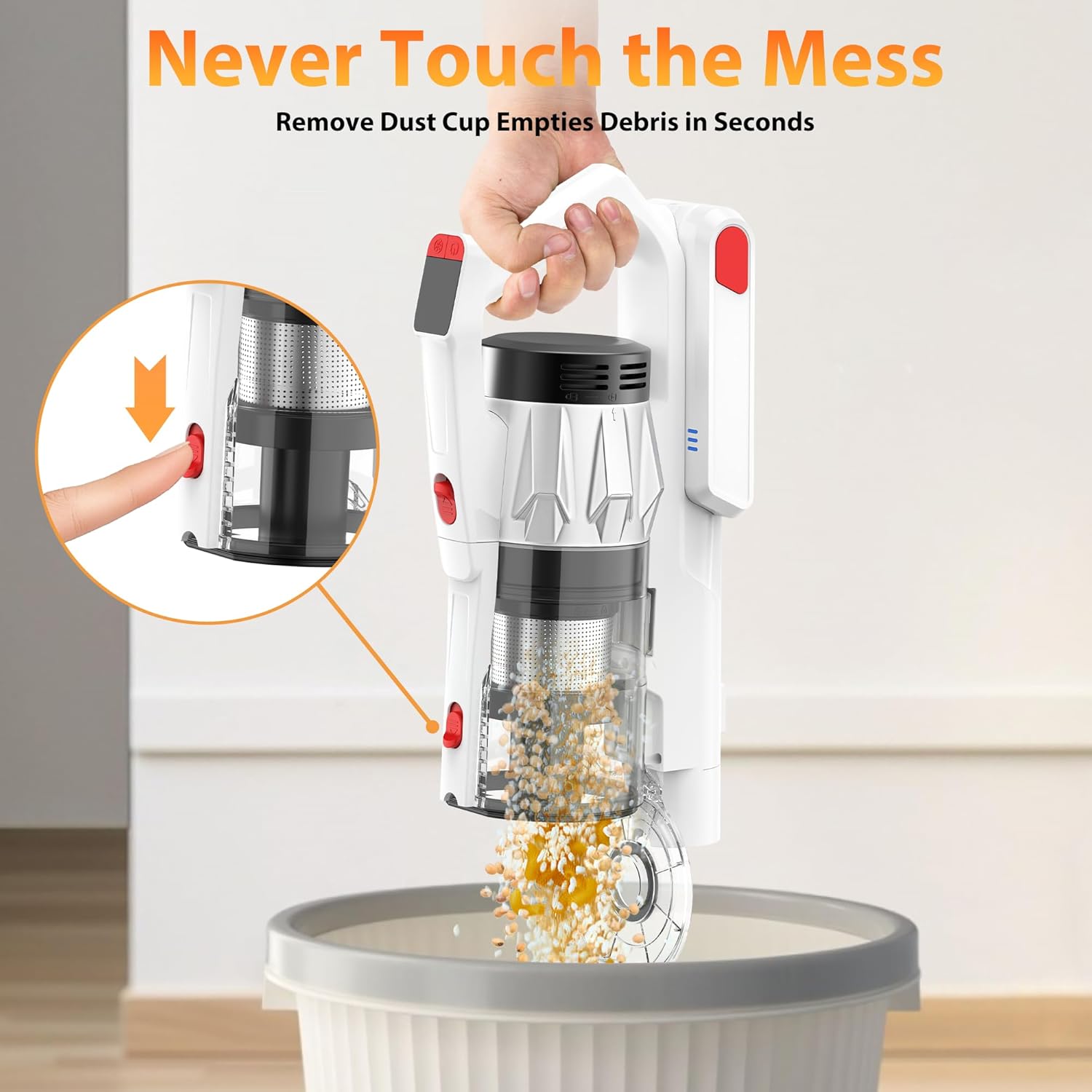
The 1.5L dust cup features a one-click pop-up lid for easy emptying. Position the dust cup over a trash bin and press the release button to open the lid and dispose of debris without touching it.
Cleaning the Filters
The Tikom V750 utilizes a 7-stage HEPA filtration system. The entire dust cup and HEPA filter are detachable and washable.
- Detach the dust cup from the main body.
- Remove the HEPA filter and other filter components from the dust cup.
- Rinse the dust cup and filters under running water until clean.
- Allow all components to air-dry completely before reassembling. Do not use the vacuum with wet filters.

Cleaning the Brush Roll
The motorized cleaner head features an anti-tangle V-shaped roller brush. Periodically check the brush roll for tangled hair or debris. To clean:
- Turn off the vacuum and disconnect the cleaner head.
- Locate the brush roll release mechanism (usually a latch or button).
- Remove the brush roll.
- Use scissors or a brush to remove any tangled hair or fibers.
- Reinsert the brush roll and secure it in place.

6. Troubleshooting
If you encounter issues with your Tikom V750, refer to the following common problems and solutions:
| Problem | Possible Cause | Solution |
|---|---|---|
| Vacuum does not turn on | Battery is not charged or not properly installed. | Ensure battery is fully charged and securely clicked into place. |
| Low suction power | Dust cup is full, filters are clogged, or brush roll is obstructed. | Empty dust cup. Clean or replace filters. Remove any obstructions from the brush roll. |
| Brush roll not spinning | Obstruction in brush roll, or brush roll error indicated on LED display. | Turn off vacuum and remove any tangled hair or debris from the brush roll. Check for damage. |
| Short battery runtime | Battery not fully charged, or operating on high suction mode continuously. | Ensure battery is fully charged. Use low suction mode for longer runtime. Battery life naturally degrades over time. |
| Unusual noise | Obstruction in the air path or brush roll. | Check and clear any blockages in the nozzle, wand, or dust cup. Clean the brush roll. |
If the problem persists after attempting these solutions, please contact Tikom customer support.
7. Specifications
| Feature | Specification |
|---|---|
| Model Name | V750 |
| Brand | Tikom |
| Motor Power | 500W |
| Suction Power | Up to 45,000Pa |
| Battery Type | 7*2600mAh Lithium-Ion (Detachable) |
| Runtime | Up to 50 minutes (Low suction), 25 minutes (High suction) |
| Charging Time | 4-5 hours |
| Dust Cup Capacity | 1.5 Liters |
| Filtration System | 7-Stage HEPA Filtration |
| Special Features | LED Smart Display, Anti-Tangle V-Roller Brush, LED Headlights, Wall Dock, One-Click Dust Emptying |
| Surface Recommendation | All floors (Hard Floor, Carpet) |
| Item Weight | 5.5 Pounds |
| Dimensions (L x W x H) | 10.3"L x 7.6"W x 17.1"H |
8. Warranty and Support
For warranty information or technical support, please refer to the warranty card included with your product or contact Tikom customer service directly. You can typically find contact details on the official Tikom website or through your purchase platform.
Please have your model number (V750) and purchase date ready when contacting support.

