Introduction
Thank you for choosing the HOMCOM LED Bathroom Mirror. This manual provides essential information for the safe installation, operation, and maintenance of your new mirror. Please read these instructions thoroughly before installation and keep them for future reference.

Image: The HOMCOM LED Bathroom Mirror, an oval mirror with illuminated edges, installed in a modern bathroom setting above a white sink with a gold faucet. The mirror displays a warm light glow.
Safety Information
- Electrical Installation: Installation must be performed by a qualified electrician in accordance with local wiring regulations. Ensure the power supply is disconnected before installation or maintenance.
- Water Resistance: This mirror is IP44 rated, meaning it is protected against splashing water. Do not immerse the mirror in water.
- Glass Handling: Handle the mirror with care. Although made of tempered glass, excessive force can cause breakage. In case of breakage, tempered glass shatters into small, less sharp pieces for safety.
- Cleaning: Use only soft, damp cloths and mild, non-abrasive cleaners. Avoid harsh chemicals that may damage the mirror surface or electrical components.
- Ventilation: Ensure adequate ventilation in the bathroom to prevent excessive humidity buildup, which can affect electronic components over time.
Package Contents
Verify that all components are present before beginning installation:
- 1 x HOMCOM LED Bathroom Mirror
- 1 x Mounting Hardware Kit (screws, wall anchors)
- 1 x Junction Box
- 1 x Instruction Manual

Image: A brown cardboard box with the HOMCOM logo and text indicating '1x PACKAGE', representing the product packaging.
Specifications
| Feature | Specification |
|---|---|
| Model Number | FR834-888V00CR |
| Dimensions | 80L x 50W cm |
| Power | 26 Watts |
| Material | 4mm Tempered Glass |
| Light Colors | Warm White (3000K), Natural (4500K), Cold White (6500K) |
| Brightness | Dimmable (10% - 100%) |
| Features | Anti-fog, Touch Sensor, Memory Function, Front & Back Lighting |
| Water Resistance | IP44 Rated |
| Weight | 3.5 kg |

Image: A diagram illustrating the mirror's dimensions: 80 cm in height, 50 cm in width, and 4 cm in depth.

Image: A visual representation of the mirror's features, including 3 adjustable light colors, dimmable brightness, anti-fog function, memory function, compatibility with touch and wall switches, front and back lighting, HD imaging, and IP44 water resistance.
Setup and Installation
Professional installation is required. This mirror is designed for wall mounting and requires hardwiring to an electrical circuit. Ensure the power supply is turned off at the main breaker before proceeding.
- Choose Location: Select a suitable wall location in your bathroom, ensuring it is within reach of the electrical wiring.
- Mark Drilling Points: Use the provided template or measure carefully to mark the drilling points for the mounting hardware.
- Drill Holes: Drill holes at the marked points and insert wall anchors if necessary.
- Mount Bracket: Secure the mounting bracket to the wall using the provided screws.
- Electrical Connection: Connect the mirror's wiring to your household electrical circuit inside the provided junction box. Ensure all connections are secure and insulated. This step must be performed by a qualified electrician.
- Hang Mirror: Carefully hang the mirror onto the wall bracket, ensuring it is securely seated.
- Restore Power: Once installation is complete and all connections are checked, restore power at the main breaker.

Image: An illustration demonstrating two ways to control the mirror's functions: via a wall switch (not included) or directly using the integrated touch sensor on the mirror surface.
Operating Instructions
The mirror features a smart touch control system and memory function.
- Power On/Off: Briefly touch the power icon on the mirror to turn the light on or off.
- Adjust Light Color: With the light on, a short press on the touch sensor will cycle through the three light color temperatures: Warm White (3000K), Natural (4500K), and Cold White (6500K).
- Adjust Brightness (Dimmable): With the light on, a long press on the touch sensor will adjust the brightness from 10% to 100%. Release your finger when the desired brightness is reached.
- Anti-Fog Function: The anti-fog function activates automatically when the mirror light is turned on. It ensures a clear reflection even in humid conditions.
- Memory Function: The mirror will remember your last light color and brightness setting when turned off and on again.

Image: Instructions for operating the mirror's lighting. A short press on the touch sensor changes the light color (3000K Warm, 4500K Natural, 6500K Cold), while a long press adjusts the brightness.

Image: A visual demonstration of the anti-fog function, showing a clear central image of a woman in a humid bathroom environment.
Maintenance
- Cleaning the Mirror Surface: Use a soft, lint-free cloth and a glass cleaner or a mixture of water and mild soap. Spray the cleaner onto the cloth, not directly onto the mirror, to avoid liquid seeping into the electrical components. Wipe gently.
- Cleaning the Frame/Edges: Wipe with a soft, damp cloth. Avoid abrasive materials or harsh chemicals.
- Regular Inspection: Periodically check the electrical connections and mounting hardware for any signs of wear or loosening. Ensure the power is off before inspection.
- Avoid Over-Wetting: Do not allow water to accumulate on the mirror's edges or electrical components.
Troubleshooting
| Problem | Possible Cause | Solution |
|---|---|---|
| Mirror light does not turn on. | No power supply; Loose electrical connection; Faulty touch sensor. | Check circuit breaker; Verify electrical connections (by a qualified electrician); Contact customer support. |
| Anti-fog function not working. | Mirror light is off; Malfunction. | Ensure mirror light is on; Contact customer support if problem persists. |
| Light brightness or color cannot be adjusted. | Incorrect operation; Faulty touch sensor. | Refer to 'Operating Instructions' for correct touch gestures; Contact customer support. |
| Mirror surface is cracked or damaged. | Impact damage. | Discontinue use immediately to prevent injury. Contact customer support for replacement options. |
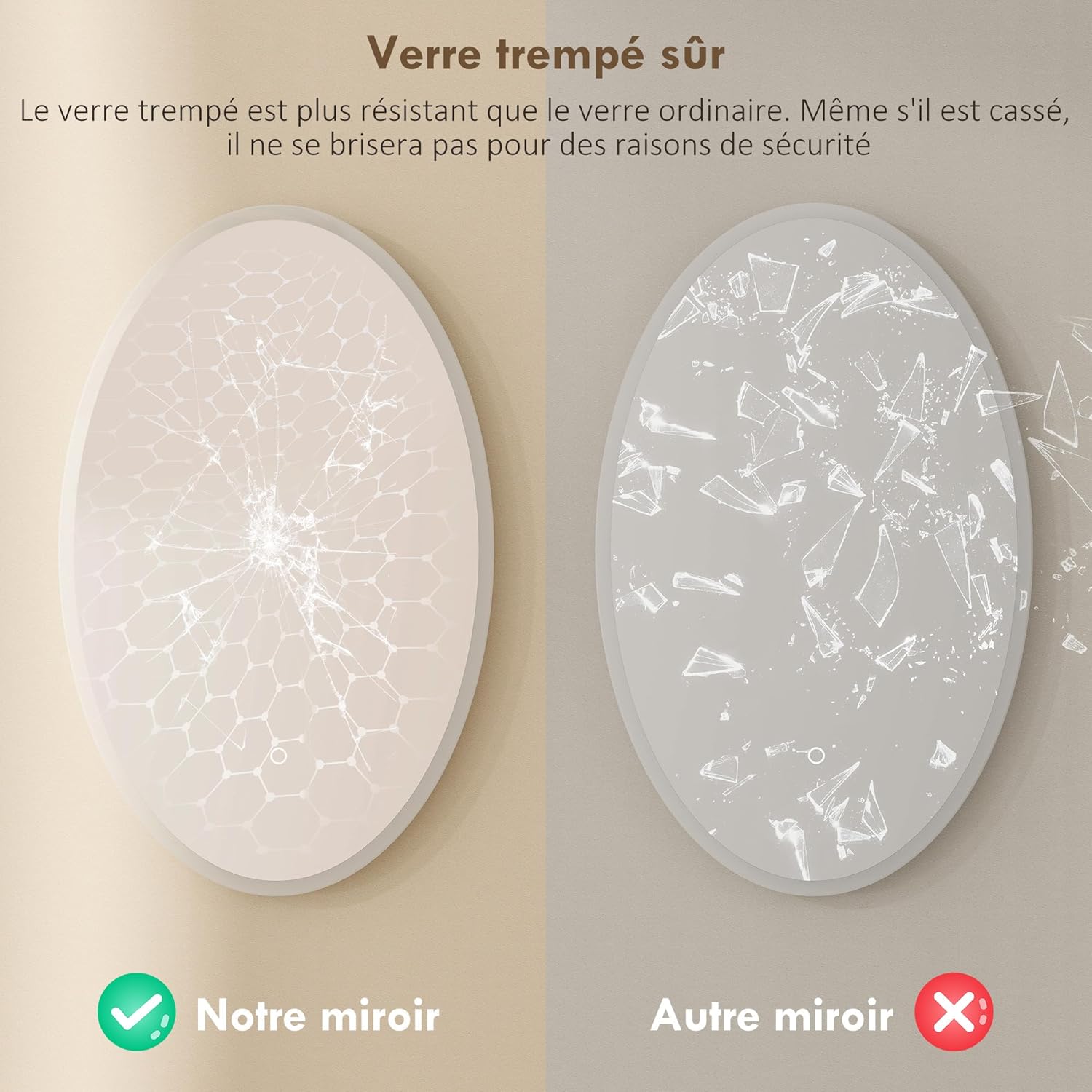
Image: A comparison showing the safety of tempered glass (left), which breaks into small, less hazardous pieces, versus ordinary glass (right), which breaks into large, sharp shards.
Warranty and Support
For warranty information, please refer to the terms and conditions provided at the time of purchase or visit the official HOMCOM website. If you encounter any issues or require technical assistance, please contact HOMCOM customer support with your model number (FR834-888V00CR) and proof of purchase.
HOMCOM Customer Service: www.aosom.com (Aosom is the parent company of HOMCOM)


