
1. Introduction
The Elitech DIT-220 is a non-contact infrared thermometer designed for quick and accurate temperature measurements across various applications, including industrial, automotive, HVAC, and home use. It features laser targeting, adjustable emissivity, and a backlit display for ease of use. This manual provides essential information for safe and effective operation of your device.
2. Safety Information
WARNING: Laser Radiation
- Do not stare directly into the laser beam.
- Avoid direct eye exposure to the laser.
- Do not point the laser at people or animals.
- Use caution when operating the laser in areas where reflective surfaces may be present.
- Keep the device out of reach of children.
- Do not attempt to disassemble or modify the device.
3. Package Contents
- 1 x Elitech DIT-220 Infrared Thermometer
- 2 x AAA Batteries
- 1 x User Manual
4. Product Overview
Familiarize yourself with the components of your Elitech DIT-220 Infrared Thermometer.
- Trigger: Press to activate the thermometer and take a measurement.
- LCD Display: Shows temperature readings, mode indicators, and battery status.
- Mode Key: Cycles through various functions and settings.
- °C/°F Button: Toggles between Celsius and Fahrenheit temperature units.
- Laser Button: Activates or deactivates the laser pointer.
5. Setup
5.1 Battery Installation
- Locate the battery compartment cover on the handle of the thermometer.
- Open the battery compartment cover.
- Insert two AAA batteries, ensuring correct polarity (+ and -).
- Close the battery compartment cover securely.
6. Operating Instructions
6.1 Taking a Measurement
- Point the thermometer at the target surface.
- Press and hold the trigger. The laser pointer (if activated) will indicate the measurement area.
- The temperature reading will appear on the LCD display. The device will display "SCAN" during measurement and "HOLD" when the trigger is released, showing the last measured temperature.
- Release the trigger to hold the reading. The device will automatically shut off after a period of inactivity to conserve battery.

6.2 Laser Pointer Activation
Press the dedicated laser button to toggle the laser pointer on or off. The laser helps to accurately identify the center of the measurement area.
6.3 Switching Temperature Units (°C/°F)
Press the °C/°F button to switch between Celsius and Fahrenheit temperature scales.
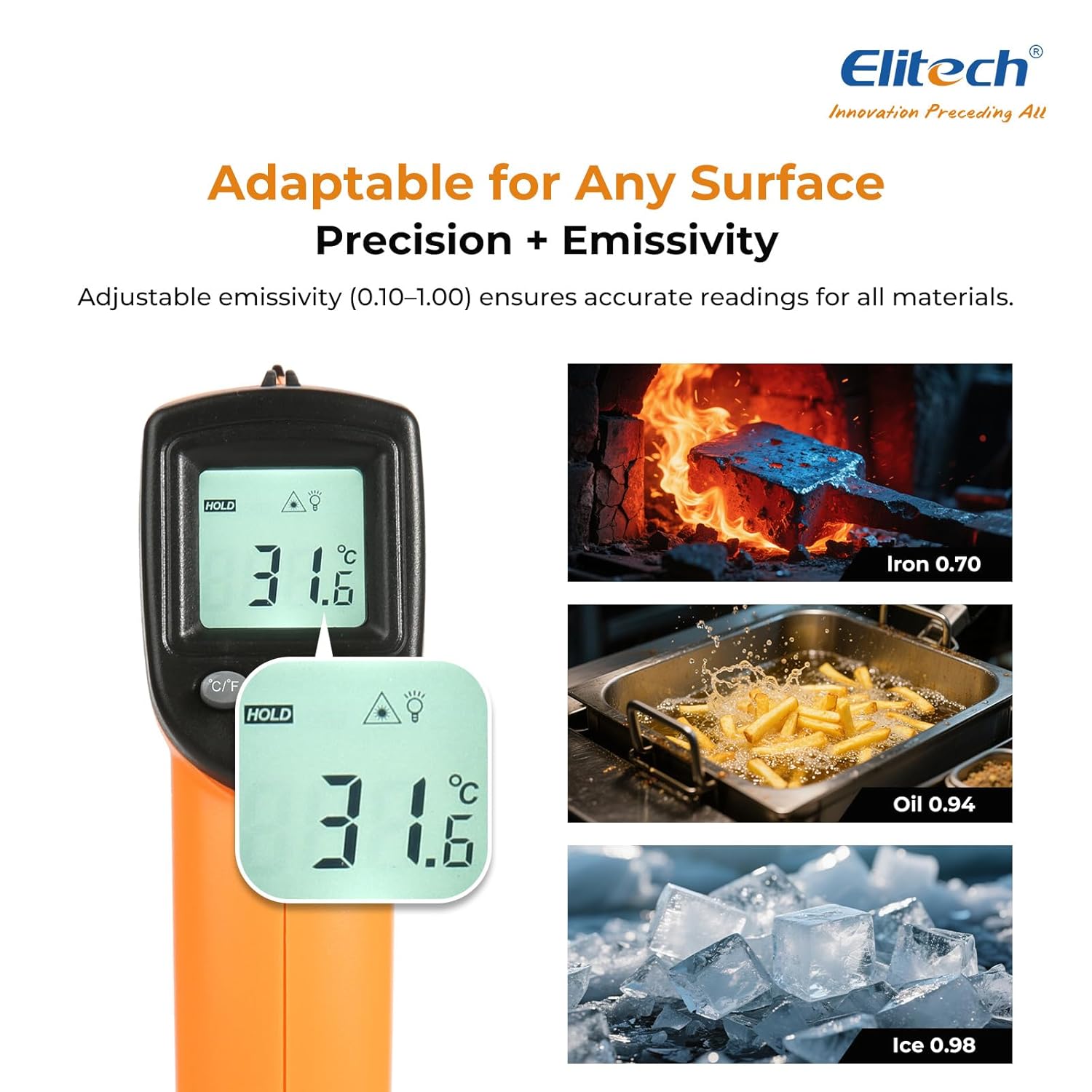
6.4 Adjustable Emissivity
Emissivity (ε) is the ability of a material to emit thermal energy. Different materials have different emissivity values. For accurate measurements, adjust the emissivity setting (0.10-1.00) to match the target material.
- Press the MODE button until "EMS" appears on the display.
- Use the °C/°F and Laser buttons to adjust the emissivity value.
- Press the MODE button again to confirm and exit.

6.5 MAX/MIN/AVG Modes
The DIT-220 can display maximum, minimum, or average temperatures during a continuous scan.
- While holding the trigger, press the MODE button repeatedly to cycle through MAX (maximum), MIN (minimum), and AVG (average) temperature displays.
- The corresponding indicator will appear on the LCD.

6.6 Distance-to-Spot Ratio (D:S)
The D:S ratio indicates the size of the measurement area relative to the distance from the target. For the DIT-220, the D:S ratio is 12:1, meaning at a distance of 12 inches, the measurement spot diameter is 1 inch. For optimal accuracy, ensure the target spot is entirely within the measurement area.

7. Maintenance
7.1 Cleaning
- Clean the lens with a soft, damp cloth or cotton swab. Do not use abrasive cleaners.
- Wipe the device casing with a damp cloth. Do not immerse the device in water.
7.2 Storage
- Store the thermometer in a cool, dry place when not in use.
- Remove batteries if the device will not be used for an extended period to prevent leakage.
8. Troubleshooting
| Problem | Possible Cause | Solution |
|---|---|---|
| No display/Device won't turn on | Low or dead batteries; Incorrect battery installation | Replace batteries; Check battery polarity |
| Inaccurate readings | Incorrect emissivity setting; Distance too far/too close; Lens is dirty | Adjust emissivity; Ensure correct D:S ratio; Clean the lens |
| Laser not working | Laser disabled; Device malfunction | Press the laser button to enable; Contact support if issue persists |
| "Lo" or "Hi" displayed | Temperature is outside the measurement range | Ensure the target temperature is within -50°C to 530°C (-58°F to 986°F) |
9. Specifications
- Model: DIT-220 (EU-DIT-220)
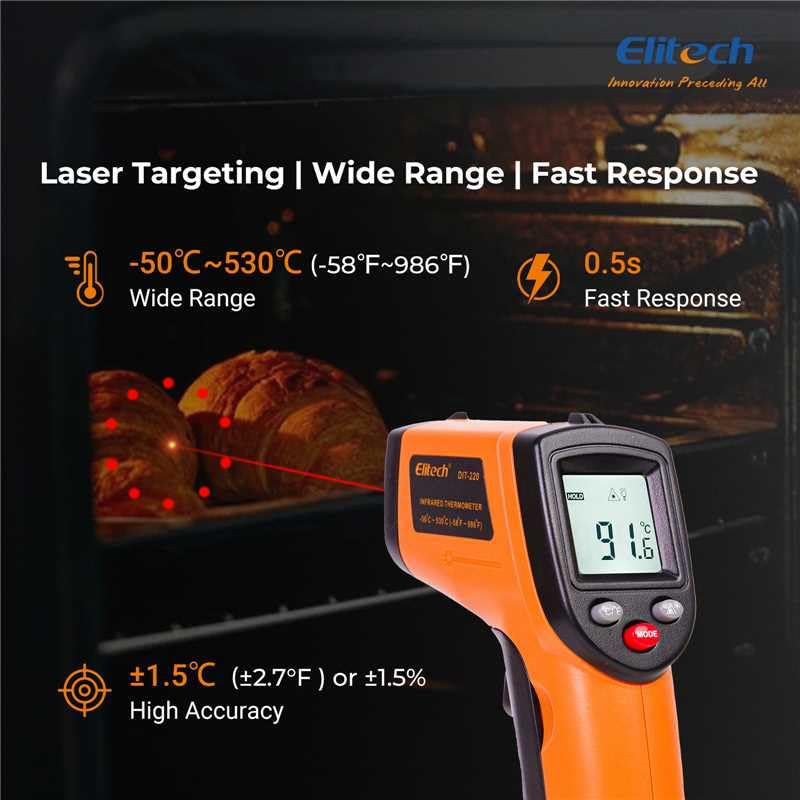
- Temperature Range: -50°C to 530°C (-58°F to 986°F)
- Accuracy: ±1.5°C (±2.7°F) or ±1.5% (whichever is greater) for 0°C to 530°C; ±3°C (±5°F) for -50°C to 0°C
- Response Time: 0.5 seconds (500 ms)
- Distance-to-Spot Ratio (D:S): 12:1
- Emissivity: Adjustable from 0.10 to 1.00
- Spectral Response: 8-14 µm
- Laser Power: <1mW (Class 2)
- Display: Backlit LCD
- Power Source: 2 x AAA batteries (included)
- Automatic Shut-off: Yes
- Operating Environment: 0°C to 50°C (32°F to 122°F), 10% to 90% RH non-condensing
- Storage Environment: -20°C to 60°C (-4°F to 140°F), <80% RH non-condensing
- Material: Plastic
- Color: Orange
10. Warranty and Support
Elitech products are designed for reliability and performance. This product comes with a standard manufacturer's warranty against defects in materials and workmanship. For specific warranty details, technical support, or service inquiries, please refer to the warranty card included with your product or visit the official Elitech website.
For further assistance, please contact Elitech customer support.