
Introduction
This manual provides essential instructions for the safe and efficient operation, maintenance, and troubleshooting of your Icango caddy G3 Electric Golf Cart. Please read this manual thoroughly before using the product and retain it for future reference.
What's in the Box
Verify that all components are present upon unpacking:
- Electric Golf Caddy (G3 unit)
- Charger
- Remote Control
- Umbrella Holder
- Phone Holder
Setup
Unfolding the Cart
The G3 Electric Golf Cart features a 3-motion folding design for compact storage and easy transport. To unfold:
- Place the folded cart on a flat, stable surface.
- Release the main latch mechanism.
- Extend the handle upwards until it locks into place.
- Ensure all wheels are securely extended and locked.
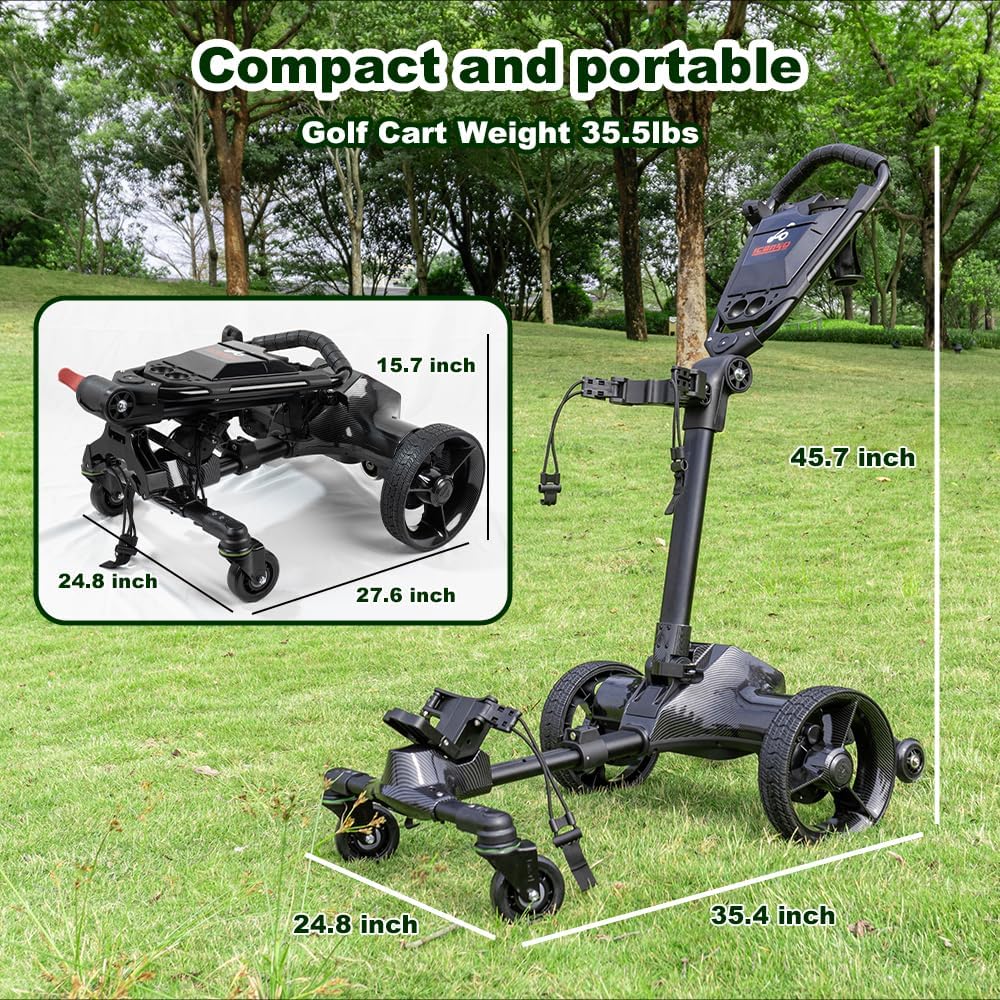
Image: The Icango caddy G3 Electric Golf Cart shown in both its unfolded and folded states, highlighting its compact dimensions for storage and transport.
Attaching Accessories
- Umbrella Holder: Securely attach the umbrella holder to the designated slot on the handle.
- Phone Holder: Mount the phone holder to the handle for easy access to the app or your device.
Operating Modes
The G3 Electric Golf Cart offers multiple control options to suit your preference:
1. Auto-Follow Mode
This mode allows the cart to automatically follow you, maintaining a constant distance. Activate this feature using the remote control.

Image: A golfer walking on a green, with the G3 Electric Golf Cart following behind her, demonstrating the auto-follow feature.
2. Remote Control Mode
Use the provided remote control for precise steering and speed adjustments. The remote also features a one-touch recall function to bring the cart back to you.

Image: The G3 Electric Golf Cart on a golf course, surrounded by icons illustrating its various operating modes, including auto-follow, cruise control, one-click recall, remote control, and manual push.
3. APP Control
Download the dedicated mobile application to control the cart via your smartphone. The app allows you to adjust speed, direction, following distance, cruise control distance, and monitor mileage and battery level.

Image: A hand holding a smartphone showing the Icango caddy G3 app interface, which allows users to adjust various settings and monitor cart data.
4. Manual Push Mode
For situations where electronic assistance is not desired, the cart can be manually pushed like a traditional golf push cart.
5. Cruise Control
Set a constant speed for the cart to maintain, allowing for a relaxed pace across the course. This feature can be managed via the remote or the mobile app.
Battery and Charging
The G3 Electric Golf Cart is powered by a 10.4Ah rechargeable lithium-ion battery, designed to provide power for up to 54 holes on a single charge.

Image: A detailed illustration of the internal structure of a high-capacity lithium battery, representing the power source for the G3 golf cart.
Charging Instructions:
- Connect the charger to the charging port on the cart.
- Plug the charger into a standard electrical outlet.
- The indicator light on the charger will show the charging status (e.g., red for charging, green for fully charged).
- Allow sufficient time for a full charge before use.
Note: The Auto Follow function requires battery power and activation via the handheld remote control.
Folding and Storage
To fold the G3 Electric Golf Cart for storage or transport:
- Ensure the cart is powered off.
- Release the locking mechanisms on the handle and frame.
- Follow the 3-motion folding sequence to collapse the cart into its compact form.
- Once folded, the cart can be easily placed in a car trunk or stored in a small space.
Image: The G3 Electric Golf Cart shown folded and placed inside the trunk of a car, demonstrating its portability and ease of storage.
Safety and Maintenance
Safety Features:
- Anti-Tipping Wheels: Equipped with double anti-tip rear wheels to maintain stability on inclines up to 20 degrees.
- UL 2271-Certified: The battery system meets UL 2271 safety standards.
- IPX5 Waterproof Rating: Provides protection against water splashes from any direction.
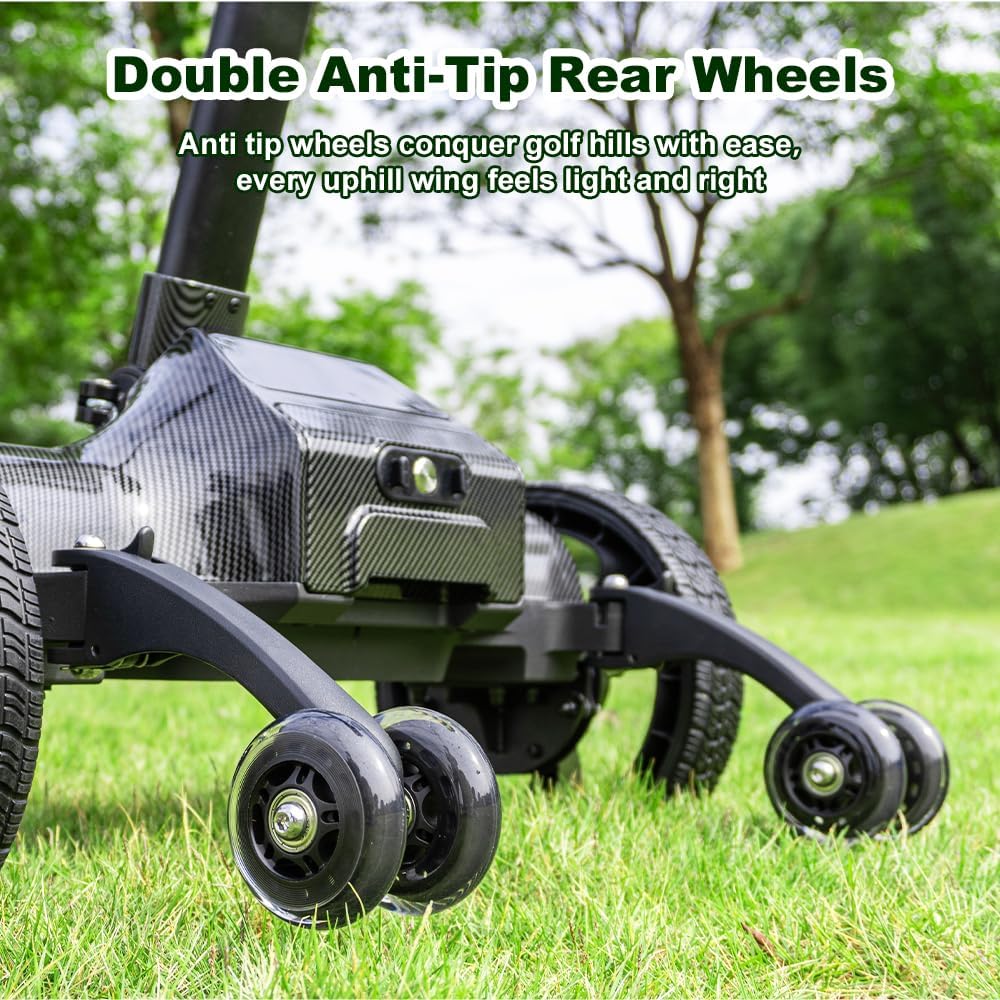
Image: A close-up view of the G3 Electric Golf Cart's double anti-tip rear wheels, designed to provide stability when traversing uphill terrain.

Image: A golfer walking up a 20-degree incline on a golf course, with the G3 Electric Golf Cart effortlessly following behind, showcasing its powerful dual 80W motors.
General Maintenance:
- Regularly clean the cart with a damp cloth. Avoid using harsh chemicals.
- Check tire pressure periodically.
- Ensure all moving parts are free of debris.
- Store the cart in a dry, cool place when not in use.
Troubleshooting
| Problem | Possible Cause | Solution |
|---|---|---|
| Cart does not power on. | Low battery, power switch off. | Charge the battery. Ensure the power switch is in the ON position. |
| Auto-follow not working. | Remote not activated, low remote battery, obstruction. | Ensure remote is powered on and paired. Check remote battery. Clear any obstructions between you and the cart. |
| Remote control unresponsive. | Remote battery low, out of range, interference. | Replace remote battery. Move closer to the cart. Avoid areas with strong electromagnetic interference. |
| App connection issues. | Bluetooth off, app not updated, cart not discoverable. | Ensure Bluetooth is enabled on your device. Update the app to the latest version. Restart the cart and try connecting again. |
Specifications
- Model Name: G3
- Brand: Icango caddy
- Item Weight: 42 Pounds
- Item Dimensions (LxWxH): 35.4 x 24.8 x 45.7 inches (unfolded)
- Folded Dimensions (LxWxH): 27.6 x 24 x 15.7 inches
- Material: Aluminum
- Battery: 10.4Ah Lithium-ion (up to 54 holes)
- Waterproof Rating: IPX5
- Max Incline: 20 degrees
- Manufacturer: NERCH
Warranty and Support
The Icango caddy G3 Electric Golf Cart comes with a 1-year warranty. For technical assistance, troubleshooting, or warranty claims, please contact the professional after-sales team, available 7 days a week, 24 hours a day.
For step-by-step setup videos and additional support, please refer to the manufacturer's official resources or contact customer service.
Official Product Video
Video: Demonstrates the Icango caddy G3 Electric Golf Cart's auto-follow, remote control, and anti-tipping features on a golf course, along with its compact folding design.
