
1. Introduction
This manual provides detailed instructions for the setup, operation, maintenance, and troubleshooting of your WARCAT Automatic Self-Cleaning Litter Box. Please read this manual thoroughly before using the product to ensure proper function and safety for your pets.
2. Safety Information
Observe the following safety precautions to prevent injury to pets or users and damage to the device:
- Do not allow children to operate or play with the litter box.
- Ensure the device is placed on a stable, level surface.
- Keep the power cord away from water and heat sources.
- Do not immerse the main unit in water. Clean with a damp cloth only.
- Only use clumping cat litter as specified in this manual.
- The litter box is equipped with infrared and gravity sensors to detect your cat's presence. Do not interfere with these sensors during operation.
- Unplug the device before performing any maintenance or cleaning.
3. Package Contents
Verify that all components are present in the package:
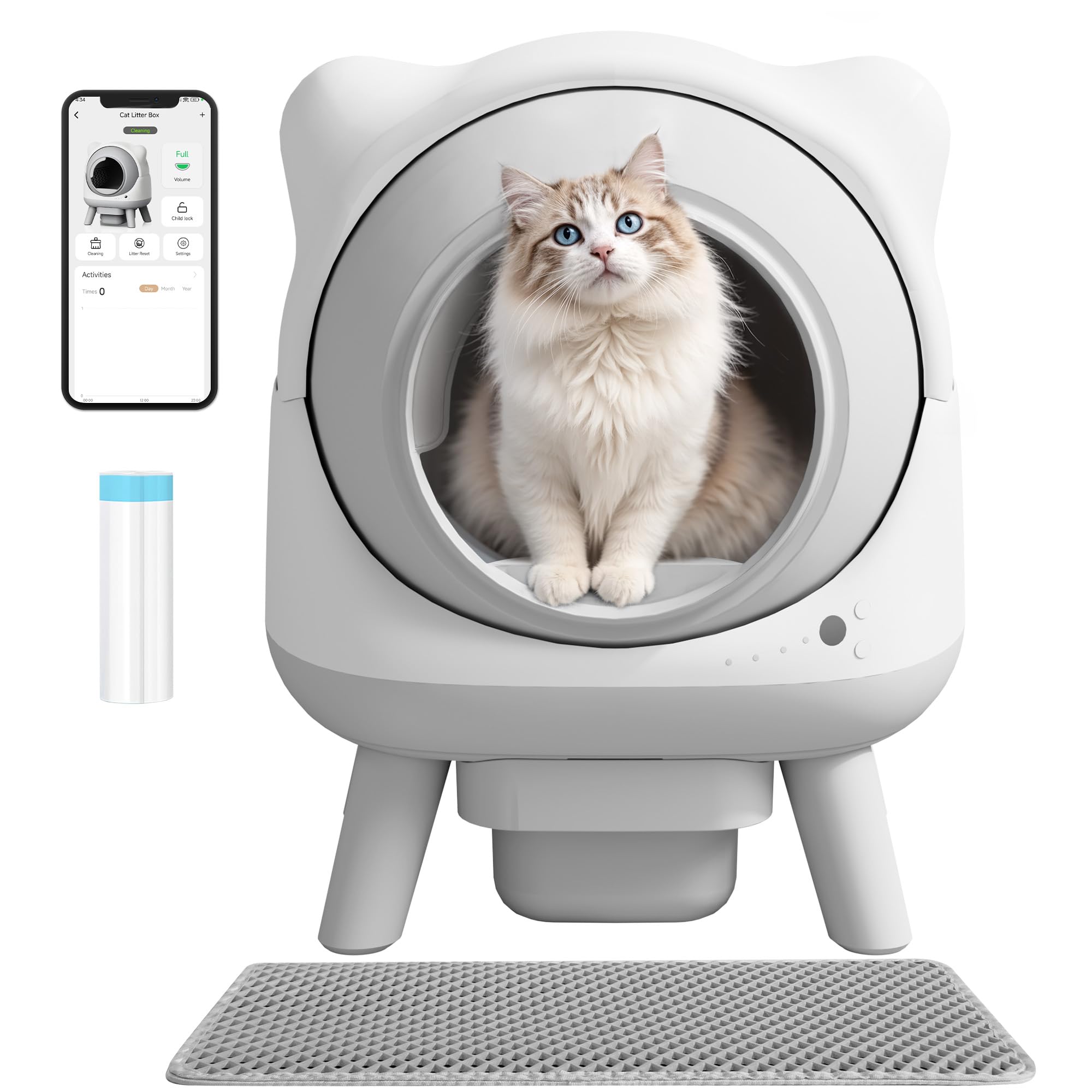
- WARCAT Automatic Self-Cleaning Litter Box Unit
- Litter Mat
- Waste Bags
- Power Adapter
- User Manual (this document)
4. Setup
- Unpacking: Carefully remove all components from the packaging.
- Placement: Place the litter box on a firm, level surface in a well-ventilated area. Ensure there is enough space around the unit for proper operation and access.
- Litter Filling: Open the litter compartment and fill it with clumping cat litter. Ensure the litter level is between the MIN and MAX indicators. The WARCAT litter box is compatible with various clumping litter types, including plant-based, bentonite, and mixed litters.

- Waste Bag Installation: Insert a waste bag into the waste drawer located at the bottom of the unit. Ensure the bag is properly secured.
- Power Connection: Connect the power adapter to the litter box and then plug it into a standard electrical outlet. The unit will perform an initial calibration cycle.
- App Download and Pairing: Download the WARCAT app from your device's app store. Follow the in-app instructions to pair your litter box with your smartphone for remote control and monitoring.
5. Operating Instructions
5.1 Automatic Cleaning Cycle
The WARCAT litter box features an intelligent induction system with infrared and gravity sensors. After your cat uses the litter box and exits, the system will automatically initiate a cleaning cycle after a preset delay (customizable via the app). The sensors ensure that the cleaning cycle pauses immediately if a cat enters the box during operation, resuming only after the cat has left.

5.2 APP Control
The WARCAT app provides full remote control and monitoring capabilities:
- Custom Cleaning Modes: Adjust cleaning schedules and delays based on your cat's routine.
- Real-time Alerts: Receive notifications for low litter levels, full waste drawer, or potential clogs.
- Usage Analytics: Access detailed reports on your cat's usage frequency, weight, and time spent, which can help monitor their health.
- Manual Cleaning: Initiate a cleaning cycle remotely at any time.
5.3 Whisper-Quiet Operation
The litter box incorporates advanced noise-suppression technology, ensuring quiet operation. This feature is designed to minimize disturbance to both pets and household members, making it suitable for noise-sensitive cats.
6. Maintenance
6.1 Litter Refill
Monitor the litter level regularly via the app or by visual inspection. When the litter level is low, add fresh clumping cat litter, ensuring it does not exceed the MAX fill line.
6.2 Waste Disposal
The app will notify you when the waste drawer is full. To empty: unplug the unit, pull out the waste drawer, seal the waste bag, and dispose of it. Replace with a new waste bag and reinsert the drawer. Plug the unit back in.
6.3 Cleaning the Unit
For general cleaning, unplug the unit. Wipe the exterior and interior surfaces with a damp cloth and mild, pet-safe detergent. Do not use abrasive cleaners or immerse the unit in water. Ensure all parts are dry before plugging the unit back in. The integrated air purification system helps eliminate odors from the litter area.

7. Troubleshooting
- Unit Not Responding: Check if the power cord is securely plugged into both the unit and the outlet. Ensure the outlet is functional.
- Cleaning Cycle Not Starting: Verify that the waste drawer is properly inserted and the litter level is adequate. Check the app for any error messages. Ensure no cat is currently inside or near the litter box.
- App Connectivity Issues: Ensure your smartphone's Bluetooth or Wi-Fi is enabled and the litter box is within range. Restart the app and, if necessary, reset the litter box's Wi-Fi connection according to in-app instructions.
- Unusual Noises: Unplug the unit and inspect the rotating drum for any obstructions. Remove any foreign objects before plugging it back in.
- Odor Persistence: Ensure the waste drawer is emptied regularly and the air purification system is active. Consider changing the litter type if odors persist.
8. Specifications
| Feature | Specification |
|---|---|
| Product Dimensions (L x W x H) | 21.06" x 18.31" x 26.42" |
| Item Weight | 19.84 Pounds |
| Material | Plastic |
| Color | White |
| Model Number | W25-SCLB25-0824-2GY-0626 |
| Litter Box Type | Automated Self-Cleaning Litter Box |
| Pet Type | Cat |
| Included Components | 1 Cat Litter Box, Litter Mat, Waste Bags |

9. Warranty and Support
The WARCAT Automatic Self-Cleaning Litter Box comes with a 1-year warranty from the date of purchase. This warranty covers manufacturing defects and malfunctions under normal use. It does not cover damage caused by misuse, accidents, or unauthorized modifications.
For technical support, warranty claims, or any questions regarding your product, please contact WARCAT customer service. Refer to the contact information provided on the product packaging or the official WARCAT website.