
Redmi 15C 5G
Redmi 15C 5G Smartphone User Manual
Model: 15C 5G
1. Introduction
Welcome to the user manual for your new Redmi 15C 5G smartphone. This guide provides essential information on setting up, operating, maintaining, and troubleshooting your device. Please read this manual thoroughly to ensure optimal performance and longevity of your smartphone.
1.1 Package Contents
Verify that your package contains the following items:
- Charger
- Cable
- SIM eject tool
- Warranty card
- User guide
- Protective case
2. Device Setup
2.1 Device Overview
Familiarize yourself with the physical components of your Redmi 15C 5G smartphone.

Image: Rear view of the Redmi 15C 5G smartphone in Midnight Black, highlighting the camera module and overall design.
2.2 SIM Card and Storage Installation
To install your SIM card(s) and/or microSD card:
- Locate the SIM tray on the side of your device.
- Insert the provided SIM eject tool into the small hole on the SIM tray and press gently until the tray pops out.
- Place your Nano-SIM card(s) and/or microSD card into the designated slots on the tray, ensuring proper orientation.
- Carefully push the SIM tray back into the device until it is flush with the side.

Image: Side view of the Redmi 15C 5G, illustrating the location of the SIM card tray.
2.3 Powering On/Off
- To Power On: Press and hold the Power button located on the side of the device until the Redmi logo appears.
- To Power Off: Press and hold the Power button, then select 'Power off' from the options that appear on the screen.
- To Restart: Press and hold the Power button, then select 'Restart' from the options.
2.4 Initial Charge
Before first use, it is recommended to fully charge your device. Use the provided 33W charger and USB Type-C cable for optimal charging speed. Connect the cable to the phone's USB-C port and the charger to a power outlet.
3. Operating Your Device
3.1 Display Features
The Redmi 15C 5G features a large 17.53cm (6.9 inch) display with up to a 120Hz refresh rate for smooth visuals. It also includes TUV Triple Eye Protection for reduced eye strain.

Image: Illustration highlighting the 17.53cm (6.9 inch) display with 120Hz Adaptive Sync and TUV Triple Eye Protection.
3.2 Battery Management
Your device is equipped with a massive 6000mAh battery, providing extended usage times. It supports 33W fast charging, allowing for quick power replenishment.
- Charging: Use the included 33W charger and cable. The device can reach 50% charge in approximately 28 minutes.
- Battery Optimization: To extend battery life, manage background app usage and adjust screen brightness.
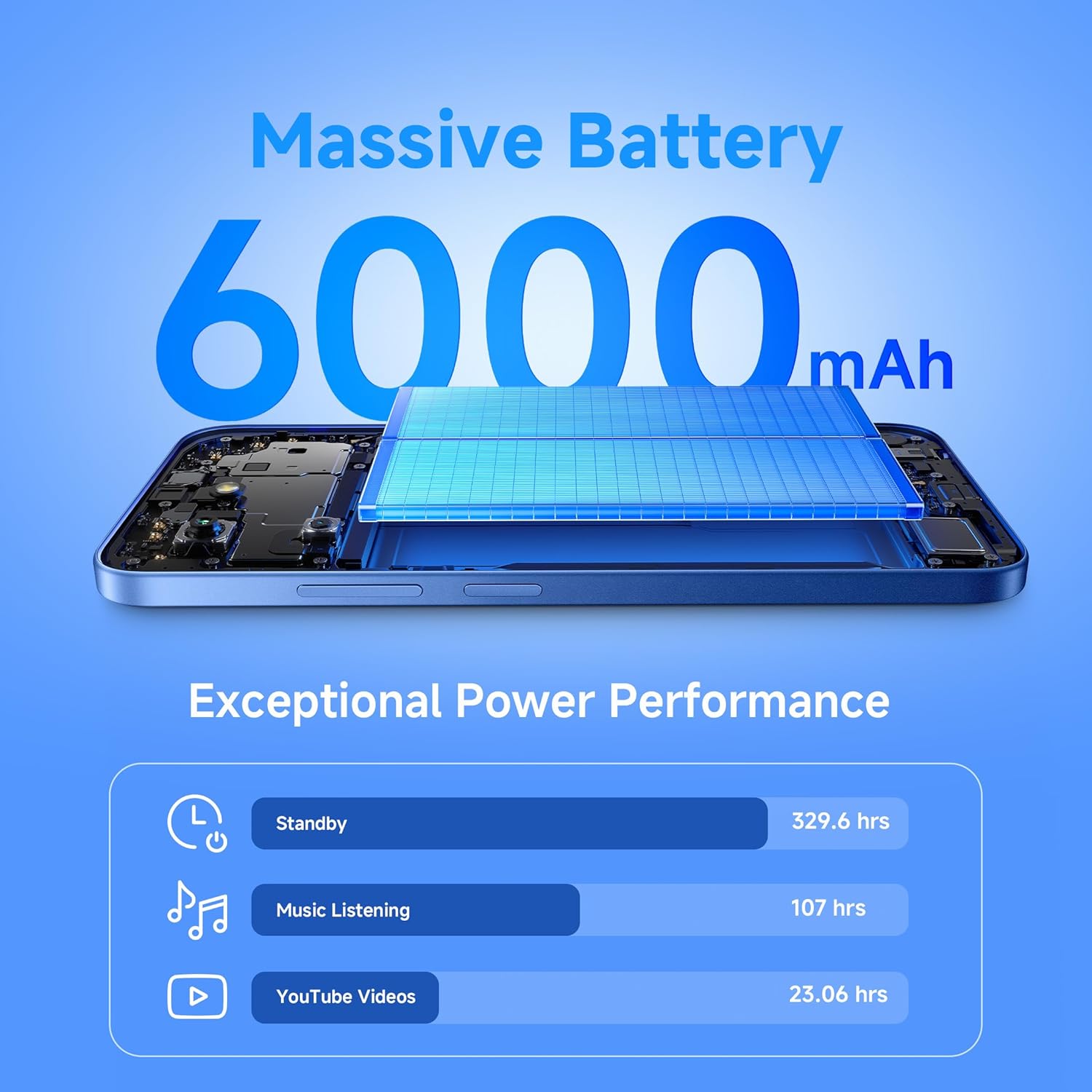
Image: Visual representation of the 6000mAh battery's exceptional power performance, including standby time, music listening hours, and YouTube video playback hours.
3.3 Camera Usage
The Redmi 15C 5G features a 50MP AI Dual Camera system. Open the Camera application to access various modes such as Photo, Portrait, Video, and more. Tap the shutter button to capture images or start/stop video recording.

Image: Close-up view of the 50MP AI Dual Camera module on the Redmi 15C 5G.
3.4 Performance and Software
Powered by the MediaTek Dimensity 6300 5G processor, the device offers efficient performance for daily tasks and connectivity. It runs on Android 15 with Xiaomi HyperOS, providing a user-friendly interface and access to a wide range of applications.

Image: Visual representation of the MediaTek Dimensity 6300 5G processor, highlighting its octa-core CPU and clock speed.
4. Maintenance
4.1 Cleaning Your Device
To clean your Redmi 15C 5G, use a soft, lint-free cloth. Avoid using harsh chemicals or abrasive materials, as these can damage the screen and finish. The device is IP64 rated for dust and water resistance, but it is not waterproof. Avoid submerging the device in water.

Image: Illustration of the Redmi 15C 5G's durability features, including dust resistance, water resistance, and hydro touch capabilities.
4.2 Software Updates
Regularly check for and install software updates to ensure your device has the latest features, security patches, and performance improvements. You can typically find update options in the device's Settings menu under 'About phone' or 'System update'.
4.3 Storage Management
To maintain optimal performance, periodically manage your device's storage. Delete unnecessary files, uninstall unused applications, and clear cache data. You can check storage usage in the Settings menu.
5. Troubleshooting
This section addresses common issues you might encounter with your Redmi 15C 5G.
- Device Not Turning On: Ensure the battery is charged. Connect the charger and wait a few minutes before attempting to power on again. If the issue persists, perform a forced restart by holding the Power button for an extended period (e.g., 10-15 seconds).
- Apps Crashing or Freezing: Close and reopen the app. Clear the app's cache and data in Settings > Apps. Ensure your device's software is up to date.
- Poor Network Connectivity: Check if airplane mode is off. Restart your device. Verify your SIM card is properly inserted. Contact your network provider if the issue continues.
- Battery Draining Quickly: Reduce screen brightness, disable unused features like Wi-Fi, Bluetooth, and GPS when not needed. Check battery usage in Settings to identify power-hungry apps.
- Screen Unresponsive: Restart the device. If the screen remains unresponsive, contact customer support.
6. Technical Specifications
| Brand | Redmi |
| Operating System | Android 15, Xiaomi HyperOS |
| RAM Memory Installed Size | 6 GB |
| CPU Model | Mediatek Dimensity 6300 |
| Memory Storage Capacity | 128 GB |
| SIM Card Slot Count | Dual SIM |
| Connector Type | USB Type C |
| Water Resistance Level | Water Resistant (IP64 Rated) |
| Rear Facing Camera Photo Sensor Resolution | 50 MP |
| Number of Rear Facing Cameras | 2 |
| Battery Capacity | 6000 Milliamp Hours |
| Item Weight | 212 Grams |
| Item Dimensions | 17.2 x 7.9 x 0.8 Centimeters |
| Screen Size | 6.9 Inches (17.53cm) |
| Resolution | 720 x 1560 |
| Refresh Rate | 120 Hz |
| Cellular Technology | 5G |
| Country of Origin | India |
7. Warranty Information
The Redmi 15C 5G comes with a 1-year manufacturer warranty for the device from the date of purchase. In-box accessories, including batteries, are covered by a 6-month manufacturer warranty from the date of purchase. Please retain your proof of purchase for warranty claims.
8. Customer Support
For further assistance, technical support, or service inquiries, please refer to the official Redmi support website or contact their customer service. You can also visit the Redmi Store on Amazon for additional product information and resources.
Related documents15C 5G


Ask a question about this manual
Ask about setup, troubleshooting, compatibility, parts, safety, or missing instructions. Manuals+ will review the question and use this page’s manual context to help answer it.