
1. Introduction
The NOLYTH Ai Voice Recorder FW922 is an advanced recording device designed for meetings, lectures, and general note-taking. It features multi-model AI capabilities for transcription and summarization across 152 languages, app control, noise cancellation, and magnetic attachment. This manual provides essential information for setting up, operating, and maintaining your device.
2. Package Contents
Please verify that all items are present in your package:
- 1 x NOLYTH Ai Voice Recorder (FW922)
- 1 x Magnetic Ring
- 1 x Magnetic Charging Cable
- 1 x USB to USB-C Adapter
- 1 x User Manual
- Premium Packaging

Image: The NOLYTH Ai Voice Recorder FW922 and its included accessories, including the magnetic ring, charging cable, and USB-C adapter, laid out next to the product box and user manual.
3. Product Features
3.1. AI Capabilities & Transcription
- Powered by advanced AI engines (GPT 4o/4.1/5/5-mini, o3-mini, Open AI Whisper, Open AI 40, Claude 3.7, Gemini 2.5 Pro/Flash).
- Supports transcription in 152 languages via the DOWAY APP.
- Offers real-time speech-to-text conversion, mind mapping, and industry-specific templates (e.g., meeting, speech, medical consultation).
- Includes a 1-year no-cost membership for unlimited transcription in 114 languages and 300 monthly minutes for the remaining 38 languages.

Image: A smartphone screen displaying the DOWAY app interface, showing a recorded audio waveform, transcription, summary, and mind map options, powered by GPT-5.
3.2. Superior Audio Quality & Compact Design
- Equipped with 1 Vibration Conduction Sensor (VCS), 2 Environmental Noise Cancellation (ENC) Mics, and 1 Embedded Bone Conduction Mic.
- Reduces background noise by -25 dB(A) for clear recordings in noisy environments.
- Durable aluminum alloy body, weighing only 32g.
- 0.3-inch 48x88 pixels LCD display shows recording mode, battery level, and status.
- Built-in vibration motor for status alerts.
- Thin design (21.26x33.86x0.26 inches) with built-in magnetic attachment.

Image: Illustration showing the panoramic 6D dual microphones and AI active noise canceling chip, demonstrating noise elimination in crowded subway and busy street environments.
3.3. Strong Performance & Flexible Storage
- 35 hours of continuous recording with a 400mAh polymer battery.
- 166 days of standby time.
- 64GB internal storage.
- Unlimited cloud backup via the DOWAY APP.
- 2-hour charging time via magnetic charging.
- Audio files are encrypted for privacy and end-to-end security.
- One-to-one binding between the recorder and DOWAY APP for enhanced security.

Image: The NOLYTH Ai Voice Recorder FW922 attached magnetically to a smartphone, highlighting its compact size, USB-C charging, data transfer capabilities, and magnetic function.
3.4. Voice to Text Recorder Key Features
- Visual mind mapping.
- Speaker labeling (up to 10 speakers).
- Automatic transcription segmentation.
- Audio merging/trimming.
- Multi-speed playback.
- One-click sharing/export (transcripts, summaries, mind maps, DOCX, PDF, etc.).
- Supports importing a wide range of audio and video formats.

Image: Visual representation of key features including speaker labels, multi-speed playback with smart trim/merge, audio import, and one-tap sharing/export options.
4. Setup & First Use
4.1. Powering On/Off
- To turn the device on: Press and hold the power button for 3 seconds.
- To light up the screen (when off): A short press on the power button.
4.2. Connecting to the DOWAY App
- Ensure the AI Smart Recorder (FW922) is powered on.
- Connect the FW922 device to your mobile phone via Bluetooth.
- Scan the QR code provided in the product manual to download and link the DOWAY App with the recorder.
Note: Keep your mobile phone and the AI voice recorder within 8 meters (approximately 26 feet) to prevent disconnection.

Image: A step-by-step visual guide showing how to power on the device, download the DOWAY app, connect via Bluetooth, start recording, and process audio into transcripts, summaries, and shareable files.
5. Operating Instructions
5.1. Switching Recording Modes
After powering on and when the display is lit, if not in recording mode, press the power button twice to switch between recording modes:
- "CALL" for call recording mode.
- "NOTE" for normal recording mode.

Image: Demonstrates the two recording modes: 'Phone Call Recording' with the device attached to a phone, and 'Note Recording' during a meeting, showing the device's display for each mode.
5.2. Starting and Pausing Recording
- To start recording: Click the recording button in the DOWAY App or press the recording button on the FW922 device.
- To pause recording: While recording, a short press on the power button will pause the recording.
5.3. Accessing and Processing Recordings
- Once recording is completed, the content will be available on both the FW922 device and in the DOWAY App.
- After transcription is finished, select the target language and transcription template to transcribe the audio.
- Audio files can be played at multiple speeds and edited within the app.
- Convert audio into formats such as transcripts, summaries, or mind maps.

Image: A four-panel illustration showing the progression from recording audio on the device to generating a transcript, a summary, and a mind map within the DOWAY app.
5.4. AI Ask and Sharing Function
- The dictation recorder and transcriber supports an "AI Ask" function for querying content.
- Utilize the sharing function to export files in various formats (e.g., mind map, DOCX, PDF).

Image: A hand holding a smartphone displaying the DOWAY app with an 'Ask AI' feature, suggesting questions like 'Summarize my meeting note' or 'Organize meeting into a to-do list'.
6. DOWAY App Integration
The DOWAY App is central to unlocking the full potential of your NOLYTH Ai Voice Recorder. It provides the interface for advanced AI features, cloud backup, and file management.
6.1. App Features
- Transcription & Summarization: Access AI-powered transcription in 152 languages and generate concise summaries.
- Mind Mapping: Automatically generate visual mind maps from your recordings.
- Speaker Labeling: Identify and label up to 10 different speakers in a recording.
- Audio Editing: Trim, merge, and adjust playback speed of your audio files.
- Cloud Backup: Securely store your recordings with unlimited cloud backup.
- Data Security: Local encryption and end-to-end security protect your privacy.
7. Membership Benefits
Your NOLYTH Ai Voice Recorder includes a 1-year no-cost membership to the DOWAY App, offering extensive transcription capabilities. After the first year, various membership tiers are available.
7.1. First-Year No-Cost Membership
- Unlimited transcription for 114 languages.
- 300 monthly minutes of transcription for the remaining 38 languages.
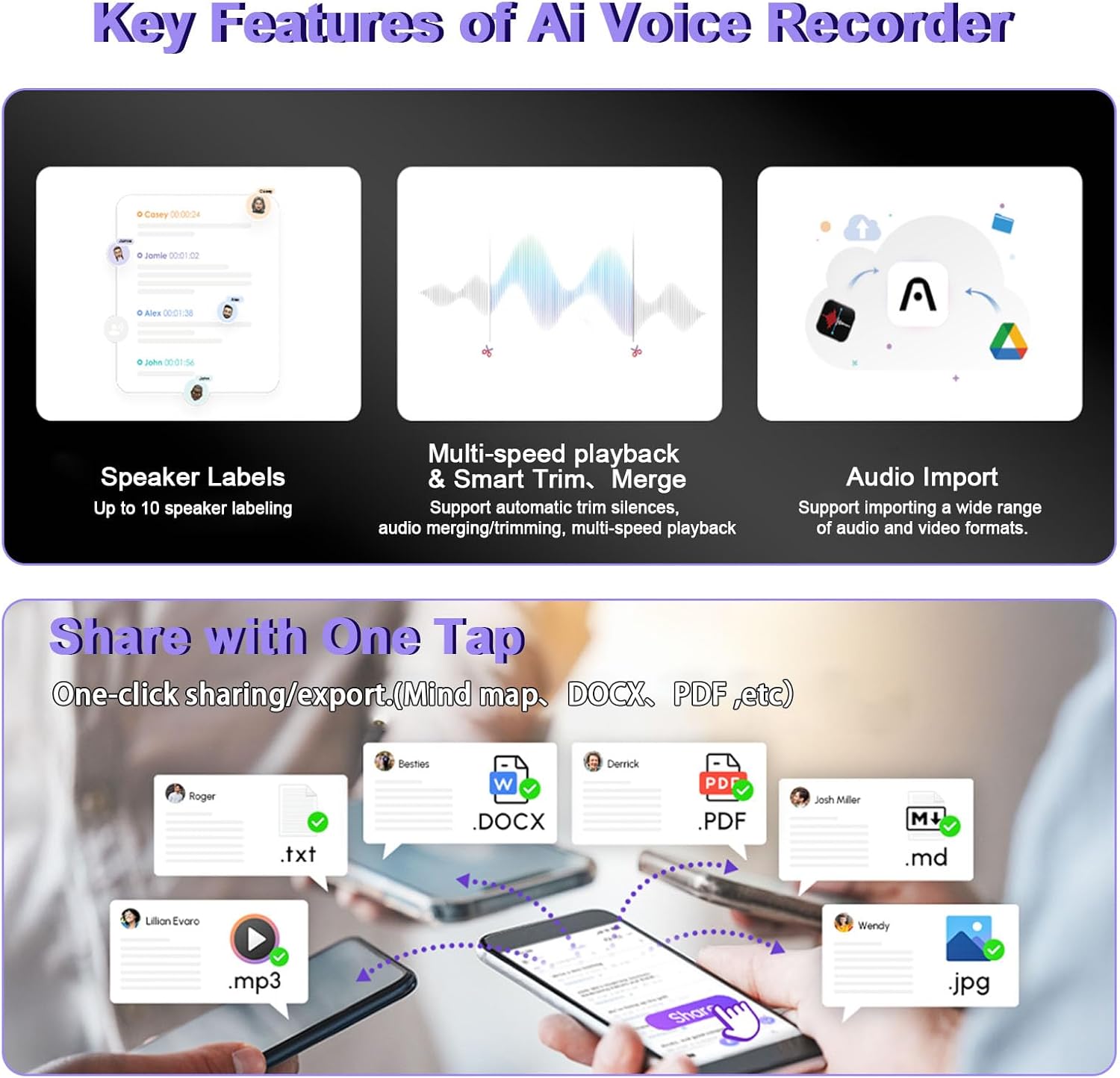
Image: A table detailing the features and benefits across different DOWAY AI Voice Recorder membership types: No cost for first year, Starter, Pro, and Max, including supported languages, transcription duration, custom templates, and other features.
8. Specifications
| Feature | Detail |
|---|---|
| Model Number | FW922 |
| Brand | NOLYTH |
| Compatible Devices | Smartphone |
| Hardware Interface | Bluetooth, Bluetooth 5 |
| Microphone Form Factor | Built-in |
| Audio Format | MP3 Audio |
| Headphones Jack | No headphones jack |
| Number of Batteries | 1 Nonstandard Battery (included) |
| Product Dimensions | 3.39"D x 2.13"W x 0.24"H |
| Memory Storage Capacity | 64 GB |
| Battery Life (Continuous Recording) | 35 Hours |
| Standby Time | 166 Days |
| Charging Time | 2 Hours (Magnetic Charging) |
| Manufacturer | Confoly Tech |
| UPC | 743623215467 |
| ASIN | B0G29TFR1Y |
9. Troubleshooting
If you encounter issues with your NOLYTH Ai Voice Recorder FW922, please refer to the following common solutions:
- Device not turning on: Ensure the device is fully charged. Press and hold the power button for 3 seconds.
- Cannot connect to DOWAY App: Verify Bluetooth is enabled on your phone and the recorder. Ensure the devices are within 8 meters. Try restarting both the recorder and the app.
- Poor recording quality: Check for excessive background noise. Ensure microphones are not obstructed. Update firmware via the DOWAY App if available.
- Transcription errors: Ensure clear audio input. Verify the correct language is selected in the DOWAY App.
- App not responding: Close and reopen the DOWAY App. Check for app updates in your phone's app store.
For further assistance, please contact NOLYTH customer support.
10. Safety Information
Please read and follow these safety guidelines to ensure proper use and longevity of your device:
- Do not expose the device to extreme temperatures, direct sunlight, or moisture.
- Avoid dropping or subjecting the device to strong impacts.
- Use only the provided charging cable and adapter.
- Keep the device out of reach of children.
- Do not attempt to disassemble or repair the device yourself. This may void your warranty.
- Dispose of the device and its battery responsibly according to local regulations.
11. Warranty and Support
Your NOLYTH Ai Voice Recorder FW922 comes with a standard manufacturer's warranty. Please refer to the warranty card included in your package or visit the official NOLYTH website for detailed warranty terms and conditions.
For technical support, product inquiries, or warranty claims, please contact NOLYTH customer service through the contact information provided on the official website or within the DOWAY App.