
1. Introduction
The MUCAR VO8 is a professional OBD2 scanner diagnostic tool designed for comprehensive vehicle analysis. It offers full system diagnostics, bidirectional control, ECU coding, and over 34 reset services, making it suitable for both advanced mechanics and automotive enthusiasts. This manual provides detailed instructions to help you effectively use your MUCAR VO8 device.
2. What's in the Box
Upon opening your MUCAR VO8 package, verify that all components are present. The standard package includes:
- 1x MUCAR VO8 Bi-Directional OBD2 Scanner
- 1x Bluetooth (VCI) Dongle
- 15x Connector and Adaptors (various types)
- 1x US/UK/EU Power Adapter
- 1x OBD Extension Cable
- 1x Type C Cable
- 1x Carrying Case
- 1x User Manual
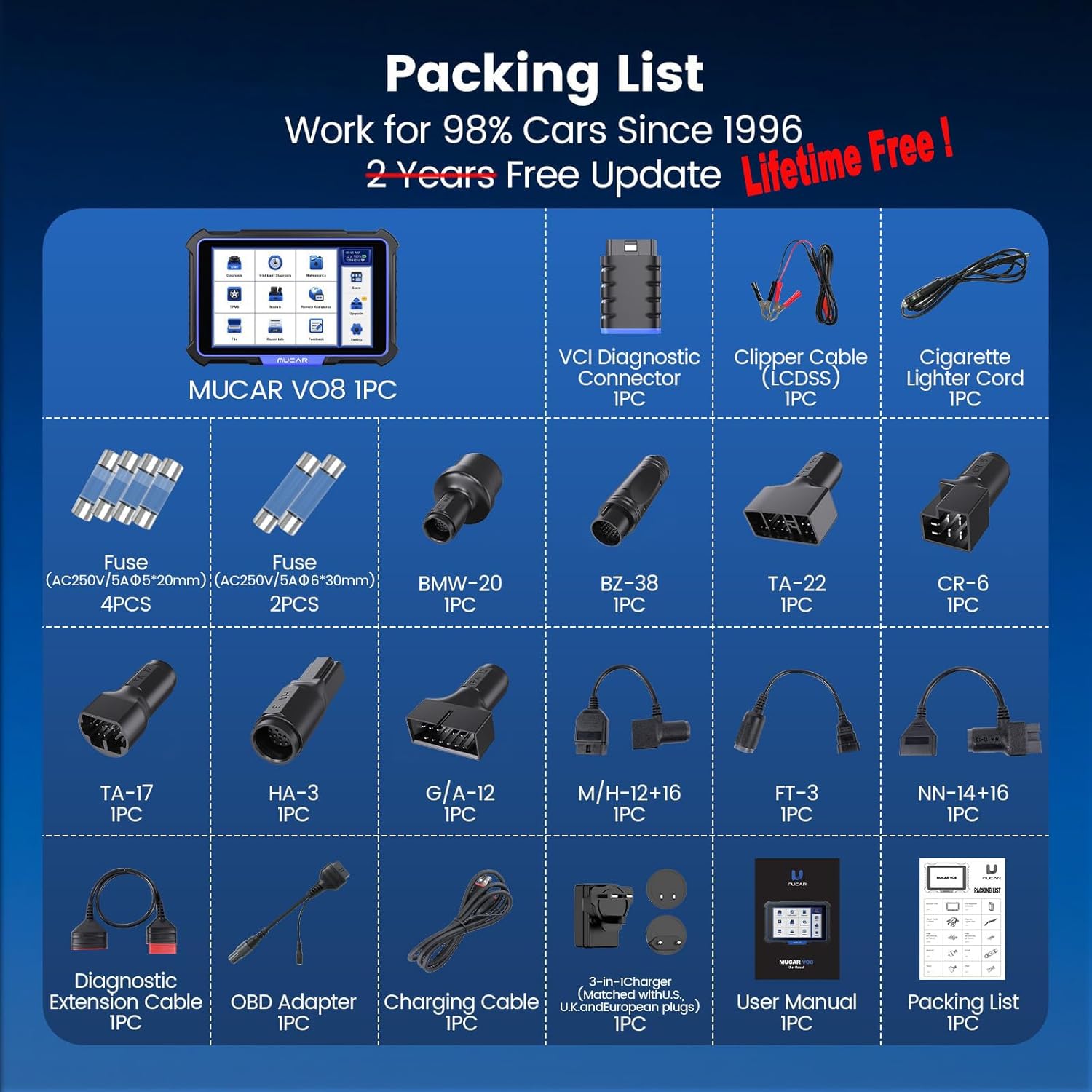
Image: Detailed view of the MUCAR VO8 packing list, showing the scanner, VCI dongle, various adapters, cables, and carrying case.
Video: An unboxing video demonstrating the contents of the MUCAR VO8 package, including the main unit, VCI dongle, and accessories.
3. Setup Instructions
3.1 Device Overview
Familiarize yourself with the MUCAR VO8 tablet and the Bluetooth VCI (Vehicle Communication Interface) dongle. The tablet features an 8-inch HD touchscreen, USB-C port for charging, and a kickstand for convenient viewing.

Image: Rear view of the MUCAR VO8 diagnostic tablet showing its ports and the separate Bluetooth VCI dongle.
3.2 Connecting to Vehicle
- Locate your vehicle's OBD2 port, typically under the dashboard on the driver's side.
- Plug the Bluetooth VCI dongle into the vehicle's OBD2 port. Ensure a secure connection.
- Power on the MUCAR VO8 tablet by pressing and holding the power button.
- The tablet will automatically establish a Bluetooth connection with the VCI dongle.

Image: Close-up of the MUCAR VO8 VCI dongle being plugged into a vehicle's OBD2 port.
3.3 Initial Software Setup
Upon first use or after an update, the device may require initial software configuration. Follow the on-screen prompts to complete the setup, including Wi-Fi connection for updates.
4. Operating Instructions
The MUCAR VO8 offers a range of diagnostic and service functions. Navigate the intuitive Android 8.0 interface using the 8-inch touchscreen.
4.1 Full System Diagnostics
The tool can automatically read all available ECU modules on over 140 vehicle brands. This includes reading and clearing diagnostic trouble codes (DTCs), viewing live data streams, and accessing ECU information.

Image: The MUCAR VO8 interface displaying options for OE-level all systems diagnosis, including Read Code, Clear Code, Active Test, and Live Data Stream.
4.2 Bidirectional Control (Active Test)
This function allows you to send commands to vehicle systems to perform specific tests and verify component functionality. This includes fan testing, throttle adjustment, window/mirror control, injector testing, and light/horn checks.
- Injector Test: Command individual injectors to test their operation.
- ABS Pump Test: Activate the ABS pump to check its functionality.
- Window/Mirror Control: Test power windows and mirrors directly from the scanner.
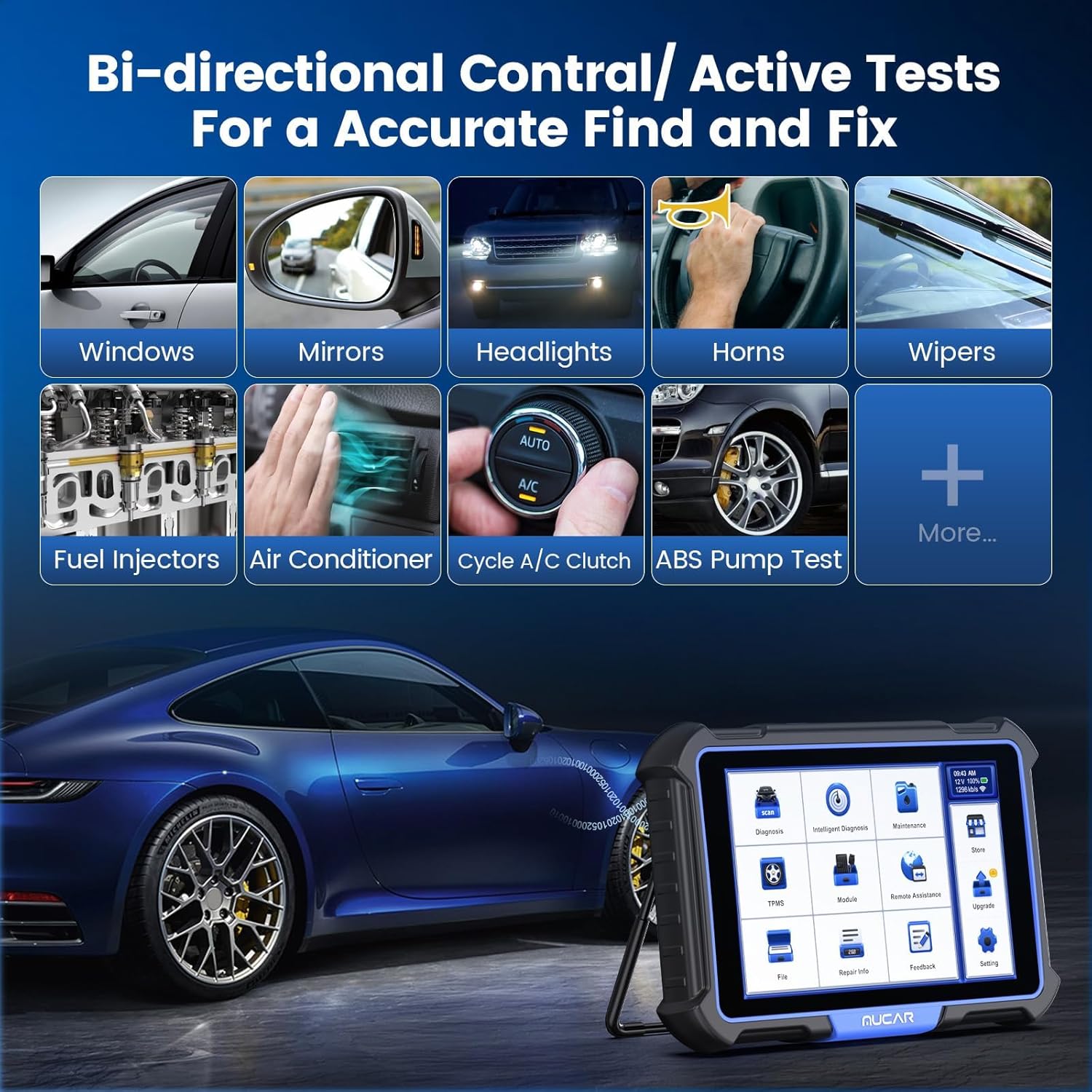
Image: The MUCAR VO8 interface showing various bidirectional control options, such as testing windows, mirrors, headlights, horns, wipers, fuel injectors, and air conditioning.
4.3 ECU Coding
ECU coding allows for reprogramming adaptive data, customizing OE settings, and activating dormant features. This is useful for component replacement, performance tuning, and vehicle personalization. Compatibility varies by vehicle model.
- Key Programming: Add, rewrite, or reset/relearn keys.
- Optimize Performance: Adjust settings to enhance vehicle performance.
- Customize OE Settings: Modify original equipment manufacturer settings.

Image: The MUCAR VO8 interface highlighting advanced ECU coding functions, including key programming, optimizing performance, and customizing OE settings.
4.4 34+ Reset Services
The MUCAR VO8 provides over 34 essential maintenance and reset services, including:
- Oil Reset
- EPB (Electronic Parking Brake) Reset
- SAS (Steering Angle Sensor) Reset
- TPMS (Tire Pressure Monitoring System) Reset
- DPF (Diesel Particulate Filter) Regeneration
- BMS (Battery Management System) Reset
- ABS Bleeding
- Throttle Matching
- Injector Coding
- Gear Learning
- IMMO (Immobilizer) Service
- And many more.
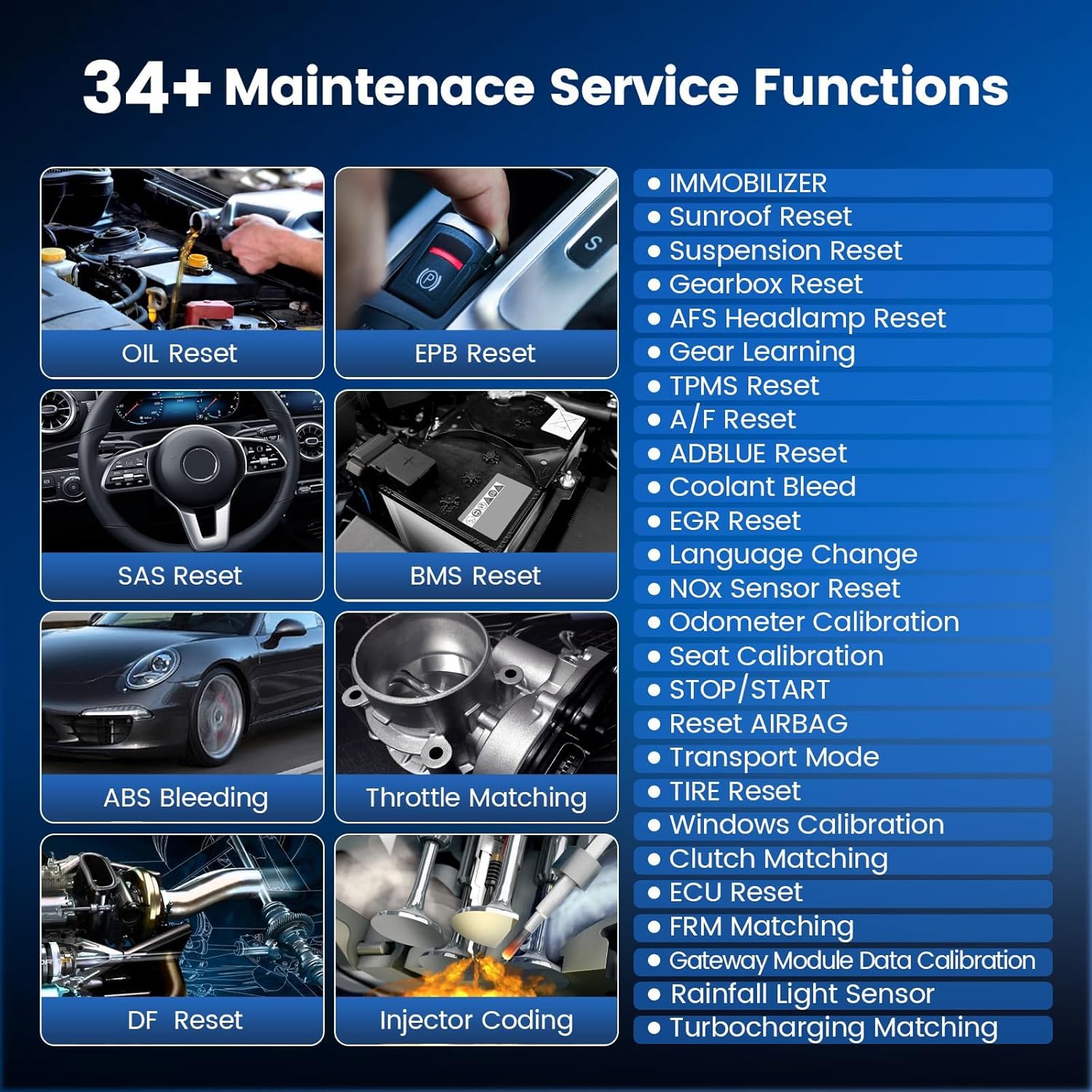
Image: A visual representation of the MUCAR VO8's extensive list of 34+ maintenance service functions, such as Oil Reset, EPB Reset, SAS Reset, and ABS Bleeding.
4.5 Data Recording and Reporting
The device allows for recording and playback of live data streams, which can be crucial for diagnosing intermittent issues. Diagnostic reports can be generated, shared, and printed for analysis or client records.

Image: The MUCAR VO8 screen displaying a live data graph and an example of a printable diagnostic report with vehicle information.
5. Maintenance
5.1 Software Updates
The MUCAR VO8 offers lifetime free software updates. Regularly update your device to ensure access to the latest vehicle coverage, diagnostic functions, and software optimizations. Connect the device to a Wi-Fi network and navigate to the 'Update' section on the main menu to check for and install available updates.

Image: The MUCAR VO8 tablet displaying its hardware specifications, including the 8-inch HD touchscreen, Android 8.0 OS, 2GB RAM, 64GB ROM, and highlighting lifetime free updates.
5.2 Cleaning and Storage
Keep the device clean by wiping it with a soft, damp cloth. Avoid using abrasive cleaners or solvents. Store the MUCAR VO8 in its carrying case in a dry, cool environment when not in use to protect it from dust and physical damage.
6. Troubleshooting
If you encounter any issues with your MUCAR VO8 device, consider the following basic troubleshooting steps:
- Device Not Powering On: Ensure the battery is charged. Connect the device to the power adapter and allow it to charge for at least 30 minutes before attempting to power it on again.
- No Communication with Vehicle: Verify that the VCI dongle is securely plugged into the OBD2 port. Ensure the vehicle's ignition is on. Check for any loose connections.
- Software Glitches: Restart the device. If issues persist, check for available software updates and install them.
- Inaccurate Readings: Ensure the vehicle information (VIN) is correctly identified. Some functions may require specific vehicle models or years; confirm compatibility.
For persistent issues or advanced technical support, please contact MUCAR customer service at service@mucarco.com.
7. Specifications
| Feature | Specification |
|---|---|
| Model | VO8 |
| Operating System | Android 8.0 |
| Screen Size | 8 Inches |
| Screen Resolution | 1280 x 800 |
| Processor | Quad-core 1.5GHz |
| RAM | 2GB |
| ROM | 64GB |
| Battery | 9450mAh Lithium Ion (included) |
| Connectivity | Bluetooth, Wi-Fi |
| Camera | 8MP Rear Camera |
| Item Weight | 8.34 pounds |
| Package Dimensions | 16.14 x 12.44 x 4.76 inches |
| Automotive Fit Type | Universal Fit |
8. Warranty and Support
The MUCAR VO8 comes with lifetime free software updates, ensuring your tool remains current with the latest vehicle data and diagnostic capabilities.
For any product-related inquiries, technical assistance, or support, please reach out to our customer service team:
- Email: service@mucarco.com
We are committed to providing prompt and helpful support to ensure your satisfaction with the MUCAR VO8 diagnostic tool.


