
1. Introduction
The VLH 32-inch FHD Smart Portable TV is a versatile and mobile entertainment and productivity device. Featuring a 32-inch Full HD touch screen, Android 15 operating system with Google EDLA certification, and a built-in 38400mAh battery, this portable TV offers flexibility for use in various environments. Its rolling stand allows for easy movement and multi-angle adjustments, making it suitable for bedrooms, living rooms, kitchens, workspaces, and outdoor settings.
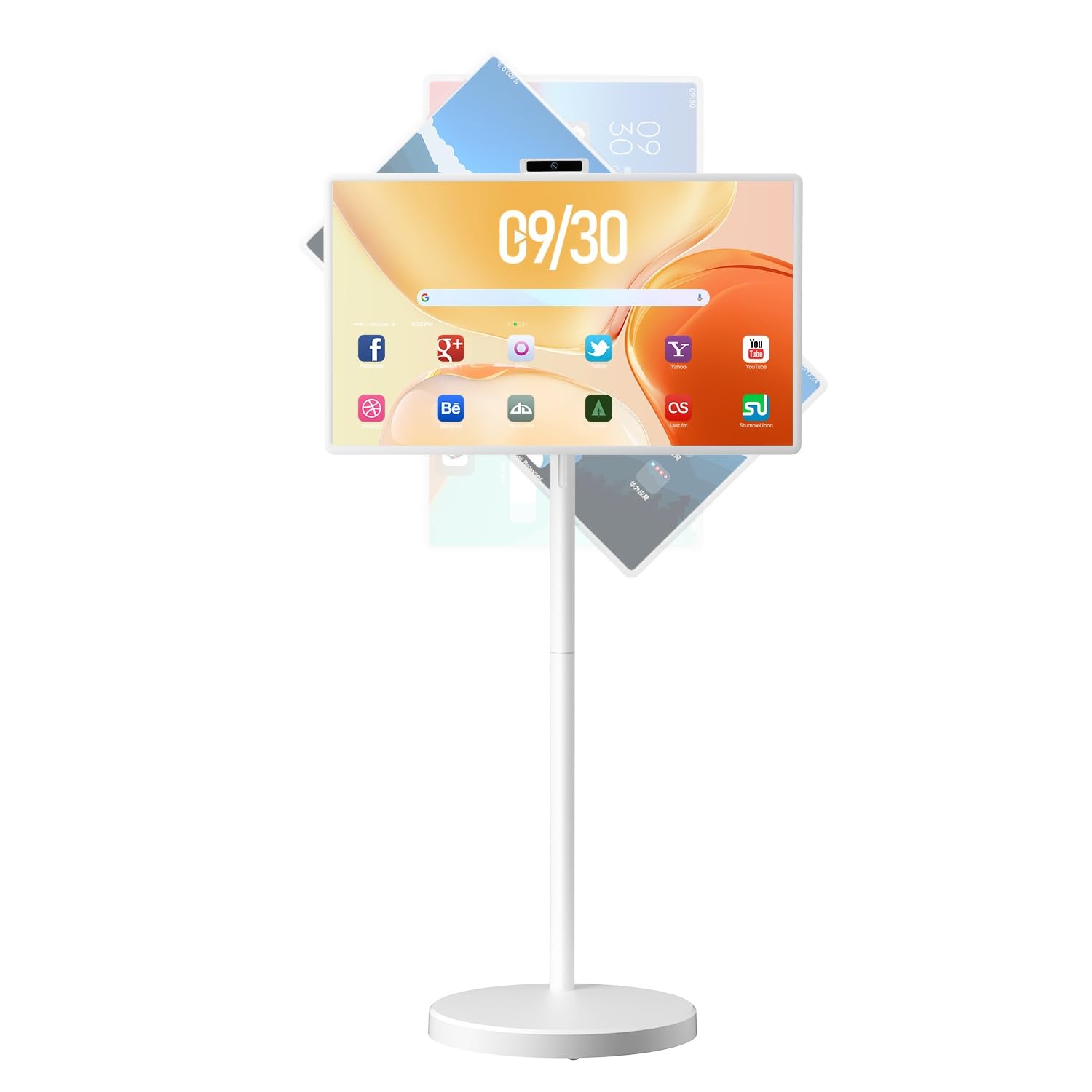
Figure 1: VLH 32-inch FHD Smart Portable TV on its rolling stand.
2. What's in the Box
Please check the package contents to ensure all items are present:
- VLH 32" FHD Smart Portable TV Unit
- Rolling Stand with 5 Silent Universal Wheels
- Remote Control
- Removable 500W Camera
- Power Adapter
- User Manual
3. Setup
3.1 Assembling the Rolling Stand
The portable TV unit comes with a pre-assembled rolling stand. Ensure the five silent universal casters are securely attached to the base. The TV unit attaches to the adjustable arm of the stand.
3.2 Initial Power-On and Basic Configuration
- Charge the Device: Before first use, fully charge the built-in 38400mAh battery using the provided power adapter.
- Power On: Press and hold the power button located on the side or back of the TV unit until the screen illuminates.
- Language Selection: Follow the on-screen prompts to select your preferred language.
- Wi-Fi Connection: Connect the TV to your home Wi-Fi network. This is essential for accessing online content and apps.
- Google Account Setup: Sign in with your Google account to access the Google Play Store and other Google services.

Figure 2: The VLH Portable TV is designed for easy movement between rooms.
4. Operating Instructions
4.1 Android 15 Operating System
Your VLH Smart Portable TV runs on the latest Android 15 OS, fully Google EDLA certified. This allows full access to the Google Play Store, enabling you to download and use a wide range of applications, including streaming services, social media, productivity tools, and games.

Figure 3: Android 15 OS with access to Google Play Store applications.
4.2 Control Methods
- Touch Screen: The 32-inch display is a multi-point touch screen, allowing for intuitive navigation, app interaction, and content control directly on the screen.
- Remote Control: The included remote control provides an alternative way to navigate the interface, select apps, adjust volume, and control media playback from a distance.
4.3 Screen Adjustments
The integrated stand offers extensive flexibility for optimal viewing:
- Height Adjustment: The screen height can be adjusted by approximately ±8 inches (20cm).
- Rotation: The screen can rotate ±90° between portrait and landscape orientations.
- Tilt: The screen supports a tilt of ±40° (Upward 25°, Downward 15°).
- Pivot: The screen can pivot for various viewing angles.

Figure 4: Multi-angle screen adjustments for optimal viewing comfort.
4.4 Connectivity
The portable TV supports multiple connection methods:
- Wireless: Wi-Fi 2.4G/5G and Bluetooth 5.0 for internet access and connecting peripherals.
- Wired Ports: HDMI, USB-A, and USB-C ports are available for connecting external devices such as computers, game consoles, game controllers, and mice.

Figure 5: Available ports for connecting external devices.
4.5 Screen Mirroring
Wirelessly cast content from your phone, tablet, or laptop to the TV screen using Wi-Fi or Bluetooth. This feature allows for easy sharing of photos, videos, and presentations.

Figure 6: Wireless screen projection from a mobile device.
5. Features
5.1 Display Quality
The 32-inch 2K IPS display offers 16.7 million display colors, 100% sRGB coverage, 8-bit color depth, and 350 nits brightness. This enhances viewing angles and color accuracy for an authentic visual experience.

Figure 7: High-quality display with vibrant colors and wide viewing angles.
5.2 Battery Capacity
Equipped with a built-in 38400mAh rechargeable battery, the TV provides extended portable use. This allows for movement around your home or outdoor use without constant power connection. A full charge can provide up to 24 hours of continuous music playback or 16 hours of video viewing.

Figure 8: Long-lasting battery for extended portable use.
5.3 Performance
The TV features 8GB RAM and 128GB storage, powered by an 8-core processor, ensuring smooth operation and ample space for applications and media.

Figure 9: Internal specifications highlighting RAM, storage, and processor.
5.4 Removable Camera
A removable 500W camera is included, ideal for video calls and online conferences, ensuring clear communication.
5.5 Audio
The TV is equipped with 20W built-in speakers, providing clear audio for all your content.
6. Maintenance
6.1 Cleaning the Screen and Body
- Use a soft, lint-free cloth to gently wipe the screen. For stubborn smudges, slightly dampen the cloth with water or a screen-safe cleaning solution.
- Clean the body of the TV and the stand with a soft, dry cloth. Avoid abrasive cleaners or solvents.
6.2 Battery Care
- To prolong battery life, avoid fully discharging the battery frequently.
- Store the TV in a cool, dry place when not in use for extended periods.
7. Troubleshooting
7.1 No Power
- Ensure the battery is charged or the power adapter is securely connected to both the TV and a working power outlet.
- Press and hold the power button for a few seconds to ensure it's not just in standby mode.
7.2 No Wi-Fi Connection
- Check if your Wi-Fi router is working correctly.
- Go to Settings > Network & Internet > Wi-Fi on the TV and ensure Wi-Fi is enabled and connected to the correct network.
- Try restarting the TV and your Wi-Fi router.
7.3 Screen Not Responding to Touch
- Ensure the screen is clean and free of debris or moisture.
- Restart the TV. If the issue persists, try using the remote control.
7.4 Remote Control Not Working
- Check the batteries in the remote control and replace them if necessary.
- Ensure there are no obstructions between the remote and the TV.
- Re-pair the Bluetooth remote if it has become disconnected.
8. Specifications
| Feature | Detail |
|---|---|
| Screen Size | 32 Inches |
| Resolution | 1080p (FHD) |
| Display Technology | LCD, IPS |
| Refresh Rate | 120 Hz |
| Operating System | Android 15 (Google EDLA Certified) |
| RAM | 8GB |
| Storage | 128GB |
| Battery Capacity | 38400mAh |
| Connectivity | Wi-Fi (2.4G/5G), Bluetooth 5.0, HDMI, USB-A, USB-C |
| Camera | Removable 500W |
| Audio Output | 20W Built-in Speakers |
| Control Method | Remote, Touch, Voice |
| Product Dimensions | 16.1"D x 28.9"W x 60.3"H |
| Model Name | VLH Portable TV On Wheels Tablet M10 WHF |
9. Warranty & Support
The VLH 32" FHD Smart Portable TV comes with a 1 Year Manufacturer Warranty. For warranty claims, technical support, or any inquiries not covered in this manual, please contact VLH customer support through the retailer where the product was purchased or visit the official VLH website for contact information.
10. Product Videos
VLH Portable TV On Wheels, 32 Inch 1080P Rolling TV
Video 1: An overview of the VLH Portable TV, showcasing its features and mobility.
32 inch portable TV
Video 2: A short demonstration highlighting the portability and ease of movement of the 32-inch TV.