
MJWW BA09
MJWW Walking Pad with Incline (Model BA09) Instruction Manual
Your guide to a healthier, more active lifestyle.
1. Introduction
Thank you for choosing the MJWW Walking Pad with Incline. This versatile 3-in-1 treadmill is designed to integrate seamlessly into your home or office, offering options for walking, jogging, and light running. With its 6% manual incline, quiet 2.5HP motor, and compact design, it provides an effective way to stay active. This manual provides essential information for safe setup, operation, and maintenance of your new walking pad.

Figure 1: Overview of the MJWW Walking Pad with Incline.
2. Important Safety Instructions
Please read all instructions carefully before using this appliance. Keep this manual for future reference.
- Always place the walking pad on a flat, stable surface.
- Ensure adequate clearance around the walking pad (at least 2 feet on all sides).
- Do not operate the walking pad if it has a damaged cord or plug, or if it is not working properly.
- Keep children and pets away from the walking pad during operation.
- Wear appropriate athletic footwear. Do not use barefoot or in socks.
- Do not exceed the maximum weight capacity of 300 lbs (136 kg).
- Consult a physician before starting any exercise program.
- Always use the safety key (if applicable) during operation.
3. Setup Guide
Your MJWW Walking Pad is designed for minimal assembly. Follow these steps to get started:
- Unboxing: Carefully remove the walking pad from its packaging. Ensure all components, including the remote control and tools, are present.
- Handlebar Installation: If your model includes a handlebar, pull it up to the upright position. Secure it using the provided screws and nuts. The video below demonstrates this process.
- Incline Adjustment: The walking pad features a 6% manual incline. To adjust, remove the foot covers at the rear of the treadmill. Insert the provided incline adjusters (red blocks) into the designated slots for higher incline, or leave them out for a lower incline. Ensure they are securely placed on both sides.
- Remote Control Setup: Insert two AAA batteries (not included) into the remote control.
- Phone Mount Installation: If desired, attach the phone mount to the handlebar using the provided screws and screwdriver.
- Power Connection: Plug the power cord into a grounded electrical outlet.

Figure 2: Manual incline adjustment mechanism.
Video 1: Demonstrates unboxing, handlebar installation, incline adjustment, and initial power-on of the MJWW Walking Pad.
4. Operating Instructions
Once set up, your walking pad is ready for use. All functions are controlled via the remote.
4.1 Powering On/Off
- Locate the red power switch at the front of the walking pad. Flip it to the 'ON' position.
- Press the 'ON' button on the remote control. The LED display will show a countdown before the belt starts moving at the lowest speed (0.6 MPH).
- To stop, press the 'OFF' button on the remote. To completely power off, flip the red switch to 'OFF'.
4.2 Speed Adjustment
- Use the '+' button on the remote to increase speed.
- Use the '-' button on the remote to decrease speed.
- The speed range is 0.6 to 7.5 MPH.
4.3 LED Display
The integrated LED display shows real-time workout data:
- Speed: Current speed in Miles Per Hour (MPH).
- Time: Duration of your workout.
- Distance: Total distance covered.
- Calories: Estimated calories burned.

Figure 3: Remote control for adjusting speed and modes.
4.4 PitPat App Integration
Unlock the full potential of your workout by connecting to the PitPat app:
- Download the PitPat app from your device's app store.
- Follow the in-app instructions to pair your walking pad via Bluetooth.
- Access guided training plans, interactive challenges, virtual routes, and social features.

Figure 4: The PitPat app offers various training programs and social features.
4.5 Usage Modes
The MJWW Walking Pad supports various activity levels:
- Working Mode (0.6-1.6 MPH): Ideal for use under a standing desk, allowing you to walk while working without disruption.
- Walking Mode (1.6-2.6 MPH): Suitable for a brisk walk to increase daily activity.
- Running Mode (2.6-3.8 MPH): For light jogging or running to elevate your heart rate.
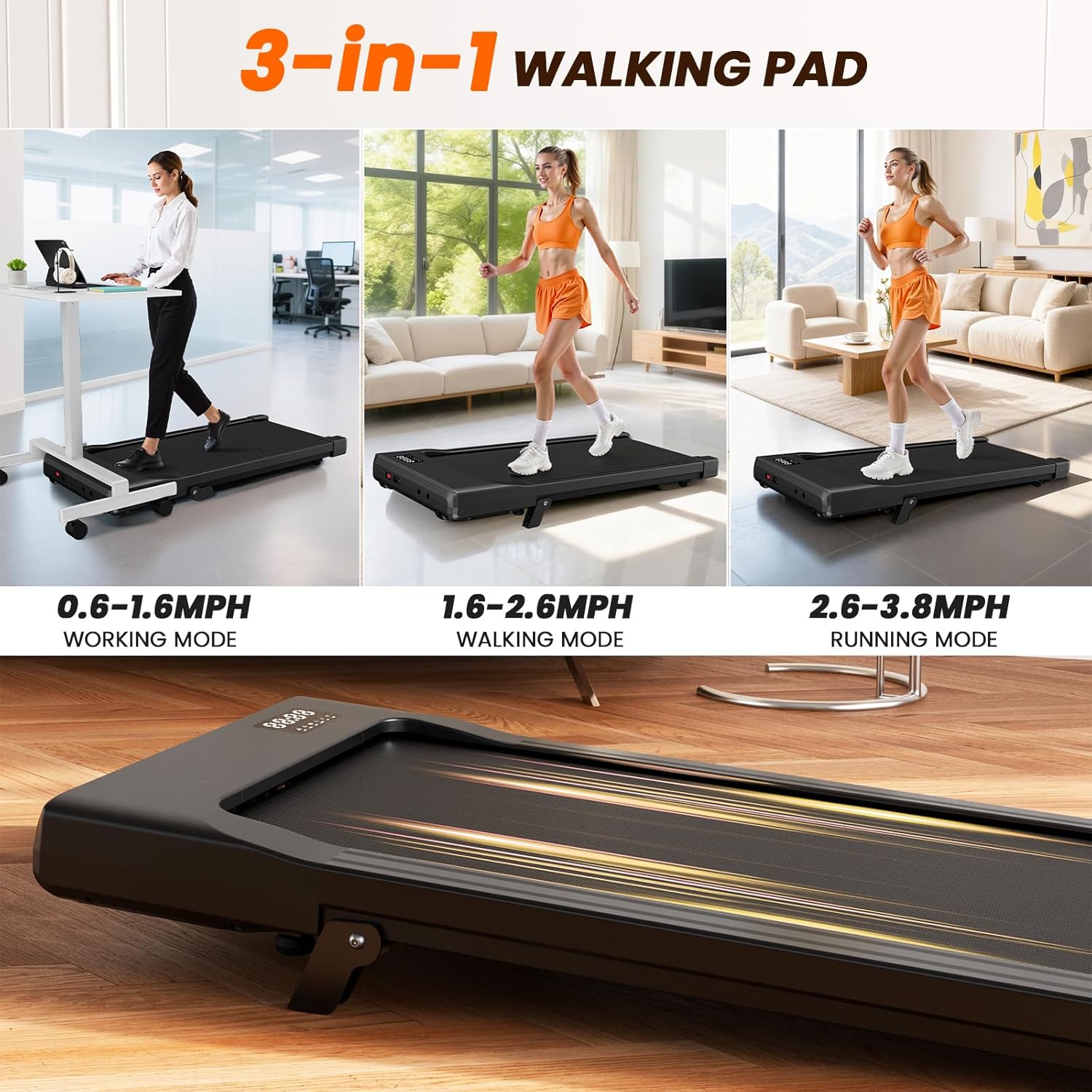
Figure 5: Visual representation of the three usage modes: Working, Walking, and Running.
5. Maintenance
Regular maintenance ensures the longevity and optimal performance of your walking pad.
5.1 Cleaning
- Wipe down the walking pad with a damp cloth after each use to remove sweat and dust.
- Avoid using abrasive cleaners or solvents that could damage the surface.
5.2 Belt Lubrication
The running belt requires periodic lubrication to reduce friction and extend its lifespan. Refer to the detailed instructions in the included user manual for the specific lubrication process and frequency.
5.3 Storage
The MJWW Walking Pad is designed to be space-saving and portable.
- It folds to just 4.17 inches thick.
- Utilize the built-in transport wheels to easily move and store the unit under a bed, sofa, or against a wall.
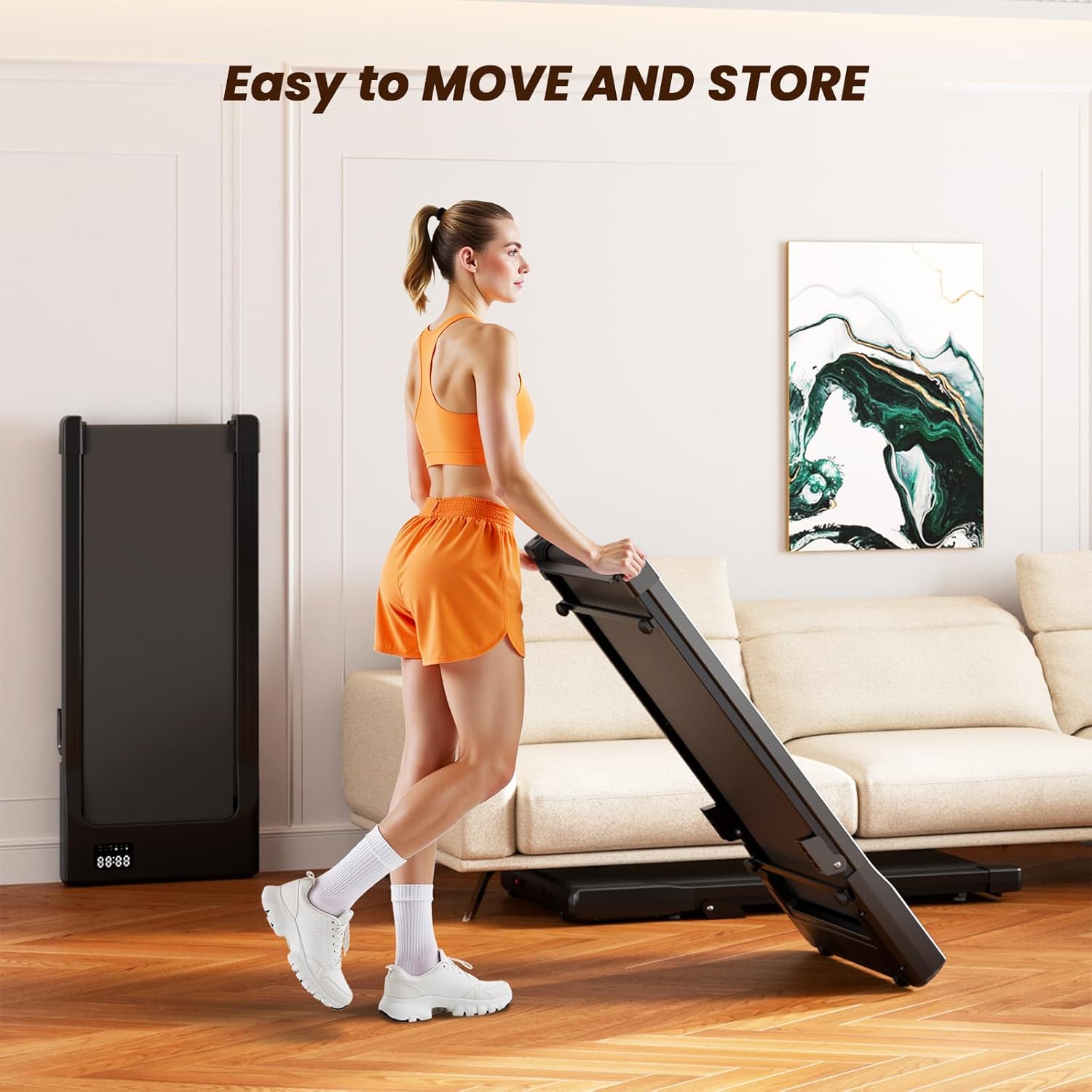
Figure 6: The walking pad can be easily moved and stored vertically or horizontally.
6. Troubleshooting
If you encounter any issues with your MJWW Walking Pad, please refer to the following common solutions or contact customer support.
- Treadmill not powering on: Ensure the power cord is securely plugged into a working outlet and the main power switch is in the 'ON' position. Check the remote control batteries.
- Belt not moving: Confirm the safety key is correctly inserted (if applicable). Ensure the remote control is paired and the 'ON' button has been pressed.
- Unusual noise: Check for any foreign objects caught in the belt or motor area. Ensure the belt is properly aligned and lubricated.
- Belt slipping: The belt may need adjustment or lubrication. Refer to the maintenance section or contact support.
7. Specifications
Key technical details of the MJWW Walking Pad with Incline (Model BA09).
| Feature | Detail |
|---|---|
| Brand | MJWW |
| Model Name | BA09 |
| Color | Black |
| Product Dimensions | 42.6"D x 19.61"W x 3.94"H |
| Item Weight | 36.6 Pounds |
| Material | Alloy Steel |
| Maximum Speed | 3.8 Miles per Hour |
| Minimum Speed | 0.6 Miles per Hour |
| Maximum Horsepower | 2.5 Horsepower |
| Maximum Incline Percentage | 6% (Manual) |
| Maximum Weight Recommendation | 300 Pounds |
| Display Type | LED |
| Metrics Measured | Speed, Time, Distance, Calories |
| Included Components | Remote Control |

Figure 7: The walking pad features a durable 5-layer running belt and supports up to 300 lbs.

Figure 8: The 2.5HP motor operates quietly, ideal for home or office environments.
8. Warranty Information
The MJWW Walking Pad comes with a limited warranty. For specific details regarding warranty coverage, duration, and terms, please refer to the warranty card included in your product packaging or contact MJWW customer support directly.
9. Customer Support
Your satisfaction is important to us. If you have any questions about the setup, operation, or maintenance of your MJWW Walking Pad, our customer service team is available 24/7 to provide assistance.
Please refer to the contact information provided in your product packaging or visit the official MJWW website for support options.
Ask a question about this manual
Ask about setup, troubleshooting, compatibility, parts, safety, or missing instructions. Manuals+ will review the question and use this page’s manual context to help answer it.