
1. Introduction
Thank you for choosing the YKYI Cordless Vacuum Cleaner P8-A. This manual provides essential information for the safe and efficient operation, maintenance, and troubleshooting of your new vacuum cleaner. Please read it thoroughly before first use and keep it for future reference.
The YKYI P8-A is a versatile cordless stick vacuum designed for various cleaning needs. It features a powerful 450W motor, up to 40KPa suction, and a 50-minute runtime. Its foldable design and LED display enhance usability, making it suitable for hard floors and pet hair.
2. Package Contents
Carefully unpack all components and ensure all items are present. If any items are missing or damaged, please contact customer support.
- Main Unit *1
- Charger *1
- LED Floor Brush Assembly *1
- Telescopic Pole *1
- Cleaning Brush *1
- 2-in-1 Combination Brush *1
- Filter HEPA *2
- Rechargeable Wall Mount *1
- User Manual *1

The following video provides a detailed unboxing of the YKYI Cordless Vacuum Cleaner, showcasing all included parts and accessories.
Video 2.1: Unboxing and overview of the YKYI Cordless Vacuum Cleaner components.
3. Setup & Assembly
3.1 Main Unit Assembly
- Insert the telescopic pole into the main unit until it clicks securely into place.
- Attach the LED floor brush assembly to the other end of the telescopic pole, ensuring it clicks into place.

3.2 Attaching Accessories
To use the vacuum in handheld mode or with specific tools, detach the telescopic pole by pressing the release button. Then, attach the desired accessory (e.g., cleaning brush, 2-in-1 combination brush) directly to the main unit until it clicks.
3.3 Wall Mount Installation
The included wall mount allows for convenient storage and charging. Choose a suitable location near a power outlet. Use the provided screws and anchors to securely fasten the wall mount to the wall. The main unit and accessories can then be stored on the mount.

4. Operating Instructions
4.1 Power On/Off and Suction Modes
To power on the vacuum, press the power button located on the main unit. The vacuum will typically start in Eco Mode. To adjust the suction power, press the mode adjustment button. There are two modes available:
- Eco Mode: Provides gentle, quiet suction (≤65dB) for daily cleaning tasks on hard floors or light dust. Offers up to 50 minutes of runtime.
- Turbo Mode: Delivers maximum suction power (40KPa) for stubborn messes, pet hair, and deep cleaning carpets.

4.2 LED Display
The integrated LED display provides real-time information about the vacuum's status:
- Battery Level: Indicates remaining battery charge.
- Floor Brush Wrapping: Alerts if the brush roll is tangled.
- Suction Level Status: Shows the current suction mode (Eco or Turbo).
- Air Duct Blocked: Notifies if there is a blockage in the air duct.

4.3 Cleaning with LED Headlights
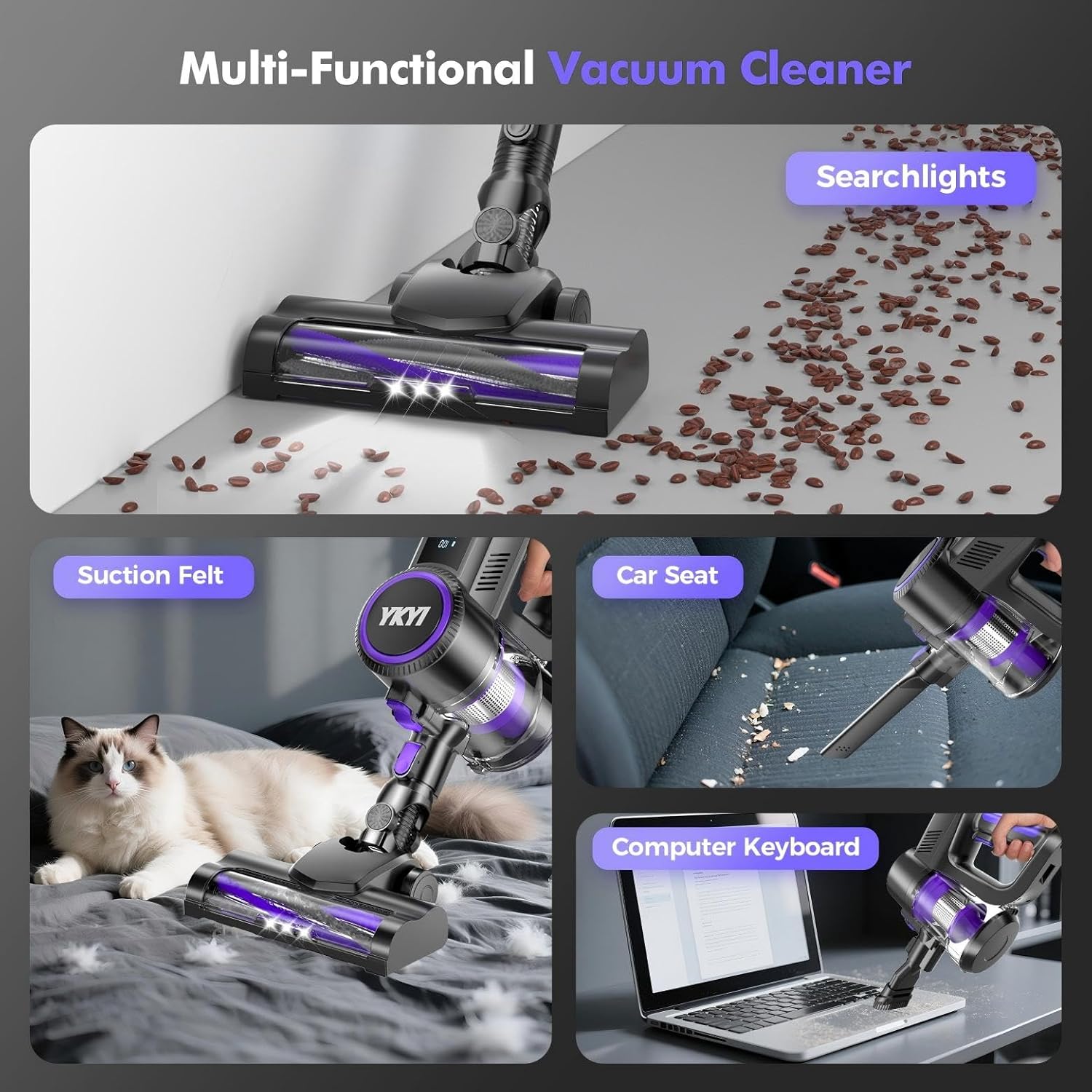
The electric floor brush is equipped with 4 LED headlights that illuminate dark areas, making hidden dust and debris visible for thorough cleaning.

4.4 Versatile Cleaning Applications
The YKYI P8-A's modular design allows for various cleaning applications:
- Floor Cleaning: Use the main unit with the telescopic pole and LED floor brush for hard floors and carpets. The brush roll auto-adjusts height for different surfaces.
- Handheld Cleaning: Detach the telescopic pole and attach the 2-in-1 combination brush or crevice tool for cleaning furniture, car interiors, keyboards, and tight spaces.
- High-Reach Cleaning: Use the telescopic pole with a smaller attachment to clean curtains, ceilings, or high shelves.


The following video demonstrates the versatility and ease of use of the YKYI Cordless Vacuum Cleaner for various cleaning tasks.
Video 4.1: Demonstration of the YKYI Cordless Vacuum Cleaner's features and cleaning capabilities.
5. Battery Charging
The YKYI P8-A features a removable and rechargeable battery. It takes approximately 4 hours to fully charge and provides up to 50 minutes of continuous cleaning in Eco Mode.
5.1 Charging the Battery
- The battery can be charged while attached to the main unit or separately.
- Connect the charger to the charging port on the battery or the wall mount.
- Plug the charger into a power outlet. The LED display will indicate charging status.

6. Maintenance
Regular maintenance ensures optimal performance and extends the lifespan of your YKYI Cordless Vacuum Cleaner.
6.1 Emptying the Dust Cup
The 1L dust cup can be emptied with a single push of a button, avoiding direct contact with dirt.
6.2 Cleaning Filters
The 6-stage filtration system includes an H13-grade HEPA filter. The HEPA filter is washable and reusable. Air-dry completely before reinstallation.
6.3 Cleaning the Brush Roll
The motorized brush roll features optimized comb teeth to prevent hair tangles. Periodically check and clean the brush roll to remove any accumulated hair or debris.

7. Troubleshooting
If you encounter any issues with your YKYI Cordless Vacuum Cleaner, please refer to the following common troubleshooting steps:
- No Power: Ensure the battery is fully charged and correctly inserted. Check the power outlet and charger connection.
- Loss of Suction: Check if the dust cup is full and empty it if necessary. Inspect filters for clogs and clean them. Ensure the air duct is not blocked.
- Brush Roll Not Spinning: Check for tangled hair or debris around the brush roll and remove any obstructions. Ensure the brush roll assembly is correctly attached.
- LED Display Error: Refer to the LED display indicators for specific error messages (e.g., air duct blocked, brush wrapping) and address the indicated issue.
For further assistance, please contact YKYI customer support.
8. Specifications
| Brand | YKYI |
| Model Name | P8-A |
| Colour | Royal Purple |
| Power/Wattage | 450 watts |
| Suction Power | 40KPa (Max) |
| Runtime | Up to 50 minutes (Eco Mode) |
| Battery | 6×2500mAh lithium batteries |
| Charging Time | 4 hours |
| Dust Cup Capacity | 1 Liters |
| Filter Type | H13-grade HEPA Filter |
| Special Features | Foldable Design, LED Display, Anti-Hair Tangle Brush, Wall Mount |
| Item Weight | 2.87 kg |
9. Warranty & Support
The YKYI Cordless Vacuum Cleaner P8-A comes with a 2-year warranty, ensuring peace of mind for your purchase. For any product-related inquiries, technical support, or warranty claims, please contact YKYI customer service through your retailer or the official YKYI website.