
1. Introduction
Thank you for purchasing the Unineo Electric Fireplace Insert. This manual provides important information for the safe operation, installation, and maintenance of your new appliance. Please read this manual thoroughly before installation and use, and retain it for future reference.
This electric fireplace insert features a realistic flame effect with multiple color options, an adjustable ember bed, top ambient lighting, and a simulated fire crackling sound. It also includes an efficient 750W/1500W Eco heater with thermostat control and a timer function, all controllable via remote or integrated buttons.
2. Important Safety Instructions
When using electrical appliances, basic precautions should always be followed to reduce the risk of fire, electric shock, and injury to persons, including the following:
- Read all instructions before using this heater.
- This appliance is CSA certified, ensuring it meets safety standards.
- Always unplug the heater when not in use.
- Do not operate any heater with a damaged cord or plug, or after the heater malfunctions or has been dropped or damaged in any manner.
- Do not use outdoors.
- This heater is not intended for use in bathrooms, laundry areas, and similar indoor locations. Never locate heater where it may fall into a bathtub or other water container.
- Do not run cord under carpeting. Do not cover cord with throw rugs, runners, or similar coverings. Arrange cord away from traffic area and where it will not be tripped over.
- To disconnect heater, turn controls to off, then remove plug from outlet.
- Do not insert or allow foreign objects to enter any ventilation or exhaust opening as this may cause an electric shock or fire, or damage the heater.
- To prevent a possible fire, do not block air intakes or exhaust in any manner. Do not use on soft surfaces, like a bed, where openings may become blocked.
- This heater has Passive Overheat Protection. It is hot when in use. To avoid burns, do not let bare skin touch hot surfaces. Keep combustible materials, such as furniture, pillows, bedding, papers, clothes, and curtains at least 3 feet (0.9 m) from the front of the heater and keep them away from the sides and rear.
- The unit includes an Active Child Lock feature to prevent unintended operation.
- Use this heater only as described in this manual. Any other use not recommended by the manufacturer may cause fire, electric shock, or injury to persons.
3. Setup and Installation
The Unineo Electric Fireplace Insert is designed for easy installation into an existing fireplace opening or a custom-built mantel. No fixing bracket or external vent is needed; simply place the unit into the opening.
3.1 Dimensions and Opening Requirements
Before installation, ensure your opening meets the recommended size range for the 36-inch model.
- Overall Dimension: 36″W × 27″H × 8.9″D
- Recommended Opening Width: 32.4″ - 35.5″
- Recommended Opening Height: 25.7″ - 26.8″
- Recommended Opening Depth: At least 8.5″

Figure 3.1: Overall Dimensions of the 36-inch Electric Fireplace Insert.
This image illustrates the precise measurements of the fireplace insert, including its width, height, and depth, to assist with pre-installation planning.

Figure 3.2: Suggested Opening Size for 36-inch Insert.
This diagram provides the minimum and maximum recommended dimensions for the fireplace opening to ensure a proper and secure fit for the 36-inch insert.
3.2 Placement and Electrical Connection
- Choose a location that is not susceptible to moisture and is away from drapes, furniture, and high traffic areas.
- Ensure the unit is placed on a stable, level surface.
- Plug the power cord directly into a 120V, 15 Amp grounded outlet. Do not use an extension cord or power strip.

Figure 3.3: Installation Examples.
This image demonstrates various common installation scenarios for the electric fireplace insert, including integration into a TV stand, a traditional mantel, or an existing fireplace opening.
4. Operating Instructions
The fireplace insert can be operated using the control panel on the unit or the included remote control.
4.1 Control Panel and Remote Control

Figure 4.1: Remote and Button Controls.
This image displays both the handheld remote control and the integrated button panel on the fireplace unit, highlighting the various functions available for operation.
4.2 Power On/Off
- Press the Power button on the control panel or remote to turn the unit on or off.
- The digital display will show the current settings.
4.3 Flame and Ember Bed Settings
Customize the visual ambiance with a variety of flame and ember bed options.
- Flame Color: Choose from 12 different flame color modes.
- Ember Bed Color: Select from 12 ember bed color options.
- Top Ambient Light: Adjust the top ambient light with 12 color modes.
- Flame Speed: Adjust the flame movement speed across 5 levels.
- Flame Brightness: Adjust the flame brightness across 5 levels.
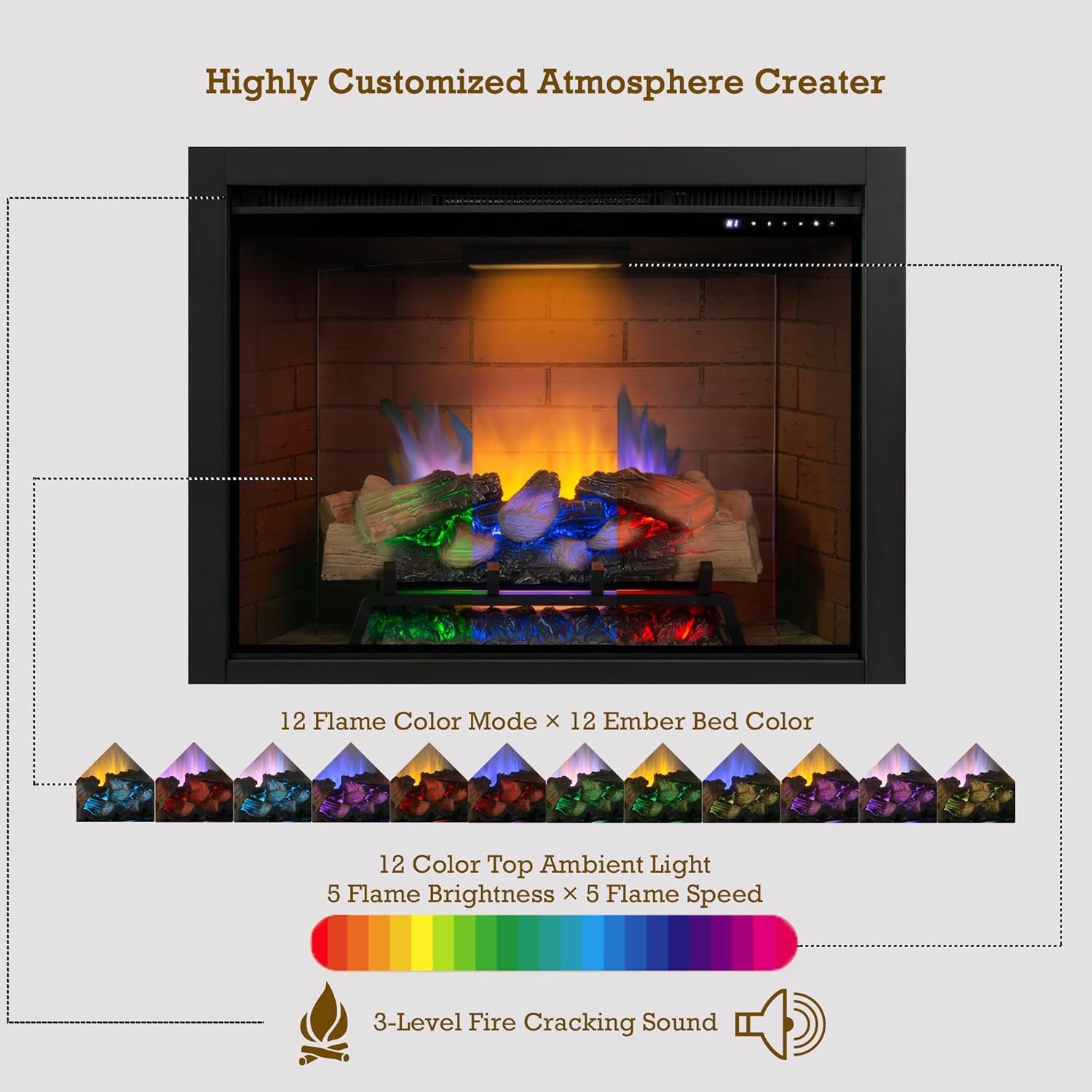
Figure 4.2: Flame Atmosphere Options.
This image illustrates the wide range of customizable flame, ember bed, and top ambient light colors, along with controls for flame speed and brightness, and the fire crackling sound feature.

Figure 4.3: Top Ambient Light and Sound.
This image highlights the 12 color options for the top ambient light and the 3-level adjustable firewood crackling sound, enhancing the fireplace experience.
4.4 Heater Functions
The integrated heater provides supplementary warmth for rooms up to 450 square feet.
- Power Settings: Select between 750W and 1500W heat output.
- Eco Mode: In Eco mode, the heater automatically adjusts power and fan speed based on the room temperature for efficient heating.
- Thermostat: Set the desired room temperature between 60°F and 99°F. The heater will cycle on and off to maintain the set temperature.
- The heater can be operated independently of the flame effects.

Figure 4.4: Eco Heater Function.
This image highlights the 750W/1500W Eco Heater, emphasizing its quiet operation and timer function for comfortable and energy-efficient heating.
4.5 Timer Function
- Set the timer for automatic shut-off from 0.5 hours to 9 hours.
4.6 Child Lock
- Activate the Child Lock feature to prevent accidental changes to settings or unauthorized use. Refer to the remote control or control panel section for specific activation instructions.
5. Maintenance
Regular maintenance ensures the longevity and optimal performance of your electric fireplace insert.
- Cleaning: Always unplug the unit before cleaning. Use a soft, damp cloth to wipe the exterior surfaces. Do not use abrasive cleaners or sprays.
- Glass Panel: Clean the glass panel with a soft cloth and a non-abrasive glass cleaner.
- Vents: Periodically check and clean the air intake and exhaust vents to ensure they are free from dust and debris, which can impede airflow and heater performance.
- Storage: If storing the unit for an extended period, unplug it and store it in a dry, dust-free location.
6. Troubleshooting
If you experience issues with your fireplace insert, refer to the following common problems and solutions:
| Problem | Possible Cause | Solution |
|---|---|---|
| Unit does not turn on. | No power, loose plug, circuit breaker tripped. | Ensure unit is plugged into a live 120V outlet. Check circuit breaker. |
| No heat output. | Heater off, thermostat set too low, overheat protection activated. | Ensure heater function is on. Increase thermostat setting. Unplug unit for 15 minutes to reset overheat protection. |
| Flame effect not working. | Flame effect turned off. | Ensure flame effect is activated via control panel or remote. |
| Remote control not working. | Dead batteries, obstruction, remote out of range. | Replace batteries. Remove obstructions. Ensure remote is within operating range and pointed at the unit. |
| Unusual noise or smell. | Dust accumulation, new unit smell. | Clean vents. New units may emit a slight odor initially, which should dissipate. If persistent or strong, discontinue use and contact support. |
If the problem persists after attempting these solutions, please contact customer support.
7. Specifications
| Brand | Unineo |
| Model Name | UNF-ZHX36I |
| Product Dimensions (D x W x H) | 8.9" x 36" x 27" |
| Size | 36 Inch |
| Item Weight | 45.32 Pounds |
| Material | Metal |
| Color | Black |
| Finish Type | Painted |
| Installation Type | Insert |
| Power Source | Corded Electric |
| Heat Output | 750W / 1500W (approx. 2560 BTU/hr / 5120 BTU/hr) |
| Heating Coverage | Up to 450 sq ft |
| Ventilation Type | Vent Free |
| Special Features | Multicolor Flame, Safety Shut Off, Eco Heater, Remote Control, Timer, Thermostat, Child Lock |
| Included Components | Remote Control |
| Certifications | CSA Certified |
8. Warranty Information
This Unineo Electric Fireplace Insert comes with a one-year limited warranty from the date of purchase. This warranty covers manufacturing defects in materials and workmanship under normal use.
The warranty does not cover damage caused by misuse, accident, alteration, improper installation, or unauthorized repairs. Please retain your proof of purchase for warranty claims.
9. Customer Support
For any questions, technical assistance, or warranty claims, please contact Unineo customer service. Our team is ready to provide support whenever you need it.
Please have your model number (UNF-ZHX36I) and purchase information ready when contacting support to expedite assistance.
Contact information (e.g., email, phone number, website) can typically be found on the product packaging or the seller's platform.