
1. Introduction
Thank you for choosing the CHAOKE Exercise Bike Model 507C. This manual provides essential information for the safe assembly, operation, and maintenance of your new exercise bike. Please read this manual thoroughly before using the product and keep it for future reference.
The CHAOKE Exercise Bike is designed for home cardio workouts, featuring adjustable magnetic resistance, app compatibility, and a sturdy build for a smooth and quiet riding experience.
2. Important Safety Information
Before beginning any exercise program, consult with your physician. This is especially important for individuals over the age of 35 or those with pre-existing health conditions.
- Always place the exercise bike on a flat, stable surface. Use the included anti-slip mat for added stability and floor protection.
- Ensure all bolts and nuts are securely tightened before each use. Regularly check for loose parts.
- Keep children and pets away from the exercise bike during operation.
- Wear appropriate exercise clothing and athletic shoes. Avoid loose clothing that could get caught in moving parts.
- Do not exceed the maximum weight capacity of 350 lbs (158 kg).
- Stop exercising immediately if you feel faint, dizzy, or experience pain.
- Adjust the seat and handlebars to a comfortable and safe position before starting your workout.
- The resistance knob also functions as an emergency brake. Press it down firmly to stop the flywheel quickly.
3. Product Features
The CHAOKE Exercise Bike Model 507C is equipped with advanced features to enhance your home workout experience:
- 100% Micro-Adjustable Magnetic Resistance: Provides precise control over workout intensity, suitable for various training needs from warm-up to high-intensity.
- Smart App Compatibility: Seamlessly connects with popular fitness apps like Z-sport, Zwift, and Kinomap for interactive and social fitness experiences.
- Stable and Safe Structure: Features a double triangle frame, 35lb heavy-duty flywheel, and 5 anti-slip pads for maximum stability. Constructed from 2.00 mm thick steel with an electrophoretic anti-rust coating.
- LCD Display & Tablet Holder: Multi-functional LCD screen displays time, speed, distance, odometer, and calories. The integrated tablet holder securely holds your device for entertainment or online classes.
- Ultra-Quiet Magnetic Resistance: Operates at under 25dB, ensuring a silent workout. Equipped with 4x4200GS magnets and a high-density rubber belt drive for smooth pedaling and reduced joint pressure.
- Adjustable Comfort: 4-way adjustable seat (forward/backward and up/down) and 2-way adjustable handlebar (up/down) to accommodate users from 4'8" to 6'4" tall. Features an enlarged, high-resilience, soft road-bike-style seat.
- User-Friendly Design: Includes an anti-slip mat, dual water bottle holders, adjustable strap-on pedal cages, safety handrails, and transport wheels for easy mobility.

Image: The CHAOKE Exercise Bike highlighting its stable double triangle frame and support tubes, designed for a maximum weight capacity of 350 lbs.
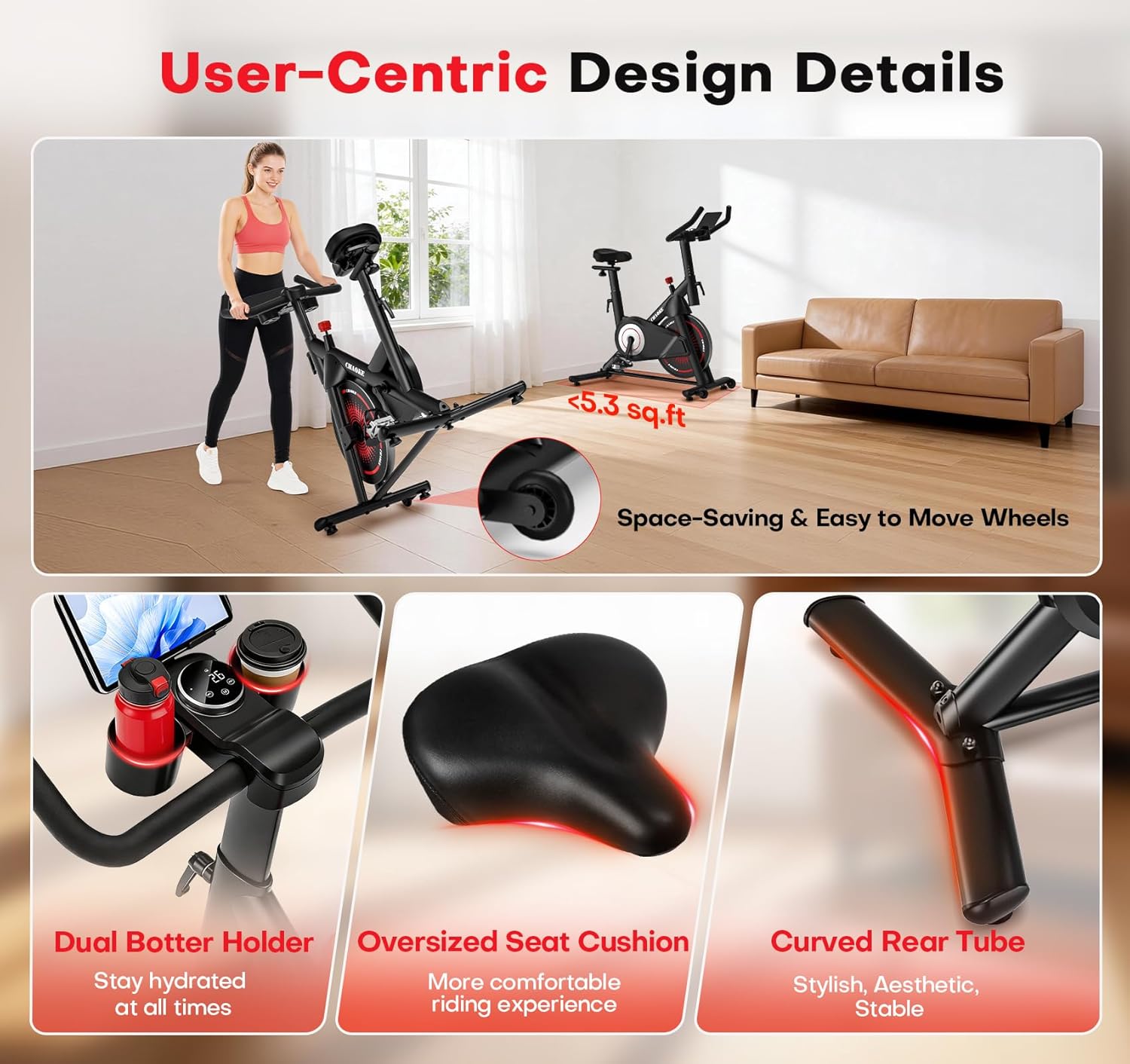
Image: Close-up details of the CHAOKE Exercise Bike, showcasing dual bottle holders, an oversized seat cushion for comfort, and a curved rear tube for stability and aesthetics.
4. Assembly Instructions
The CHAOKE Exercise Bike comes 80% pre-assembled. The remaining assembly typically takes 25-30 minutes. A detailed manual, video guide, and full toolkit are included in the package.
4.1 Unpacking
- Carefully remove all components from the packaging.
- Check the parts list against the contents of the box to ensure all items are present.
- Place all parts on a clear, flat surface with enough space for assembly.
4.2 Step-by-Step Assembly
Refer to the included printed manual for detailed diagrams and specific steps. General steps include:
- Attach the front and rear stabilizer bars to the main frame.
- Install the pedals (note: left and right pedals are threaded differently).
- Mount the seat post and seat.
- Install the handlebar post and handlebars.
- Connect the LCD display cables and mount the display.
- Ensure all connections are secure and all bolts are tightened.

Image: Components laid out for assembly, showing the main frame, stabilizer bars, pedals, and toolkit. The image highlights the quick assembly process.
Video: An official video demonstrating the assembly process of the CHAOKE Exercise Bike. This video provides visual guidance for quick and correct setup.
5. Operating Instructions
5.1 Adjusting Seat and Handlebars
Proper adjustment ensures comfort and reduces the risk of injury.
- Seat Height: Loosen the adjustment knob on the seat post. Adjust the seat so that your knee has a slight bend at the bottom of the pedal stroke. Tighten the knob securely.
- Seat Forward/Backward: Loosen the adjustment knob under the seat. Adjust the seat horizontally to align your knee with the pedal axle when pedals are level. Tighten the knob.
- Handlebar Height: Loosen the adjustment knob on the handlebar post. Adjust the handlebars to a comfortable height that allows for a relaxed upper body posture. Tighten the knob.
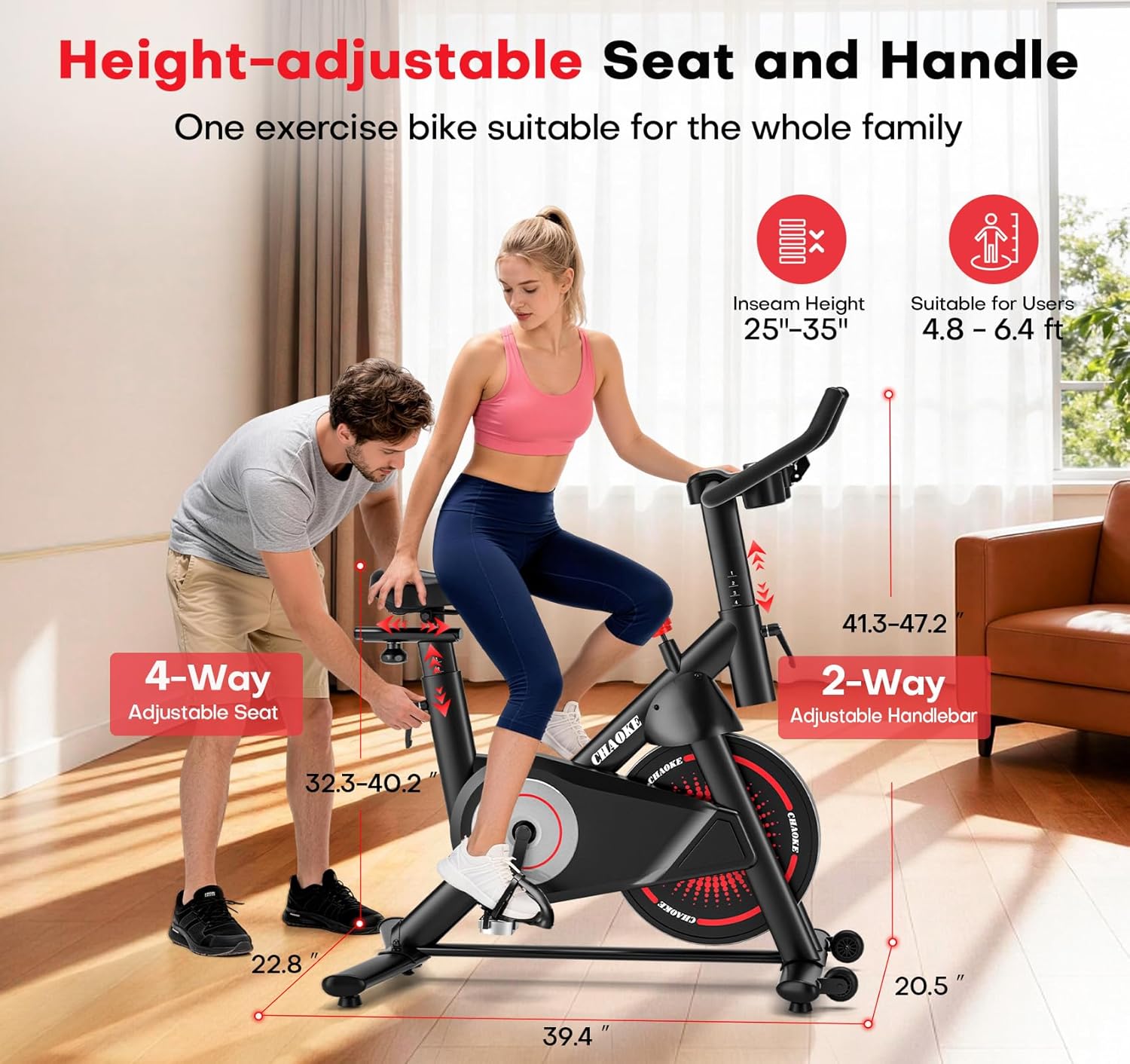
Image: A person adjusting the seat height of the CHAOKE Exercise Bike, illustrating the 4-way adjustable seat and 2-way adjustable handlebar for various user heights.
5.2 Using the Resistance System
The bike features a magnetic resistance system for smooth and quiet operation.
- Increase Resistance: Turn the red resistance knob clockwise to increase the workout intensity.
- Decrease Resistance: Turn the red resistance knob counter-clockwise to decrease the workout intensity.
- Emergency Stop: Press the red resistance knob down firmly to engage the emergency brake and stop the flywheel immediately.

Image: A hand turning the red resistance knob on the CHAOKE Exercise Bike, demonstrating the micro-adjustable resistance levels from 0-100%.
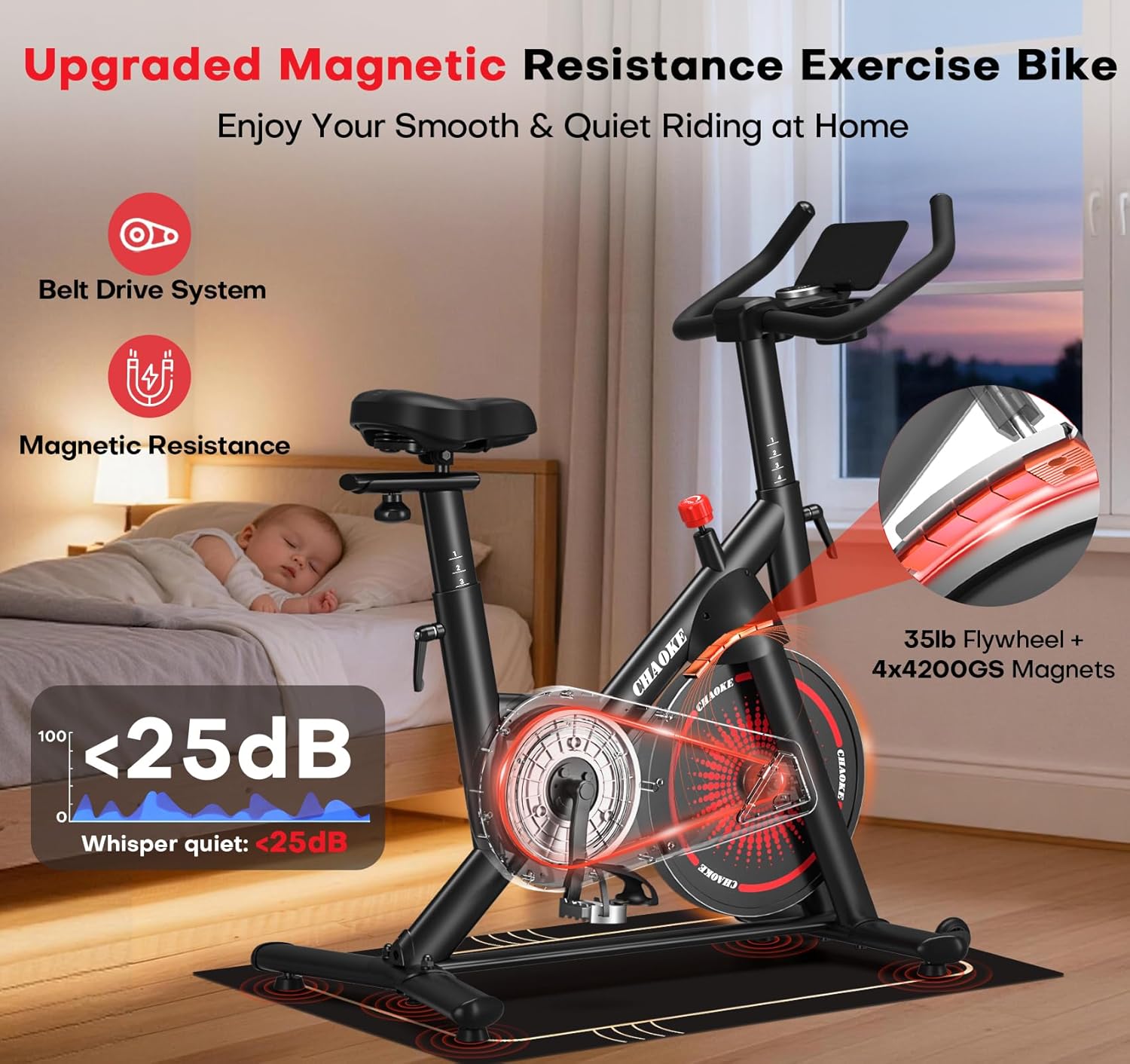
Image: An illustration of the CHAOKE Exercise Bike's magnetic resistance system, highlighting the 35lb flywheel and 4x4200GS magnets for quiet operation (under 25dB).
5.3 Using the LCD Display and App Connectivity
The multi-functional LCD display tracks your workout data, and the bike is compatible with various fitness apps.
- LCD Display Functions: The display shows Time, Speed, Distance, Odometer, and Calories Burned. Use the "MODE" button to cycle through display modes or hold it to reset values (consult the specific display manual for detailed instructions).
- Tablet Holder: Place your tablet or smartphone securely in the integrated holder for entertainment or to use fitness apps.
- App Compatibility: The bike is Bluetooth-enabled and compatible with apps like Z-sport, Zwift, and Kinomap.
- Download your preferred fitness app from your device's app store.
- Ensure Bluetooth is enabled on your device.
- Follow the app's instructions to connect to your CHAOKE Exercise Bike.
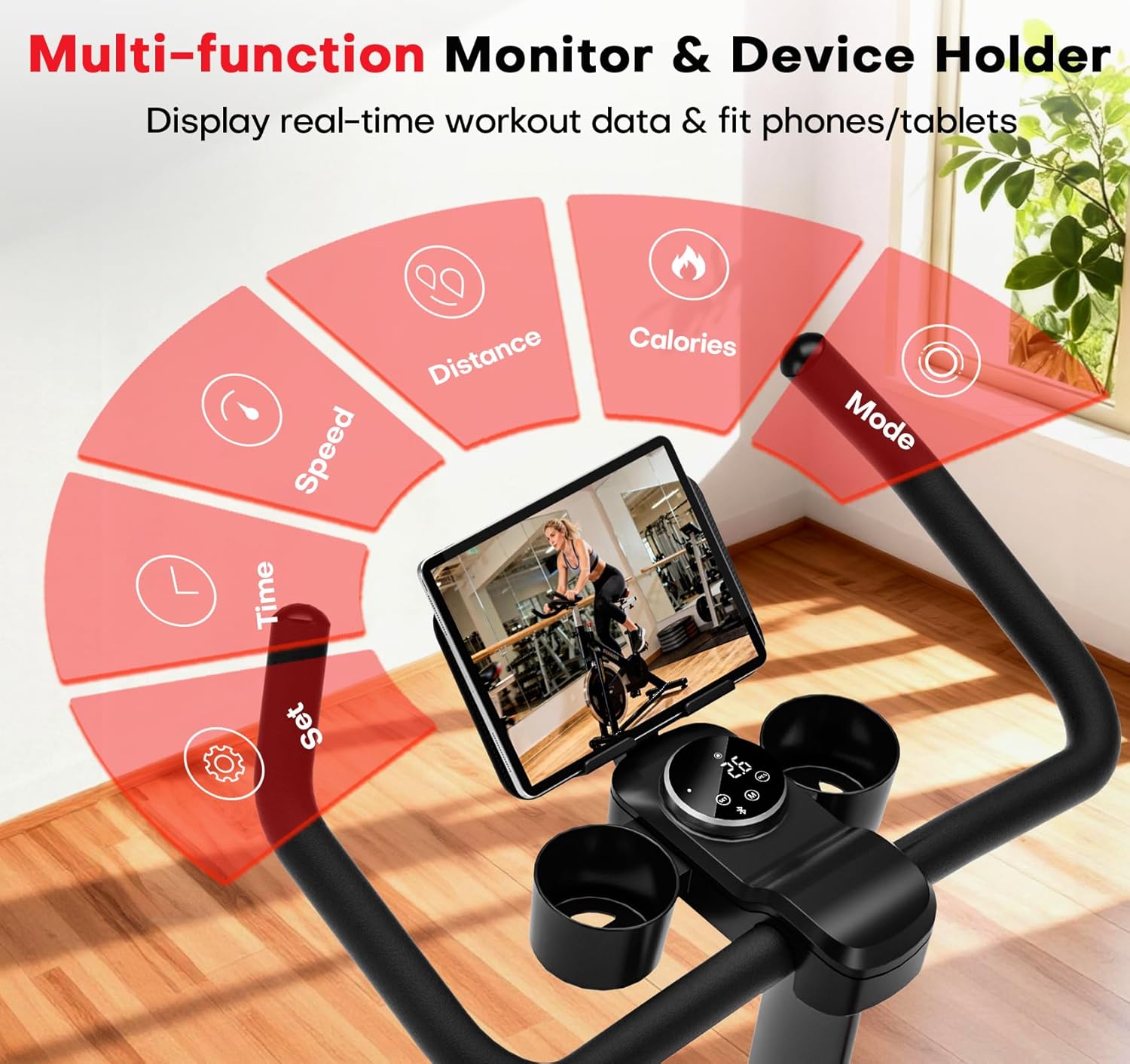
Image: Close-up of the CHAOKE Exercise Bike's multi-function LCD monitor and tablet holder, displaying workout data such as time, speed, distance, and calories.

Image: A user cycling on the CHAOKE Exercise Bike with a tablet in the holder, showing various fitness app interfaces like Kinomap and Zwift, demonstrating smart cycle features.
6. Maintenance
Regular maintenance ensures the longevity and safe operation of your CHAOKE Exercise Bike.
- Cleaning: Wipe down the bike with a damp cloth after each use to remove sweat and dust. Avoid abrasive cleaners or solvents.
- Inspecting Bolts and Nuts: Periodically check all bolts, nuts, and moving parts for tightness. Re-tighten as necessary.
- Belt Drive System: The magnetic resistance system and belt drive are designed to be maintenance-free and do not require lubrication.
- Storage: When not in use, store the bike in a clean, dry place. Use the transport wheels to move it easily.
7. Troubleshooting
If you encounter any issues, refer to the following common solutions:
| Problem | Possible Cause | Solution |
|---|---|---|
| Bike is unstable or wobbles. | Uneven surface; loose stabilizer bolts. | Ensure bike is on a flat surface. Check and tighten all stabilizer bolts. Adjust leveling feet if present. |
| Squeaking or grinding noise. | Loose parts; foreign object; worn components. | Check all bolts and connections for tightness. Inspect for any foreign objects near the flywheel or pedals. If noise persists, contact customer support. |
| LCD display not working. | Loose cable connection; dead batteries. | Check the connection cable from the bike to the display. Replace batteries in the LCD unit. |
| Resistance not changing. | Resistance knob mechanism issue. | Ensure the resistance knob is properly engaged. If the issue persists, contact customer support. |
For issues not listed here, or if troubleshooting steps do not resolve the problem, please contact CHAOKE customer support.
8. Product Specifications
| Feature | Detail |
|---|---|
| Brand | CHAOKE |
| Model Name | 507C |
| Resistance Mechanism | Magnetic |
| Number of Resistance Levels | 100 (Micro-adjustable) |
| Drive System | Belt |
| Maximum Weight Recommendation | 350 Pounds (158 kg) |
| Product Dimensions (LxWxH) | 39.37"D x 22.83"W x 47.27"H (100cm D x 58cm W x 120cm H) |
| Item Weight | 59.5 Pounds (27 kg) |
| Material | Alloy Steel |
| Power Source | Battery Powered (for LCD display) |
| Minimum User Height | 4.7 Feet (143 cm) |
| Special Features | App Compatible, Magnetic Resistance, Anti-Slip Mat, Two Bottle Holders, Ultra Quiet, Heavy Duty, Thickened Steel, Digital Display, Compact |
| UPC | 757611433214 |
9. Warranty and Customer Support
CHAOKE stands behind the quality of its products.
- Warranty: Your CHAOKE Exercise Bike comes with a 1-year warranty. Please retain your proof of purchase.
- Returns: Enjoy a 30-day easy return policy.
- Customer Support: If you require assistance, our expert engineers are available to provide personalized video guidance. We guarantee a response within 18 hours. Your satisfaction is our priority.
- Contact: For support, please refer to the contact information provided in your purchase documentation or visit the official CHAOKE website.