
Introduction
This manual provides comprehensive instructions for the Galvanox Portable Charger Set, Model DWA6520, designed for DeWalt 20V MAX batteries. This kit offers a complete charging solution, enabling fast and reliable power for your tools whether you are on a jobsite, in your vehicle, or between locations. It includes a bidirectional USB-C adapter, a 65W GaN wall charger, an 83W dual-port car charger, and a durable USB-C cable, all housed in a protective carrying case. The USB-C adapter also transforms your DeWalt battery into a high-capacity power bank for charging other devices.
What's in the Box
Verify that all components are present in your Galvanox Portable Charger Set:
- USB-C Battery Charging Adapter
- 65W GaN Wall Charger
- 83W Dual-Port Car Charger (USB-C + USB-A)
- 100W Braided USB-C Cable (5ft)
- Molded EVA Carrying Case

Image: All components of the Galvanox Portable Charger Set, including the USB-C battery charging adapter, 65W GaN wall charger, 83W dual-port car charger, 100W braided USB-C cable, and molded EVA carrying case.
Setup
- Attach the USB-C Battery Charging Adapter: Align the USB-C battery charging adapter with your DeWalt 20V MAX battery. Slide the adapter onto the battery until it clicks securely into place. Ensure a firm connection.
- Connect to Power Source:
- Wall Charging: Plug the 65W GaN Wall Charger into a standard AC outlet. Connect the 100W braided USB-C cable to the wall charger and then to the USB-C port on the battery charging adapter.
- Car Charging: Insert the 83W Dual-Port Car Charger into your vehicle's 12V accessory socket. Connect the 100W braided USB-C cable to the car charger (either USB-C PD or USB-A QC 3.0 port) and then to the USB-C port on the battery charging adapter.
- Initial Charge: For optimal performance, ensure your DeWalt battery is fully charged before its first use with the Galvanox adapter.

Image: The Galvanox charger connected to a DeWalt battery, illustrating both wall charging and car charging options.
Operating Instructions
Charging DeWalt Batteries
Once the battery charging adapter is securely attached to your DeWalt battery and connected to a power source (wall or car charger), the adapter will begin charging the battery. The adapter features an 8-pin pure copper connector for efficient power transfer and a multi-stage charge indicator.
- Stage 1 Charging: Indicates the initial phase of charging.
- Stage 2 Charging: Indicates the battery is in the secondary charging phase.
- Pack Charged: Indicates the battery is fully charged.
- Hot/Cold Delay: Indicates the battery temperature is outside the optimal charging range. Charging will resume automatically once the temperature normalizes.

Image: The 4-stage power indicator on the Galvanox battery charging adapter, displaying charging status and temperature delays.
Power Bank Functionality
The bidirectional USB-C port on the adapter allows your DeWalt battery to function as a high-capacity power bank. This enables you to charge other USB-C compatible devices such as laptops, phones, or tablets directly from your DeWalt battery.
- Ensure the USB-C battery charging adapter is attached to a charged DeWalt battery.
- Connect your device (e.g., smartphone, tablet, laptop) to the USB-C port on the adapter using the 100W braided USB-C cable or another compatible USB-C cable.
- The adapter will automatically begin supplying power to your connected device. The output can reach up to 65W, suitable for high-draw devices.
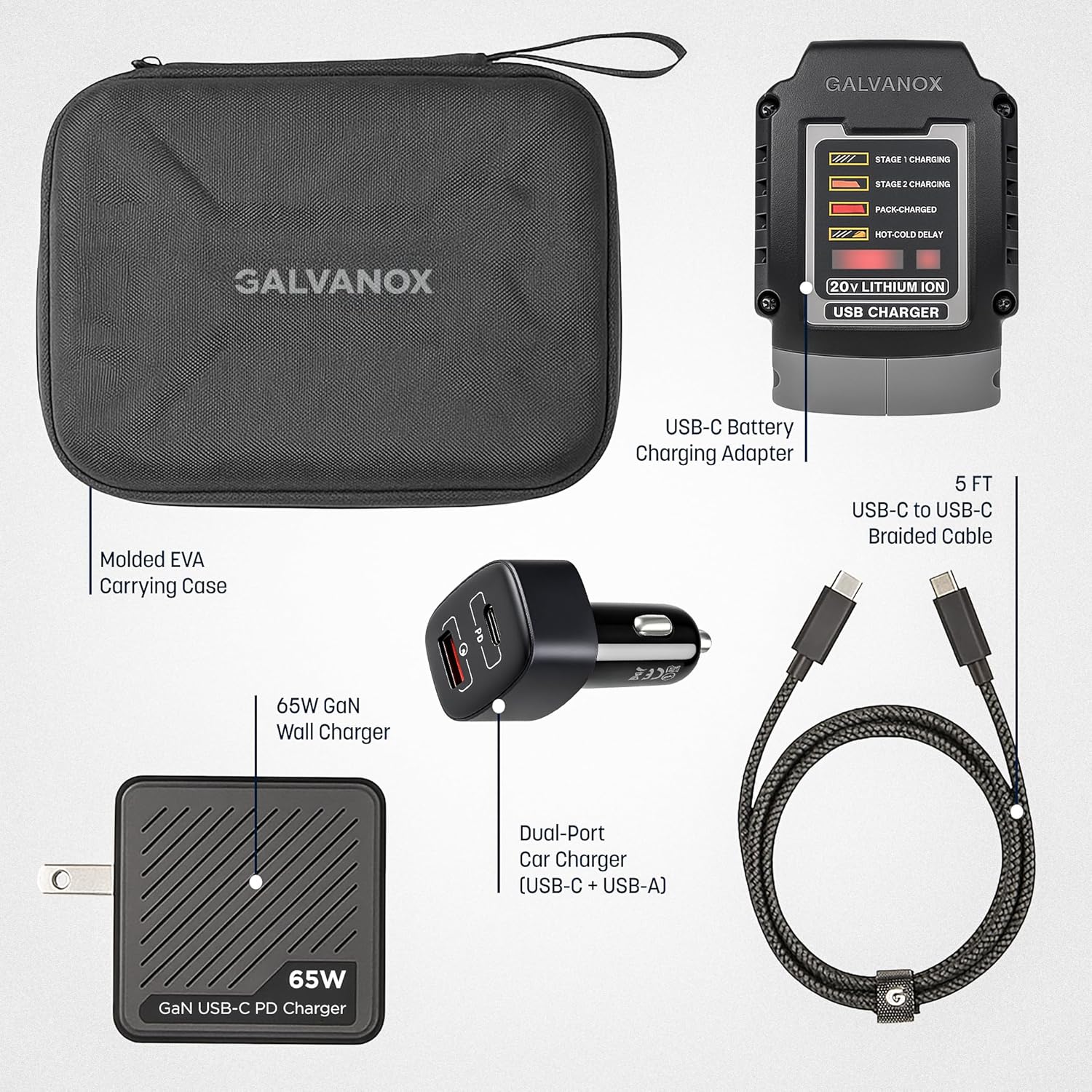
Image: The Galvanox adapter converting a DeWalt battery into a power bank, charging a smartphone.
Maintenance
- Cleaning: Use a dry, soft cloth to clean the adapter and chargers. Do not use liquid cleaners or solvents.
- Storage: Store all components in the provided molded EVA carrying case when not in use. This protects the items from dust, moisture, and physical damage. Store in a cool, dry place away from direct sunlight.
- Cable Care: The 100W braided USB-C cable is designed for durability. Avoid sharp bends or excessive pulling to maintain its integrity. Use the integrated Velcro wire tie to keep the cable neat.
- Connection Points: Periodically inspect the 8-pin pure copper connector on the adapter and the USB-C ports for any debris or damage. Ensure they are clean for optimal contact.

Image: The Galvanox Portable Charger Set components stored in the molded EVA carrying case.
Troubleshooting
- Adapter Not Charging Battery:
- Ensure the adapter is fully seated on the DeWalt battery.
- Verify the wall or car charger is properly connected to a live power source.
- Check the USB-C cable for damage and ensure it is securely connected at both ends.
- Observe the indicator lights for a 'Hot/Cold Delay' status. Charging will resume when the battery temperature is within the optimal range.
- Device Not Charging from Power Bank:
- Ensure the DeWalt battery attached to the adapter has sufficient charge.
- Verify the USB-C cable connecting your device to the adapter is functional and securely connected.
- Confirm your device is compatible with USB-C charging.
- Slow Charging:
- Ensure you are using the provided 100W braided USB-C cable, as lower quality cables may limit charging speed.
- For optimal speed, use the 65W GaN wall charger or the USB-C PD port on the car charger.
Specifications
| Feature | Specification |
|---|---|
| Brand | GALVANOX |
| Model Number | DWA6520 |
| Compatible Devices | DCB200, DCB201, DCB203, DCB203G, DCB204, DCB205, DCB205G, DCB205BT, DCB206, DCB208, DCB210, DCB230, DCB240, DCB324, DCB606, DCB609, DCB609G, DCB612, DCB615, DCB2108, DCBP034, DCBP034G, DCBP320, DCBP520, DCBP520G |
| Number of Items | 5 (Adapter, Wall Charger, Car Charger, Cable, Case) |
| Number of Ports | 3 (1x USB-C on adapter, 1x USB-C on wall charger, 1x USB-C + 1x USB-A on car charger) |
| 65W GaN Wall Charger Output | 5V, 9V, 12V, 15V, 20V |
| 83W Dual-Port Car Charger Output | USB-C PD (65W), USB-A QC 3.0 (18W) |
| USB-C Cable | 5ft, 100W, Braided |
| Product Dimensions (Adapter) | 3.9 x 2.7 x 1.3 inches (approx.) |
| Product Dimensions (Case) | 7 x 5.2 x 2.5 inches (approx.) |
| Item Weight | 522 g (approx.) |
Warranty and Support
Galvanox products are designed for reliability and performance. For warranty information, technical support, or any inquiries regarding your Galvanox Portable Charger Set, please refer to the contact information provided with your purchase or visit the official Galvanox website. Please retain your proof of purchase for warranty claims.