
1. Introduction
The MUCAR 682 OBD2 Scanner is a professional-grade diagnostic tool designed for comprehensive vehicle system analysis. It offers full system diagnostics, bidirectional control capabilities, and over 20 reset functions, making it suitable for both enthusiastic home mechanics and professional workshops. This device provides clear, actionable insights into vehicle issues, supported by AI-assisted diagnostics and lifetime free software updates.
2. What's in the Box
Upon opening the package, verify that all components are present:
- MUCAR 682 Scanner Unit
- Diagnostic Cable (OBD2 to D232)
- Type-C Cable
- User Manual
- Packing Box

Image: Contents of the MUCAR 682 OBD2 Scanner package.
3. Setup
- Charge the Unit: Before first use, ensure the MUCAR 682 scanner is fully charged using the provided Type-C cable and a suitable power adapter (not included).
- Connect to Vehicle:
- Locate the OBD2 port in your vehicle, typically found under the dashboard on the driver's side.
- Connect the D232 end of the diagnostic cable to the corresponding port on the MUCAR 682 unit. Gently tighten the two thumb screws to secure the connection.
- Connect the OBD2 end of the diagnostic cable to your vehicle's OBD2 port.
- Power On: Press the power button located on the top of the MUCAR 682 unit. The device will power up, which may take a few seconds.
- Connect to Wi-Fi: For software updates and AI-assisted diagnostics, connect the unit to a stable Wi-Fi network. Navigate to the settings menu on the device to configure Wi-Fi.
- Automatic VIN Detection: Once connected to the vehicle, the scanner can automatically detect the vehicle's VIN (Vehicle Identification Number) to retrieve vehicle details. This streamlines the diagnostic process.
4. Operating Instructions
The MUCAR 682 features an intuitive interface with both touchscreen and physical button navigation. The display is bright and clear, offering good resolution for easy readability.
4.1 Basic Diagnostic Functions
- Read Codes: Access and display Diagnostic Trouble Codes (DTCs) from various vehicle systems.
- Clear Codes: Erase DTCs from the vehicle's computer after repairs have been made.
- Live Data: View real-time data streams from vehicle sensors and modules. This data can be displayed in text or graphical format, with a 4-in-1 merged chart option for comparative analysis.
- DTC Lookup: Utilize the built-in DTC lookup feature to understand the meaning of specific fault codes.

Image: Multi-functional capabilities of the MUCAR 682 scanner.
4.2 Advanced Diagnostic Functions
The MUCAR 682 offers advanced features to assist in more complex diagnostics and maintenance tasks.
- Full System Diagnostics: Scan all available electronic control modules (ECMs) in the vehicle, including Engine, ABS, Airbags, Transmission, BCM, TPMS, Steering, and more, to read and clear codes.

Image: All-System Diagnostic Tool capabilities.
- Bidirectional Control (Active Test): This function allows the scanner to send commands to vehicle components to test their functionality. Examples include:
- Adjusting Throttle
- Opening/Closing Windows
- Operating Rearview Mirror
- Testing Fuel Injector Faults
- Testing Indoor Lighting
- Testing Horn Sound

Image: Bidirectional Control functionality.
- 20+ Reset Functions: Perform various maintenance and service resets, including but not limited to:
- Oil Reset
- Brake Reset
- SAS (Steering Angle Sensor) Reset
- TPMS (Tire Pressure Monitoring System) Reset
- Throttle Matching
- ABS Bleeding
- IMMO/Key Matching (for programming spare keys)
- Injector Coding (INJEC)
- DPF (Diesel Particulate Filter) Regeneration
- BMS (Battery Management System) Reset
- Airbag Reset
- Sunroof Reset
- Suspension (SUS) Reset
- Gearbox (BOX) Reset
- Gear Learning (GEAR)
- Seat Calibration
- Windows Calibration

Image: Overview of 20+ Practical Reset Functions.
- AI-Assisted Diagnostics: The scanner provides AI-driven explanations for fault codes, translating cryptic messages into plain English and suggesting likely causes and potential fixes.
- History & Report: Save diagnostic reports and share them via email or print for record-keeping.
4.3 Software Updates
The MUCAR 682 comes with lifetime free software updates. Connect the device to Wi-Fi and navigate to the 'Upgrade' section to download and install the latest software versions, ensuring compatibility with new vehicle models and diagnostic features.
5. Maintenance
- Cleaning: Use a soft, dry cloth to clean the scanner's screen and body. Avoid using abrasive cleaners or solvents.
- Storage: Store the device in a cool, dry place, away from direct sunlight and extreme temperatures.
- Cable Care: Inspect the diagnostic cable regularly for any signs of wear or damage. Replace if necessary to ensure reliable connection.
- Battery: The unit includes a 12V battery. For optimal battery life, avoid fully discharging the battery frequently.
6. Troubleshooting
- Unit Not Powering On: Ensure the unit is sufficiently charged. Verify the diagnostic cable is securely connected to both the scanner and the vehicle's OBD2 port.
- Connection Issues: Check all cable connections. Ensure the vehicle's ignition is on (or engine running, depending on the test).
- Software Update Problems: Verify a stable Wi-Fi connection. If issues persist, try restarting the device and attempting the update again.
- Inaccurate Readings: Ensure the correct vehicle information (VIN) has been detected or manually entered. Consult the AI-assisted diagnostics for further guidance on specific fault codes.
7. Specifications
| Feature | Specification |
|---|---|
| Manufacturer | MUCAR |
| Model | MUCAR 682 |
| Item Model Number | MU64SYS |
| CPU | 1.8GHz 4-Core |
| RAM | 2GB |
| ROM | 32GB |
| Operating System | Android 8.1 |
| Screen Size | 6.2 Inches |
| Screen Resolution | 1024 * 600 |
| Connectivity | WIFI 2.4G |
| Languages Supported | 28+ (including English) |
| Vehicle Coverage | 150+ Vehicle Brands |
| Supported Protocols | CAN-FD, FCA Autoauth |
| Compatibility | 1996- Newer vehicles |
| Batteries | 1 x 12V battery (included) |
| Item Weight | 1 kg 10 g |
| Package Dimensions | 25.81 x 16.31 x 7.59 cm |
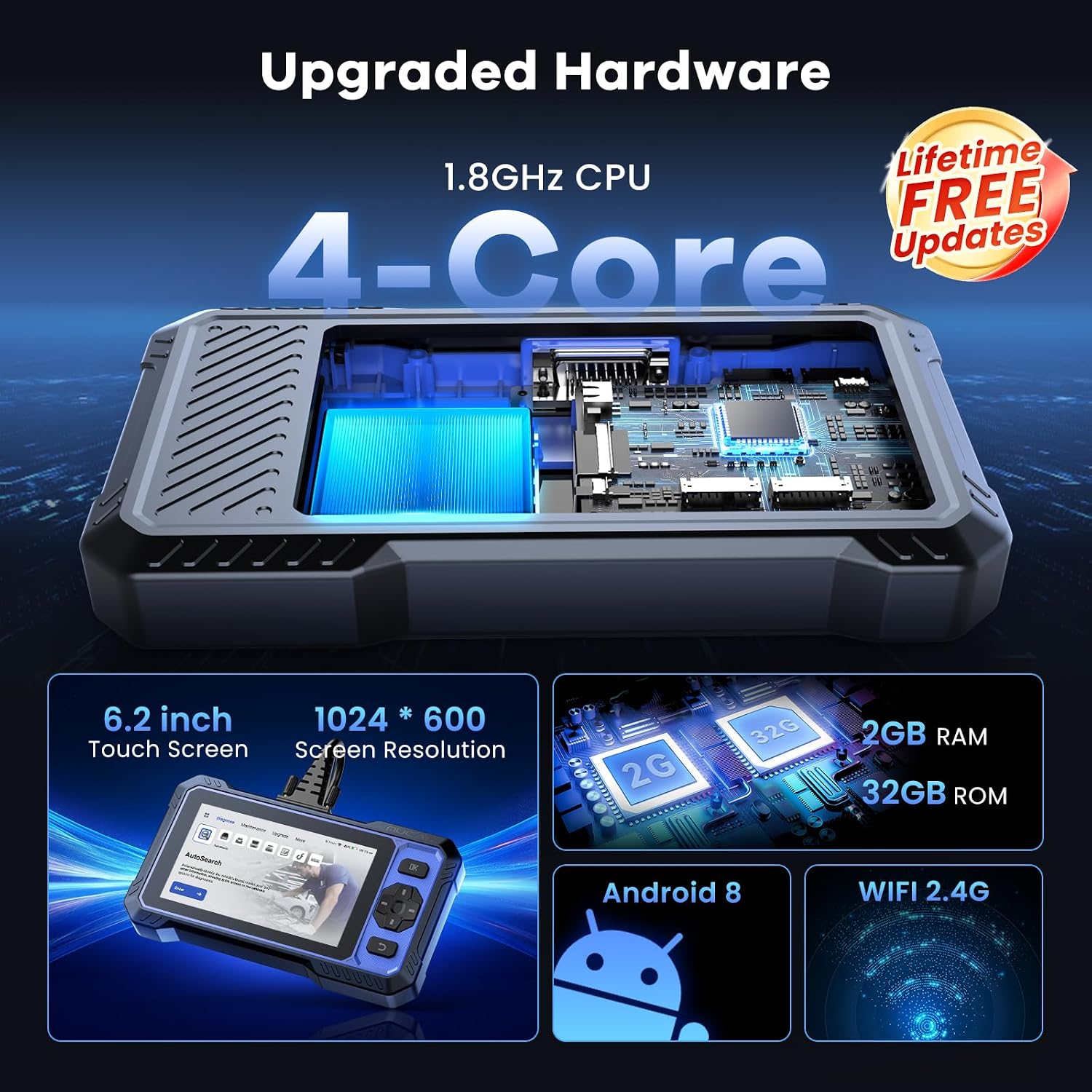
Image: Upgraded Hardware specifications.

Image: Worldwide Compatibility and Supported Features.
8. Warranty and Support
The MUCAR 682 OBD2 Scanner includes lifetime free software updates, ensuring your device remains current with the latest vehicle models and diagnostic capabilities. For specific warranty information or technical support, please refer to the official MUCAR website or contact their customer service directly. Keep your purchase receipt for any warranty claims.


