
1. Safety Information
Read all instructions carefully before using the treadmill. Keep this manual for future reference.
1.1 Important Safety Precautions
- Always attach the safety lock to your clothing before starting the treadmill. In case of an emergency or if you lose balance, pulling the safety lock will immediately stop the machine.
- Ensure the treadmill is placed on a flat, stable surface.
- Keep children and pets away from the treadmill during operation.
- Do not use the treadmill if you feel unwell or dizzy.
- Wear appropriate athletic footwear.
- Do not place hands or feet near moving parts.
- Maximum user weight capacity: 300 lbs.

Figure 1.1: User attaching the safety lock to their shirt. The safety lock is crucial for immediate shutdown in emergencies.
2. Setup
2.1 Unpacking and Initial Setup
The JAGJOG JT60 Treadmill comes 90% pre-assembled, allowing for quick setup. Simply remove it from the packaging and unfold it.

Figure 2.1: The treadmill is largely pre-assembled for user convenience.
2.2 Unfolding the Treadmill
- Carefully lift the console and handles to the upright position.
- Secure the handles using the quick-fix handle knobs located at the base of the console.
- Ensure all components are securely locked in place before use.

Figure 2.2: A user demonstrating the unfolding process of the treadmill.
2.3 Connecting Power
Plug the power cord into a grounded electrical outlet. Ensure the power switch at the front end of the motor cover is in the "ON" position.
3. Operation
3.1 Control Panel Overview
The treadmill features a 14.96-inch LED touchscreen display and dual-operational buttons on the handrails for easy control.

Figure 3.1: The smart dual control panel with LED display and handrail controls.
3.2 Starting a Workout
- Attach the safety lock to the designated slot on the console and clip the other end to your clothing.
- Press the 'Start' button on the touchscreen or handrail. The treadmill will begin at a low speed.
- Adjust speed and incline as desired using the touchscreen or handrail buttons.
3.3 Adjusting Incline and Speed
- Auto Incline: The treadmill offers up to 15% auto incline. Use the incline buttons on the console or handrails to adjust the gradient.
- Speed: Adjust the running speed up to 8.8 MPH using the speed buttons on the console or handrails.
- HIIT Programs: Select from 12 pre-set High-Intensity Interval Training programs for varied workouts.

Figure 3.2: Visual representation of the 15% auto incline feature.

Figure 3.3: The 12 HIIT programs available for varied workouts.
3.4 Heart Rate Monitoring
Grip the pulse sensors on the handrails to monitor your heart rate during your workout. Your heart rate will be displayed on the LED screen.
3.5 Smart App Connectivity
Connect your treadmill to the Fitshow app via Bluetooth to track your workout statistics, explore virtual routes, and customize your training.

Figure 3.4: The treadmill connected to a smart app for virtual running experiences.
3.6 Stopping the Treadmill
Press the 'Stop' button on the console or handrail. The treadmill will gradually slow down and come to a complete stop. Alternatively, pulling the safety lock will immediately stop the machine.
4. Maintenance
4.1 Lubrication
Regular lubrication of the running belt is essential for optimal performance and longevity. Use the provided lubricating oil. Refer to the user manual for specific instructions on how and when to apply the lubricant.

Figure 4.1: Lubricating oil is included for treadmill maintenance.
4.2 Cleaning
Wipe down the treadmill with a damp cloth after each use to remove sweat and dust. Avoid using abrasive cleaners.
4.3 Storage
The treadmill is foldable for compact storage. To fold, lift the running deck until it locks into the upright position. It can then be easily moved using its built-in wheels and stored under a bed or in a closet.

Figure 4.2: The treadmill folds compactly for convenient storage.
5. Troubleshooting
5.1 Common Issues and Solutions
- Error Code E07: This code indicates that the safety lock is not properly engaged. Ensure the safety lock is firmly placed in its slot on the console.
- Treadmill not starting: Check if the power cord is securely plugged in and the power switch is ON. Ensure the safety lock is engaged.
- Unusual noise: Check for any loose parts or foreign objects under the running belt. Lubricate the belt if necessary.
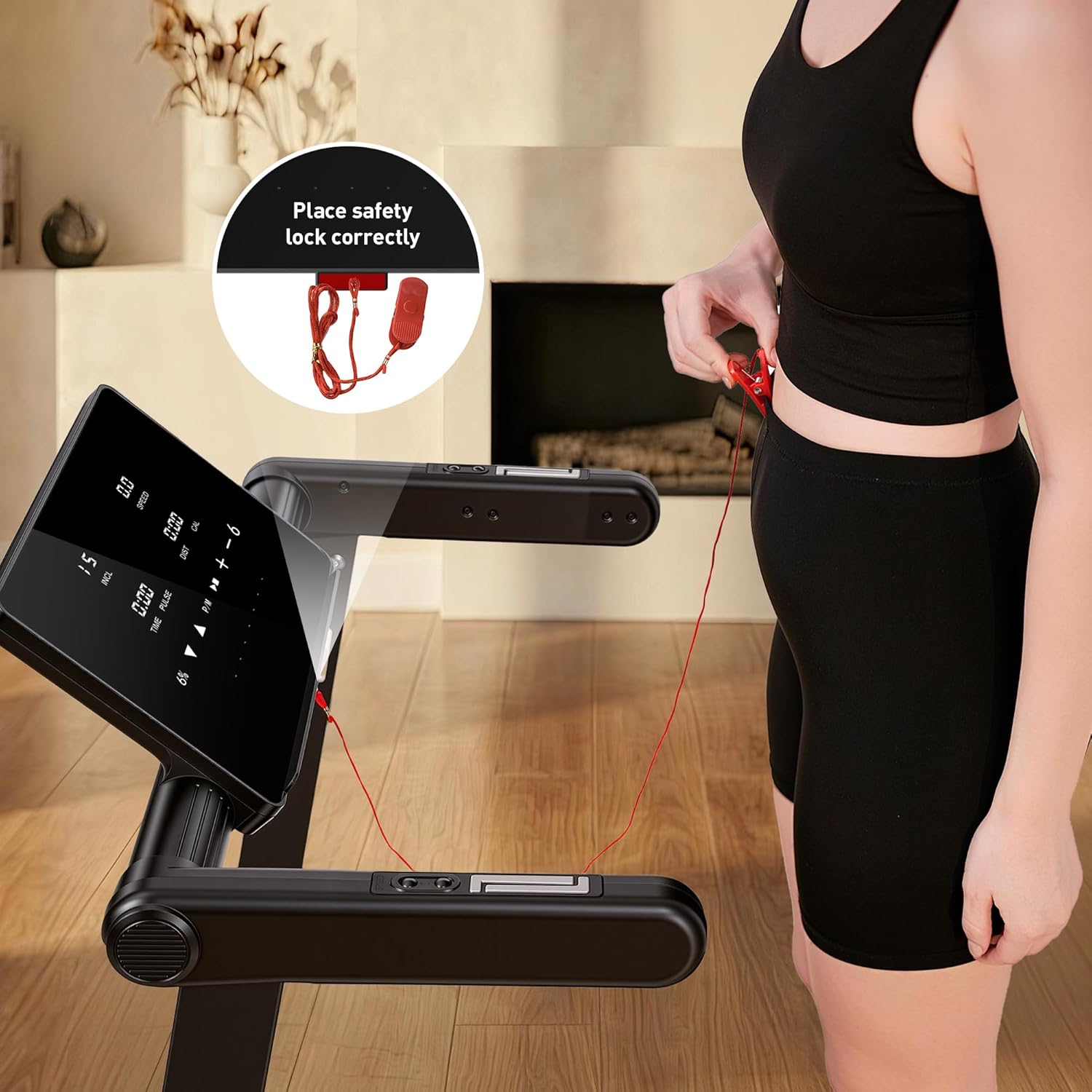
Figure 5.1: Correct placement of the safety lock to prevent E07 error.
6. Specifications
| Feature | Detail |
|---|---|
| Model Name | JT60 |
| Brand | JAGJOG |
| Motor Horsepower | 3.5 HP (Quiet Motor, under 48dB) |
| Maximum Speed | 8.8 MPH (14 KM/H) |
| Maximum Incline | 15% Auto Incline |
| Running Deck Length | 41 Inches (103 cm) |
| Running Deck Width | 17 Inches (42 cm) |
| Maximum Weight Capacity | 300 Pounds |
| Display Type | 14.96-inch LED Touchscreen |
| Programs | 12 HIIT Programs |
| Connectivity | Bluetooth (Fitshow App compatible) |
| Shock Absorption | Dual-layer deck with 10 shock absorbers |
| Folded Dimensions (L x W x H) | 51.18" x 26.77" x 11.02" |
| Item Weight | 90 Pounds |
| Assembly Required | No (90% Pre-assembled) |
7. Warranty & Support
7.1 Product Warranty
The JAGJOG JT60 Treadmill comes with a 1-year warranty. Please retain your proof of purchase for warranty claims.
7.2 Customer Support
For any questions, technical assistance, or warranty claims, please contact JAGJOG customer support. Refer to the contact information provided in your packaging or on the official JAGJOG website.
8. Product Videos
8.1 JAGJOG Treadmill with 15% Auto Incline
This video provides an overview of the JAGJOG Treadmill, highlighting its 15% auto incline feature and overall design.
8.2 Treadmill with Auto Incline, 18" wide Treadmill for Home
This video demonstrates the auto incline and wide running surface of the treadmill, suitable for home use.
