
Product Overview
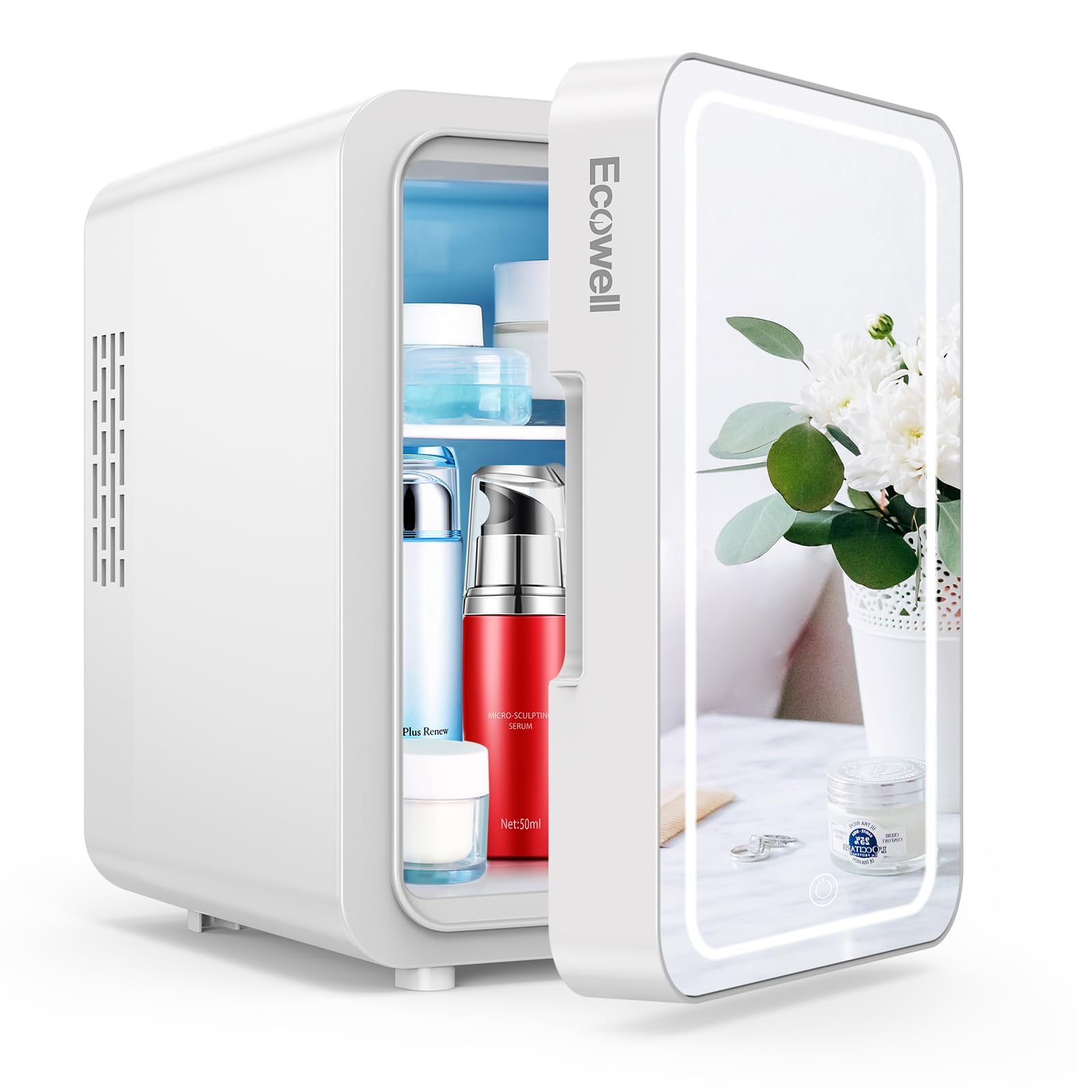
The ECOWELL WRE110 Mini Skincare Fridge is a versatile 4-liter compact appliance designed for cooling or warming items. It features an integrated LED mirror with adjustable lighting, making it suitable for various personal and professional uses.
Key Features
- LED Mirror Design: Features a mirror with 3 adjustable LED light levels, controlled by a touch sensor switch, ideal for makeup application in various lighting conditions.
- Compact & Portable: 4-liter capacity, capable of storing up to 6 standard 12 oz cans. External dimensions are 9.7x6.9x9.6 inches, with an interior of 5.5x5.1x7.9 inches. Includes a removable divider and shelf for flexible storage and a convenient carry handle.
- Cooler & Warmer Functionality: Cools items up to 30-40°F (15-20°C) below ambient temperature, reaching a minimum of 37.4°F (3°C). Can also warm items to 131-150°F (55-65°C). Note that cooling and warming performance varies with ambient temperature.
- Eco-Friendly & Safe: ETL/FCC/CE/EMC certified. Utilizes polyurethane foam technology and advanced semiconductor electronic systems for efficient cooling and warming. Operates quietly at 40 dB and is free of CFCs and refrigerants.
- Multi-Purpose Use: Includes both AC (110V) and DC (12V car charger) power cords, allowing for indoor and outdoor use. Suitable for storing skincare products, cosmetics, beverages, and small food items in bedrooms, offices, dorms, or vehicles.
Package Contents
- ECOWELL WRE110 Mini Skincare Fridge
- AC Power Cord (for 110V standard home outlets)
- DC Car Power Cord (for 12V car chargers)
- Removable Shelf
- Removable Door Divider
Product Dimensions and Capacity
- External Dimensions (D x W x H): 9.7" x 6.9" x 9.6"
- Internal Dimensions (D x W x H): 5.5" x 5.1" x 7.9"
- Capacity: 4 Liters (approximately 6 standard 12 oz cans)
- Item Weight: 4.2 Pounds
Safety Instructions
Please read all safety instructions carefully before using the ECOWELL WRE110 Mini Skincare Fridge to ensure safe operation and prevent damage to the unit or injury to yourself.
- Ensure the power cord is securely plugged into a compatible outlet.
- Do not block the ventilation openings on the back and sides of the unit. Allow at least 4 inches of space around the fridge for proper airflow.
- Keep the appliance away from direct sunlight, heat sources, and moisture.
- Do not immerse the unit in water or other liquids.
- Unplug the unit before cleaning or if it will not be used for an extended period.
- Do not attempt to repair or modify the unit yourself. Contact customer support for assistance.
- This appliance is not intended for use by persons (including children) with reduced physical, sensory, or mental capabilities, or lack of experience and knowledge, unless they have been given supervision or instruction concerning use of the appliance by a person responsible for their safety.
Setup
- Unpack the Fridge: Carefully remove the mini fridge and all accessories from its packaging.
- Choose a Location: Place the fridge on a flat, stable surface. Ensure there is adequate ventilation around the unit (at least 4 inches on all sides and back) to prevent overheating. Avoid placing it near heat sources or in direct sunlight.
- Insert Shelf and Divider: If desired, insert the removable shelf and door divider into the designated slots inside the fridge to organize your items.
- Connect Power:
- For Home Use (AC): Connect the AC power cord to the "AC" port on the back of the fridge, then plug the other end into a standard 110V wall outlet.
- For Car Use (DC): Connect the DC car power cord to the "DC" port on the back of the fridge, then plug the other end into your vehicle's 12V car charger socket.


Operation
Cooling and Warming Functions
- Select Mode: On the back of the fridge, locate the "COOL/OFF/WARM" switch.
- Slide the switch to "COOL" for cooling items. A green indicator light will illuminate.
- Slide the switch to "WARM" for warming items. A red indicator light will illuminate.
- Slide the switch to "OFF" to turn off the unit.
- Loading Items: Place items inside the fridge. For optimal performance, avoid overfilling the unit.
- Temperature Stability: The cooling and warming functions are influenced by the ambient temperature. The unit maintains a temperature relative to its surroundings, rather than a fixed absolute temperature.

LED Mirror Operation
- Activate Light: The LED light around the mirror is controlled by a touch sensor switch located on the mirror's surface. Touch the sensor to turn the light on.
- Adjust Brightness: Repeatedly touch the sensor to cycle through 3 adjustable light levels (low, medium, high) to suit your preference.
- Turn Off Light: Continue touching the sensor until the light turns off, or simply leave it on the desired setting.

Maintenance
Cleaning
- Always unplug the unit before cleaning.
- Wipe the interior and exterior surfaces with a soft, damp cloth and mild detergent.
- Do not use abrasive cleaners or harsh chemicals, as these can damage the surfaces.
- Ensure the unit is completely dry before plugging it back in.
- Regularly check and clean the ventilation openings to prevent dust buildup, which can affect performance.
Storage
If the fridge will not be used for an extended period, unplug it, clean it thoroughly, and ensure it is dry. Store it in a cool, dry place away from direct sunlight.
Troubleshooting
| Problem | Possible Cause | Solution |
|---|---|---|
| Unit not cooling/warming |
|
|
| LED mirror light not working |
|
|
| Excessive noise |
|
|
Specifications
| Feature | Detail |
|---|---|
| Brand | ECOWELL |
| Model Name | WRE110 |
| Capacity | 4 Liters |
| Product Dimensions (D x W x H) | 9.7" x 6.9" x 9.6" |
| Item Weight | 4.2 Pounds |
| Cooling Method | Thermoelectric |
| Voltage | 120 Volts (AC), 12 Volts (DC) |
| Noise Level | Approximately 40 dB |
| Certifications | ETL/FCC/CE/EMC |
Warranty and Support
The ECOWELL WRE110 Mini Skincare Fridge comes with a 1-year limited warranty from the date of purchase, covering manufacturing defects. Please retain your proof of purchase for warranty claims.
For technical support, troubleshooting assistance, or warranty inquiries, please contact ECOWELL customer service. Contact information can typically be found on the product packaging or the official ECOWELL website.
