
Introduction
Thank you for choosing the Anmite 15.6 Inch Portable Touch Screen Monitor. This device is designed to enhance your productivity and entertainment experience, offering a vibrant Full HD 1080P IPS display with touch functionality. Its lightweight and slim design make it an ideal companion for laptops, gaming consoles, and smartphones. This manual provides essential information for setting up, operating, maintaining, and troubleshooting your monitor.
What's in the Box
- Anmite Portable Monitor x 1
- Mini-HDMI to HDMI cable x 1
- Type-C to Type-C cable x 1
- Type-C to USB-A cable x 1
- User Guide x 1
Setup
Connecting to Devices
The Anmite portable monitor supports various devices via Type-C (USB-C) and Mini HDMI connections.
- Type-C Connection (Full Function): For devices with a full-featured Type-C port (supporting video output and power delivery), connect the monitor using the included Type-C to Type-C cable. This single cable can provide both video signal and power. Note: Ensure your device's Type-C port supports video output. If it is only for charging, this connection will not work for display.
- HDMI Connection: For devices with an HDMI output (e.g., laptops, gaming consoles), use the included Mini-HDMI to HDMI cable. When using HDMI, the monitor requires external power. Connect the monitor to a power source (e.g., wall adapter, power bank) using the Type-C to USB-A cable and a compatible USB power adapter (not included).
This image shows the Anmite portable monitor connected to both a laptop and a smartphone using a single Type-C cable, emphasizing its "One-line Direct Connection" feature for quick extension or second screen functionality.
Powering On
After connecting the monitor to your device and power source (if necessary), press the power button located on the side of the monitor to turn it on. The monitor will automatically detect the input signal.
Initial Configuration
Upon first use, you may need to adjust display settings on your connected device (e.g., extend display, duplicate display, resolution). The monitor's On-Screen Display (OSD) menu can be accessed and navigated using the physical buttons on the side to adjust brightness, contrast, color, and other display parameters.
Operating
Touch Screen Functionality
The 15.6-inch display features responsive touch screen capabilities. You can interact directly with the screen for navigation, selection, and multi-touch gestures (e.g., pinch-to-zoom, three-finger drag). Touch functionality requires a compatible device and connection (typically via a full-featured Type-C cable or a separate USB-A to Type-C cable for touch data when using HDMI). Note: Touch screen compatibility may vary by device and operating system. For example, some mobile devices like iPhones may not support touch input on external monitors.
Display Modes
Depending on your connected device and operating system, you can configure the monitor for various display modes:
- Extend Mode: Expands your desktop across both screens, allowing for increased workspace.
- Duplicate Mode: Mirrors your primary display, showing the same content on both screens.
- Second Screen Only: Displays content only on the portable monitor.
Audio
The monitor includes built-in dual speakers for audio output. For a more immersive audio experience or private listening, you can connect headphones or external speakers via the 3.5mm audio output interface.
OSD Menu Navigation
Use the physical buttons on the side of the monitor to access and navigate the On-Screen Display (OSD) menu. This menu allows you to adjust settings such as brightness, contrast, color temperature, input source, and other display preferences.
Maintenance
Cleaning the Screen
To clean the screen, gently wipe it with a soft, lint-free cloth. For stubborn smudges, lightly dampen the cloth with water or a screen-cleaning solution. Avoid using harsh chemicals, abrasive materials, or spraying liquid directly onto the screen.
General Care and Handling
Handle the monitor with care to prevent damage. Avoid placing heavy objects on it or exposing it to extreme temperatures, humidity, or direct sunlight. When transporting, consider using a protective sleeve or case to safeguard the screen and body.
Troubleshooting
- No Signal/Display Issues:
- Ensure all cables (Type-C, HDMI, power) are securely connected.
- Verify that your device's Type-C port supports video output if using a single Type-C cable.
- Check the input source setting in the monitor's OSD menu.
- Confirm your device's display settings are configured to output to an external monitor.
- Touch Screen Not Working:
- Ensure the monitor is connected via a full-featured Type-C cable or that a separate USB-A to Type-C cable is connected for touch data if using HDMI.
- Verify that your operating system and device support touch input on external displays. Some devices may require specific drivers or settings.
- Audio Issues (No Sound or Low Volume):
- Check the volume level on both the monitor and your connected device.
- Ensure no headphones or external speakers are connected to the 3.5mm audio jack if you intend to use the built-in speakers.
- Verify that the audio output is directed to the portable monitor in your device's sound settings.
- Power Issues:
- If using HDMI, ensure the monitor is connected to an adequate power source via the Type-C to USB-A cable.
- If using Type-C, ensure your device provides sufficient power or connect an external power source to the monitor.
Specifications

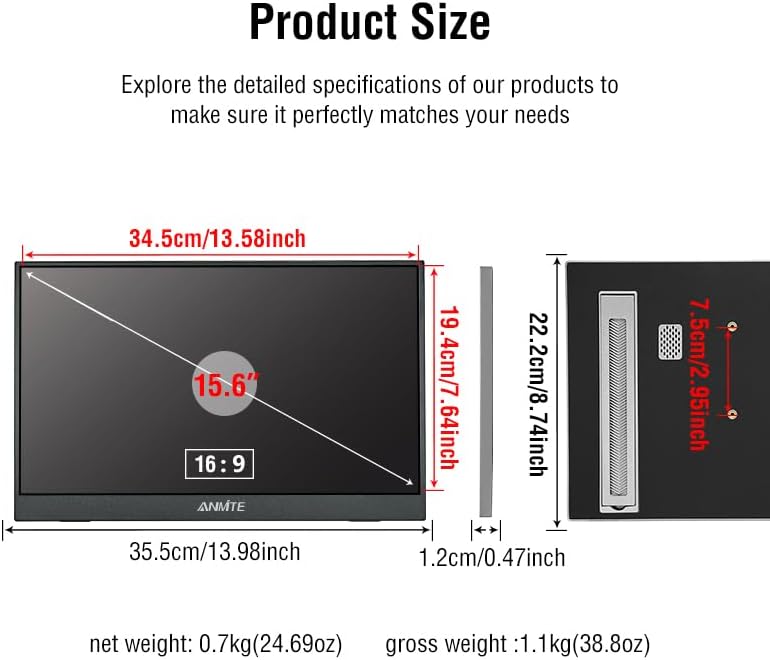
This diagram provides detailed measurements of the Anmite 15.6 inch portable monitor, including its length (35.5cm/13.98inch), height (22.2cm/8.74inch), thickness (1.2cm/0.47inch), and screen diagonal (15.6"). It also shows the VESA mounting hole spacing.
| Feature | Description |
|---|---|
| Model Number | A156W04T |
| Screen Size | 15.6 Inches |
| Panel Type | IPS |
| Aspect Ratio | 16:9 |
| Resolution | 1920 x 1080 Pixels (FHD 1080p) |
| Brightness | 280cd/m² |
| Contrast Ratio | 1000:1 |
| Refresh Rate | 60Hz |
| Display Color | 16.7M |
| Visual Angle | H:178° V:178° |
| Input Interface | Mini-HDMI, Type-C (Full Function), Type-C (Power) |
| Output Interface | 3.5mm audio interface |
| Speakers | Built-in speakers (1W*2) |
| Product Dimensions | 0.51 x 8.77 x 14 inches (366*233*6-13 mm) |
| Net Weight | 0.82kg (1.76 pounds) |
| VESA Mount | 7.5cm x 7.5cm compatible |

This image illustrates the Anmite portable monitor mounted on a VESA compatible arm, demonstrating its wall mounting capability. The text "Wall mounting hole spacing 7.5cm* 7.5cm" and "Flat rear shell for better installation" are visible, indicating the standard VESA pattern.
Warranty and Support
For warranty information, technical support, or service inquiries, please refer to the warranty card included with your product or contact Anmite customer service directly. Contact details can typically be found on the official Anmite website or within the product packaging.


