
1. Introduction
Thank you for choosing the FINOTI F204 RC Drone. This manual provides essential information for the safe operation, setup, and maintenance of your drone. Please read this manual thoroughly before operating the aircraft to ensure proper function and to avoid damage or injury. Keep this manual for future reference.

Figure 1.1: The FINOTI F204 RC Drone in its folded, portable configuration.
2. Product Overview
2.1 Key Features
- 4K Professional HD Camera: Captures high-resolution photos and 1080p videos with a 1/1.28-inch sensor.
- 3-Axis Mechanical Stabilizing Gimbal: Ensures smooth and stable footage during flight.
- Laser Obstacle Avoidance: Intelligently detects obstacles ahead for safer flight.
- GPS Positioning: Provides stable hovering, intelligent following, and precise return-to-home functions.
- Brushless Motors: Offers powerful, quiet, and durable performance.
- Foldable Design: Compact and portable for easy transport.
- Long Flight Time: Up to 25 minutes on a single charge.
- 5G WiFi Image Transmission: Real-time video feed to your smartphone.
- User-Friendly Controls: Features like one-key takeoff/landing and headless mode for ease of use.
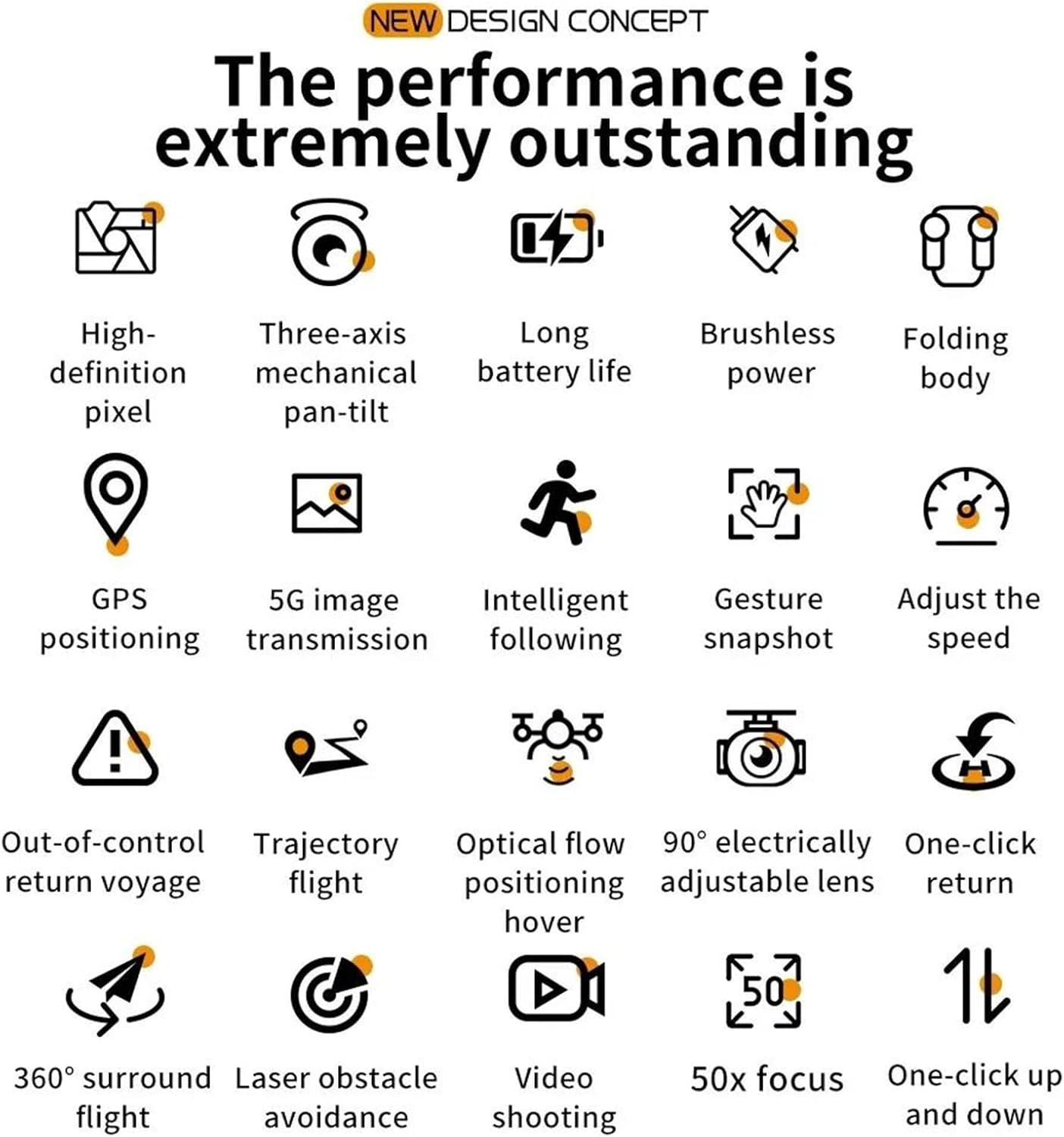
Figure 2.1: Visual representation of the drone's core features, including high-definition pixel, three-axis mechanical pan-tilt, long battery life, brushless power, folding body, GPS positioning, 5G image transmission, intelligent following, gesture snapshot, speed adjustment, out-of-control return, trajectory flight, optical flow positioning hover, 90° electrically adjustable lens, one-click return, 360° surround flight, laser obstacle avoidance, video shooting, 50x focus, and one-click up and down.
2.2 Package Contents
Please check the package contents upon unboxing. If any items are missing or damaged, contact your retailer.
- FINOTI F204 RC Drone
- Remote Controller
- Flight Battery (Single Battery variant)
- USB Charging Cable
- Spare Propellers
- Screwdriver
- User Manual
2.3 Drone Components
Familiarize yourself with the drone's main parts:
- Foldable Arms with Motors and Propellers
- 4K HD Camera with 3-Axis Gimbal
- Laser Obstacle Avoidance Sensor
- LED Indicator Lights
- Battery Compartment

Figure 2.2: The drone's three-axis mechanical stabilizing gimbal, capable of vertical, horizontal, and overhead shooting, with examples of 45° frontal, side 65°, and 110° vertical camera angles.
2.4 Remote Controller Components
The remote controller is your primary interface for controlling the drone. Refer to the diagram below for button functions.
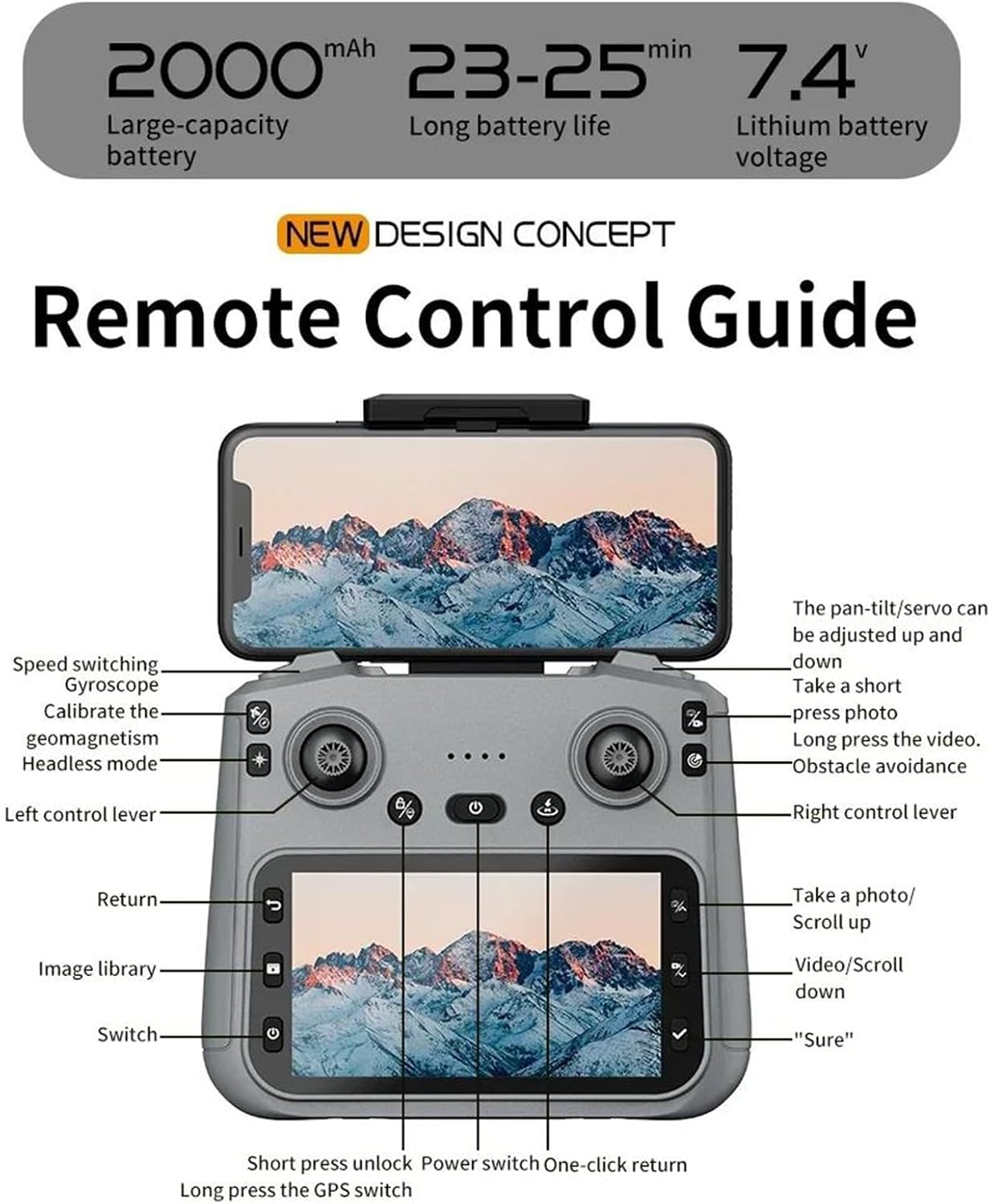
Figure 2.3: Remote Control Guide. Key controls include: Speed switching, Gyroscope, Calibrate geomagnetism, Headless mode, Left control lever, Return, Image library, Switch, Short press unlock, Power switch, One-click return, Long press GPS switch, Pan-tilt/servo adjustment, Take a short press photo, Long press video, Obstacle avoidance, Right control lever, Take a photo/Scroll up, Video/Scroll down, and 'Sure' button.
3. Setup Guide
3.1 Charging the Flight Battery
- Remove the flight battery from the drone.
- Connect the battery to the provided USB charging cable.
- Plug the USB cable into a 5V/2A USB power adapter (not included).
- The charging indicator on the battery will show its status (e.g., red for charging, green for fully charged).
- Charging typically takes 120-150 minutes. Do not leave batteries unattended while charging.
3.2 Installing Propellers
Ensure propellers are installed correctly according to their rotation direction (A and B). Match the propellers to the corresponding motor arms.
- Unfold the drone arms.
- Attach the propellers to the motor shafts, ensuring a secure fit. Use the provided screwdriver if necessary.
3.3 Preparing the Remote Controller
- Install 3x AA batteries (not included) into the remote controller.
- Extend the phone holder on the remote controller and securely mount your smartphone.
3.4 Downloading and Connecting the App
- Scan the QR code in the manual or search for the designated drone app (e.g., 'FINOTI Drone' or similar, check packaging) in your smartphone's app store.
- Install the app.
- Power on the drone and the remote controller.
- On your smartphone, go to Wi-Fi settings and connect to the drone's Wi-Fi network (e.g., 'FINOTI-F204-XXXX').
- Open the drone app. The live video feed should appear, indicating a successful connection.
4. Flight Operation
4.1 Pre-Flight Checklist
- Ensure drone battery and remote controller batteries are fully charged.
- Propellers are correctly installed and free from damage.
- Choose an open area free from obstacles, people, and electromagnetic interference.
- Check weather conditions; avoid flying in strong winds (above 10 KM/H) or rain.
- Ensure the drone and app are connected and GPS signal is acquired (if applicable).

Figure 4.1: The drone utilizing GPS positioning for stable flight and to prevent loss of contact.
4.2 Pairing the Drone and Controller
- Place the drone on a flat, level surface.
- Power on the drone.
- Power on the remote controller.
- Push the left joystick up then down. The drone's indicator lights will stop flashing and become solid, indicating successful pairing.
4.3 Takeoff and Landing
- One-Key Takeoff: Press the one-key takeoff button on the remote controller (refer to Figure 2.3). The drone will automatically ascend to a safe height and hover.
- Manual Takeoff: Push both joysticks down and outwards to unlock the motors. Then, slowly push the left joystick up to ascend.
- One-Key Landing: Press the one-key landing button. The drone will automatically descend and land.
- Manual Landing: Slowly pull the left joystick down to descend. Once landed, push both joysticks down and inwards to lock the motors.
4.4 Basic Flight Controls
Refer to the Remote Control Guide (Figure 2.3) for joystick and button functions.
- Left Joystick (Throttle/Yaw): Up/Down for altitude, Left/Right for rotation (yaw).
- Right Joystick (Pitch/Roll): Up/Down for forward/backward movement (pitch), Left/Right for left/right movement (roll).
- Speed Switching: Adjust flight speed (e.g., low, medium, high) using the dedicated button.
4.5 Advanced Flight Features
- GPS Mode: Provides stable hovering and precise positioning. Ensure sufficient GPS satellites are acquired before flight.
- Follow Me Mode: The drone will automatically follow the remote controller or a designated subject (via app).
- Trajectory Flight: Draw a path on the app interface, and the drone will fly along the specified route.
- Laser Obstacle Avoidance: The drone uses its laser sensor to detect and avoid obstacles, enhancing flight safety. This feature is particularly useful in complex environments.

Figure 4.2: The drone equipped with a laser obstacle avoidance sensor to intelligently detect potential hazards, ensuring a safer flight experience.
- 360° Surround Flight: The drone can orbit a point of interest.
- Optical Flow Positioning: Assists with stable hovering indoors or in areas with weak GPS signals.
- One-Click Return: Press the return button, and the drone will automatically fly back to its takeoff point.
5. Camera Operation
The F204 drone is equipped with a 4K professional HD camera for capturing aerial photos and videos.

Figure 5.1: The drone's anti-shake dual cameras, featuring a built-in Electronic Image Stabilization (EIS) chip for improved image quality. The image also contrasts self-stabilizing gimbal shooting effect with non-stabilized shooting.
5.1 Taking Photos
- Remote Controller: Press the dedicated photo button (short press) on the remote controller (refer to Figure 2.3).
- App Control: Tap the photo icon in the drone app interface.
- Gesture Snapshot: Perform the designated hand gesture (refer to app instructions) while facing the drone's camera to trigger a photo.
5.2 Recording Videos
- Remote Controller: Press and hold the video button on the remote controller to start/stop recording.
- App Control: Tap the video icon in the drone app interface to start/stop recording.
5.3 Gimbal Adjustment
The drone features a 3-axis mechanical gimbal for camera stabilization. You can adjust the camera angle during flight:
- Use the pan-tilt/servo adjustment wheel/button on the remote controller (refer to Figure 2.3) to tilt the camera up or down.
- The camera supports 90° electrically adjustable lens movement.
6. Maintenance
6.1 Cleaning the Drone
- Always power off the drone and remove the battery before cleaning.
- Use a soft, dry cloth to wipe the drone's body.
- For the camera lens, use a specialized lens cleaning cloth and solution.
- Remove any debris from the motors and propellers.
6.2 Battery Care and Storage
- Store batteries in a cool, dry place, away from direct sunlight and heat sources.
- Do not overcharge or over-discharge batteries.
- For long-term storage, charge batteries to approximately 50-60% capacity.
- Inspect batteries regularly for any signs of swelling or damage. Discontinue use if damaged.
6.3 Propeller Replacement
- If a propeller is damaged, replace it immediately with a new one.
- Ensure you use the correct type of propeller (A or B) for the corresponding motor arm.
- Use the provided screwdriver to remove and install propellers.
7. Troubleshooting
This section addresses common issues you might encounter.
| Problem | Possible Cause | Solution |
|---|---|---|
| Drone does not power on | Battery not charged or incorrectly installed | Charge battery fully; ensure it is securely inserted. |
| Drone cannot pair with controller | Incorrect pairing sequence; low controller battery | Follow pairing steps (Section 4.2); replace controller batteries. |
| Unstable flight/Drifting | Drone not calibrated; damaged propeller; strong wind | Calibrate gyroscope/geomagnetism (refer to Figure 2.3); replace damaged propellers; avoid flying in strong winds. |
| No live video feed in app | Wi-Fi not connected; app not open; drone/phone too far | Ensure phone is connected to drone's Wi-Fi; restart app; keep drone and phone within range. |
| GPS functions not working | Insufficient GPS signal; flying indoors | Fly in an open outdoor area; wait for sufficient GPS satellites to be acquired. |
8. Specifications
| Feature | Specification |
|---|---|
| Model | F204 (Model Number: 66655594-SINGLEBATTERY) |
| Brand | FINOTI |
| Motor Type | Brushless Motor |
| Max Flight Time | 23-25 minutes |
| Drone Weight | 245g |
| Camera | 4K Professional HD Camera |
| Video Resolution | 1080p HD Recording |
| Sensor Size | 1/1.28 Inches |
| Gimbal | 3-Axis Mechanical Stabilizing Gimbal, 90° Electrically Adjustable Lens |
| Obstacle Avoidance | Laser Barrier Avoidance |
| GPS | Yes |
| Remote Distance | Up to 1000 meters |
| Operating Frequency | 2.4 GHz (Aircraft), 5G WiFi (Image Transmission) |
| Connectivity | APP Controller, Remote Control, WiFi |
| Max Takeoff Weight | <1kg |
| Max Wind Speed Resistance | <10 KM/H |
| Battery Capacity | 2000mAh, 7.4V Lithium Battery |
9. Warranty and Support
Specific warranty information for the FINOTI F204 RC Drone is not provided in this manual. For details regarding warranty coverage, return policies, or technical support, please refer to the product packaging, the retailer's website, or contact FINOTI customer service directly.
Always ensure you purchase from authorized sellers to guarantee valid warranty and support services.