
1. Safety Information
Important: This product is to be used under direct adult supervision only.
- Always ensure the child wears the safety belt provided.
- Do not operate the vehicle near stairs, steep inclines, or public roads.
- Ensure the driving area is clear of obstacles and hazards.
- Only use the original charger and battery provided with the product.
- Keep hands, hair, and clothing away from moving parts.
- Maximum weight capacity: 30 kg.
- Recommended age range: 37-96 months (approximately 3-8 years).
2. Product Overview
The AIYAPLAY TOYOTA Land Cruiser electric ride-on car offers a realistic and engaging driving experience for children. It features a licensed TOYOTA design, dual driving modes, and various multimedia functions.
Key Features:
- Official TOYOTA Design: Authentic Land Cruiser styling with two 12V motors and adjustable speeds (3-5 km/h).
- Safe and Comfortable Ride: Equipped with soft-start technology to prevent sudden jerks, a 3-point safety belt, rear suspension, and durable PP wheels for a smooth ride.
- Dual Driving Mode: Children can drive independently, or parents can control the car using the 2.4G remote control (up to 20 meters range) with three adjustable speeds.
- Realistic Driving Experience: Features realistic horn and engine sounds, dashboard lights, music, USB input, wireless connection, and an integrated storytelling function.
What's in the Box:
- AIYAPLAY TOYOTA Land Cruiser Electric Ride-On Car
- 2.4G Remote Control
- Charger
- User Manual

Image 2.1: Child enjoying the AIYAPLAY TOYOTA Land Cruiser electric car.
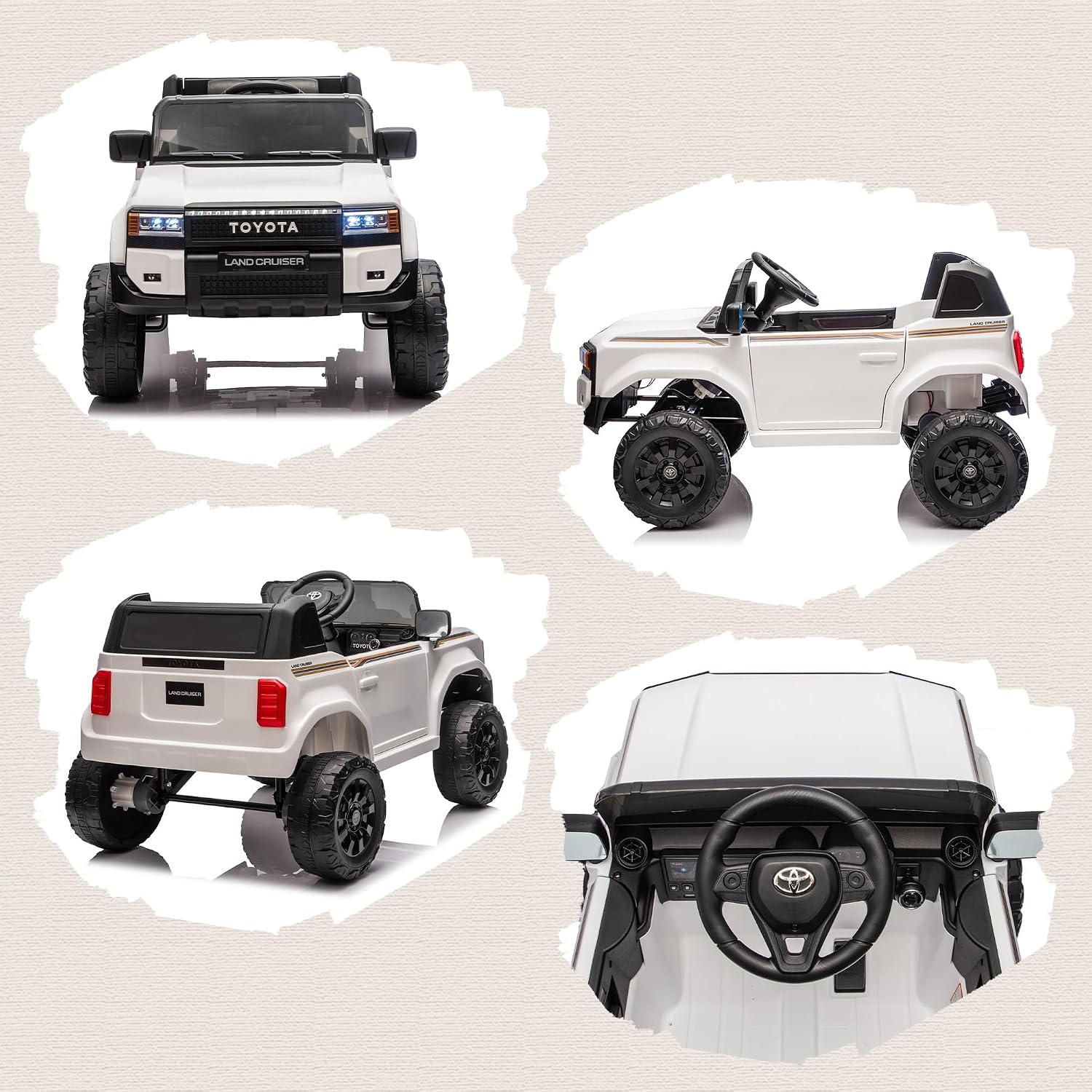
Image 2.2: Multiple views of the AIYAPLAY TOYOTA Land Cruiser electric car.

Image 2.3: Rear suspension system for a smooth ride on various terrains.
3. Setup and Assembly
Assembly is required for this product. Please follow these steps carefully:
- Unpack the electric car components from the packaging.
- Connect the two motors and the battery to the car according to the diagrams in the separate assembly guide (if provided).
- Adjust the seat and secure the safety belt for the child.
- Ensure all connections are secure and all screws are tightened.
For detailed visual instructions, refer to the dedicated assembly manual included in the box.

Image 3.1: Product packaging.
4. Operating Instructions
Starting the Car:
- Turn on the car using the power switch located on the dashboard or the remote control.
- The soft-start technology will ensure a gradual acceleration.
Driving Modes:
- Child Manual Control: The child can operate the car using the steering wheel and foot pedal.
- Parental Remote Control: Parents can override child control using the 2.4G remote control. The remote allows for steering, acceleration, braking, and selecting one of three adjustable speeds.

Image 4.1: Parental remote control in use.

Image 4.2: Soft-start technology for smooth acceleration.
Multimedia Functions:
The car features a dashboard with various multimedia options:
- Music Playback: Built-in music and storytelling functions.
- USB Input: Connect a USB device to play your own audio files.
- Wireless Connection: Connect to compatible devices wirelessly.
- Horn and Engine Sounds: Realistic sound effects for an immersive experience.

Image 4.3: Dashboard with multimedia controls.
Charging the Battery:
- Ensure the car is turned off.
- Connect the charging cable to the car's charging port.
- Plug the charger into a standard wall outlet.
- The charging indicator light will show the charging status.
- Do not overcharge the battery. Refer to the charger's instructions for typical charging times.
5. Maintenance
- Cleaning: Wipe the car with a damp cloth. Do not use harsh chemicals or abrasive cleaners. Avoid spraying water directly onto electrical components.
- Storage: Store the car in a dry and cool place when not in use. Protect it from direct sunlight and moisture.
- Battery Care: For optimal battery life, charge the battery fully before first use and after each use. If storing for extended periods, charge the battery every 3 months.
- Inspection: Regularly check all screws, nuts, and connections to ensure they are tight and secure. Inspect wheels and tires for wear and tear.
6. Troubleshooting
If you encounter any issues with your AIYAPLAY TOYOTA Land Cruiser, please refer to the following common problems and solutions:
| Problem | Possible Cause | Solution |
|---|---|---|
| Car does not start | Low battery; Loose battery connection; Power switch off | Charge battery; Check battery terminals; Turn power switch on |
| Car moves slowly | Low battery; Overload; Driving on rough terrain | Charge battery; Reduce weight; Drive on smoother surfaces |
| Remote control not working | Remote battery low; Not paired; Obstruction | Replace remote batteries; Re-pair remote (refer to remote manual); Ensure clear line of sight |
| No sound from multimedia | Volume too low; Incorrect mode selected; USB device issue | Increase volume; Select correct input mode; Check USB device/files |
If the problem persists, please contact customer support.
7. Specifications
| Feature | Detail |
|---|---|
| Brand | AIYAPLAY |
| Model Number | 370-431V90WT |
| Material | Metal, Polypropylene (PP) |
| Overall Dimensions (L x W x H) | 99 cm x 66 cm x 55.5 cm |
| Product Weight | 16 kg |
| Maximum Weight Capacity | 30 kg |
| Recommended Age | 37-96 months (approx. 3-8 years) |
| Battery Duration | Approx. 45 minutes (depending on usage) |
| Motors | Two 12V Motors |
| Speed | 3-5 km/h (adjustable) |
| Remote Control Frequency | 2.4G |
| Remote Control Range | Up to 20 meters |
| Assembly Required | Yes |

Image 7.1: Product dimensions and specifications.
8. Warranty and Support
Manufacturer's Warranty: This product comes with a 2-year manufacturer's warranty from the date of purchase. Please retain your proof of purchase for warranty claims.
The warranty covers manufacturing defects and material faults under normal use. It does not cover damage caused by misuse, accidents, unauthorized modifications, or normal wear and tear.
Customer Support:
For any questions, technical assistance, or warranty claims, please contact AIYAPLAY customer support through the retailer where the product was purchased or visit the official AIYAPLAY website for contact information.
Please have your model number (370-431V90WT) and proof of purchase ready when contacting support.

