
1. Safety Information
Please read all safety instructions carefully before assembling and operating the desk. Keep this manual for future reference.
- Always ensure the desk is properly anchored to the floor. Do not use the desk if it wobbles or feels unstable.
- Keep fingers and other body parts away from the moving parts when adjusting the height.
- Do not exceed the maximum weight limit of 220 pounds (approximately 100 kg) on the desktop.
- Ensure all cables are managed to prevent entanglement during height adjustments.
- Do not allow children to operate the desk without adult supervision.
2. Product Overview
The SEDETA Electric Standing Desk offers a versatile workspace with integrated storage and adjustable height functionality.
Key Features
- Ample Storage Space: Features a 55.1-inch x 23.6-inch desktop and 6 large drawers for organizing files, office supplies, or gaming devices. The desktop is made of FSC-certified wood.
- Height Adjustable: Electric height adjustment from 28.3 inches to 47.2 inches with three programmable height preset buttons.
- Durable Construction: Equipped with a powerful lifting system supporting up to 220 pounds (100 kg), with a smooth lifting speed of 25 mm/s and low noise operation (below 30 decibels).
- Built-in Power Outlets: Includes four AC power outlets and two USB ports for charging up to six devices simultaneously, with a one-touch power switch.
Product Dimensions

Image: Detailed dimensions of the desk, including desktop width (55.1"), depth (23.6"), and height range (28.3"-47.2"). Individual drawer dimensions are also shown.
Control Panel Overview
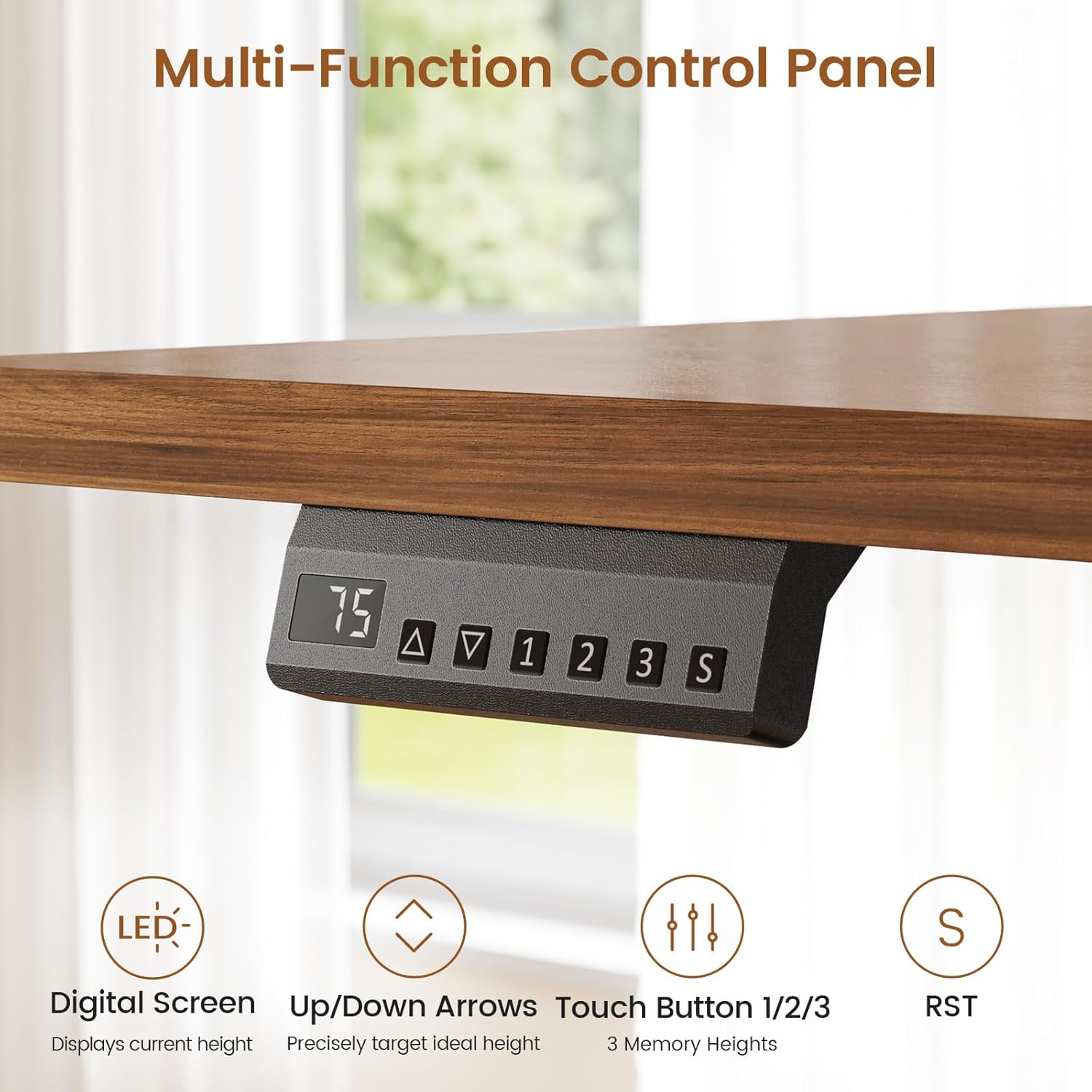
Image: The multi-function control panel features a digital screen displaying current height, up/down arrows for precise adjustment, three memory preset buttons (1, 2, 3), and a reset button (S).
3. Assembly Instructions
The SEDETA Electric Standing Desk is designed for straightforward assembly. Clear and detailed instructions, along with numbered parts, are included in the packaging. It is recommended to follow these instructions step-by-step.
- Unpack all components and verify against the parts list provided in the manual.
- Assemble the drawer units first, ensuring all connections are secure.
- Attach the lifting columns to the drawer units.
- Carefully place and secure the desktop onto the lifting columns.
- Connect the control panel and power supply according to the diagrams.
- Perform an initial test of the lifting mechanism before fully loading the desk.
Note: The desk typically ships in two separate boxes, which may arrive at different times.
4. Operating Instructions
Adjusting Desk Height

Image: The desk can be adjusted from a sitting height of 28.3 inches to a standing height of 47.2 inches, promoting ergonomic posture.
The desk's height can be adjusted using the control panel located on the underside of the desktop.
- Up/Down Arrows: Use the up (▲) and down (▼) arrows to manually adjust the desk to your desired height. The digital screen will display the current height.
- Memory Presets (1, 2, 3): To save a preferred height, adjust the desk to the desired position, then press the 'S' button followed by one of the numbered memory buttons (1, 2, or 3). To recall a saved height, simply press the corresponding numbered button.
- Reset (S): If the desk encounters an error or needs to be recalibrated, press and hold the 'S' button until the desk moves to its lowest position and resets.
Using Built-in Power Outlets

Image: The integrated power strip provides four AC outlets and two USB ports, controlled by a single on/off switch, with a 6.5-foot power cord.
The desk includes a built-in charging station with four 120V/12A AC outlets and two 5V/2A USB ports. Use the one-touch power switch to turn the outlets on or off for safety and convenience.
Smooth Operation
Video: This video demonstrates the smooth and quiet operation of the SEDETA Electric Standing Desk's height adjustment mechanism, highlighting its stability even with a glass of water on the surface.
The desk's lifting system operates smoothly and quietly, with a noise level below 30 decibels, ensuring minimal disturbance during adjustments.
5. Maintenance
Regular maintenance helps ensure the longevity and optimal performance of your standing desk.
- Cleaning: Wipe the desktop and frame with a soft, damp cloth. Avoid harsh chemicals or abrasive cleaners that could damage the finish.
- Cable Management: Periodically check and organize cables to prevent them from getting pinched or tangled during height adjustments.
- Inspection: Regularly inspect all screws and connections to ensure they are tight. Retighten if necessary.
- Weight Distribution: Distribute weight evenly across the desktop to prevent strain on the lifting mechanism.
6. Troubleshooting
If you encounter issues with your SEDETA Electric Standing Desk, refer to the following common solutions:
- Desk Not Moving:
- Check if the power cord is securely plugged into both the desk and a working wall outlet.
- Ensure the one-touch power switch for the built-in outlets is in the 'on' position.
- Perform a reset by pressing and holding the 'S' button until the desk moves to its lowest position and stops.
- Uneven Height Adjustment:
- Ensure the desk is on a level surface.
- Perform a reset as described above to recalibrate the lifting columns.
- Unusual Noise During Operation:
- Verify that no objects are obstructing the lifting columns or moving parts.
- Check for loose screws or connections and tighten if necessary.
- Drawers Not Closing Smoothly:
- Ensure the drawer slides are properly aligned and free of obstructions.
- Check that the drawer contents are not interfering with closure.
If these steps do not resolve the issue, please contact customer support.
7. Specifications
| Feature | Detail |
|---|---|
| Brand | SEDETA |
| Model | B0G1M9CMDQ |
| Desk Design | Standing Desk |
| Product Dimensions (D x W x H) | 23.6"D x 55.1"W x 28.3"H |
| Color | White |
| Style | Modern |
| Base Material | Engineered Wood |
| Top Material Type | Engineered Wood |
| Minimum Height | 28.3 Inches |
| Maximum Height | 47.2 Inches |
| Number of Drawers | 6 |
| Maximum Weight Recommendation | 220 Pounds (100 kg) |
| Power Outlets | 4 AC Outlets (120V/12A), 2 USB Ports (5V/2A) |
| Required Assembly | Yes |
| Mounting Type | Freestanding |
8. Warranty and Support
SEDETA provides a limited warranty for this product. For specific warranty details, please refer to the documentation included with your purchase.
After-sales Service: If your Standing Desk arrives damaged, scratched, or with missing parts, please contact SEDETA customer service directly. We will assist you with a free replacement or a partial refund as applicable.
Additional protection plans may be available for purchase:
- 2-Year Protection Plan
- 3-Year Protection Plan
- Complete Protect (monthly billing)
For support, please visit the official SEDETA store or contact the seller directly through your purchase platform.