
1. Introduction
This manual provides detailed instructions for the TELESIN Magnetic Master Grip Creator Kit, designed to enhance your iPhone 17 Pro Max photography and videography experience. Please read this manual thoroughly before using the product to ensure proper operation and to maximize its features.

The TELESIN Magnetic Master Grip provides enhanced control and stability for your iPhone 17 Pro Max photography and videography.
2. Package Contents
Verify that all items are present in your package:
- TELESIN Magnetic Master Grip x 1
- C03 Selfie Light x 1
- UV Filter x 1
- Black Mist 1/4 Filter x 1
- Graphene Case x 1
- User Manual x 1
3. Product Features
3.1. Graphene Cooling System
The integrated 7600mm² Graphene cooling system efficiently dissipates heat, preventing your iPhone from overheating during prolonged use, especially during 4K video recording. This ensures stable performance and extends the lifespan of your device.

This image highlights the integrated 7600mm² Graphene cooling technology, designed to prevent overheating during extended use and maintain optimal iPhone performance.
3.2. Magnetic Wireless Charging
Equipped with a built-in 3200mAh battery, the grip provides magnetic wireless charging for your iPhone, maintaining MagSafe compatibility. This feature extends your shooting time, supporting up to an additional 1 hour of 4K 60fps video recording.

The grip features a 3200mAh battery for magnetic wireless charging, extending your iPhone's battery life and supporting up to 1 hour of 4K 60fps recording.
3.3. Magnetic Filters & Modular Flexibility
The CNC aluminum rails on the grip facilitate the easy attachment of magnetic filters. This design not only aids in lens cooling but also allows for quick swapping of various filter types, such as UV, Black Mist, CPL, and VND (additional filters sold separately).

The CNC aluminum rails allow for easy attachment of magnetic filters, enhancing lens cooling and expanding creative filter options like UV, Black Mist, CPL, and VND (filters sold separately).
3.4. Ergonomic Thumb Rest with Anti-Touch Protection
A dedicated ergonomic thumb rest is integrated into the design to provide a secure and comfortable grip. This feature prevents accidental screen touches and unintended camera exits, ensuring a stable and controlled shooting experience.

An ergonomic thumb rest is integrated to prevent accidental screen touches and unintended camera exits, ensuring a stable and controlled shooting experience.
3.5. Mechanical Shutter & Adaptive Zoom Dial
The grip features a two-stage mechanical shutter button for precise focus and capture. An adaptive zoom dial is optimized for the iPhone 17's telephoto lens, offering 0.1x precision adjustments in photo mode and 1-3x cinematic smooth zoom in video mode, minimizing touchscreen jitter.
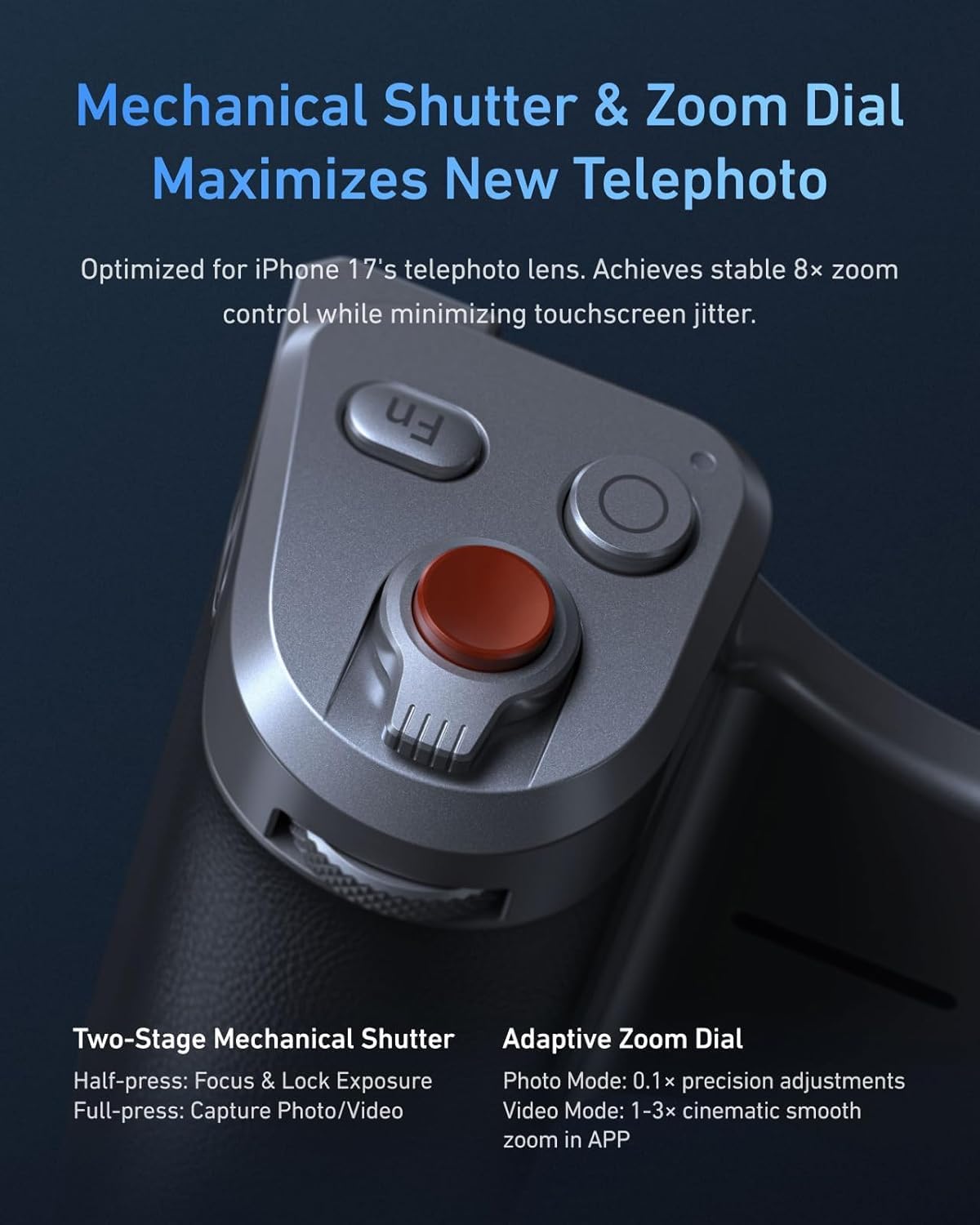
The grip includes a two-stage mechanical shutter for precise focus and capture, along with an adaptive zoom dial optimized for the iPhone 17's telephoto lens, offering 0.1x precision adjustments in photo mode and 1-3x cinematic smooth zoom in video mode.
3.6. Professional Grip Design
Inspired by classic cameras, the grip boasts a professional, ergonomic design with eco silicone leather for comfortable handling. Its contours adapt to various hand sizes, providing a secure and natural feel during use.

Inspired by classic cameras, the grip features a professional, ergonomic design with eco silicone leather for comfortable handling, adapting to various hand sizes.
4. Setup Guide
- Attach the Graphene Case: Carefully place your iPhone 17 Pro Max into the provided Graphene Case, ensuring it fits securely.
- Mount the Master Grip: Align the TELESIN Master Grip with the Graphene Case. The magnetic connection will securely attach the grip to your iPhone.
- Power On: Press and hold the power button on the grip (location specified in diagram, if available) until the indicator light illuminates.
- Connect via Bluetooth: On your iPhone, go to Settings > Bluetooth and select the TELESIN Master Grip from the list of available devices to pair.
- Attach Selfie Light/Filters: If desired, magnetically attach the C03 Selfie Light or any compatible magnetic filters (UV, Black Mist, etc.) to the designated areas on the grip or case.
5. Operating Instructions
5.1. Using the Mechanical Shutter
- Half-Press: Lightly press the shutter button to focus and lock exposure.
- Full-Press: Fully press the shutter button to capture a photo or start/stop video recording.
5.2. Adjusting Zoom
- Zoom Dial: Rotate the adaptive zoom dial (located near the shutter button) to adjust the zoom level.
- Photo Mode: Provides 0.1x precision adjustments.
- Video Mode: Offers 1-3x cinematic smooth zoom.
5.3. Wireless Charging
Ensure the grip is powered on and your iPhone is securely attached. Wireless charging will initiate automatically. Monitor your iPhone's battery indicator for charging status.
5.4. Using the C03 Selfie Light
Attach the C03 Selfie Light magnetically to the grip. Press the power button on the selfie light to turn it on/off and cycle through brightness settings (if applicable).
6. Maintenance
- Cleaning: Use a soft, dry cloth to clean the grip and case. Avoid abrasive materials or harsh chemicals.
- Storage: Store the product in a cool, dry place away from direct sunlight and extreme temperatures.
- Battery Care: For optimal battery life, charge the grip regularly and avoid fully discharging it for extended periods.
7. Troubleshooting
- Grip not connecting to iPhone:
- Ensure the grip is powered on and fully charged.
- Check your iPhone's Bluetooth settings to confirm it's paired. Try unpairing and re-pairing.
- Restart both your iPhone and the grip.
- Wireless charging not working:
- Verify the grip is powered on and has sufficient battery.
- Ensure your iPhone is correctly aligned with the magnetic charging area on the grip.
- Remove any non-magnetic cases or obstructions between the iPhone and the grip.
- Shutter button or zoom dial unresponsive:
- Confirm Bluetooth connection is active.
- Check if the grip's battery is low.
- Ensure no physical obstructions are preventing button movement.
8. Specifications
| Feature | Specification |
|---|---|
| Brand | TELESIN |
| Model Number | TXSM-P5-MCS-13-TIP+P5-FLT-012-AU |
| Compatibility | iPhone 17 Pro Max |
| Material | Acrylonitrile Butadiene Styrene (ABS) |
| Grip Type | Phone Grip |
| Special Features | Ergonomic Design, Graphene Cooling, Magnetic Wireless Charging, Mechanical Shutter, Adaptive Zoom Dial, Magnetic Filter Mount |
| Included Components | TELESIN Master Grip, C03 Selfie Light, UV Filter, Black Mist 1/4 Filter, Graphene Case |
9. Warranty and Support
TELESIN products come with a standard manufacturer's warranty. For specific warranty details, please refer to the warranty card included with your product or visit the official TELESIN website. For technical support, troubleshooting assistance, or inquiries about replacement parts, please contact TELESIN customer service through their official channels.
Official TELESIN Store: TELESIN Amazon Store
