
KEEPRO T12
KEEPRO T12 3-in-1 Wireless Charging Station User Manual
Model: T12
1. Introduction and Overview
The KEEPRO T12 is a versatile 3-in-1 wireless charging station designed for Apple devices. It allows simultaneous charging of your iPhone, Apple Watch, and AirPods. Its foldable design makes it suitable for both home use and travel, providing a compact and organized charging solution.
This manual provides detailed instructions for setting up, operating, and maintaining your charging station, along with important safety information and troubleshooting tips.

Image: The KEEPRO T12 3-in-1 Wireless Charging Station in its operational state, charging an iPhone, Apple Watch, and AirPods.
2. What's in the Box
Please verify that all items are present in the package:
- KEEPRO Foldable 3-in-1 Fast Wireless Charging Station
- 20W USB-C PD Charger Adapter
- 3ft (1m) USB-C to USB-C Cable
- User Manual (this document)

Image: Package contents including the charging station, power adapter, and cable.
3. Setup Instructions
- Unfold the Charging Station: Gently unfold the charging station to its upright position. The phone charging module and watch charging module can be adjusted to your preferred angle.
- Connect the Power Adapter: Insert one end of the provided USB-C to USB-C cable into the USB-C port on the back of the charging station.
- Connect to Power Source: Plug the other end of the USB-C cable into the included 20W USB-C PD charger adapter. Then, plug the adapter into a wall outlet.
- Power On: The charging station is now ready for use. A small indicator light may illuminate to confirm power connection.
Video: A brief demonstration of unfolding the KEEPRO 3-in-1 Wireless Charging Station and its compact form factor.
4. Operating Instructions
4.1 Charging Your iPhone
Place your MagSafe-compatible iPhone (iPhone 12 series or newer) onto the magnetic charging pad. The phone will magnetically align and begin charging. The charging station supports up to 15W fast wireless charging for compatible iPhones.
For optimal charging performance, ensure your iPhone is centered on the magnetic pad. The adjustable module allows for charging in both portrait and landscape orientations.

Image: Demonstrates the strong magnetic connection for iPhone charging.
4.2 Charging Your Apple Watch
Place your Apple Watch onto the dedicated watch charging module. Ensure the watch is properly seated for charging to initiate. The module supports various Apple Watch models.
4.3 Charging Your AirPods
Place your AirPods (with wireless charging case) into the charging indentation on the base of the station. Charging will begin automatically.
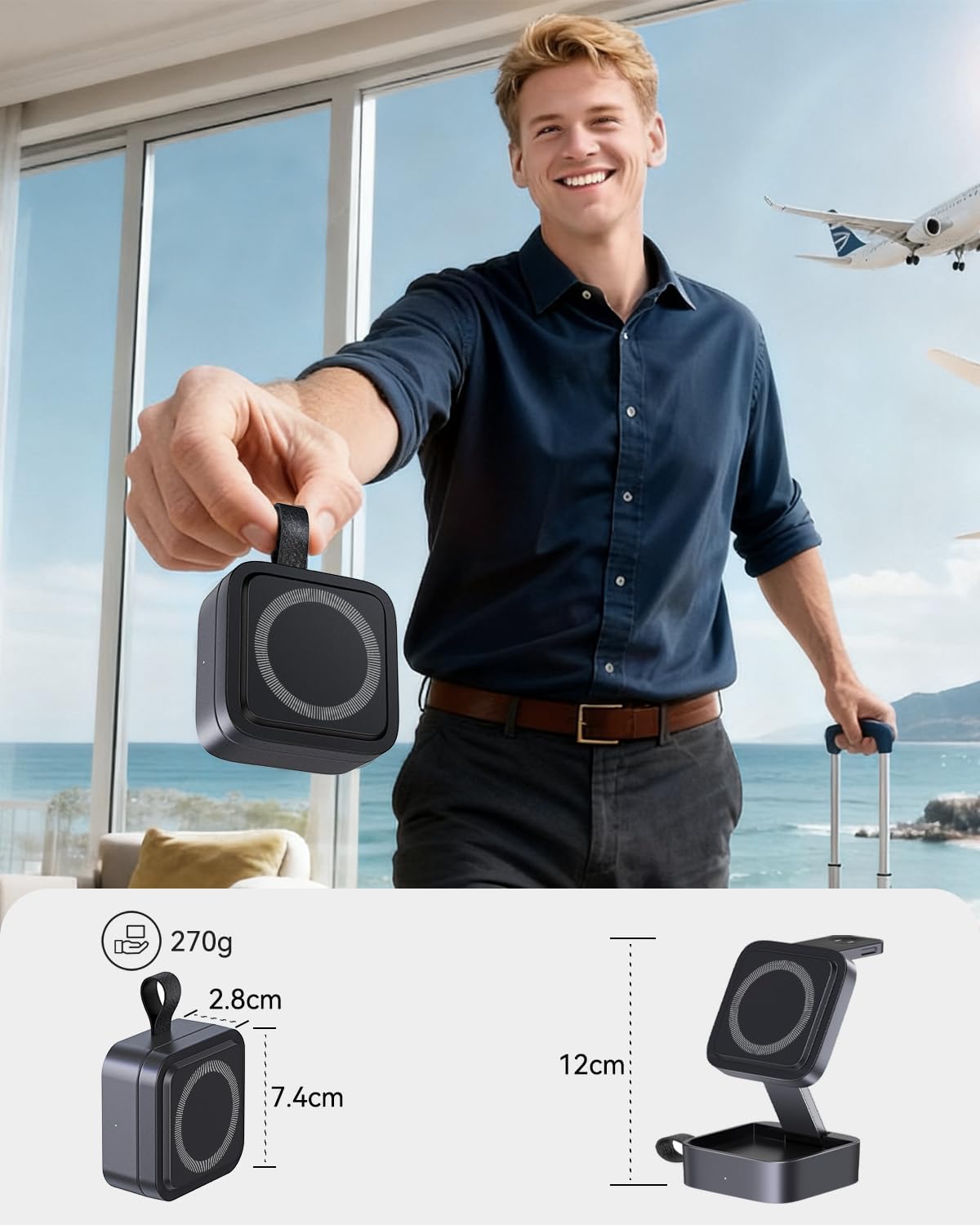
Image: The charging station actively charging an iPhone, Apple Watch, and AirPods.
4.4 Foldable and Portable Design
The charging station features a foldable design, allowing it to collapse into a compact form for easy storage and portability. This makes it ideal for travel, fitting conveniently into bags or backpacks.

Image: The charging station demonstrating its portability by being stored in a bag.
5. Compatibility
The KEEPRO T12 charging station is compatible with a wide range of Apple devices:
- iPhones: iPhone Air, iPhone 17e, 17 Pro Max, 17 Pro, 17 Plus, 17, 16 Pro Max, 16 Pro, 16 Plus, 16, 15 Pro Max, 15 Pro, 15 Plus, 15, 14 Pro Max, 14 Pro, 14 Plus, 14, 13 Pro Max, 13 Pro, 13 Plus, 13, 13 mini, 12 Pro Max, 12 Pro, 12 Plus, 12, 12 mini. (Magnetic alignment is supported for iPhone 12 series and newer).
- Apple Watch: Ultra 3, Ultra 2, Ultra, SE, 11, 10, 9, 8, Series 7, Series 6, Series 5, Series 4, Series 3, Series 2, Series 1.
- AirPods: AirPods Pro 3, Pro 2, Pro, AirPods 4, 3, 2 (with wireless charging case). Note: Only supports AirPods 4 with Active Noise Cancellation.
- Also compatible with other devices that support wireless charging.

Image: Visual representation of compatible Apple devices.
6. Safety and Protection
The KEEPRO T12 charging station incorporates a multi-intelligent protection system to ensure safe and reliable charging for your devices. This system includes:
- Intelligent Chip Protection: Monitors charging status for optimal performance.
- Over-Heat Protection: Prevents the device from overheating during charging.
- Over-Voltage Protection: Safeguards against excessive voltage input.
- Over-Current Protection: Protects against excessive current flow.
- Over-Charge Protection: Prevents damage from prolonged charging once a device is full.
- Short-Circuit Protection: Ensures enhanced safety by preventing short circuits.

Image: Visual representation of the multi-intelligent protection system.
7. Maintenance
To ensure the longevity and optimal performance of your KEEPRO T12 charging station, follow these maintenance guidelines:
- Cleaning: Disconnect the power before cleaning. Use a soft, dry cloth to wipe the surface of the charging station. Avoid using abrasive cleaners, solvents, or harsh chemicals.
- Storage: When not in use, especially during travel, fold the charging station into its compact form to protect the charging surfaces. Store in a cool, dry place away from direct sunlight and extreme temperatures.
- Cable Care: Avoid bending or crimping the USB-C cable excessively. Always grasp the plug, not the cable, when disconnecting.
8. Troubleshooting
| Problem | Possible Cause | Solution |
|---|---|---|
| Device not charging or charging slowly. |
|
|
| Magnetic connection is weak. |
|
|
| Indicator light is off or blinking. |
|
|
9. Specifications
| Brand | KEEPRO |
| Model Number | T12 |
| Connector Type | USB Type C |
| Wireless Charging Standard | MagSafe |
| Wattage (Max) | 15 Watts (for iPhone) |
| Input Voltage | 110 Volts |
| Output Voltage | 12 Volts |
| Output Current | 3 Amps |
| Item Weight | 270 g |
| Enclosure Material | Plastic, Silicone |
| Special Features | Fast Charging, MagSafe Compatible, Multi Device Charging, Short Circuit Protection, Travel-friendly |
10. Warranty and Support
Warranty: The KEEPRO T12 3-in-1 Wireless Charging Station comes with a 12-month warranty from the date of purchase. This warranty covers manufacturing defects and malfunctions under normal use.
Customer Support: For any questions, technical assistance, or warranty claims, please contact KEEPRO customer support through the retailer where the product was purchased or visit the official KEEPRO website for contact information.
Ask a question about this manual
Ask about setup, troubleshooting, compatibility, parts, safety, or missing instructions. Manuals+ will review the question and use this page’s manual context to help answer it.