
1. Introduction
The Emerson SmartVoice 4-in-1 Wall Plug (Model ES522) provides convenient, offline voice control for your devices without the need for Wi-Fi, apps, or complex setup. This smart outlet features two AC outlets and two USB-A ports, offering versatile power management for your home or office. Enjoy enhanced privacy and accessibility with local voice command processing.

Image: The Emerson SmartVoice Wall Plug in use, demonstrating its convenience for controlling devices like lamps with simple voice commands. It highlights the 'Hey Emerson, Lights on' command.
2. Safety Information
- Indoor Use Only: This device is designed for indoor use in dry locations. Do not expose to water or moisture.
- Electrical Rating: Do not exceed the electrical rating of 15 Amps, 125 Volts AC, 1875 Watts. Overloading may cause damage or fire.
- Grounding: Ensure the wall outlet is properly grounded.
- Children: Keep out of reach of children.
- Ventilation: Do not cover the device or block ventilation openings.
- Disassembly: Do not attempt to disassemble or modify the device. Refer all servicing to qualified personnel.
- ETL Listed: This product is ETL listed, ensuring it meets recognized safety standards.
3. Package Contents
Verify that your package contains the following items:
- Emerson SmartVoice 4-in-1 Wall Plug (Model ES522)
- User Manual (this document)
- Quickstart Guide

Image: The retail packaging for the Emerson SmartVoice Wall Plug, displaying the product and highlighting features like '30+ Voice Commands' and 'No App, No Wi-Fi, No Hub'.
4. Product Overview
The Emerson SmartVoice Wall Plug is designed for ease of use and functionality. Familiarize yourself with its components:
- Regular Outlet: An always-on AC outlet for devices requiring continuous power.
- SmartVoice Outlet: An AC outlet controlled by voice commands.
- USB-A Ports (x2): For charging USB-compatible devices. These ports are always on.
- Indicator Light: Provides visual feedback on the device's status.
- Power/Program Button: Used for manual control and programming wake words.
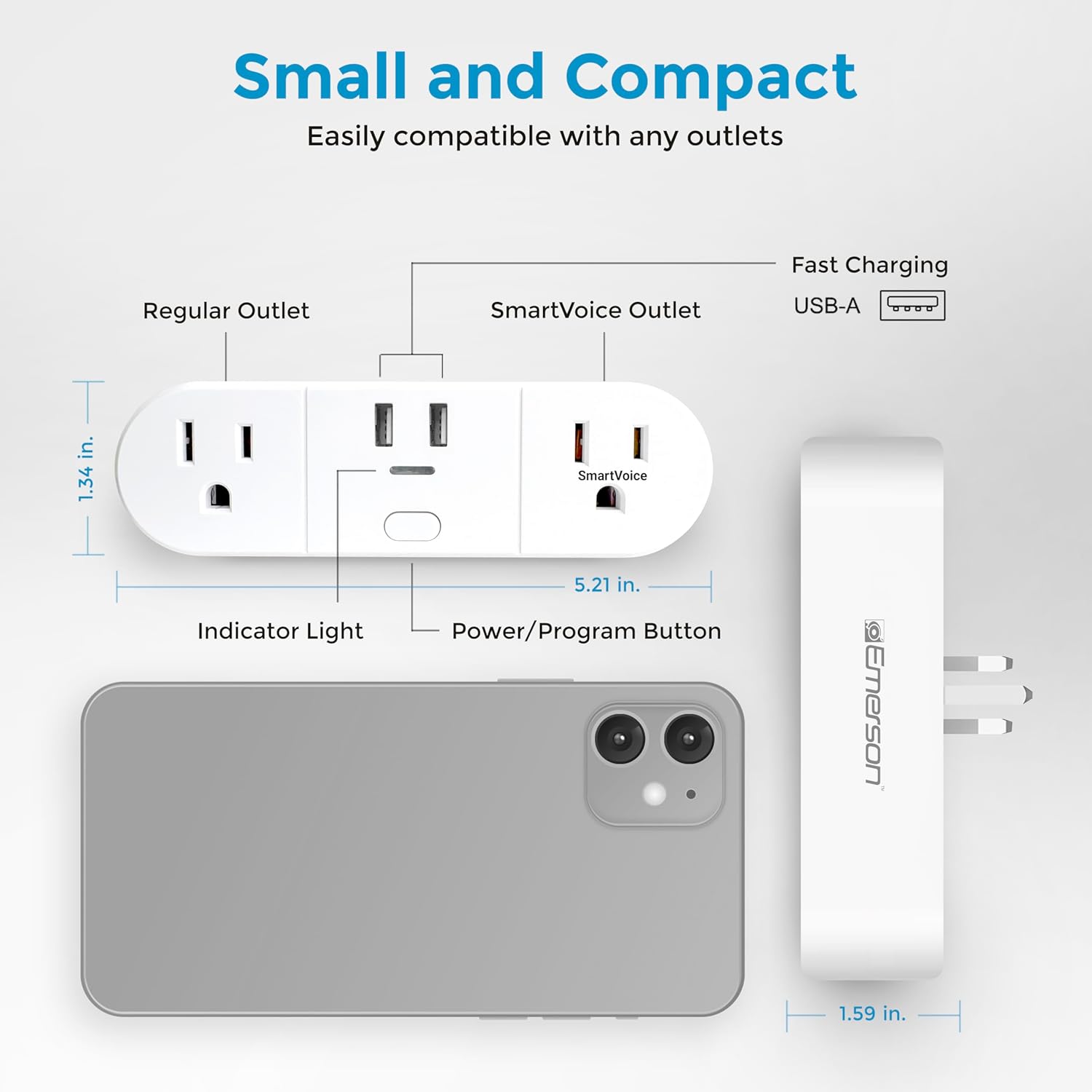
Image: A detailed diagram of the Emerson SmartVoice Wall Plug, highlighting its compact size and labeling each component for easy identification, including the regular outlet, SmartVoice outlet, USB-A ports, indicator light, and power/program button.
5. Setup
The Emerson SmartVoice Wall Plug requires no Wi-Fi, app, or complex setup. It works instantly out of the box.
- Plug In: Insert the SmartVoice Wall Plug into a standard 3-prong wall outlet.
- Connect Devices:
- Plug devices you want to control via voice into the SmartVoice Outlet.
- Plug devices requiring continuous power into the Regular Outlet.
- Connect USB devices to the USB-A Ports for charging.
- Start Using: The device is now ready for voice commands.

Image: The Emerson SmartVoice Wall Plug plugged into a wall, illustrating its use with a floor lamp and a tower fan, showing how it integrates into a living space to control appliances.
6. Operating Instructions
The SmartVoice Wall Plug responds to over 30 offline voice commands. Ensure you are within a reasonable range for the microphone to pick up your voice clearly.
6.1 Basic Voice Commands
To activate the device, start with the default wake word "Hey Emerson," followed by a command. The SmartVoice Outlet will respond.
- To Turn On: "Hey Emerson, Turn On" or "Hey Emerson, Lights On" or "Hey Emerson, Power On"
- To Turn Off: "Hey Emerson, Turn Off" or "Hey Emerson, Lights Off" or "Hey Emerson, Power Off"

Image: A visual guide to common voice commands for the Emerson SmartVoice Wall Plug, including commands for turning devices on/off and setting timers.
6.2 Sleep & Wake Timers
You can set timers using voice commands for the SmartVoice Outlet.
- Set Sleep Timer: "Hey Emerson, Sleep in [X] hours/minutes" (e.g., "Hey Emerson, Sleep in one hour")
- Set Wake Timer: "Hey Emerson, Wake in [X] hours/minutes" (e.g., "Hey Emerson, Wake in 6 hours")
- Cancel Timer: "Hey Emerson, Cancel Timer"
6.3 Customizing Wake Words (Group Control)
The SmartVoice Wall Plug supports up to five different custom wake words, allowing you to control multiple plugs individually or as a group in the same room.
- Enter Programming Mode: Press and hold the Power/Program Button for 5 seconds until the indicator light flashes.
- Speak New Wake Word: Say your desired custom wake word (e.g., "Hey Lamp," "Hey Fan," "Hey Plug 1").
- Confirm: The indicator light will stop flashing and confirm the new wake word.
- Use Custom Wake Word: Now, use your custom wake word followed by a command (e.g., "Hey Lamp, Turn On").
To reset a custom wake word to the default "Hey Emerson," repeat the programming steps and say "Hey Emerson" as the new wake word.
7. Maintenance
To ensure optimal performance and longevity of your Emerson SmartVoice Wall Plug:
- Cleaning: Disconnect the plug from the wall outlet before cleaning. Wipe with a dry, soft cloth. Do not use liquid cleaners or aerosols.
- Storage: Store in a cool, dry place away from direct sunlight and extreme temperatures when not in use.
- Inspection: Periodically inspect the plug and connected cords for any signs of damage. Discontinue use if damage is observed.
8. Troubleshooting
If you encounter issues with your SmartVoice Wall Plug, refer to the following common solutions:
| Problem | Possible Cause | Solution |
|---|---|---|
| Device does not respond to voice commands. | Microphone not picking up voice; incorrect wake word or command; device not powered. | Speak clearly and closer to the device. Ensure you are using the correct wake word and command. Check if the plug is securely inserted into the wall outlet. |
| SmartVoice Outlet does not turn on/off. | Device connected to the Regular Outlet; power outage; faulty appliance. | Ensure the appliance is plugged into the SmartVoice Outlet. Check your home's circuit breaker. Test the appliance in a different outlet. |
| Timer function is not working. | Incorrect timer command; timer already active. | Ensure the timer command is spoken correctly (e.g., "Sleep in 1 hour"). Try saying "Cancel Timer" before setting a new one. |
| Indicator light is off. | No power to the outlet. | Check the wall outlet and your home's circuit breaker. |
9. Specifications
- Model: ES522
- Input Voltage: 125V AC
- Max Current: 15 Amps
- Max Power: 1875 Watts
- USB Output: 5V DC, 2.4A (shared)
- Outlets: 2 AC outlets (1 voice-controlled, 1 always-on), 2 USB-A ports (always-on)
- Dimensions: 5.21"D x 1.34"W x 1.59"H
- Weight: 8.1 ounces
- Material: Plastic, Rubber
- Certifications: ETL Listed
- Operating Environment: Indoor use only

Image: A visual summary of the Emerson SmartVoice Wall Plug's features and specifications, including its offline voice control, multiple wake word support, USB-A ports, dual outlets, 15A rating, and ETL certification.
10. Warranty and Support
For warranty information and customer support, please refer to the documentation included with your product or visit the official Emerson Smart website.
Official Product Page: https://emersonsmart.com/products/emerson-smartvoice-wall-plug-es521
If you require further assistance, please contact Emerson customer service through their website.


