
Introduction
Thank you for choosing the CALOETHNEY HX801S Bluetooth Neckband Headphones. This manual provides essential information for the proper setup, operation, and maintenance of your device. Please read it thoroughly before use to ensure optimal performance and longevity of your headphones.
The HX801S features a retractable neckband design, Bluetooth 5.1 connectivity, and a long-lasting battery. It is designed for comfort and convenience, offering stereo sound and vibration call reminders.
Safety Information
- Do not expose the headphones to extreme temperatures, humidity, or corrosive environments.
- Avoid dropping or subjecting the device to strong impacts.
- Do not attempt to disassemble or modify the headphones, as this may void the warranty and cause damage.
- Keep the device away from children and pets.
- Use only the provided charging cable or a certified equivalent.
- Listening at high volumes for extended periods can cause hearing damage. Adjust volume to a safe level.
Package Contents
Please check the package for the following items:
- CALOETHNEY HX801S Bluetooth Neckband Headphones
- USB Charging Cable
- Eartips (various sizes)
- User Manual (this document)
Product Overview
Familiarize yourself with the components and controls of your HX801S headphones.

Figure 1: Headphone Controls and Components
This image displays the CALOETHNEY HX801S neckband headphones with various parts labeled, including the Memory Flex Neck Band, LED Indicator, Power Button, MFB (Multi-Function Button for Play/Pause), Previous/Next Song buttons, Stretch Switch for earbuds, Volume Up/Down buttons, and the Charging Port (USB-C).

Figure 2: Front View of HX801S Headphones
A clear view of the CALOETHNEY HX801S Bluetooth Neckband Headphones, showcasing their black and blue design and the in-ear earbuds.
Setup
1. Charging the Headphones
Before first use, fully charge your headphones. Connect the provided USB charging cable to the USB-C charging port on the headphones and to a power source (e.g., computer USB port or USB wall adapter). The LED indicator will show the charging status.
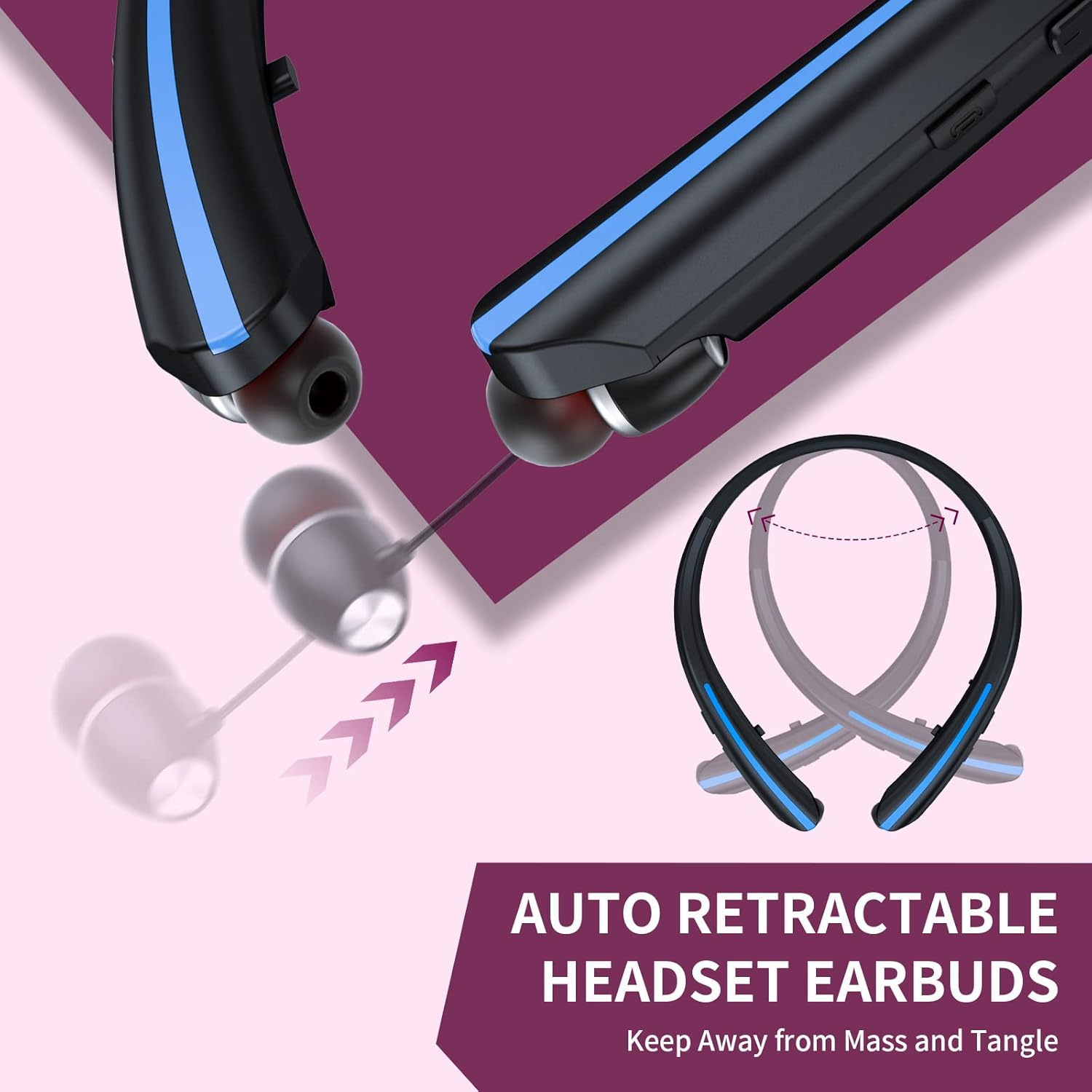
Figure 3: Charging Port and Battery Information
This image highlights the USB-C charging port on the headphones and indicates a 200mAh battery capacity, with a full charge time of approximately 2 hours, providing 18-24 hours of music/talk time.
- A full charge takes approximately 2 hours.
- The LED indicator will typically turn solid blue or off when fully charged.
- The headphones offer up to 22 hours of music time, 20 hours of talk time, and 550 hours of standby time on a single charge.
2. Powering On/Off
- To Power On: Press and hold the Power Button (refer to Figure 1) for approximately 3 seconds until the LED indicator flashes blue and you hear a power-on prompt.
- To Power Off: Press and hold the Power Button for approximately 3 seconds until the LED indicator flashes red and you hear a power-off prompt.
3. Bluetooth Pairing
To connect your headphones to a Bluetooth-enabled device:
- Ensure the headphones are powered off.
- Press and hold the Power Button for approximately 5-7 seconds until the LED indicator flashes red and blue alternately. This indicates pairing mode.
- On your device (smartphone, tablet, laptop), enable Bluetooth and search for available devices.
- Select "HX801S" from the list of found devices.
- Once connected, the LED indicator will flash blue slowly, and you will hear a connection confirmation.

Figure 4: Bluetooth Pairing Process
This image illustrates a smartphone's Bluetooth settings screen, showing the "HX801S" device available for connection, demonstrating the pairing step.
The headphones support Bluetooth 5.1 for a stable connection up to 10 meters (33 feet).
Operating Instructions
1. Basic Music Controls
- Play/Pause: Press the MFB (Multi-Function Button) once.
- Next Song: Press the "Next Song" button once.
- Previous Song: Press the "Previous Song" button once.
- Volume Up: Press the "Volume Up" button.
- Volume Down: Press the "Volume Down" button.
2. Call Management
- Answer/End Call: Press the MFB once during an incoming call or during an active call.
- Reject Call: Press and hold the MFB for approximately 2 seconds during an incoming call.
- Redial Last Number: Double-press the MFB when no call is active.

Figure 5: Incoming Call Vibration Reminder
This image shows a smartphone receiving an incoming call, with visual cues indicating the vibration reminder feature of the headphones, ensuring you don't miss important calls.
3. Connecting Two Bluetooth Devices Simultaneously
The HX801S headphones can connect to two Bluetooth devices at the same time, allowing you to seamlessly switch between them.
- Pair the headphones with the first device (Device A) as described in the "Bluetooth Pairing" section.
- Disable Bluetooth on Device A. The headphones will re-enter pairing mode.
- Pair the headphones with the second device (Device B).
- Enable Bluetooth on Device A. The headphones should automatically connect to both Device A and Device B.

Figure 6: Dual Device Connectivity
This image demonstrates the ability of the HX801S headphones to connect to two devices simultaneously, such as a laptop and a smartphone, allowing for easy switching between audio sources.
4. Retractable Earbuds
The earbuds feature a retractable mechanism for convenient storage and to prevent tangling. Gently pull the earbud cable to extend it. To retract, press the 'Stretch Switch' button (refer to Figure 1) and guide the cable back into the neckband. Avoid forcing the retraction or pulling the earbuds excessively to prevent damage.
Figure 7: Retractable Earbud Mechanism
This image illustrates the retractable design of the earbuds, showing how they can be extended and retracted into the neckband for tangle-free storage.
Maintenance
1. Cleaning
- Wipe the headphones with a soft, dry cloth.
- Do not use abrasive cleaners, alcohol, or chemical solvents.
- Regularly clean the eartips to remove earwax and debris for optimal sound quality and hygiene.
2. Storage
- Store the headphones in a cool, dry place away from direct sunlight.
- When not in use, retract the earbuds to protect the cables.
3. Water Resistance
The HX801S headphones are designed with a waterproof rating, making them suitable for use during workouts or in light rain. However, they are not intended for submersion in water. Ensure the charging port cover is securely closed to maintain water resistance.

Figure 8: Water Resistance Feature
This image visually represents the waterproof capability of the HX801S headphones, showing water splashing over the device, indicating its suitability for active use.
Troubleshooting
If you encounter any issues with your headphones, please refer to the following common problems and solutions:
| Problem | Possible Cause | Solution |
|---|---|---|
| Headphones do not power on. | Low battery. | Charge the headphones for at least 2 hours. |
| Cannot pair with device. | Headphones not in pairing mode; Bluetooth off on device; too far from device. | Ensure headphones are in pairing mode (flashing red/blue). Turn on Bluetooth on your device. Move headphones closer to the device (within 10 meters). |
| No sound or muffled sound. | Volume too low; headphones not connected; eartips blocked or improperly fitted. | Increase volume on headphones and device. Reconnect headphones. Clean eartips and ensure they are properly seated in your ears. Try different eartip sizes. |
| Intermittent connection. | Too far from device; interference; low battery. | Move closer to the connected device. Avoid environments with strong Wi-Fi or other Bluetooth signals. Charge the headphones. |
| Earbuds do not retract smoothly. | Mechanism obstruction or damage. | Ensure no debris is blocking the retraction path. Do not force the retraction. If persistent, contact customer support. |
Specifications
| Feature | Specification |
|---|---|
| Model Number | HX801S |
| Brand | CALOETHNEY |
| Connectivity Technology | Wireless (Bluetooth) |
| Bluetooth Version | 5.1 |
| Bluetooth Range | Up to 10 meters (33 feet) |
| Battery Capacity | 200mAh |
| Battery Charge Time | Approx. 2 hours |
| Music Playtime | Up to 22 hours |
| Talk Time | Up to 20 hours |
| Standby Time | Up to 550 hours |
| Ear Placement | In Ear |
| Form Factor | Neckband |
| Noise Control | Active Noise Cancellation |
| Water Resistance Level | Waterproof |
| Compatible Devices | Cellphones, Desktops, Laptops, Tablets, Telephones |
Warranty and Support
Warranty Information
The CALOETHNEY HX801S Bluetooth Neckband Headphones come with a 1-year warranty from the date of purchase. This warranty covers manufacturing defects. It does not cover damage caused by misuse, accidents, unauthorized modifications, or normal wear and tear.
Customer Support
If you have any questions, require technical assistance, or need to claim warranty service, please contact CALOETHNEY customer support through the retailer where you purchased the product or refer to the contact information provided on the product packaging or the official CALOETHNEY website.